Minecraft version
Back to mods 
CurseForge · Minecraft mod
Trash Slot
Adds a seamless, vanilla-styled trash slot to your inventory
Choose a version Pick your version below, then grab the matching file.
Quick answer
Which Trash Slot release should I use?
Latest stable file trashslot-fabric-26.1.2-1.0.0.jar
Game version 26.1.2
Loader Fabric
Trash Slot trashslot-fabric-26.1.2-1.0.0.jar targets 26.1.2 with Fabric. The project page does not say whether this file belongs on the client, dedicated server, or both. No extra mods listed for this file.
Where it goes
Is Trash Slot required on the client, server, or both?
The project page does not say whether this file belongs on the client, dedicated server, or both.
Client Source doesn’t say
Dedicated server Source doesn’t say
Loader for this release Fabric
Required install it here Optional supported, not mandatory Not supported do not install here Source doesn’t say do not assume
The source does not explicitly classify this release as client-only or server-only.
What else does Trash Slot trashslot-fabric-26.1.2-1.0.0.jar need?
trashslot-fabric-26.1.2-1.0.0.jar. Change the file and its required mods may change too.
This file does not list any required mods. Do not add a library just because a different file uses it.
This file does not list any required or optional mods.
Before you install it
Add Trash Slot without breaking your instance.
Built for Trash Slot trashslot-fabric-26.1.2-1.0.0.jar. Pick another file and the loader, install side or required mods may change.
- 01
Stick to this file
Use trashslot-fabric-26.1.2-1.0.0.jar. It targets 26.1.2 with Fabric; another release may have different loader, side or dependency requirements.
- 02
Bring the mods it needs
This file does not list any required mods. Do not add a library just because a different file uses it.
- 03
Put it on the correct side
The project page does not say whether this file belongs on the client, dedicated server, or both.
- 04
Pick the file you checked
Use the “Get this file” button beside trashslot-fabric-26.1.2-1.0.0.jar. It opens that exact file at the source.
About this project
What does Trash Slot add?
🗑️ Trash Slot 🗑️
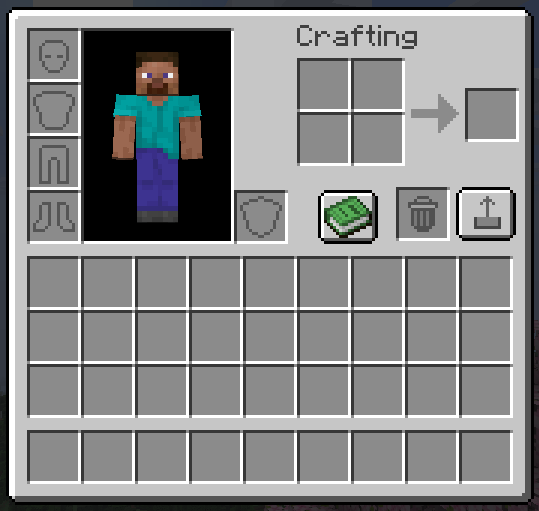
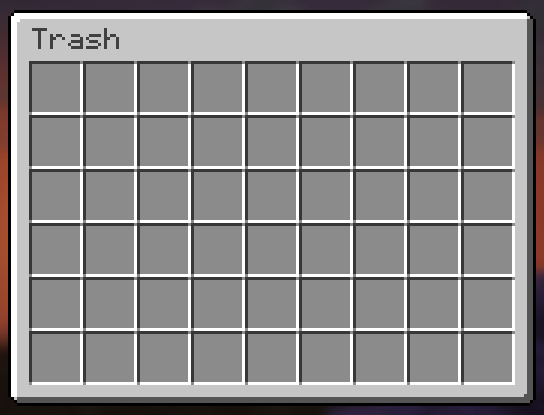
Trash Slot adds a dedicated trash slot to your inventory screen with a full 54-slot recovery chest. Drag items in to delete them, or use hotkeys for instant cleanup — and get them back anytime if you made a mistake.
✨ Features ✨
Drag-and-Drop Trash Slot
A real inventory slot right in your crafting area. Drag any item into it and it’s instantly deleted — no confirmation dialogs, no delays. Feels completely vanilla.
54-Slot Recovery Chest
Every deleted item is saved to a recovery grid styled as a vanilla large chest. Items fill left-to-right, top-to-bottom in deletion order. When the chest is full, the oldest items get overwritten first. Click any slot to recover instantly.
Delete Key Shortcuts
Press Delete while hovering any inventory item to trash it. Press Shift+Delete to trash all items of that type from your entire inventory at once.
Permanent Delete in Recovery
Press Delete while hovering an item inside the recovery chest to permanently destroy it — no recovery possible. Regular Delete from the inventory always goes to recovery first.
Vanilla Recovery Button
A pixel-perfect vanilla-style button next to the trash slot opens the recovery chest. Matches the recipe book button style exactly — proper border, highlight, and hover states.
Server-Safe
All delete and recover operations use custom network packets. The server validates everything — works correctly in multiplayer with no duplication or desync.
Configurable Position
Trash slot position is adjustable via config file (trashslot.json).
🎮 How to Use 🎮
- Open your inventory — trash slot appears next to the crafting grid
- Drag items into the trash slot — or press Delete over any item
- Click the recovery button — to open the 54-slot recovery chest
- Click items to recover — they return to your inventory instantly
📦 Installation
- Install NeoForge or Fabric for Minecraft 26.1.2
- Drop the jar into your
modsfolder - Launch the game — the trash slot appears automatically
🔧 Compatibility
Minecraft: 26.1.2
Loaders: NeoForge & Fabric
Side: Both (server + client)
Multiplayer: ✅ Fully supported
❓ FAQ ❓
Is deleted data saved between sessions?
Yes — deletion history is saved per-player and persists across logins.
What happens when the recovery chest is full?
The oldest deleted item gets overwritten. The chest holds 54 items (6×9 grid).
Does this need to be on the server?
Yes — the mod handles inventory changes server-side for safety. Install on both client and server for multiplayer.
Can I include this in my modpack?
Yes, freely — public or private, no notification needed.
Where do I report bugs?
Open an issue on the GitHub repository. Please include your loader, MC version, and a latest.log.
📄 License 📄
MIT — source available on GitHub.
Made by hooneyBadgers.
Project description from CurseForge.
Pick your setup
Trash Slot by Minecraft version and loader
Choose the version and loader you play, then open the matching release.
Check the dependencies, then try the file in a copied instance before changing a world you care about.
Recent files
Trash Slot versions and loaders
trashslot-fabric-26.1.2-1.0.0.jar
11 Apr 2026
Client Source doesn’t say Server Source doesn’t say Dependencies No extras listed Listed on Release listing
Check the 26.1.2 · Fabric setup Fabric26.1.2 release
trashslot-neoforge-26.1.2-1.0.0.jar
11 Apr 2026
Client Source doesn’t say Server Source doesn’t say Dependencies No extras listed Listed on Release listing
Check the 26.1.2 · NeoForge setup NeoForge26.1.2 release
Looking for an older file? The official CurseForge project page is in Resources.