Minecraft version
Back to mods 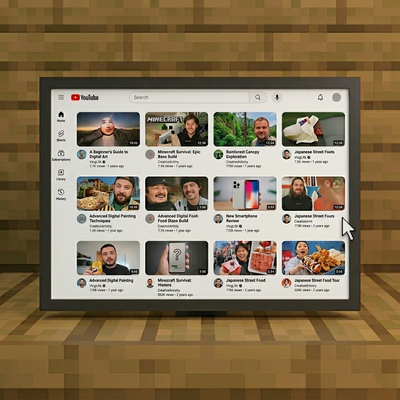
CurseForge · Minecraft mod
Desktop Block
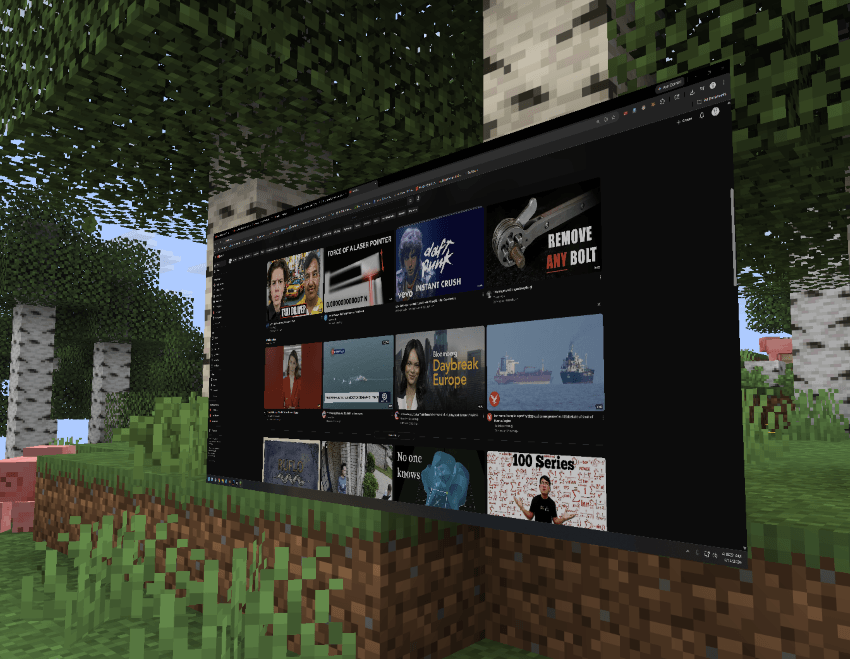
Desktop block that mirrors your PC environment in real-time.
Choose a version Pick your version below, then grab the matching file.
Quick answer
Which Desktop Block release should I use?
Latest stable file windowtoworld-neoforge-1.0.0.jar
Game version 1.21.1
Loader NeoForge
Desktop Block windowtoworld-neoforge-1.0.0.jar targets 1.21.1 with NeoForge. The project page does not say whether this file belongs on the client, dedicated server, or both. No extra mods listed for this file.
Where it goes
Is Desktop Block required on the client, server, or both?
The project page does not say whether this file belongs on the client, dedicated server, or both.
Client Source doesn’t say
Dedicated server Source doesn’t say
Loader for this release NeoForge
Required install it here Optional supported, not mandatory Not supported do not install here Source doesn’t say do not assume
The source does not explicitly classify this release as client-only or server-only.
What else does Desktop Block windowtoworld-neoforge-1.0.0.jar need?
windowtoworld-neoforge-1.0.0.jar. Change the file and its required mods may change too.
This file does not list any required mods. Do not add a library just because a different file uses it.
This file does not list any required or optional mods.
Before you install it
Add Desktop Block without breaking your instance.
Built for Desktop Block windowtoworld-neoforge-1.0.0.jar. Pick another file and the loader, install side or required mods may change.
- 01
Stick to this file
Use windowtoworld-neoforge-1.0.0.jar. It targets 1.21.1 with NeoForge; another release may have different loader, side or dependency requirements.
- 02
Bring the mods it needs
This file does not list any required mods. Do not add a library just because a different file uses it.
- 03
Put it on the correct side
The project page does not say whether this file belongs on the client, dedicated server, or both.
- 04
Pick the file you checked
Use the “Get this file” button beside windowtoworld-neoforge-1.0.0.jar. It opens that exact file at the source.
About this project
What does Desktop Block add?
📺 DesktopBlock 📺
Access your desktop directly inside your Minecraft world.
Tired of having to alt-tab out of Minecraft to watch a tutorial or catch your favorite streamer? Vanilla Minecraft has no way to view external content. DesktopBlock introduces functional "flat-screen TV" blocks that allow you to access your desktop. You can watch YouTube videos directly in-game. Keep working on your build while you watch — no external browser required. DesktopBlock gives you full access to your pc. It's literally YOUR computer inside the game.
🖱️ USAGE**🖱️**
- Block name: monitor
- Find in creative inventory
- Place block, right click on block, esc to exit.
✨ Planned Features ✨
- Fully functional flat-screen TV blocks, rendered with realistic bezels and screen glow
- In-game browser interface specifically optimized for the YouTube layout (browse, search, play, pause, volume)
- In-game sound output synced with the video
- Synced viewing for multiplayer — all players in the area watch the same video at the same time
- Basic Redstone integration (turn TVs on/off with redstone signals)
- Simple crafting recipes using glass panes, redstone dust, and glowstone blocks
- Minimal performance impact using efficient web-rendering technology
- Adjustable screen scaling options in the mod config
🔧 Installation 🔧
- Install Forge or NeoForge for Minecraft 1.20.1
- Drop MineTube Core API (and WebRender MC Library if required) into your mods/ folder
- Drop MineTube into your mods/ folder
- Launch the game — craft a 'Flat Screen TV' block and place it down to begin watching.
⚠ Must be installed on both client and server for multiplayer syncing to function correctly.
⚙️ Compatibility ⚙️
| Mod / Loader / Setting | Status |
|---|---|
| NeoForge | ✅ Fully supported |
| Fabric | ✅ Fully supported |
| Shaders (OptiFine/Iris) | ⚠ Supported, but performance may vary; toggle the 'Shader Compatibility Mode' in the MineTube config if screen flickering occurs. |
| Performance Mods (Sodium/Rubidium) | ✅ Supported |
❓ FAQ ❓
Will there be Fabric or Quilt support? We only support Fabric and NeoForge at this time.
Can I watch Twitch or other streaming sites? DesktopBlock gives you full access to your pc. Its literally YOUR computer inside the game.
Does this mod cause lag? Video decoding occurs externally, but rendering the screen in-game uses resources. It may impact performance on lower-end systems. Use performance mods (Sodium/Rubidium) for best results.
Can I add this to my modpack? Yes — freely, without needing special permission. Attribution is appreciated.
🐛 Bugs & Support 🐛
Report issues on the GitHub issue tracker. Please include your Minecraft version, Forge/NeoForge version, a list of other mods installed, and a full latest.log.
📄 License 📄
MIT — source available on GitHub. Made by CreepyOoze
Project description from CurseForge.
Pick your setup
Desktop Block by Minecraft version and loader
Choose the version and loader you play, then open the matching release.
Minecraft version
1.21.1
2 loader buildsCheck the dependencies, then try the file in a copied instance before changing a world you care about.
Recent files
Desktop Block versions and loaders
windowtoworld-neoforge-1.0.0.jar
23 Jun 2026
Client Source doesn’t say Server Source doesn’t say Dependencies No extras listed Listed on Release listing
Check the 1.21.1 · NeoForge setup 1.21.1NeoForge release
windowtoworld-fabric-1.0.0.jar
23 Jun 2026
Client Source doesn’t say Server Source doesn’t say Dependencies No extras listed Listed on Release listing
Check the 1.21.1 · Fabric setup Fabric1.21.1 release
windowtoworld-neoforge-1.0.0.jar
23 Jun 2026
Client Source doesn’t say Server Source doesn’t say Dependencies No extras listed Listed on Release listing
Check the 26.1.2 · NeoForge setup NeoForge26.1.2 release
windowtoworld-fabric-1.0.0.jar
23 Jun 2026
Client Source doesn’t say Server Source doesn’t say Dependencies No extras listed Listed on Release listing
Check the 26.1.2 · Fabric setup Fabric26.1.2 release
windowtoworld-neoforge-1.0.0.jar
14 Apr 2026
Client Source doesn’t say Server Source doesn’t say Dependencies No extras listed Listed on Release listing
Check the 26.1.2 · NeoForge setup NeoForge26.1.2 release
Looking for an older file? The official CurseForge project page is in Resources.