Minecraft version
Back to mods 
CurseForge · Minecraft mod
Simple Text to Speech
Simple Text to Speech lets you type a message and play it through Simple Voice Chat as spoken audio.
Choose a version Pick your version below, then grab the matching file.
Quick answer
Which Simple Text to Speech release should I use?
Latest stable file simpletts-1.20.1-Fabric-1.0.0.jar
Game version 1.20.1
Loader Fabric
Simple Text to Speech simpletts-1.20.1-Fabric-1.0.0.jar targets 1.20.1 with Fabric. The project page does not say whether this file belongs on the client, dedicated server, or both. No extra mods listed for this file.
Where it goes
Is Simple Text to Speech required on the client, server, or both?
The project page does not say whether this file belongs on the client, dedicated server, or both.
Client Source doesn’t say
Dedicated server Source doesn’t say
Loader for this release Fabric
Required install it here Optional supported, not mandatory Not supported do not install here Source doesn’t say do not assume
The source does not explicitly classify this release as client-only or server-only.
What else does Simple Text to Speech simpletts-1.20.1-Fabric-1.0.0.jar need?
simpletts-1.20.1-Fabric-1.0.0.jar. Change the file and its required mods may change too.
This file does not list any required mods. Do not add a library just because a different file uses it.
This file does not list any required or optional mods.
Before you install it
Add Simple Text to Speech without breaking your instance.
Built for Simple Text to Speech simpletts-1.20.1-Fabric-1.0.0.jar. Pick another file and the loader, install side or required mods may change.
- 01
Stick to this file
Use simpletts-1.20.1-Fabric-1.0.0.jar. It targets 1.20.1 with Fabric; another release may have different loader, side or dependency requirements.
- 02
Bring the mods it needs
This file does not list any required mods. Do not add a library just because a different file uses it.
- 03
Put it on the correct side
The project page does not say whether this file belongs on the client, dedicated server, or both.
- 04
Pick the file you checked
Use the “Get this file” button beside simpletts-1.20.1-Fabric-1.0.0.jar. It opens that exact file at the source.
About this project
What does Simple Text to Speech add?
Simple Text to Speech
Simple Text to Speech lets you type a message and play it through Simple Voice Chat as spoken audio.
It is a client-side mod for Minecraft 1.20.1 with Fabric and Forge support. Speech is generated locally with the Voices library, and can be played into voice chat as if you were talking.
Features
- Type text and send it through Simple Voice Chat as speech
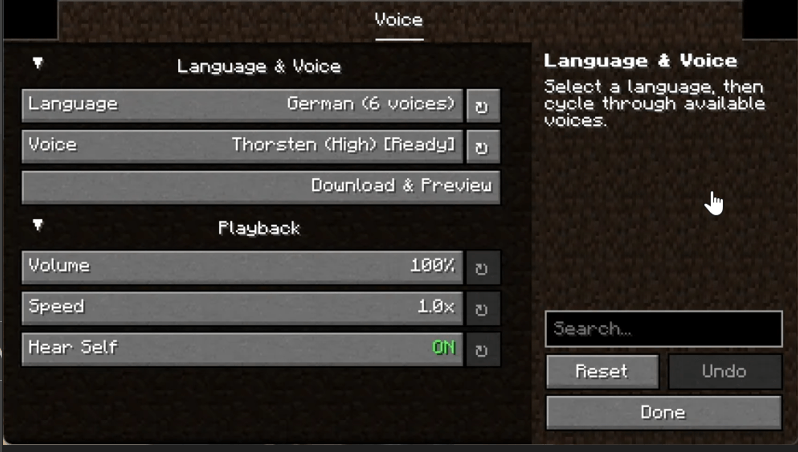
- Built in config screen with voice, volume, speed, and local playback options
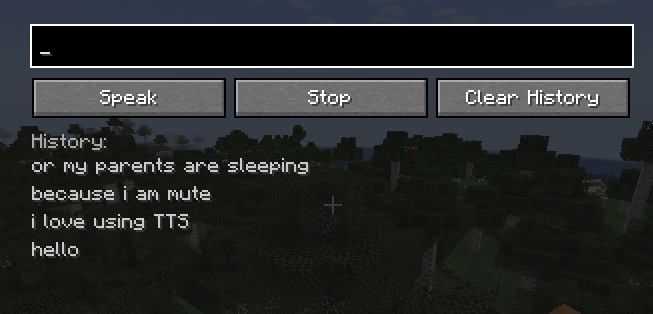
- Quick input screen for sending speech without opening the config
- Speech history for replaying common messages
- Downloadable voices with multiple language options
- Local preview button for testing a voice before using it in game
Screenshots
Requirements
- Minecraft 1.20.1
- Simple Voice Chat
- Fabric or Forge, depending on the build you use
How To Use
- Install Simple Voice Chat and Simple Text to Speech.
- Start the game and join a world or server where Simple Voice Chat is available.
- Open the config screen and choose a language and voice.
- If needed, use the preview button to download and test the selected voice.
- Open the speak screen with the configured keybind.
- Type a message and press
Speak.
You can also use commands:
/tts speak <text>/tts stop
Hear Self plays your generated speech locally in addition to sending it through voice chat.
Notes
- Voice generation happens on your client.
- Some voices are downloaded on first use.
- Voice quality and startup time depend on the selected model.
Support on Discord
If you'd like to support me and the development of my mods, I recommend trying out BisectHosting. Use code "project8gbderam" to get 25% off your first month of a gaming server for new customers. They offer 24/7 support and lightning-fast response times, ensuring you're in great hands and providing exceptional assistance for all your gaming needs.
Bisect
Project description from CurseForge.
Pick your setup
Simple Text to Speech by Minecraft version and loader
Choose the version and loader you play, then open the matching release.
Check the dependencies, then try the file in a copied instance before changing a world you care about.
Recent files
Simple Text to Speech versions and loaders
simpletts-1.20.1-Fabric-1.0.0.jar
15 Apr 2026
Client Source doesn’t say Server Source doesn’t say Dependencies No extras listed Listed on Release listing
Check the 1.20.1 · Fabric setup Fabric1.20.1 release
simpletts-1.20.1-Forge-1.0.0.jar
15 Apr 2026
Client Source doesn’t say Server Source doesn’t say Dependencies No extras listed Listed on Release listing
Check the 1.20.1 · Forge setup 1.20.1Forge release
Looking for an older file? The official CurseForge project page is in Resources.
 mod
CurseForge · Minecraft
OverlimitProjectE
An endgame ProjectE add-on that introduces powerful high-tier items, sigils, and an automated EMC-generating device with offline accumulation support.
 mod
CurseForge · Minecraft
Everlasting Foods
Adds infinite-use everlasting food items that never get consumed when eaten.
 mod
CurseForge + Modrinth · Minecraft
Cloth Config API (Fabric/Forge/NeoForge)
Configuration Library for Minecraft Mods