Minecraft version
Back to mods 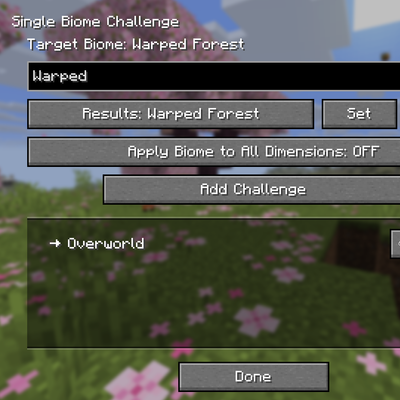
CurseForge · Minecraft mod
Single Biome Challenge
Generate Single biomes easier on the World Creation page. You can also add the challenge of needing to get a specific achievement before progressing to the next dimension.
Choose a version Pick your version below, then grab the matching file.
Quick answer
Which Single Biome Challenge release should I use?
Latest stable file singlebiomechallenge-1.1.0.jar
Game version 26.1.2
Loader NeoForge
Single Biome Challenge singlebiomechallenge-1.1.0.jar targets 26.1.2 with NeoForge. The project page does not say whether this file belongs on the client, dedicated server, or both. No extra mods listed for this file.
Where it goes
Is Single Biome Challenge required on the client, server, or both?
The project page does not say whether this file belongs on the client, dedicated server, or both.
Client Source doesn’t say
Dedicated server Source doesn’t say
Loader for this release NeoForge
Required install it here Optional supported, not mandatory Not supported do not install here Source doesn’t say do not assume
The source does not explicitly classify this release as client-only or server-only.
What else does Single Biome Challenge singlebiomechallenge-1.1.0.jar need?
singlebiomechallenge-1.1.0.jar. Change the file and its required mods may change too.
This file does not list any required mods. Do not add a library just because a different file uses it.
This file does not list any required or optional mods.
Before you install it
Add Single Biome Challenge without breaking your instance.
Built for Single Biome Challenge singlebiomechallenge-1.1.0.jar. Pick another file and the loader, install side or required mods may change.
- 01
Stick to this file
Use singlebiomechallenge-1.1.0.jar. It targets 26.1.2 with NeoForge; another release may have different loader, side or dependency requirements.
- 02
Bring the mods it needs
This file does not list any required mods. Do not add a library just because a different file uses it.
- 03
Put it on the correct side
The project page does not say whether this file belongs on the client, dedicated server, or both.
- 04
Pick the file you checked
Use the “Get this file” button beside singlebiomechallenge-1.1.0.jar. It opens that exact file at the source.
About this project
What does Single Biome Challenge add?
Single Biome Challenge
A NeoForge mod that transforms your Minecraft world into a structured challenge experience. Force a single biome across all dimensions, lock dimensions behind custom requirements, and create unique gameplay for players. I was inspired to make this by a YouTuber I watch named Stefflah. Shout out to him.
Features
Single Biome Mode
Pick any biome in the game and the entire world generates with only that biome. Every cave, every surface, every generation - all become your chosen biome. Perfect for:
- Building in a specific aesthetic (desert, jungle, snow, etc.)
- Themed survival maps
- Resource scarcity challenges
Cross-Dimension Biome
When enabled, your chosen biome extends to the Nether and End as well. The mod intelligently adjusts terrain generation so each dimension still "feels right" - the Nether stays rocky, the End remains void-like, but the biome theme carries through.
Dimension Locking (Challenges)
Create custom challenges that gate dimensions behind requirements. Players must complete all requirements for a dimension before they can enter it. Requirement Types:
- Items - Player must have the item in their inventory (e.g., "50x Gold Ingot")
- Blocks - Player must have the block in their inventory (e.g., "10x Diamond Block")
- Mobs - Player must kill the mob (e.g., "100x Zombie")
- Biomes - Player must visit the biome (e.g., "Visit a Desert Biome")
- Structures - Player must find the structure (e.g., "Find a Village") Note: Biomes are hidden from the requirement list when Single Biome Mode is active. This prevents impossible progression paradoxes.
Custom Starting Dimension
Choose which dimension players spawn in instead of the Overworld. Players can start in the Nether or End instead, with automatic safe spawn point calculation and respawn handling.
Progress Screen
Press a keybinding (default: J) to open the in-game progress screen. This shows:
- Which dimensions are locked/unlocked
- What requirements remain for each dimension
- Visual progress with checkmarks
Cheat Mode: Creative players or server operators can manually toggle requirements as complete using the config option. This is useful for testing or rewarding players through other means.
How to Use
Creating a Challenge World
- Create a new world in Minecraft
- Click the "Single Biome Challenge" button on the world creation screen
- Select Your Biome: Use the search box to find and select your target biome
- Cross-Dimension Toggle: Turn ON if you want the biome in Nether/End too
- Add Challenges: Click "Add Challenge" to lock dimensions
- Select which dimension to lock (Nether, End, etc.)
- Click "Add Requirements" to choose what players must do
- Select requirement type (Structures, Items, Blocks, Mobs)
- Search and select specific requirements
- For items/blocks/mobs, specify the quantity needed
- Set Starting Dimension: Choose where players spawn
- Click Done and create your world
During Play
- Progress auto-saves to your world - no manual saving needed
- If you change dimensions via bed/anchor, you'll respawn in your chosen starting dimension
- The Warped Forest in the Nether is preserved because it has unique features
- If you're stuck (can't obtain a requirement in your biome), you'll need to reset the world
Configuration
Server-Side Config
In config/singlebiomechallenge-common.toml:
# Enable cheat toggling for creative players or server operators
cheatsEnabled = false
Set to true to allow manual progress toggling in the progress screen.
Technical Details
- All progress is tracked server-side - players cannot cheat by modifying client files
- Requirements are verified every second when players are online
- Progress persists through server restarts and world reloads
- The mod uses vanilla's SavedData system for reliable persistence
Compatibility
- Works with vanilla Minecraft dimensions
- Works with modded dimensions (any dimension registered in the game)
- Structures from other mods are automatically included in the requirement list
- Compatible with most world generation mods (terrain may vary)
Tips for Server Owners
- Use this mod to create progression-based servers
- Combine with other mods for additional requirements
- Set creative mode players as "cheat operators" using the config
- Test your challenge configuration before releasing to players
- Include instructions about requirements so players know what to do
Project description from CurseForge.
Pick your setup
Single Biome Challenge by Minecraft version and loader
Choose the version and loader you play, then open the matching release.
Check the dependencies, then try the file in a copied instance before changing a world you care about.
Recent files
Single Biome Challenge versions and loaders
singlebiomechallenge-1.1.0.jar
15 Apr 2026
Client Source doesn’t say Server Source doesn’t say Dependencies No extras listed Listed on Release listing
Check the 26.1.2 · NeoForge setup NeoForge26.1.2 release
singlebiomechallenge-1.0.0.jar
14 Apr 2026
Client Source doesn’t say Server Source doesn’t say Dependencies No extras listed Listed on Release listing
Check the 26.1.2 · NeoForge setup NeoForge26.1.2 release
Looking for an older file? The official CurseForge project page is in Resources.