Open Parties and Claims Optional for Create Aeronautics: Claims aeroclaims-0.9.5.jar
optionalMatching file found Matched file: open-parties-and-claims-neoforge-1.21.1-0.33.0.jar

CurseForge · Minecraft mod
Claim system for Create Aeronautics (Sable), compatible with OPAC or FTB.
Quick answer
Create Aeronautics: Claims aeroclaims-0.9.5.jar targets 1.21.1 with NeoForge. The project page does not say whether this file belongs on the client, dedicated server, or both. All 3 required mods have matching files.
Where it goes
The project page does not say whether this file belongs on the client, dedicated server, or both.
The source does not explicitly classify this release as client-only or server-only.
aeroclaims-0.9.5.jar. Change the file and its required mods may change too.
Install Create Aeronautics, Sable, Create first. We found matching files for this game-version and loader setup. 12 come through another mod in the chain.
12 extra mods were pulled in by other dependencies. Indented rows show who needs each one. We only count dependency files that match this setup. A file for another loader does not fill the gap.
Before you install it
Built for Create Aeronautics: Claims aeroclaims-0.9.5.jar. Pick another file and the loader, install side or required mods may change.
Use aeroclaims-0.9.5.jar. It targets 1.21.1 with NeoForge; another release may have different loader, side or dependency requirements.
Install Create Aeronautics, Sable, Create first. We found matching files for this game-version and loader setup. 12 come through another mod in the chain.
The project page does not say whether this file belongs on the client, dedicated server, or both.
Use the “Get this file” button beside aeroclaims-0.9.5.jar. It opens that exact file at the source.
About this project
Sub-levels claim system for Create: Aeronautics
Works and compatible with Open Parties and Claims or FTB Teams/Chunks.
This is a custom claim system, and it integrates with either OPAC/FTB - you can choose between the two. It works with their parties, allies, and claim limits. Players won't feel much difference between OPAC, FTB, and our claim system.
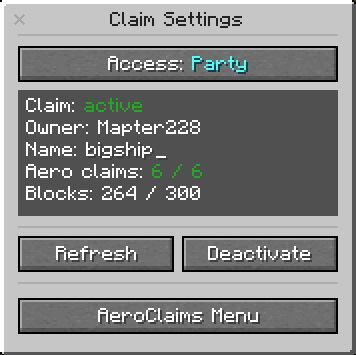
You can claim Sub-level (ship, aircraft, whatever you want) with the Claim block using its GUI.
You also will have to use Aero claims depending on your Sub-level size.
You can acquire Aero-claims by converting regular OPAC/FTB claims to the Aero-claims
Each Aero-claim provides protection to certain amount of blocks (can be changed in config).
You can increase the claim size by adding more Aero-claims to Claim block.
Example:
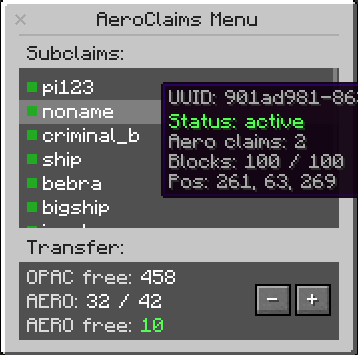
For players:
/aeroclaims menu — Open the sub-level management interface

/aeroclaims info — Show info about your claimed sub-levels and slot limits

/aeroclaims tp <shipUuid> — Teleport to your claimed sub-level (if enabled in config)
For admins:
/aeroclaims info <player> — View sub-level claim info for a specific player

/aeroclaims sublevels unclaim <shipUuid> — Unclaim a sub-level by UUID, returning claim and forceload slots to the owner

/aeroclaims sublevels teleport <shipUuid> — Teleport to any sub-level by UUID

/aeroclaims sublevels repair claim-blocks — Inspect sub-levels and restore missing or mismatched claim blocks

/aeroclaims sublevels repair phantoms check — Find phantom claims whose sub-levels no longer exist

/aeroclaims sublevels repair phantoms clear — Safely purge verified phantom claims and return slots to owners

/aeroclaims sublevels refresh (all | player <player> | sublevel <shipUuid>) — Recount ship blocks and refresh claim borders

/aeroclaims sublevels delete unclaimed confirm — Delete all unclaimed sub-levels from the world (requires enableClearCommand in config)

/aeroclaims sublevels dump — Export debug data about registered sub-levels to world/aeroclaims/
Project description from CurseForge.
Pick your setup
Choose the version and loader you play, then open the matching release.
Check the dependencies, then try the file in a copied instance before changing a world you care about.
Recent files
17 Oct 2026
8 Sept 2026
23 Jul 2026
30 Jun 2026
20 Jun 2026
27 May 2026
4 May 2026
28 Apr 2026
26 Apr 2026
25 Apr 2026
23 Apr 2026
23 Apr 2026
Looking for an older file? The official CurseForge project page is in Resources.
 mod
A mod for Minecraft helping control input method
 mod
A mod that adds a variety of decorative and colorful blocks to the game
 mod
Colony ME Access integrates MineColonies with AE2 for easier resource management, builder request handling, automatic recipe learning, and streamlined colony automation and quality-of-life features.