

Minecraft version
Back to mods 
CurseForge · Minecraft mod
Epic Fight: Impactful
An Epic Fight addon. Adding hit stop and screen shake for more impactful combat experience.
Choose a version Pick your version below, then grab the matching file.
Quick answer
Which Epic Fight: Impactful release should I use?
Latest stable file impactful-21.16.2+-neoforge1.21.1.jar
Game version 1.21.1
Loader NeoForge
Epic Fight: Impactful impactful-21.16.2+-neoforge1.21.1.jar targets 1.21.1 with NeoForge. The project page does not say whether this file belongs on the client, dedicated server, or both. No extra mods listed for this file.
Where it goes
Is Epic Fight: Impactful required on the client, server, or both?
The project page does not say whether this file belongs on the client, dedicated server, or both.
Client Source doesn’t say
Dedicated server Source doesn’t say
Loader for this release NeoForge
Required install it here Optional supported, not mandatory Not supported do not install here Source doesn’t say do not assume
The source does not explicitly classify this release as client-only or server-only.
What else does Epic Fight: Impactful impactful-21.16.2+-neoforge1.21.1.jar need?
impactful-21.16.2+-neoforge1.21.1.jar. Change the file and its required mods may change too.
This file does not list any required mods. Do not add a library just because a different file uses it.
This file does not list any required or optional mods.
Before you install it
Add Epic Fight: Impactful without breaking your instance.
Built for Epic Fight: Impactful impactful-21.16.2+-neoforge1.21.1.jar. Pick another file and the loader, install side or required mods may change.
- 01
Stick to this file
Use impactful-21.16.2+-neoforge1.21.1.jar. It targets 1.21.1 with NeoForge; another release may have different loader, side or dependency requirements.
- 02
Bring the mods it needs
This file does not list any required mods. Do not add a library just because a different file uses it.
- 03
Put it on the correct side
The project page does not say whether this file belongs on the client, dedicated server, or both.
- 04
Pick the file you checked
Use the “Get this file” button beside impactful-21.16.2+-neoforge1.21.1.jar. It opens that exact file at the source.
About this project
What does Epic Fight: Impactful add?
Modern action games have made many attempts to make player feel the force in every punches. Impactful is one of these attempts brings hit stop and screen shake to Epic Fight.
Features:
Customizable hit stop based on weapon categories or specify with attack animation Customizable screen shake based on weapon categories or specify with attack animation Customizable screen shake based on block type when player is guarding Adding screen shake to every ground slam, like meteor slam, etc. Customizable radial Blur based on weapon categories or specify with attack animation Player Only
https://github.com/Cyber2049/Epic-Fight-Impactful/blob/master/radial_blur.gif?raw=true
How to custom your own setting: Version after 20.11, need to setup resoucepack and datapack. example for 20.11.1
For visual effects of screen shake and radial blur just need to setup resoucepack in client side.
you can custom the visual effect deponds on items in resoucepack. "modid/item_skin/item_registryname.json". just like how to custom trails
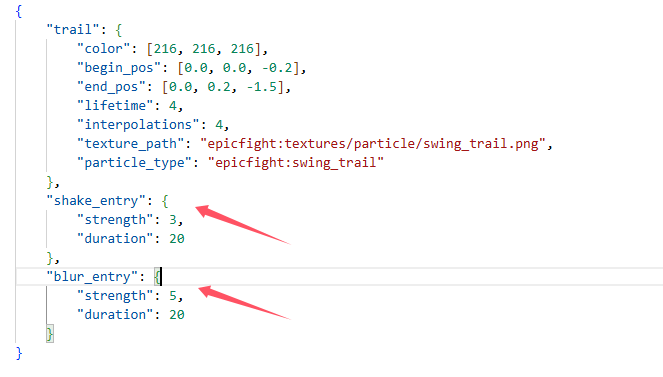 or you can custom the visual effect deponds on animation in resoucepack. "modid/animmodels/animations/biped/combat/visual_effct/animation_registryname.json"
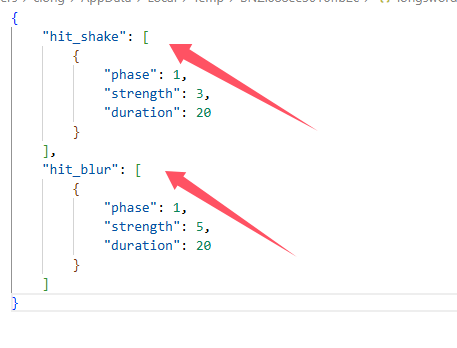
For hit stop need to setup resoucepack and datapack in both side.
custom hit stop setting deponds on item capabilities in datapack "modid/capabilities/weapons/item_registryname.json". just like how to custom weapon capability
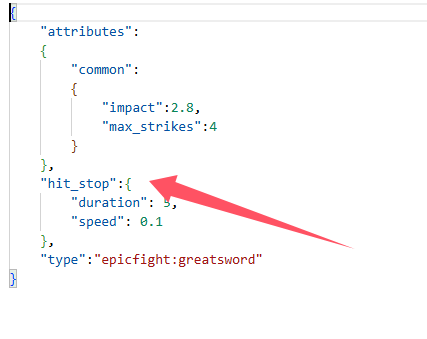
custom hit stop setting deponds on animation
"modid/animmodels/animations/biped/combat/hit_stop/animation_registryname.json"
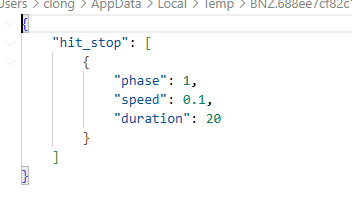
When playing on the server, animation setting of hit stop must setup in server side as a datapack, and setup in client side as a resoucepack.
When singleplayer, just need to setup as a resourcepack
Version before 20.11, only need to set the configuration file impactful-common.toml and impactful-client.toml
The Epic Fight - Impactful Team
Project description from CurseForge.
Pick your setup
Epic Fight: Impactful by Minecraft version and loader
Choose the version and loader you play, then open the matching release.
Check the dependencies, then try the file in a copied instance before changing a world you care about.
Recent files
Epic Fight: Impactful versions and loaders
impactful-21.16.2+-neoforge1.21.1.jar
15 Apr 2026
Client Source doesn’t say Server Source doesn’t say Dependencies No extras listed Listed on Release listing
Check the 1.21.1 · NeoForge setup 1.21.1NeoForge release
impactful-21.16.1-neoforge1.21.1.jar
impactful-21.16.1+-neoforge1.21.1.jar
15 Apr 2026
Client Source doesn’t say Server Source doesn’t say Dependencies No extras listed Listed on Release listing
Check the 1.21.1 · NeoForge setup 1.21.1NeoForge release
Looking for an older file? The official CurseForge project page is in Resources.
 mod
mod CurseForge · Minecraft
CreateColonies
A compatibility project between Create and Structurize/Minecolonies
 mod
mod CurseForge · Minecraft
Pipez Optimizer
An unofficial Pipez add-on that significantly reduces server lag, optimizes transfer logic, and adds custom extraction frequencies and high-tier upgrades.
 mod
mod CurseForge + Modrinth · Minecraft
BBL Casting - Multiblocks
An addon to BBL Casting which adds the multiblock controller to process loads of materials !