


CurseForge · Minecraft mod
ConfigLib TXF
A powerful & lightweight config library for Minecraft mods
Quick answer
Which ConfigLib TXF release matches 26.2 Forge?
ConfigLib TXF 26.2-2.0.4-forge targets 26.2 with Forge. Installation on the client is optional. Installation on the dedicated server is optional. No extra mods listed for this file.
Where it goes
Is ConfigLib TXF required on the client, server, or both?
Installation on the client is optional. Installation on the dedicated server is optional.
The source marks this as usable on both the client and server.
What else does ConfigLib TXF 26.2-2.0.4-forge need?
26.2-2.0.4-forge on 26.2 Forge. Every mod below is checked against that same setup.
This file does not list any required mods. Do not add a library just because a different file uses it.
This file does not list any required or optional mods.
Before you install it
Add ConfigLib TXF without breaking your instance.
Built for ConfigLib TXF 26.2-2.0.4-forge on 26.2 Forge. Pick another file and the loader, install side or required mods may change.
- 01
Stick to this file
Use 26.2-2.0.4-forge. It targets 26.2 with Forge; another release may have different loader, side or dependency requirements.
- 02
Bring the mods it needs
This file does not list any required mods. Do not add a library just because a different file uses it.
- 03
Put it on the correct side
Installation on the client is optional. Installation on the dedicated server is optional.
- 04
Pick the file you checked
Use the “Get this file” button beside 26.2-2.0.4-forge. It opens that exact file at the source.
About this project
What does ConfigLib TXF add?
ConfigLib TXF mod
A powerful & lightweight config library for Minecraft mods
Main features:
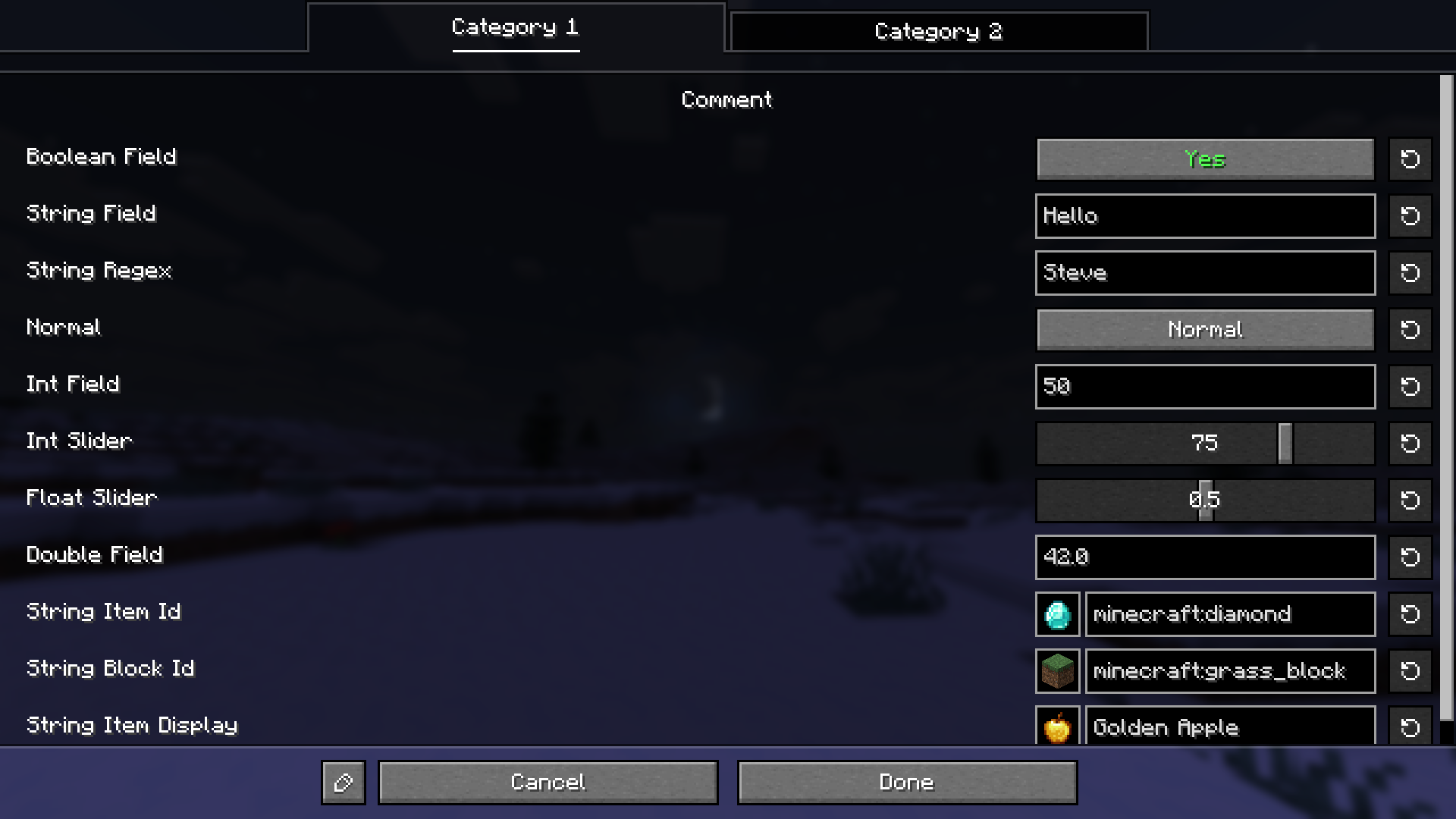
Automatic Config Screen: A ready-to-use GUI with tabs, categories, and a reset button on every field
JSON5 Config Files: Human-friendly config files with auto-generated comments showing defaults, ranges, and allowed values
Rich Widgets: Toggles, sliders, cycle buttons, color picker, file/directory chooser, and item/block icon preview
Real-Time Editing: Changes apply instantly while editing, with per-field validation (min/max, regex) and visual feedback
Server Sync: Seamlessly syncs selected fields from server to clients in multiplayer, keeping gameplay consistent
Multiple Configs: Split a mod's settings across several files with an automatic hub screen for navigation
Full Translation Support: Every label, tooltip, tab, and enum value can be translated through the standard language files
Fabric/Quilt dependencies:
- Mod Menu mod (Optional)

Dependency (Maven Central)
`repositories {
mavenCentral()
}
dependencies {
// Fabric
implementation 'io.github.jahirxtrap:configlibtxf:TAG-fabric'
// Forge
implementation 'io.github.jahirxtrap:configlibtxf:TAG-forge'
// NeoForge
implementation 'io.github.jahirxtrap:configlibtxf:TAG-neoforge'
}`
Replace TAG with the version you want (e.g. 26.1.2-2.0.0).
Usage
// initialize config TXFConfig.init(MODID, ModConfig.class);
Project description from CurseForge.
Pick your setup
ConfigLib TXF by Minecraft version and loader
Choose the version and loader you play, then open the matching release.
26.2
4 loader builds26.1.2
4 loader builds26.1.1
4 loader builds26.1
4 loader builds1.21.11
4 loader builds1.21.1
4 loader builds1.21
4 loader builds1.20.1
3 loader builds1.20
3 loader buildsCheck the dependencies, then try the file in a copied instance before changing a world you care about.
Recent files
ConfigLib TXF versions and loaders
26.2-2.0.4-forge
configlibtxf-26.2-2.0.4-forge.jar
19 Jun 2026
ConfigLib TXF 26.2-2.0.4-forge
configlibtxf-26.2-2.0.4-forge.jar
19 Jun 2026
Looking for an older file? The official CurseForge project page is in Resources.