Minecraft version
Back to mods 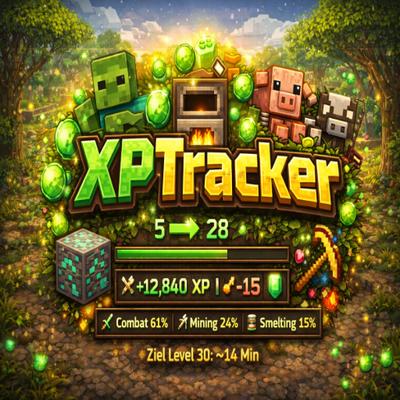
CurseForge · Minecraft mod
XPTracker
Monitors your experience gains in real time, breaks them down by source, and displays everything in a clean, configurable HUD overlay.
Choose a version Pick your version below, then grab the matching file.
Quick answer
Which XPTracker release matches 26.2 Fabric?
Best match for your filters xptracker-mc26.2-1.0.1.jar
Game version 26.2
Loader Fabric
xptracker-mc26.2-1.0.1.jar targets 26.2 with Fabric. The project page does not say whether this file belongs on the client, dedicated server, or both. No extra mods listed for this file.
Where it goes
Is XPTracker required on the client, server, or both?
The project page does not say whether this file belongs on the client, dedicated server, or both.
Client Source doesn’t say
Dedicated server Source doesn’t say
Loader for this release Fabric
Required install it here Optional supported, not mandatory Not supported do not install here Source doesn’t say do not assume
The source does not explicitly classify this release as client-only or server-only.
What else does xptracker-mc26.2-1.0.1.jar need?
xptracker-mc26.2-1.0.1.jar on 26.2 Fabric. Every mod below is checked against that same setup.
This file does not list any required mods. Do not add a library just because a different file uses it.
This file does not list any required or optional mods.
Before you install it
Add XPTracker without breaking your instance.
Built for xptracker-mc26.2-1.0.1.jar on 26.2 Fabric. Pick another file and the loader, install side or required mods may change.
- 01
Stick to this file
Use xptracker-mc26.2-1.0.1.jar. It targets 26.2 with Fabric; another release may have different loader, side or dependency requirements.
- 02
Bring the mods it needs
This file does not list any required mods. Do not add a library just because a different file uses it.
- 03
Put it on the correct side
The project page does not say whether this file belongs on the client, dedicated server, or both.
- 04
Pick the file you checked
Use the “Get this file” button beside xptracker-mc26.2-1.0.1.jar. It opens that exact file at the source.
About this project
What does XPTracker add?
XPTracker
Track every point of XP you earn and find out where it comes from!
This lightweight client-side Fabric mod monitors your experience gains in real time, breaks them down by source, and displays everything in a clean, configurable HUD overlay.
Features
Session Tracking
- Total XP gained - See exactly how much experience you've earned this session
- Level gains - Track how many levels you've gained since starting
- Session time - Know how long you've been grinding
- XP per minute - Measure your farming efficiency in real time
Source Detection
- Combat - XP from killing mobs
- Mining - XP from breaking ores (Coal, Diamond, Emerald, Lapis, Redstone, Nether Quartz, Nether Gold, Sculk, Spawners)
- Smelting - XP from collecting furnace outputs
- Trading - XP from villager trades
- Fishing - XP from reeling in catches
- Breeding - XP from breeding animals
- Percentage breakdown - See which sources contribute most to your XP
Smart Session Management
- Toggle tracking - Start and pause freely with a single keybind
- Auto-pause - Automatically pauses when you open the pause menu
- Auto-resume - Picks back up when you return to the game
- Session persistence - Optionally keep your session across world changes
- Chat summary - Detailed breakdown printed to chat when you reset
Customizable HUD
- Four positions - Top-left, top-right, bottom-left, bottom-right
- Adjustable scale - Make it bigger or smaller
- Custom colors - Choose text and background colors
- Toggle individual stats - Show only what you care about
- Background opacity - Adjust for readability
Player-Friendly
- Keybinds -
Jto toggle tracking,Kto reset session - In-game config - Full YACL config screen via ModMenu
- Bilingual - English and German translations included
- Client-side only - No server installation required
Requirements
- Minecraft: 26.1+
- Fabric Loader: 0.18.4 or higher
- Fabric API: Required
- Java: 25 or higher
- ModMenu + YACL: Optional (for in-game config screen)
Perfect For
- Grinders - Measure and optimize your XP farming setups
- Builders - Track XP from mining sessions
- Traders - See how much XP villager trading actually gives you
- Everyone - Anyone curious about where their XP comes from!
Links
- Issues & Bugs: GitHub Issues
- Source Code: GitHub Repository
License
This mod is open-source and licensed under the MIT License.
Made with love by DennisTheGamer
Project description from CurseForge.
Pick your setup
XPTracker by Minecraft version and loader
Choose the version and loader you play, then open the matching release.
Minecraft version
26.2
1 loader buildMinecraft version
26.1.2
1 loader buildMinecraft version
26.1.1
1 loader buildMinecraft version
26.1
1 loader buildCheck the dependencies, then try the file in a copied instance before changing a world you care about.
Recent files
XPTracker versions and loaders
xptracker-mc26.2-1.0.1.jar
21 Jun 2026
Client Source doesn’t say Server Source doesn’t say Dependencies No extras listed Listed on Release listing
Check the 26.2 · Fabric setup Fabric26.2 release
Looking for an older file? The official CurseForge project page is in Resources.
 mod
Modrinth · Minecraft
Cleric Heal Villager
Clerics now take care of Villagers, helping them stay in life for trades. [1.21.9 - 26.3]
 mod
Modrinth · Minecraft
Villager Heal Villager
Villagers now take care of Villagers, helping them stay in life for trades. [1.21.9 - 26.3]
 mod
Modrinth · Minecraft
Armorer Heal Golem
Armorer Villagers now take care of Iron Golems, helping them stay strong and ready to defend the village. [1.21.9 - 26.3]