Minecraft version
Back to mods 
CurseForge · Minecraft mod
Capy's Upside Down
A mysterious, dark and corrupted clone of your world, inspired by Stranger Things. Extensive and unique features.
Choose a version Pick your version below, then grab the matching file.
Quick answer
Which Capy's Upside Down release should I use?
Latest stable file Capy's Upside Down (1.4) Stable Release
Game version 1.21.8
Loader NeoForge
Capy's Upside Down (1.4) Stable Release targets 1.21.8 with NeoForge. The project page does not say whether this file belongs on the client, dedicated server, or both. No extra mods listed for this file.
Where it goes
Is Capy's Upside Down required on the client, server, or both?
The project page does not say whether this file belongs on the client, dedicated server, or both.
Client Source doesn’t say
Dedicated server Source doesn’t say
Loader for this release NeoForge
Required install it here Optional supported, not mandatory Not supported do not install here Source doesn’t say do not assume
The source does not explicitly classify this release as client-only or server-only.
What else does Capy's Upside Down (1.4) Stable Release need?
Capy's Upside Down (1.4) Stable Release. Change the file and its required mods may change too.
This file does not list any required mods. Do not add a library just because a different file uses it.
This file does not list any required or optional mods.
Before you install it
Add Capy's Upside Down without breaking your instance.
Built for Capy's Upside Down (1.4) Stable Release. Pick another file and the loader, install side or required mods may change.
- 01
Stick to this file
Use Capy's Upside Down (1.4) Stable Release. It targets 1.21.8 with NeoForge; another release may have different loader, side or dependency requirements.
- 02
Bring the mods it needs
This file does not list any required mods. Do not add a library just because a different file uses it.
- 03
Put it on the correct side
The project page does not say whether this file belongs on the client, dedicated server, or both.
- 04
Pick the file you checked
Use the “Get this file” button beside Capy's Upside Down (1.4) Stable Release. It opens that exact file at the source.
About this project
What does Capy's Upside Down add?
Capy's Upside Down
Warning: Using Shader Packs may break the look of the Upside Down if they remove thick fog or modify it in any way.
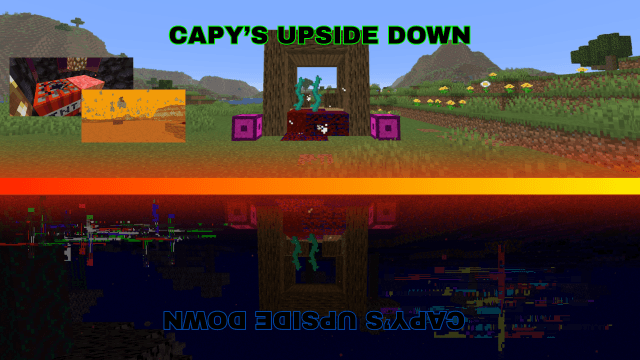
Are you ready for an exhillerating adventure in your Minecraft world?
Visit the upside down, visit Dimension X (The sand dimension from the show), Get new items, blocks, communicate to other players, face off the Demogorgon, and DESTROY THE EXOTIC MATTER TO KILL THE UPSIDE DOWN.
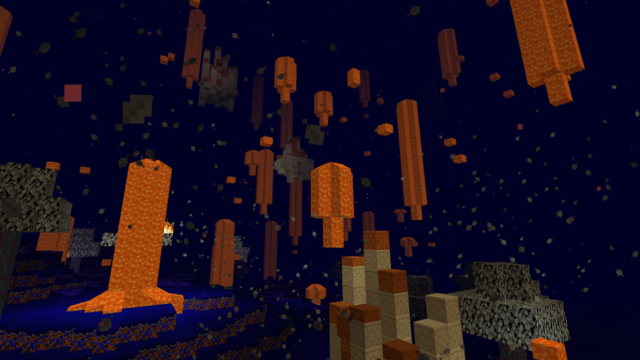
Inspired by Stranger Things, this mod adds the Upside Down and more from stranger things to Minecraft. The Upside Down is a dark mirror of the overworld, with thick fog, and a blue atmospheric tint. Dust fills the air, and dry lightning strikes the ground.
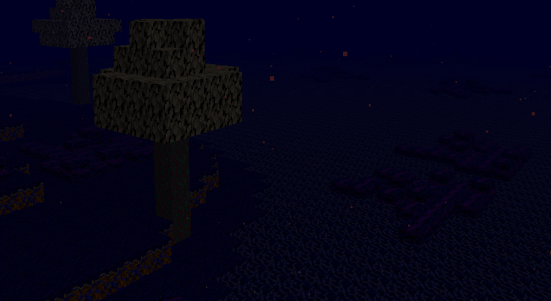
It doesn't help that tons of mobs spawn, trying to end your journey. Not to mention the demogorgon that can spawn. Try to limit breaking, placing, killing, and even chatting, or it may hear you. Its only weakness is fire. Bring a flint and steel at all times.
Gates
To enter the upside down, find a gate like this and right click on the gate block. But be careful, if you light it on fire or destroy it somehow, it will be gone; forever.
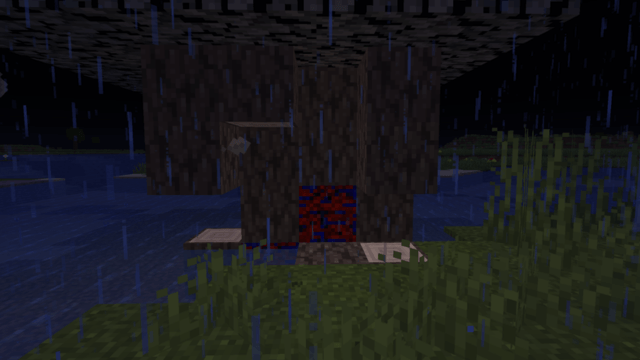
While in the upside down, you may find that the biomes don't make any sense. Maybe the gate is in a plains biome, but you are in a Jungle. This is where the corruption comes into play. The world generation (shape, caves, some structures) will be the same, but biomes and trees, etc will be different. Expect the unexpected!
Exotic Matter
While in the Upside Down, you may find large shrines with beacons attached to them. Inside, they hold exotic matter. You can't destroy it with your fist or a pickaxe, you need TNT. By default, you have to destroy 3 exotic matter structures before the upside down completely closes for everyone. You can disable this in a gamerule or set the limit to how many exotic matter need to be destroyed.
If you destroy all exotic matter, all players will have 60 seconds to escape. If they don't escape, they will be sent to the Abyss, which is literally just a void.
New Item Type
Do you want overpowered gear to fight off the Demogorgon? Well, look no further!
This mod also adds a new ore called "Flipsite", which can be turned into "Reversed" tools and armor. They are extremely powerful, but hard to get.
Inside of the Upside Down, you will find a substitute for water, which is Vines. Collect it with a bucket, and then put it into your crafting menu to get the vine item.
Then, smelt the vine items into "Dried Vines".
After you do that, craft Raw Flipsite, with this recipe.
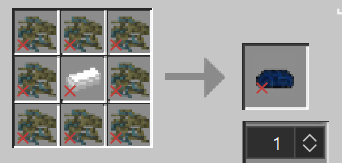
8 Dried Vine
1 Iron Ingot
Now, you need a new block called the "Boilerplate". You need to hit the Unenchanted Flipsite on it to break it into shards and to be able to craft "Enchanted Flipsite", which can be made into Reversed Tools. This block can only be placed in the upside down.
Use this recipe.
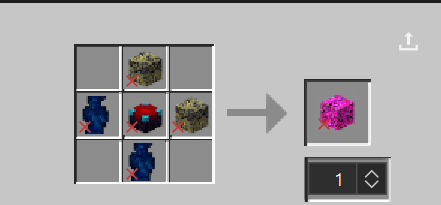
2 Dead Vine Cobblestone (can be made by placing Cobblestone in the Upside Down which turns it into vined cobblestone, and then placing that block into the Overworld.)
2 Vines (refer to previous instructions)
1 Enchanting Table
Once you have placed the Boilerplate in the Upside Down, it will change texture. Equip your Raw Flipsite, and then right click on the Boilerplate. The boilerplate will break, and your Unenchanted Flipsite will turn into Enchanted Flipsite Shards.
Now, finally; you can craft your Enchanted Flipsite.
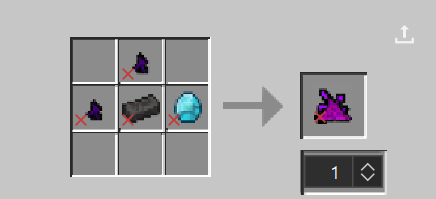
(2 flipsite shards, 1 netherite ingot, 1 diamond)
This item lets you craft normal tools and armor with the traditional recipes. The items and armor are also extremely overpowered.
Dimension X
Inside of the Upside Down, pillar up until you start to see sandstone above you. Eventually, you will reach Dimension X, a world made of floating pillars and sandstone. There are multiple exits, but don't turn into Holly Wheeler, bring a water bucket, or else you'll plummet to your death.
Inside of the Dimension X is also a very rare new structure that has some OP loot rolls, including enchanted Reversed tools. Good luck finding it.
Customization / Block Cloning
There are many game rules that will aid you with your gameplay to create the desired experience.
By default, when you place a block in the Overworld, it will be synced to the Upside Down until somebody enters the dimension for the first time, freezing it in place. But this can be disabled, block cloning itself can also be disabled.
Note: Pre-existing worlds will not sync to the upside down. Only new block updates like placing and breaking work. Sorry.
There is so, so much more to explore in this mod, these are just the basic features. I hope you enjoy it, I spent a lot of time working on it.
Notice: Running this mod on servers may lag them. Consider using a server-side optimization mod.
Project description from CurseForge.
Pick your setup
Capy's Upside Down by Minecraft version and loader
Choose the version and loader you play, then open the matching release.
Check the dependencies, then try the file in a copied instance before changing a world you care about.
Recent files
Capy's Upside Down versions and loaders
Capy's Upside Down (1.4) Stable Release
Capy's Upside Down (Stable 1.4).jar
17 Apr 2026
Client Source doesn’t say Server Source doesn’t say Dependencies No extras listed Listed on Release listing
Check the 1.21.8 · NeoForge setup 1.21.8NeoForge release
Looking for an older file? The official CurseForge project page is in Resources.
 mod
CurseForge + Modrinth · Minecraft
Sticky Redstone
Adds redstone that can go on the side of blocks!
 mod
CurseForge · Minecraft
Nekomata Zombie apocalypse
"Experience a brutal apocalypse where zombies evolve with tools, gear, and swarm tactics to dismantle your defenses."
 mod
CurseForge · Minecraft
FurMutage Early Testing (A Changed Addon)
This is an addon for the changed minecraft mod, right now it is super early access, and adds concepts and ideas that are not fully baked but are almost ready.