Minecraft version
Back to mods 
CurseForge · Minecraft mod
AppleTrees
Adds apple-bearing leaves with growth stages, JEI recipes, Jade tooltips, and built-in debug logging.
Choose a version Pick your version below, then grab the matching file.
Quick answer
Which AppleTrees release should I use?
Latest stable file appletrees-1.21.11-forge-1.2.1.jar
Game version 1.21.11
Loader Forge
appletrees-1.21.11-forge-1.2.1.jar targets 1.21.11 with Forge. The project page does not say whether this file belongs on the client, dedicated server, or both. No extra mods listed for this file.
Where it goes
Is AppleTrees required on the client, server, or both?
The project page does not say whether this file belongs on the client, dedicated server, or both.
Client Source doesn’t say
Dedicated server Source doesn’t say
Loader for this release Forge
Required install it here Optional supported, not mandatory Not supported do not install here Source doesn’t say do not assume
The source does not explicitly classify this release as client-only or server-only.
What else does appletrees-1.21.11-forge-1.2.1.jar need?
appletrees-1.21.11-forge-1.2.1.jar. Change the file and its required mods may change too.
This file does not list any required mods. Do not add a library just because a different file uses it.
This file does not list any required or optional mods.
Before you install it
Add AppleTrees without breaking your instance.
Built for appletrees-1.21.11-forge-1.2.1.jar. Pick another file and the loader, install side or required mods may change.
- 01
Stick to this file
Use appletrees-1.21.11-forge-1.2.1.jar. It targets 1.21.11 with Forge; another release may have different loader, side or dependency requirements.
- 02
Bring the mods it needs
This file does not list any required mods. Do not add a library just because a different file uses it.
- 03
Put it on the correct side
The project page does not say whether this file belongs on the client, dedicated server, or both.
- 04
Pick the file you checked
Use the “Get this file” button beside appletrees-1.21.11-forge-1.2.1.jar. It opens that exact file at the source.
About this project
What does AppleTrees add?
AppleTrees
AppleTrees adds growable Apple Trees, visible fruit growth, rare apple drops, Goblin Harvester automation, and Blaze Powder Infusion.
The mod is designed to make apple farming more useful while still feeling natural and vanilla-friendly. Grow Apple Trees, watch the fruit progress through visible stages, harvest rare apples, automate your orchard, and use Blaze Powder to boost your next harvest.
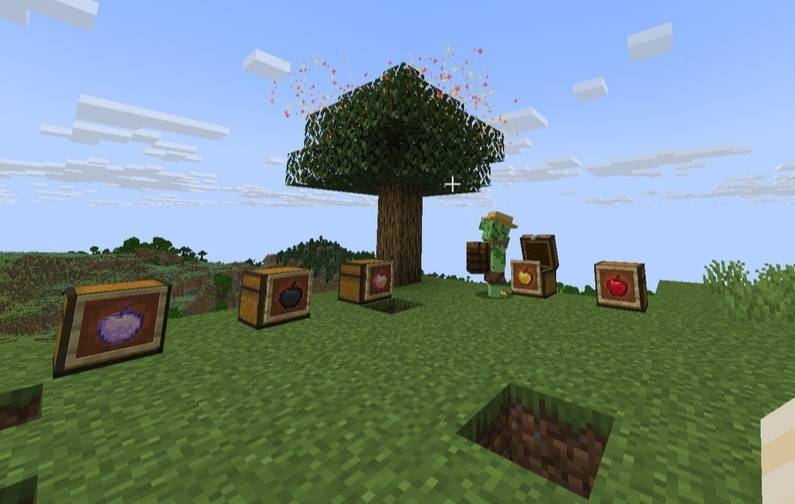
Main Features
Apple Trees
AppleTrees adds custom Apple Trees with fruiting leaves.
Visible fruit growth stages
Mature apple leaves can be harvested
Bone meal support
Clear tooltip feedback
Server-synced growth data
Rare Apple Progression
AppleTrees can produce several apple types:
Apple
Golden Apple
Enchanted Golden Apple
Amethyst Apple
Netherite Apple
Rare drops are chance-based. They are meant to feel special and rewarding.
Netherite Apple
The Netherite Apple is an ultra-rare AppleTrees drop. It is not craftable.
It gives powerful effects, including:
Regeneration VI
Absorption VI
Resistance VI
Fire Resistance
Strength V
Speed II
Blaze Powder Infusion
Use vanilla Blaze Powder on AppleTrees leaves to infuse the connected tree/leaf cluster.
Blaze Infusion:
Works on fruiting and non-fruiting AppleTrees leaves
Infuses connected fruiting leaves
Makes infused leaves grow faster
Boosts the next mature harvest
Clears after one successful harvest per infused leaf
Uses custom particles and sound
There are no charges, no timer, and no permanent infusion.
Goblin Harvester
The Goblin Harvester can automate orchard harvesting.
It can:
Harvest mature fruiting leaves
Store drops internally
Deposit into nearby chests and barrels
Sort apples using item-frame labels
Work with Apple, Golden Apple, Enchanted Golden Apple, Amethyst Apple, and Netherite Apple
Prioritize rare apples
Limit regular apple overflow
Smart Storage Sorting
Use item frames to label chests or barrels.
Supported labels:
Apple
Golden Apple
Enchanted Golden Apple
Amethyst Apple
Netherite Apple
The Goblin only deposits matching items into labeled containers.
Double chests are supported as one combined container, and larger farm lanes are supported by moving to the next matching container when one fills up.
Goblin Anchor Commands
Useful commands for managing moved Goblins:
/appletrees goblin sethome/appletrees goblin resetanchor/appletrees goblin status
These help when moving Goblins from one orchard to another.
Integrations
AppleTrees includes support for:
Jade
WTHIT
JEI
Optional debug logging
Tooltip data can show growth stage, harvest readiness, maturity, timing information, and infusion status.
Debug Logging
Use:
/appletrees debug on/off/status
Debug logging can help with:
Growth cycles
Harvest events
Drop rolls
Goblin behavior
Infusion behavior
Bug reports and balancing
Summary
AppleTrees makes apple growth visible, readable, and useful. It adds rare apple progression, orchard automation, smart sorting, and Blaze Powder Infusion while staying lightweight and vanilla-friendly.
Project description from CurseForge.
Pick your setup
AppleTrees by Minecraft version and loader
Choose the version and loader you play, then open the matching release.
Minecraft version
1.20.1
2 loader buildsCheck the dependencies, then try the file in a copied instance before changing a world you care about.
Recent files
AppleTrees versions and loaders
appletrees-1.21.11-forge-1.2.1.jar
appletrees-1.2.1.jar
4 Jun 2026
Client Source doesn’t say Server Source doesn’t say Dependencies No extras listed Listed on Release listing
Check the 1.21.11 · Forge setup Forge1.21.11 release
appletrees-forge-1.20.1-1.2.1.jar
2 Jun 2026
Client Source doesn’t say Server Source doesn’t say Dependencies No extras listed Listed on Release listing
Check the 1.20.1 · Forge setup 1.20.1Forge release
appletrees-1.1.2.-1.20.1-forge.jar
appletrees-1.1.2.jar
2 Jun 2026
Client Source doesn’t say Server Source doesn’t say Dependencies No extras listed Listed on Release listing
Check the 1.20.1 · Forge setup 1.20.1Forge release
appletrees 1.21.11-fabric1.2.0.jar
23 May 2026
Client Source doesn’t say Server Source doesn’t say Dependencies No extras listed Listed on Release listing
Check the 1.21.11 · Fabric setup Fabric1.21.11 release
appletrees-1.1.1.-forge-1.21.11.jar
appletrees-1.1.1.jar
2 May 2026
Client Source doesn’t say Server Source doesn’t say Dependencies No extras listed Listed on Release listing
Check the 1.21.11 · Forge setup Forge1.21.11 release
appletrees-1.1.1.-forge-1.20.1jar
appletrees-1.1.1.jar
2 May 2026
Client Source doesn’t say Server Source doesn’t say Dependencies No extras listed Listed on Release listing
Check the 1.20.1 · Forge setup 1.20.1Forge release
appletrees-forge-1.21.11-1.1.0.jar
appletrees-1.1.0.jar
1 May 2026
Client Source doesn’t say Server Source doesn’t say Dependencies No extras listed Listed on Release listing
Check the 1.21.11 · Fabric setup Fabric1.21.11 release
appletrees-forge-1.20.1-1.1.0.jar
appletrees-1.1.0.jar
1 May 2026
Client Source doesn’t say Server Source doesn’t say Dependencies No extras listed Listed on Release listing
Check the 1.20.1 · Fabric setup Fabric1.20.1 release
appletrees-1.0.0FABRIC.jar
appletrees-1.0.0.jar
19 Apr 2026
Client Source doesn’t say Server Source doesn’t say Dependencies No extras listed Listed on Release listing
Check the 1.21.11 · Fabric setup Fabric1.21.11 release
appletrees-1.0.0FORGE.jar
appletrees-1.0.0.jar
19 Apr 2026
Client Source doesn’t say Server Source doesn’t say Dependencies No extras listed Listed on Release listing
Check the 1.21.11 · Forge setup Forge1.21.11 release
Looking for an older file? The official CurseForge project page is in Resources.
 mod
CurseForge + Modrinth · Minecraft
ShapeGen
Additional shapes for any block, including modded ones
 mod
CurseForge + Modrinth · Minecraft
Fate/Unlimited Block Works
Bring the holy grail war to minecraft
 mod
CurseForge · Minecraft
Raw's Chunk Generation
Automatic chunk generation extension. Generates a buffer zone around online players, and generates around recent player activity when no players are online.