Quick answer
Which Jam's Minimap release should I use?
Latest stable file minimap.jar
Game version 1.21.11
Loader Fabric
Jam's Minimap minimap.jar targets 1.21.11 with Fabric. The project page does not say whether this file belongs on the client, dedicated server, or both. No extra mods listed for this file.
Where it goes
Is Jam's Minimap required on the client, server, or both?
The project page does not say whether this file belongs on the client, dedicated server, or both.
Client Source doesn’t say
Dedicated server Source doesn’t say
Loader for this release Fabric
Required install it here Optional supported, not mandatory Not supported do not install here Source doesn’t say do not assume
The source does not explicitly classify this release as client-only or server-only.
What else does Jam's Minimap minimap.jar need?
minimap.jar. Change the file and its required mods may change too.
This file does not list any required mods. Do not add a library just because a different file uses it.
Matching file found Matched file: [1.21.11] Fabric API 0.141.6+1.21.11
We only count dependency files that match this setup. A file for another loader does not fill the gap.
Before you install it
Add Jam's Minimap without breaking your instance.
Built for Jam's Minimap minimap.jar. Pick another file and the loader, install side or required mods may change.
- 01
Stick to this file
Use minimap.jar. It targets 1.21.11 with Fabric; another release may have different loader, side or dependency requirements.
- 02
Bring the mods it needs
This file does not list any required mods. Do not add a library just because a different file uses it.
- 03
Put it on the correct side
The project page does not say whether this file belongs on the client, dedicated server, or both.
- 04
Pick the file you checked
Use the “Get this file” button beside minimap.jar. It opens that exact file at the source.
About this project
What does Jam's Minimap add?
English
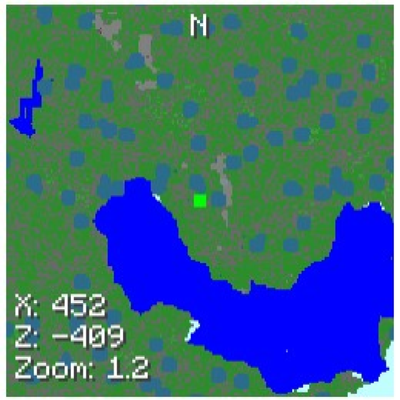
- Full in-game config screen with save/reset, logo, and on-screen controls (toggles and sliders) for enabled, fixed/rotating map, grid, north marker, players/entities, size, X/Y position, zoom, render distance, opacity, and block sample size.
- HUD integration: adds a "Minimap Config" button to the pause menu for one-click access.
- Smooth, efficient rendering pipeline: 2× CPU image → GPU texture, incremental rebuilds only when position/rotation/config changes, rate-limited updates.
- Fast world sampling and color mapping: top-block scanning with early exit, configurable block sample size, and a precomputed block-colour lookup table.
- Accurate markers and UI: real-time player markers (excluding self) with rotation-aware placement, player dot and direction indicator, optional grid/N label, coordinates and zoom readout.
- Robust asset loading: reads bundled icon into a NativeImageBackedTexture for the config UI, with safe handling of IO errors.
- Developer-friendly hooks: pause-menu injection via ScreenEvents.AFTER_INIT with defensive reflection and logging; clear logging for debugging and safe fallbacks.
Español
- Pantalla de configuración en juego con guardar/restablecer, logo y controles (conmutadores y deslizadores) para activar, mapa fijo/rotatorio, cuadrícula, indicador norte, jugadores/entidades, tamaño, posición X/Y, zoom, distancia de renderizado, opacidad y tamaño de muestreo de bloques.
- Botón "Minimap Config" en el menú de pausa para acceso rápido.
- Tubo de render eficiente: imagen CPU 2× a textura GPU, reconstrucciones incrementales solo cuando hay cambios, con límite de frecuencia.
- Muestreo y coloreado rápidos: escaneo del bloque superior con salida temprana, tamaño de muestra configurable y tabla de colores precalculada.
- Marcadores y UI precisos: marcadores de jugadores en tiempo real (excluyéndote), indicador de dirección, cuadrícula/etiqueta N opcional y lectura de coordenadas/zoom.
- Carga de recursos robusta: icono empaquetado convertido a NativeImageBackedTexture con manejo seguro de errores IO.
- Hooks para desarrolladores: inyección en el menú de pausa usando ScreenEvents.AFTER_INIT con reflexión defensiva y registro para depuración.
Project description from CurseForge.
Pick your setup
Jam's Minimap by Minecraft version and loader
Choose the version and loader you play, then open the matching release.
Minecraft version
1.21.11
1
loader build Check the dependencies, then try the file in a copied instance before changing a world you care about.
Recent files
Jam's Minimap versions and loaders
 mod
 mod
 mod