Minecraft version
Back to mods 
CurseForge · Minecraft mod
LittleQuests
LittleQuests adds a lightweight and fully customizable quest system to Minecraft. Quests are organized into categories, allowing players to easily create their own progression. And an ecenomy system allow players to buy items from quests rewards coins.
Choose a version Pick your version below, then grab the matching file.
Quick answer
Which LittleQuests release should I use?
Latest stable file littlequests-1.21.1-2.5.9.jar
Game version 1.21.1
Loader NeoForge
littlequests-1.21.1-2.5.9.jar targets 1.21.1 with NeoForge. The project page does not say whether this file belongs on the client, dedicated server, or both. No extra mods listed for this file.
Where it goes
Is LittleQuests required on the client, server, or both?
The project page does not say whether this file belongs on the client, dedicated server, or both.
Client Source doesn’t say
Dedicated server Source doesn’t say
Loader for this release NeoForge
Required install it here Optional supported, not mandatory Not supported do not install here Source doesn’t say do not assume
The source does not explicitly classify this release as client-only or server-only.
What else does littlequests-1.21.1-2.5.9.jar need?
littlequests-1.21.1-2.5.9.jar. Change the file and its required mods may change too.
This file does not list any required mods. Do not add a library just because a different file uses it.
This file does not list any required or optional mods.
Before you install it
Add LittleQuests without breaking your instance.
Built for littlequests-1.21.1-2.5.9.jar. Pick another file and the loader, install side or required mods may change.
- 01
Stick to this file
Use littlequests-1.21.1-2.5.9.jar. It targets 1.21.1 with NeoForge; another release may have different loader, side or dependency requirements.
- 02
Bring the mods it needs
This file does not list any required mods. Do not add a library just because a different file uses it.
- 03
Put it on the correct side
The project page does not say whether this file belongs on the client, dedicated server, or both.
- 04
Pick the file you checked
Use the “Get this file” button beside littlequests-1.21.1-2.5.9.jar. It opens that exact file at the source.
About this project
What does LittleQuests add?
Description
LittleQuests is a simple mod that adds a lightweight and fully customizable quest system to Minecraft, compatible with all others mods items. Quests are organized into categories and configurable via simple JSON files or commands, allowing server owners to easily create their own progression. So you track your progress in a clean interface with classic, daily and/or repeatable quests.
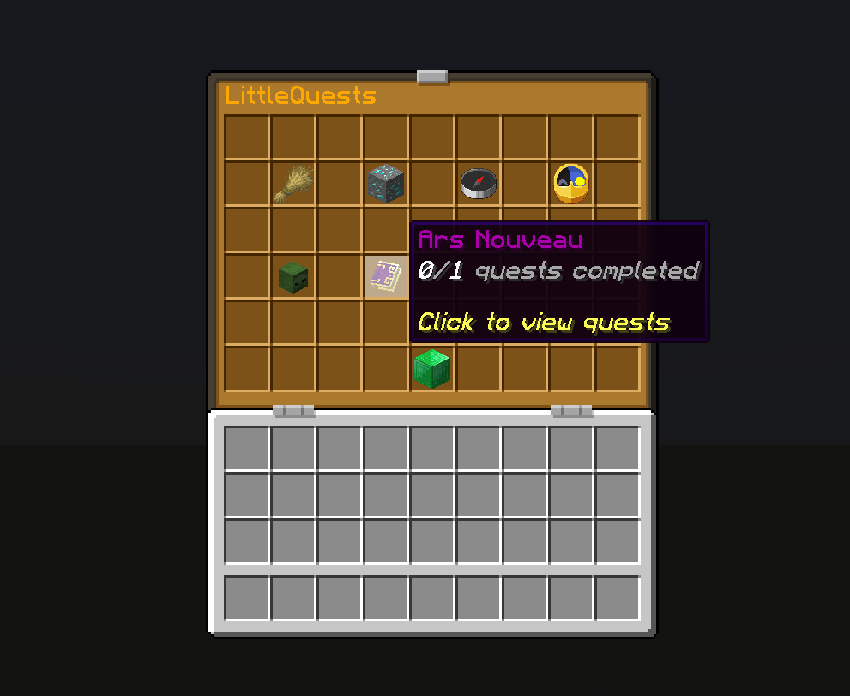
For now quest are only items exchanges: you give requested items and you reveive specific items and coins.
Shop
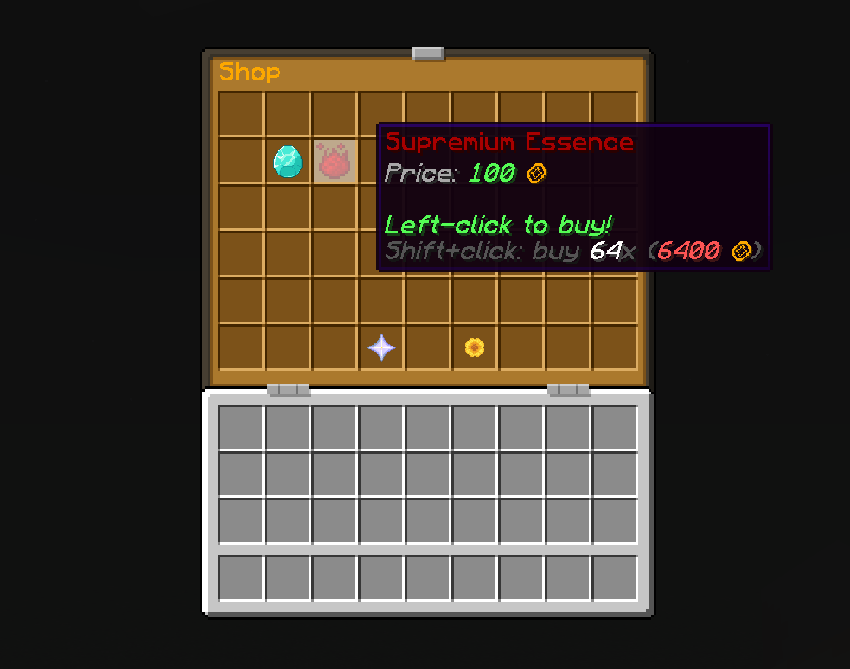
Because yes ! There is now an economy system too. You can set some coins in addon to quest rewards and you can enter the shop (on the categories menu - emerald block by default) to buy items.
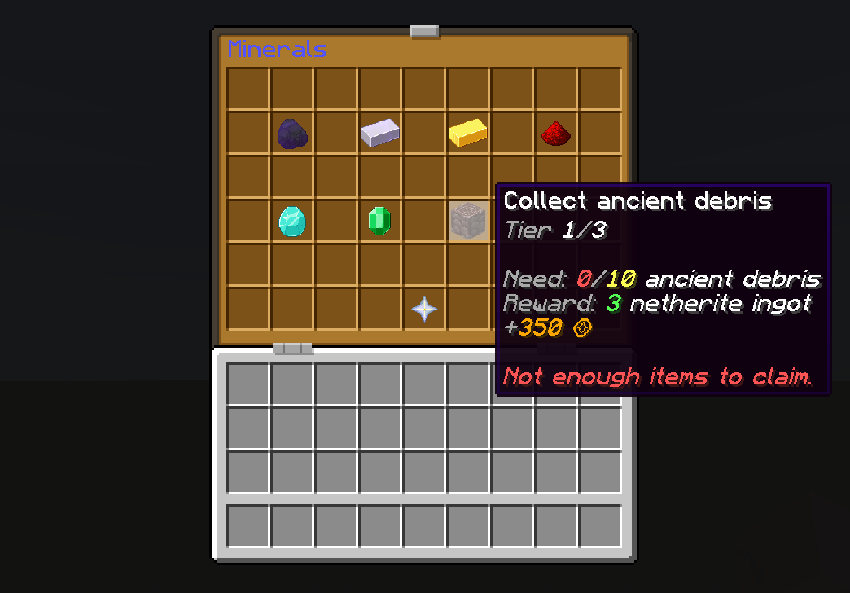
Coins name, shop toggling and sold items are fully configurable via commands and shop.json file in the config folder of your game or server (like categories and quests by the way).
And categories and shop items can have text formatting properties such as colors, bold, etc...
Others details
The mod works in solo and multiplayer environments (required on both client and server), making it ideal for small to medium servers looking for simple progression without heavy systems.
It's compatible with all other mods because you just have to namespaced your items in the commands or config files and the mod will automatically check if items are availables in the party / server. If not, the command is automaticcaly canceled (if you configured the mod directly in json files, the server or party will just not start so be careful).
Other Minecraft versions comming soon and Fabric and Forge versions are planned.
List of all commands:
(You can start all mod's commands by /littlequests or /lq)
(The "name" params are the ones you can apply chat formatting properties (like &1, &2, &b, &o, &k, etc... You have to write the "" in the command only if you apply format or if the name contains spaces)
Create a category: /lq category create [id] ["name"] [namespace:item] <isDaily> <isRepeatable>
Remove a category:
/lq category remove [id]
List all categories:
/lq category list
Edit a category (name - visible item in GUI - if has daily quests - if has repeatable quests):
/lq category edit [id] set name ["name"]
/lq category edit [id] set itemDisplay [namespace:item]
/lq category edit [id] set isDaily <true|false>
/lq category edit [id] set isRepeatable <true|false>
Create a quest:
/lq quest create [categoryId] [id] [namespace:item] [description]
Remove a quest:
/lq quest remove [id]
List all quests:
/lq quest list
Add a new tier to a quest (questId - requested item - amount, -reward items - amount - reward coins):
/lq quest addTier [questId] [namespace:item] [amount] [namespace:item] [amount] <rewardCoins>
Reset all tiers of a quest for a given player:
/lq quest reset [questId] [playerName]
Edit a quest (category - description / name - item in GUI):
/lq quest edit [id] set categoryId [catId]
/lq quest edit [id] set description [description]
/lq quest edit [id] set itemDisplay [namespace:item]
Edit a tier of a quest (tierNumber is the position of the tier in the array on the json file):
/lq quest editTier [questId] [tierNumber] set [requestedItem|requestedAmount|rewardItem|rewardAmount|rewardCoins] [value]
Toggle the shop:
/lq shop toggle
Add a new item in the shop:
/lq shop add [id] ["name"] [namespace:item] [amount] [price]
Remove a shop item:
/lq shop remove [id]
List all shop items:
/lq shop list
Edit a shop item (ItemId - name - item visible in GUI - amount sold - price):
/lq shop edit [id] set ["name"|itemDisplay|amount|price] [value]
See a player's coins:
/lq coins show [player]
Send your coins to another player (works only in multiplayers):
/lq coins send [amount] [player]
Add coins to a player balance:
/lq coins add [player] [amount]
Set player coins balance:
/lq coins set [player] [amount]
Reload all json files (if you make changes directly from them. This auto sync all connected players):
/lq reload
Sync your game instance with the game or server config:
/lq sync
Display your LittleQuests stats and the current daily quest(s):
/lq stats
Project description from CurseForge.
Pick your setup
LittleQuests by Minecraft version and loader
Choose the version and loader you play, then open the matching release.
Check the dependencies, then try the file in a copied instance before changing a world you care about.
Recent files
LittleQuests versions and loaders
littlequests-1.21.1-2.5.9.jar
littlequests-2.5.9.jar
21 Apr 2026
Client Source doesn’t say Server Source doesn’t say Dependencies No extras listed Listed on Release listing
Check the 1.21.1 · NeoForge setup 1.21.1NeoForge release
Looking for an older file? The official CurseForge project page is in Resources.
 mod
mod CurseForge · Minecraft
Terminal Arms
A mod that enriches vanilla End gameplay. 一款丰富原版末地玩法的模组
 mod
mod CurseForge · Minecraft
Harvest And Sow
You can harvest and replant crops with a single right-click!
 mod
mod CurseForge + Modrinth · Minecraft
Diorama
A minimap and world map drawn at an angle, like a model of your world on a table. Towers stand up, cliffs have faces and trees cast shadows.