Mod Menu Optional for enderlink-1.1.0.jar
optionalMatching file found Matched file: v20.0.1 for 26.2
CurseForge · Minecraft mod
A minecraft teleportation mod. Add, link and teleport!
Quick answer
enderlink-1.1.0.jar targets 26.2, 26.3-snapshot, 26.3-pre-1 with Fabric. The project page does not say whether this file belongs on the client, dedicated server, or both. All 1 required mods have matching files.
Where it goes
The project page does not say whether this file belongs on the client, dedicated server, or both.
The source does not explicitly classify this release as client-only or server-only.
enderlink-1.1.0.jar on 26.2. Every mod below is checked against that same setup.
Install Fabric API first. We found matching files for this game-version and loader setup. 2 come through another mod in the chain.
2 extra mods were pulled in by other dependencies. Indented rows show who needs each one. We only count dependency files that match this setup. A file for another loader does not fill the gap.
Before you install it
Built for enderlink-1.1.0.jar on 26.2. Pick another file and the loader, install side or required mods may change.
Use enderlink-1.1.0.jar. It targets 26.2, 26.3-snapshot, 26.3-pre-1 with Fabric; another release may have different loader, side or dependency requirements.
Install Fabric API first. We found matching files for this game-version and loader setup. 2 come through another mod in the chain.
The project page does not say whether this file belongs on the client, dedicated server, or both.
Use the “Get this file” button beside enderlink-1.1.0.jar. It opens that exact file at the source.
About this project
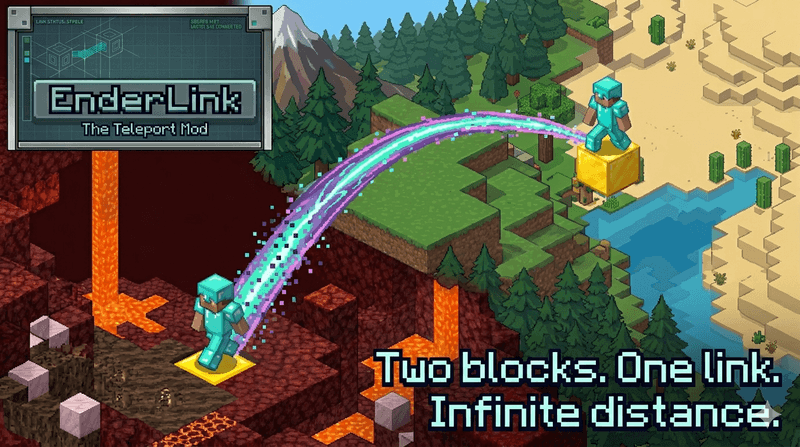
Two blocks. One link. Infinite distance.
EnderLink is a Fabric teleportation mod that lets players register teleport pads, link them together, and travel between them by sneaking on the block.
It is designed to be simple for players, configurable for server owners, and fully functional on dedicated servers.
EnderLink turns normal configured blocks into teleport pads.
Typical flow:
/enderlink add./enderlink add./enderlink link TP1 TP2.Pads are stored permanently on the server, can be listed by command, and are automatically removed when the block is broken or becomes invalid.
/enderlink add - Register the teleport block you are currently standing on./enderlink link <first> <second> -Link two teleport pads together. Links are always two-way./enderlink unlink <first> <second> - Remove the link between two pads./enderlink remove <name> - Remove a teleport pad completely./enderlink rename <name> <newName> - Rename a teleport pad./enderlink list - Show all stored pads and links./enderlink info - Show info about the pad you are currently standing on./enderlink info <name> - Show info about a specific teleport pad./enderlink reload - Reload the config from disk.Server owners can configure:
EnderLink writes a commented config file to: config/enderlink/enderlink.json
Config Options
teleportBlocks - List of block ids that can act as teleport pads. Default: minecraft:gold_block, minecraft:lapis_blockchargeTicks - Warmup time before teleporting. 20 ticks = 1 secondsafetyEnabled - If true, EnderLink blocks unsafe destinations.particlesEnabled - Enables teleport particles.particleType - Particle id used during warmup and arrival.warmupParticleCount - How many particles spawn while charging.arrivalBurstParticleCount - How many particles spawn immediately on arrival.arrivalTrailParticleCount - How many particles spawn each tick during the short arrival particle trail.arrivalParticleDurationTicks - How long the extra arrival particle trail lasts after teleporting.soundEnabled - Enables arrival sound.soundEvent - Sound event id played on arrival.soundVolume - Volume for the arrival sound.soundPitch - Pitch for the arrival sound.allowedDimensions - List of dimension ids allowed to participate in teleports. You can use shorthand like overworld or full ids like minecraft:overworld.luckPerms - Enables LuckPerms integration if the LuckPerms mod is installed.maxPadsPerPlayer - Default maximum amount of teleport pads per player.maxLinksPerPlayer - Default maximum amount of links per player.addAccesslinkAccessunlinkAccessremoveAccessrenameAccesslistAccessinfoAccess - Command access mode when LuckPerms is disabled. Valid values: EVERYONE, OPS_ONLYYou can place a carpet on top of a teleport block to hide it.
The pad still works for:
EnderLink blocks unsafe teleports.
Examples of blocked destinations:
EnderLink supports two permission modes:
For all permission options, visit the github page: https://github.com/SwordfishBE/EnderLink#-permissions
EnderLink is fully usable on dedicated servers.
Mod Menu and Cloth Config are only needed if you want the optional in-game config screen on the client.
Feel free to join my Minecraft server to test my mods: play.swordfishbe.eu
Project description from CurseForge.
Pick your setup
Choose the version and loader you play, then open the matching release.
Check the dependencies, then try the file in a copied instance before changing a world you care about.
Recent files
10 Sept 2026
16 Jun 2026
Looking for an older file? The official CurseForge project page is in Resources.
 mod
modA config serializer for YetAnotherConfigLib using FASTJSON2
 mod
modFully configurable mod that adds custom loading screen tips. [Made for Modpack creators]
 mod
modInsert items in sand and gravel with a dispenser to make the blocks suspicious.