Minecraft version
Back to mods 
CurseForge · Minecraft mod
AstorClient
Configurable client-side HUD, themes, maps, module control and utilities for Fabric, Forge and NeoForge.
Choose a version Pick your version below, then grab the matching file.
Quick answer
Which AstorClient release should I use?
Latest stable file AstorClient 1.3.2 - NeoForge 26.2
Game version 26.2
Loader NeoForge
AstorClient 1.3.2 - NeoForge 26.2 targets 26.2 with NeoForge. The project page does not say whether this file belongs on the client, dedicated server, or both. No extra mods listed for this file.
Where it goes
Is AstorClient required on the client, server, or both?
The project page does not say whether this file belongs on the client, dedicated server, or both.
Client Source doesn’t say
Dedicated server Source doesn’t say
Loader for this release NeoForge
Required install it here Optional supported, not mandatory Not supported do not install here Source doesn’t say do not assume
The source does not explicitly classify this release as client-only or server-only.
What else does AstorClient 1.3.2 - NeoForge 26.2 need?
AstorClient 1.3.2 - NeoForge 26.2. Change the file and its required mods may change too.
This file does not list any required mods. Do not add a library just because a different file uses it.
This file does not list any required or optional mods.
Before you install it
Add AstorClient without breaking your instance.
Built for AstorClient 1.3.2 - NeoForge 26.2. Pick another file and the loader, install side or required mods may change.
- 01
Stick to this file
Use AstorClient 1.3.2 - NeoForge 26.2. It targets 26.2 with NeoForge; another release may have different loader, side or dependency requirements.
- 02
Bring the mods it needs
This file does not list any required mods. Do not add a library just because a different file uses it.
- 03
Put it on the correct side
The project page does not say whether this file belongs on the client, dedicated server, or both.
- 04
Pick the file you checked
Use the “Get this file” button beside AstorClient 1.3.2 - NeoForge 26.2. It opens that exact file at the source.
About this project
What does AstorClient add?
✦ AstorClient
A configurable client-side HUD, interface and quality-of-life suite for Minecraft Java Edition.
Fabric • Forge • NeoForge | Minecraft 1.16.5–26.2 | Client-side
Install the JAR that exactly matches both your Minecraft version and mod loader. Fabric, Forge and NeoForge files are separate and must not be mixed.
🎮 Your game, clearly organized
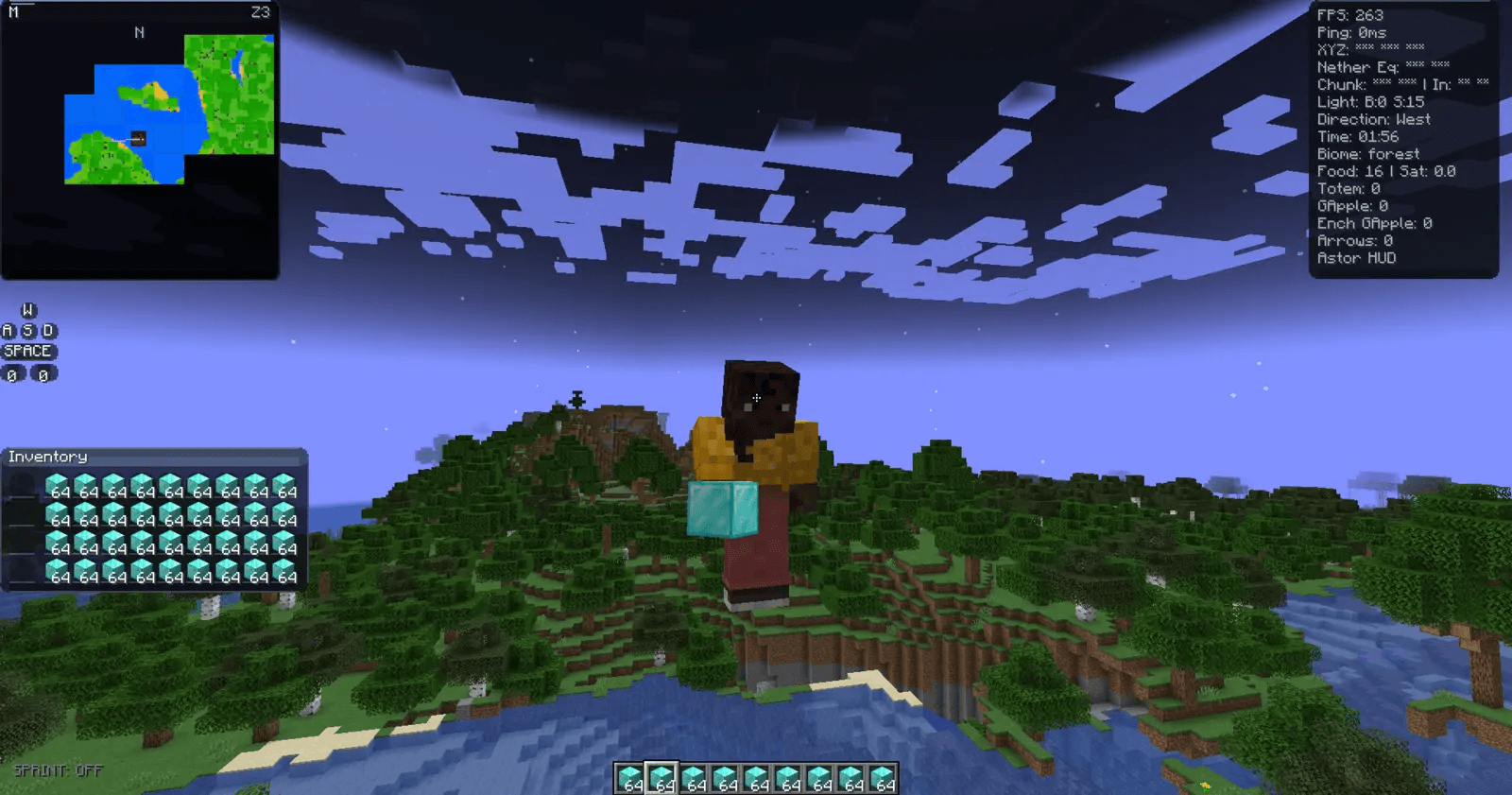
A configurable in-game layout combining the minimap, information HUD, keystrokes and inventory preview.
AstorClient keeps useful client information visible without forcing one fixed layout. Enable only the tools you want, position supported HUD elements around your screen, and keep the rest disabled for a cleaner experience.
🧭 One control center for supported modules
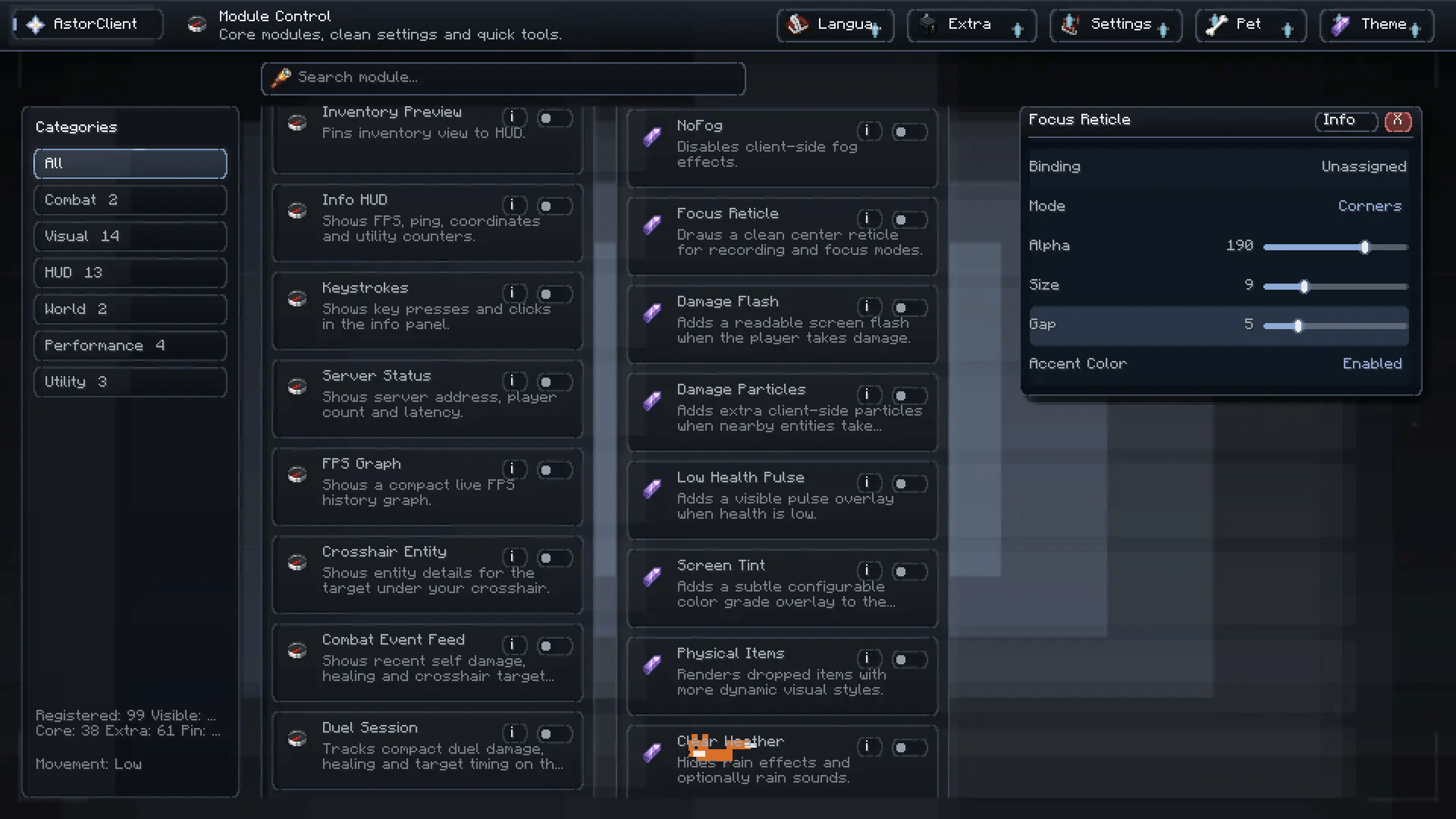
Search, filter, enable, pin and configure supported modules from a single interface.
The module browser groups features by category and provides quick access to descriptions and settings. Version-specific compatibility is handled deliberately: modules that cannot be represented safely on a target build are hidden or omitted instead of exposing a non-functional switch.
Core systems
| System | What it provides |
|---|---|
| Module Control | Search, categories, favorites, toggles and per-module settings |
| Theme Studio | Style packs, color presets, custom RGB controls, backgrounds and optional effects |
| HUD Editor | Drag, resize, align and arrange supported widgets with reusable layouts |
| Maps & Waypoints | Minimap, fullscreen map, waypoint controls and route tools on supported builds |
| Config Code | Export, share and import compatible module settings |
| Extra Modules | Optional alerts, safety helpers and additional information panels |
🖥️ Build a HUD that fits your playstyle
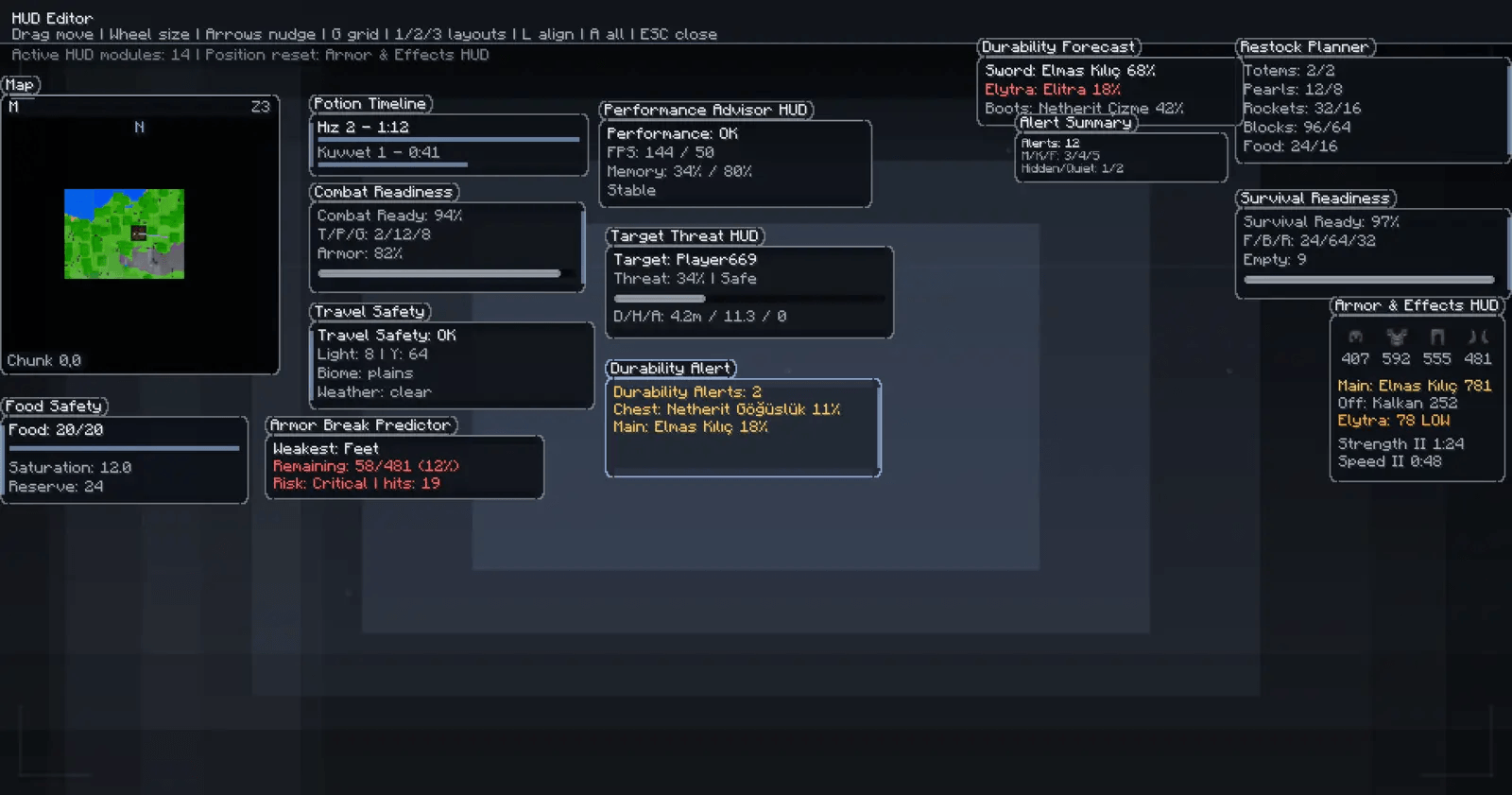
Arrange map, survival, combat, durability, effects and performance widgets from the HUD editor.
Move, resize, nudge and align supported panels. The available widgets depend on the selected Minecraft version and loader because rendering and event APIs differ across releases.
🌍 Six bundled interface languages
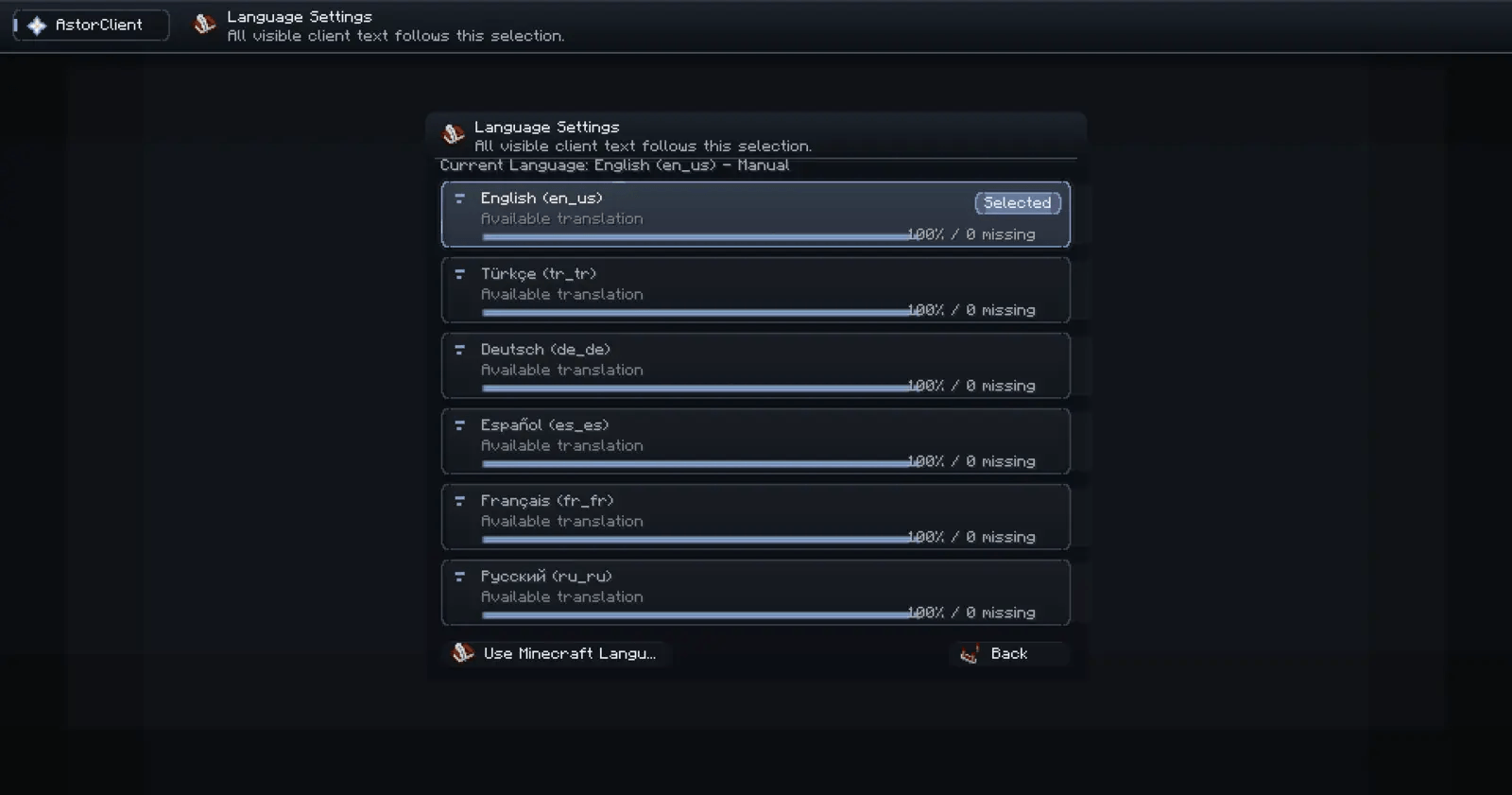
Choose a manual AstorClient language or follow Minecraft's active language.
- English (
en_us) - Türkçe (
tr_tr) - Deutsch (
de_de) - Español (
es_es) - Français (
fr_fr) - Русский (
ru_ru)
Settings are stored in Minecraft's configuration directory and separated by schema/version where required.
✨ Feature highlights
- Searchable module management with favorites and focused settings panels
- Customizable HUD layouts, information panels and optional visual helpers
- Theme presets, backgrounds, colors, motion and accessibility-oriented controls
- Inventory, armor, effects, durability, server, target and performance information
- Minimap, fullscreen map and waypoint tools on supported builds
- Config import/export for moving compatible settings between installations
- Failure isolation so an optional module error does not disable the whole client where possible
📦 Compatibility
The current AstorClient catalog is distributed as 82 exact-target JARs:
| Loader | Published targets | Minecraft range |
|---|---|---|
| Fabric | 32 | 1.16.5–26.2 |
| Forge | 30 | Officially available targets from 1.16.5–26.2 |
| NeoForge | 20 | Officially available targets from 1.20.1–26.2 |
Every file is tagged for one Minecraft version and one loader. Missing loader/version combinations are intentionally omitted when an official compatible loader artifact is unavailable or the port cannot be represented safely.
Minecraft 26.x builds currently expose four compatibility-gated modules: Fullbright, Auto Sprint, Zoom and Clean Weather. NeoForge 26.1 and 26.1.1 files are intentionally absent because no stable official NeoForge artifacts exist for those exact targets.
Feature availability
The screenshots show the full modern interface. Older Minecraft versions and Forge/NeoForge ports may expose a smaller supported module set. AstorClient hides unsupported modules rather than presenting controls that cannot work correctly on that target.
🚀 Installation
- Install the loader listed on the file page: Fabric Loader, Forge or NeoForge.
- Download the AstorClient JAR matching both your Minecraft version and loader.
- Place the JAR in the instance's
modsfolder. - Launch Minecraft and open AstorClient with Right Shift by default.
AstorClient is client-side. Never place a Fabric JAR in Forge/NeoForge or a Forge/NeoForge JAR in Fabric.
✅ Release validation
All 82 artifacts are checked for valid JAR structure and hashes, exact Minecraft/loader metadata, client entrypoints, configuration schema, bundled assets, language-key parity, compatible Java bytecode and loader-specific production structure.
Files marked Release have direct launch evidence. Files marked Beta passed the shared structural/content audit but remain conservative until broader exact-target launch coverage is available.
📜 License
AstorClient is distributed under the AstorClient Free Use License. It is free to use and redistribute as a Minecraft client mod. Selling access, license keys, memberships, subscriptions or paid unlocks for AstorClient is not permitted.
AstorClient is not an official Minecraft product and is not approved by or associated with Mojang or Microsoft.
Project description from CurseForge.
Pick your setup
AstorClient by Minecraft version and loader
Choose the version and loader you play, then open the matching release.
Minecraft version
26.1.2
2 loader buildsMinecraft version
26.1.1
1 loader buildMinecraft version
26.1
1 loader buildMinecraft version
1.21.11
2 loader buildsMinecraft version
1.21.10
2 loader buildsMinecraft version
1.21.9
2 loader buildsMinecraft version
1.21.8
2 loader buildsMinecraft version
1.21.7
2 loader buildsMinecraft version
1.21.6
2 loader buildsMinecraft version
1.21.5
2 loader buildsMinecraft version
1.21.4
2 loader buildsShowing the newest 12 of 32 game versions. Older files are in the list below.
Check the dependencies, then try the file in a copied instance before changing a world you care about.
Recent files
AstorClient versions and loaders
AstorClient 1.3.2 - NeoForge 26.2
astorclient-neoforge-mc26.2-1.3.2.jar
29 Aug 2026
Client Source doesn’t say Server Source doesn’t say Dependencies No extras listed Listed on Release listing
Check the 26.2 · NeoForge setup NeoForge26.2 release
AstorClient 1.3.2 - NeoForge 26.1.2
astorclient-neoforge-mc26.1.2-1.3.2.jar
29 Aug 2026
Client Source doesn’t say Server Source doesn’t say Dependencies No extras listed Listed on Release listing
Check the 26.1.2 · NeoForge setup NeoForge26.1.2 beta
AstorClient 1.3.2 - NeoForge 1.21.11
astorclient-neoforge-mc1.21.11-1.3.2.jar
29 Aug 2026
Client Source doesn’t say Server Source doesn’t say Dependencies No extras listed Listed on Release listing
Check the 1.21.11 · NeoForge setup NeoForge1.21.11 release
AstorClient 1.3.2 - NeoForge 1.21.10
astorclient-neoforge-mc1.21.10-1.3.2.jar
29 Aug 2026
Client Source doesn’t say Server Source doesn’t say Dependencies No extras listed Listed on Release listing
Check the 1.21.10 · NeoForge setup NeoForge1.21.10 beta
AstorClient 1.3.2 - NeoForge 1.21.9
astorclient-neoforge-mc1.21.9-1.3.2.jar
29 Aug 2026
Client Source doesn’t say Server Source doesn’t say Dependencies No extras listed Listed on Release listing
Check the 1.21.9 · NeoForge setup NeoForge1.21.9 beta
AstorClient 1.3.2 - NeoForge 1.21.8
astorclient-neoforge-mc1.21.8-1.3.2.jar
29 Aug 2026
Client Source doesn’t say Server Source doesn’t say Dependencies No extras listed Listed on Release listing
Check the 1.21.8 · NeoForge setup 1.21.8NeoForge beta
AstorClient 1.3.2 - NeoForge 1.21.7
astorclient-neoforge-mc1.21.7-1.3.2.jar
29 Aug 2026
Client Source doesn’t say Server Source doesn’t say Dependencies No extras listed Listed on Release listing
Check the 1.21.7 · NeoForge setup 1.21.7NeoForge beta
AstorClient 1.3.2 - NeoForge 1.21.6
astorclient-neoforge-mc1.21.6-1.3.2.jar
29 Aug 2026
Client Source doesn’t say Server Source doesn’t say Dependencies No extras listed Listed on Release listing
Check the 1.21.6 · NeoForge setup 1.21.6NeoForge beta
AstorClient 1.3.2 - NeoForge 1.21.5
astorclient-neoforge-mc1.21.5-1.3.2.jar
29 Aug 2026
Client Source doesn’t say Server Source doesn’t say Dependencies No extras listed Listed on Release listing
Check the 1.21.5 · NeoForge setup 1.21.5NeoForge beta
AstorClient 1.3.2 - NeoForge 1.21.4
astorclient-neoforge-mc1.21.4-1.3.2.jar
29 Aug 2026
Client Source doesn’t say Server Source doesn’t say Dependencies No extras listed Listed on Release listing
Check the 1.21.4 · NeoForge setup 1.21.4NeoForge beta
AstorClient 1.3.2 - NeoForge 1.21.3
astorclient-neoforge-mc1.21.3-1.3.2.jar
29 Aug 2026
Client Source doesn’t say Server Source doesn’t say Dependencies No extras listed Listed on Release listing
Check the 1.21.3 · NeoForge setup 1.21.3NeoForge beta
AstorClient 1.3.2 - NeoForge 1.21.2
astorclient-neoforge-mc1.21.2-1.3.2.jar
29 Aug 2026
Client Source doesn’t say Server Source doesn’t say Dependencies No extras listed Listed on Release listing
Check the 1.21.2 · NeoForge setup NeoForge1.21.2 release
Looking for an older file? The official CurseForge project page is in Resources.
 mod
mod CurseForge · Minecraft
StageBox
A music speaker mod with custom .ogg playback, animated speakers, LED effects, and cable sync.
 mod
mod CurseForge · Minecraft
Gastronausean (Alienevo addon)
An alienevo addon that adds Gutrot as a new transformation
 mod
mod CurseForge · Minecraft
Double Iron Chests
Double chests for Iron Chests