Minecraft version
Back to mods 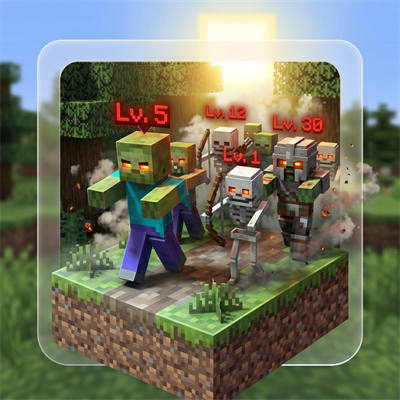
CurseForge · Minecraft mod
Ala Horde
Hostile mobs grow stronger as you kill them — per-species kill counter scales HP, damage, speed and XP for every new spawn.
Choose a version Pick your version below, then grab the matching file.
Quick answer
Which Ala Horde release should I use?
Latest stable file Ala Horde 1.1.0 (NeoForge)
Game version 26.2
Loader NeoForge
Ala Horde 1.1.0 (NeoForge) targets 26.2 with NeoForge. The project page does not say whether this file belongs on the client, dedicated server, or both. No extra mods listed for this file.
Where it goes
Is Ala Horde required on the client, server, or both?
The project page does not say whether this file belongs on the client, dedicated server, or both.
Client Source doesn’t say
Dedicated server Source doesn’t say
Loader for this release NeoForge
Required install it here Optional supported, not mandatory Not supported do not install here Source doesn’t say do not assume
The source does not explicitly classify this release as client-only or server-only.
What else does Ala Horde 1.1.0 (NeoForge) need?
Ala Horde 1.1.0 (NeoForge). Change the file and its required mods may change too.
This file does not list any required mods. Do not add a library just because a different file uses it.
This file does not list any required or optional mods.
Before you install it
Add Ala Horde without breaking your instance.
Built for Ala Horde 1.1.0 (NeoForge). Pick another file and the loader, install side or required mods may change.
- 01
Stick to this file
Use Ala Horde 1.1.0 (NeoForge). It targets 26.2 with NeoForge; another release may have different loader, side or dependency requirements.
- 02
Bring the mods it needs
This file does not list any required mods. Do not add a library just because a different file uses it.
- 03
Put it on the correct side
The project page does not say whether this file belongs on the client, dedicated server, or both.
- 04
Pick the file you checked
Use the “Get this file” button beside Ala Horde 1.1.0 (NeoForge). It opens that exact file at the source.
About this project
What does Ala Horde add?
AlaHorde — Hostile mobs that level up
Hostile Minecraft mobs grow stronger as you kill them. AlaHorde tracks every kill of every hostile species (zombies, skeletons, creepers, witches, endermen, blazes, ghasts, even the Wither and Ender Dragon) across the entire world. Hit a threshold for a species and every new spawn of that species comes back stronger — more health, more damage, faster, with bigger XP rewards.
The world remembers. The horde adapts.
What it does
| Stat | Per-level scaling | Default |
|---|---|---|
| Max health | +10% over base per level | configurable |
| Attack damage | +8% over base per level | configurable |
| Movement speed | +5% over base per level | configurable |
| XP drop | +10% over base per level | configurable |
- 25 kills per level by default — fully configurable
- Level cap at 20 — kills are still counted past it
- RPG-style
[Lv.N]label above each spawned mob with color tier (gray Lv.1 → white → yellow → gold → red) - No X-Ray — labels are occluded by solid blocks; you only see the level when the mob is in line of sight
- Bosses included — Wither, Ender Dragon, Warden scale by the same formula. Boss AI phases stay intact (we only touch attribute base values)
- Level-up announcements — chat broadcast (configurable radius) plus flame/smoke particles at the kill site
- Per-world progress — survives restarts, persisted in world
SavedData
Commands
| Command | Permission | What it does |
|---|---|---|
/alahorde info |
everyone | Shows the tracked species with current level and kill progress |
/alahorde reset all |
op (lvl 2) | Resets every species' counter to zero |
/alahorde reset <mob_id> |
op (lvl 2) | Resets a single species (e.g. /alahorde reset minecraft:zombie) |
Configuration
Every option is editable from the in-game Mods → AlaHorde → Settings screen, or by hand in <world>/serverconfig/alahorde-server.toml.
Highlights:
general.enabled— master switch. When off, the mod is fully inert (no scaling, no labels, no kill counting). Lets you A/B test against vanilla without removing the jar.general.killsPerLevel— kills required per level-up (default 25)general.maxLevel— level cap (default 20)general.excludedMobs— entity ids opted out of the system (e.g.["minecraft:bat"])scaling.*— HP / damage / speed / XP per-level multipliersvisuals.*— toggle the level label, level-up chat message, and notify radius
Compatibility
- Multiplayer: progress is stored per-world and shared across all players on the server. Vanilla clients can join — no client-side mod required for core gameplay (the level label uses vanilla custom-name rendering).
- Other mods: mob categories from other mods are respected. Use
excludedMobsto opt out specific species. - Modpacks: zero hard dependencies. Drop in and go.
Languages
English, Русский, Українська, Deutsch, Español, Français, Português (BR), 日本語, 简体中文, Polski.
Translations welcome — open a PR on GitHub.
Installation
- Install NeoForge 26.1.2.28-beta for Minecraft 1.21.10
- Download the latest
alahorde-26.1.2-<version>.jarfrom this page - Drop the jar into
.minecraft/mods/(client) or<server>/mods/(server) - Launch — first start writes the default config to
<world>/serverconfig/alahorde-server.toml
Source / Issues
GitHub repository — bug reports, feature requests and pull requests welcome.
License: MIT © Artem Pavelko (Ma3auka)
Project description from CurseForge.
Pick your setup
Ala Horde by Minecraft version and loader
Choose the version and loader you play, then open the matching release.
Minecraft version
26.1.2
1 loader buildMinecraft version
1.21.10
1 loader buildCheck the dependencies, then try the file in a copied instance before changing a world you care about.
Recent files
Ala Horde versions and loaders
Ala Horde 1.1.0 (NeoForge)
alahorde-neoforge-26.2-1.1.0.jar
30 Aug 2026
Client Source doesn’t say Server Source doesn’t say Dependencies No extras listed Listed on Release listing
Check the 26.2 · NeoForge setup NeoForge26.2 release
Ala Horde 1.1.0 (Fabric)
alahorde-fabric-26.2-1.1.0.jar
30 Aug 2026
Client Source doesn’t say Server Source doesn’t say Dependencies No extras listed Listed on Release listing
Check the 26.2 · Fabric setup Fabric26.2 release
AlaHorde 1.0.0 - Hostile mobs that level up
alahorde-26.1.2-1.0.0.jar
26 Apr 2026
Client Source doesn’t say Server Source doesn’t say Dependencies No extras listed Listed on Release listing
Check the 26.1.2 · NeoForge setup NeoForge1.21.1026.1.2 release
Looking for an older file? The official CurseForge project page is in Resources.