

Minecraft version
Back to mods 
CurseForge · Minecraft mod
Modpack Core Essentials
Change game window title and icon. Add a welcome message to the screen when you first start the game. Very light. Easy to customize. Zero bloat. NeoForge & Fabric.
Choose a version Pick your version below, then grab the matching file.
Quick answer
Which Modpack Core Essentials release matches 26.1.2?
Best match for your filters ModpackCoreEssentials-26.1.2-Fabric-v1.3.0
Game version 26.1.2
Loader Fabric
Modpack Core Essentials ModpackCoreEssentials-26.1.2-Fabric-v1.3.0 targets 26.1.2 with Fabric. The project page does not say whether this file belongs on the client, dedicated server, or both. No extra mods listed for this file.
Where it goes
Is Modpack Core Essentials required on the client, server, or both?
The project page does not say whether this file belongs on the client, dedicated server, or both.
Client Source doesn’t say
Dedicated server Source doesn’t say
Loader for this release Fabric
Required install it here Optional supported, not mandatory Not supported do not install here Source doesn’t say do not assume
The source does not explicitly classify this release as client-only or server-only.
What else does Modpack Core Essentials ModpackCoreEssentials-26.1.2-Fabric-v1.3.0 need?
ModpackCoreEssentials-26.1.2-Fabric-v1.3.0 on 26.1.2. Every mod below is checked against that same setup.
This file does not list any required mods. Do not add a library just because a different file uses it.
This file does not list any required or optional mods.
Before you install it
Add Modpack Core Essentials without breaking your instance.
Built for Modpack Core Essentials ModpackCoreEssentials-26.1.2-Fabric-v1.3.0 on 26.1.2. Pick another file and the loader, install side or required mods may change.
- 01
Stick to this file
Use ModpackCoreEssentials-26.1.2-Fabric-v1.3.0. It targets 26.1.2 with Fabric; another release may have different loader, side or dependency requirements.
- 02
Bring the mods it needs
This file does not list any required mods. Do not add a library just because a different file uses it.
- 03
Put it on the correct side
The project page does not say whether this file belongs on the client, dedicated server, or both.
- 04
Pick the file you checked
Use the “Get this file” button beside ModpackCoreEssentials-26.1.2-Fabric-v1.3.0. It opens that exact file at the source.
About this project
What does Modpack Core Essentials add?

A lightweight, client-side utility mod built for modpack creators.
Modpack Core Essentials gives modpack authors a clean set of tools to customize modpack without any performance overhead.
✨ Features ✨
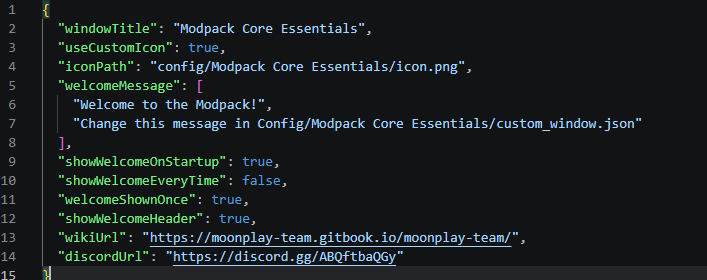
🪟 Custom Game Window Title Set a custom title for the Minecraft window to match your modpack's branding. Players will see your modpack's name in their game window title.

🖼️ Custom Window Icon Replace the default Minecraft window icon with your own.

📋 Configurable Welcome Screen Display a welcome screen when players launch the game. You can configure it to appear only once (on first launch), never or every time the game starts -> great for changelogs, server announcements, or greetings.
⚙️ Full ModMenu Integration Seamlessly integrates with ModMenu, providing an in-game config editor so you can tweak settings without leaving the game.
❤️ But also easy config file!
📦 Requirements
Fabric
| Dependency | Version |
|---|---|
| Minecraft | 26.1.2+ |
| Fabric Loader | 0.19.2+ |
| Fabric API | Any |
| Java | 25 |
Recommended: ModMenu (for in-game configuration)
NeoForge
| Dependency | Version |
|---|---|
| Minecraft | 1.21.1 / 26.1.2 |
| NeoForge Loader | 21.1.228+ |
| Java | 21+ |
In the future, we will support more versions.
🔧 FAQ:
- Is this mod Client-Side Only?
This mod runs entirely on the client. No need to install it on server.
Why doesn't the icon load when I click the reload button?
Because you can't “reload” a window icon. You need to restart the game.
What size should the icon be?
64x64 or 32x32
🔗 Links
Built with ❤️ by the MoonPlay Team.
Project description from CurseForge.
Pick your setup
Modpack Core Essentials by Minecraft version and loader
Choose the version and loader you play, then open the matching release.
Minecraft version
26.1.2
2 loader buildsMinecraft version
26.1.1
1 loader buildMinecraft version
26.1
1 loader buildMinecraft version
1.21.1
1 loader buildCheck the dependencies, then try the file in a copied instance before changing a world you care about.
Recent files
Modpack Core Essentials versions and loaders
ModpackCoreEssentials-26.1.2-Fabric-v1.3.0
modpackcoreessentials-fabric-26.1.2-1.3.0.jar
5 Aug 2026
Client Source doesn’t say Server Source doesn’t say Dependencies No extras listed Listed on Release listing
Check the 26.1.2 · Fabric setup Fabric26.1.2 release
ModpackCoreEssentials NeoForge-v1.0.1
ModpackCoreEssentials-NeoForge-26.1.2-1.0.1.jar
30 May 2026
Client Source doesn’t say Server Source doesn’t say Dependencies No extras listed Listed on Release listing
Check the 26.1.2 · NeoForge setup NeoForge26.1.2 release
Modpack Core Essentials Fabric-v1.0.0
ModpackCoreEssentials-1.0.0.jar
27 Apr 2026
Client Source doesn’t say Server Source doesn’t say Dependencies No extras listed Listed on Release listing
Check the 26.1.2 · Fabric setup Fabric26.1.2 release
Looking for an older file? The official CurseForge project page is in Resources.
 mod
mod CurseForge + Modrinth · Minecraft
Just Enough Filters (JEF)
A lightweight add-on for JEI/REI/EMI. Filtering exact items is just a click away!
 mod
mod CurseForge · Minecraft
Lazy Craft
A collection of quality-of-life crafting features to make crafting feel intuitive
 mod
mod CurseForge · Minecraft
FTB Quest Enhance
Enhances FTB Quests editing with clipboard image pasting, chapter canvas text, and entity model previews for quests and kill tasks.