
Minecraft version
Back to mods 
CurseForge · Minecraft mod
Spatial Tools Compatible
A standalone structure tools mod for copying, cutting, previewing, transforming, and pasting complex builds, with built-in support for AE2, GTCEu, Mekanism, and FramedBlocks.
Choose a version Pick your version below, then grab the matching file.
Quick answer
Which Spatial Tools Compatible release should I use?
Latest stable file spatialtoolscmp-1.12.2.jar
Game version 1.20.1
Loader Forge
Spatial Tools Compatible spatialtoolscmp-1.12.2.jar targets 1.20.1 with Forge. The project page does not say whether this file belongs on the client, dedicated server, or both. No extra mods listed for this file.
Where it goes
Is Spatial Tools Compatible required on the client, server, or both?
The project page does not say whether this file belongs on the client, dedicated server, or both.
Client Source doesn’t say
Dedicated server Source doesn’t say
Loader for this release Forge
Required install it here Optional supported, not mandatory Not supported do not install here Source doesn’t say do not assume
The source does not explicitly classify this release as client-only or server-only.
What else does Spatial Tools Compatible spatialtoolscmp-1.12.2.jar need?
spatialtoolscmp-1.12.2.jar. Change the file and its required mods may change too.
This file does not list any required mods. Do not add a library just because a different file uses it.
This file does not list any required or optional mods.
Before you install it
Add Spatial Tools Compatible without breaking your instance.
Built for Spatial Tools Compatible spatialtoolscmp-1.12.2.jar. Pick another file and the loader, install side or required mods may change.
- 01
Stick to this file
Use spatialtoolscmp-1.12.2.jar. It targets 1.20.1 with Forge; another release may have different loader, side or dependency requirements.
- 02
Bring the mods it needs
This file does not list any required mods. Do not add a library just because a different file uses it.
- 03
Put it on the correct side
The project page does not say whether this file belongs on the client, dedicated server, or both.
- 04
Pick the file you checked
Use the “Get this file” button beside spatialtoolscmp-1.12.2.jar. It opens that exact file at the source.
About this project
What does Spatial Tools Compatible add?
Spatial Tools Compatible lets you move, copy, preview, rotate, flip, paste, and replace blocks in entire builds easily!
Whether you are relocating a base, duplicating a machine setup, sharing a blueprint, or adjusting a complex modded structure, this mod gives you tools that feel powerful, predictable, and safe to use. It works as a standalone structure tool, but becomes especially useful in technical modpacks where normal copy-paste tools often fail. With built-in support for AE2, GTCEu, Mekanism, FramedBlocks, Sophisticated Storage, Curios, Project Red, LaserIO, Flux Networks, Extended AE and more! it is designed to preserve not just the shape of your build, but the important details that make it actually work.
What This Mod Does
Spatial Tools Compatible is a structure tools mod focused on copying, cutting, previewing, transforming, and pasting builds in a clean and controlled way.
It is useful for:
- Moving builds to new locations
- Rotating or flipping existing builds
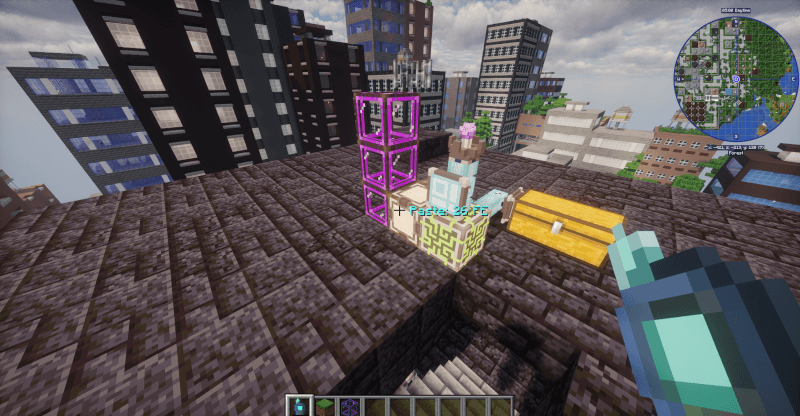
- Copying machines, cables, pipes, framed blocks, and technical setups
- Saving reusable structures
- Sharing builds with other players
- Working with modded blocks that need more than simple block copying
The mod works perfectly well on its own. Optional integrations expand what it can do when supported mods are installed.
Main Tools
Portable Spatial Storage
A handheld tool for moving structures.
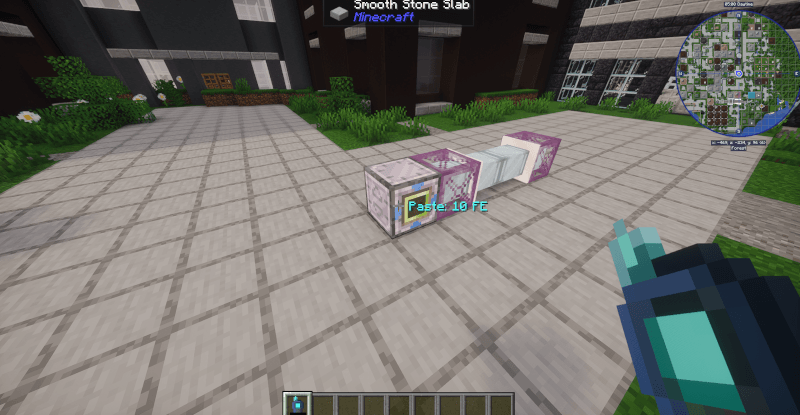
It captures a selected area, removes it from the world, stores it, and allows you to paste it somewhere else. It saves all data about the structure, all machine settings, inventories, all your resources stay safe!
- Select two corners to capture a structure
- Right-click to cut the structure out of the world
- It will store it for later placement
- You will see preview before pasting
- It will check collisions before placement so you won't lose any blocks!
- In the menu you can also rotate and flip the structure before pasting
This is ideal when you want to relocate a build.
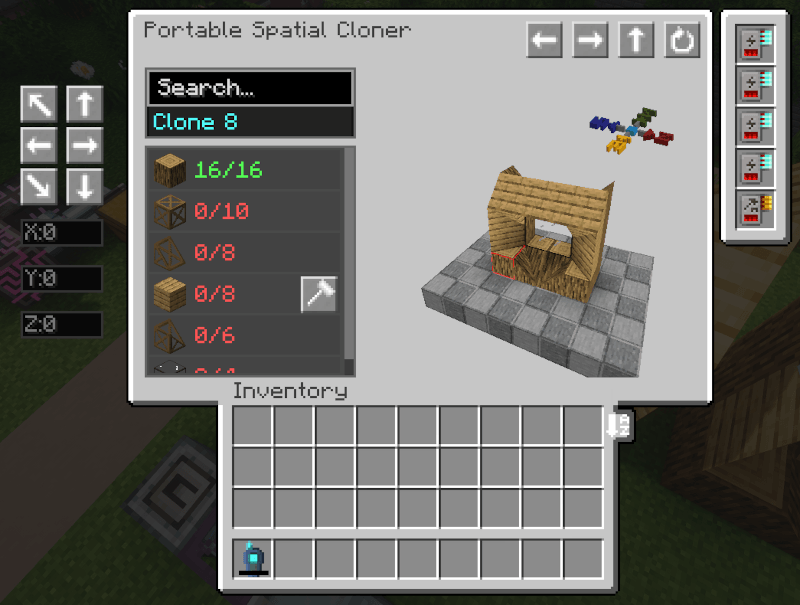
Portable Spatial Cloner
A copy-based version of the tool that leaves the original structure intact. It also saves as much data about the structure as it can, for example machine upgrades, machine settings or cable connections. On paste it will restore them so you won't need to do manual setup after!
- Copies structures without removing the original
- Supports partial placement when some blocks are missing
- Tracks required materials
- Can save many builds at once
- Can export and import structures to files you can share with others!
- Can use AE2 storage and autocrafting when available
- Can also pull materials from any other storage systems like for example: the storage controller from sophisticated storage or even a normal vanilla chest
This is useful for reusable blueprints, repeated machine setups, base modules, and sharing builds between worlds or players.
Portable Spatial Replacer
A tool for replacing large groups of blocks at once.
It flood-fills through all connected blocks of the same type and swaps them to the chosen target block in one click. It supports undo if you change your mind!
- Replaces entire connected groups of blocks in one action
- Configurable radius and connectivity mode
- Supports strict blockstate matching
- Will not touch blocks that have items stored inside
- Pulls materials from inventory or AE2 storage and refunds removed blocks
- Supports undo to restore to the previous state
This is great for swapping out large Greg cables, pipes or coils.
Preview and Transform Workflow
Both tools support a full preview workflow before placement.
You can adjust your build before committing it to the world:
- Real-time preview in the world
- 3D preview inside the GUI
- Horizontal/vertical flip
- Rotation
- Placement offsets with live preview
This makes it much easier to place large or complex structures exactly where you want them.
Multi-Structure Management
The Cloner is not limited to a single temporary clipboard.
You can:
- Store multiple structures at once
- Search and name saved structures
- Export structures to files
- Import structures from files
This turns the tool into a reusable blueprint system, not just a simple copy-paste item.
Built-In Mod Compatibility
Spatial Tools Compatible includes special handling for modded blocks and systems that often break with generic building tools.
The goal is to preserve as much of the structure’s real behavior and configuration as possible.
AE2
- Supports AE2 cable buses and cable parts
- Saves part settings and upgrades
- Has AE2 storage integration
- Has AE2 autocrafting support
GTCEu
- Saves Machine settings
- Saves Bus/Hatch settings
- Saves Pipes and covers with their connections and settings
- Connects all pipes and cables after pasting for you
Mekanism
- Machine upgrades and settings
FramedBlocks
- Proper support for framed blocks
- Copies framed blocks correctly
- Pastes framed blocks correctly
- Lists framed block requirements
Sophisticated Storage
- Can pull materials from Sophisticated Storage containers in your inventory when pasting
Curios
- Searches Curios slots for tools and materials
LaserIO
- Saves node connection settings
- Restores connections after pasting
Flux Networks
- Saves network settings like priority, surge mode, and transfer limits
- Restores network assignments after pasting
Extended AE
- Saves wireless connector and hub connection data
- Re-links connections after pasting
Project Red
- Proper support for multipart blocks
- Copies and pastes them correctly
Survival and Creative Use
The tools are designed to behave sensibly in both survival and creative play.
- In survival, placement requires materials
- In creative, restrictions are bypassed
- Special and unbreakable blocks are only copied in creative
This allows the mod to fit both normal gameplay and creative building!
Notes
- AE2 is not required to use this mod
- AE2 integration is optional
- Compatibility depends on the blocks and systems involved
- The mod is specifically designed to handle difficult modded structures that many generic building tools do not
- Energy upgrades can be changed in the config
- Default energy upgrade item: ae2:energy_card
- For those who worry about save corruption with large structures, you don't have to! All data is saved in server data not in the item's NBT.
Images
Project description from CurseForge.
Pick your setup
Spatial Tools Compatible by Minecraft version and loader
Choose the version and loader you play, then open the matching release.
Minecraft version
1.20.5
1 loader buildMinecraft version
1.20.4
1 loader buildMinecraft version
1.20.3
1 loader buildMinecraft version
1.20.2
1 loader buildMinecraft version
1.20.1
1 loader buildCheck the dependencies, then try the file in a copied instance before changing a world you care about.
Recent files
Spatial Tools Compatible versions and loaders
spatialtoolscmp-1.12.2.jar
6 Sept 2026
Client Source doesn’t say Server Source doesn’t say Dependencies No extras listed Listed on Release listing
Check the 1.20.1 · Forge setup 1.20.1Forge release
spatialtoolscmp-1.12.0.jar
2 Sept 2026
Client Source doesn’t say Server Source doesn’t say Dependencies No extras listed Listed on Release listing
Check the 1.20.1 · Forge setup 1.20.1Forge release
spatialtoolscmp-1.11.0.jar
15 Aug 2026
Client Source doesn’t say Server Source doesn’t say Dependencies No extras listed Listed on Release listing
Check the 1.20.1 · Forge setup 1.20.1Forge release
1.10.1
spatialtoolscmp-1.10.1.jar
9 Aug 2026
Client Optional Server Optional Dependencies No extras listed Listed on Release listing
Check the 1.20.1 · Forge setup 1.20.1Forge release
spatialtoolscmp-1.10.0.jar
5 Aug 2026
Client Source doesn’t say Server Source doesn’t say Dependencies No extras listed Listed on Release listing
Check the 1.20.6 · Forge setup 1.20.1Forge1.20.21.20.3 release
spatialtoolscmp-1.9.0.jar
3 Aug 2026
Client Source doesn’t say Server Source doesn’t say Dependencies 1 required · 1 unchecked Listed on Release listing
Check the 1.20.6 · Forge setup 1.20.1Forge1.20.21.20.3 release
spatialtoolscmp-1.8.0.jar
3 Aug 2026
Client Source doesn’t say Server Source doesn’t say Dependencies 1 required · 1 unchecked Listed on Release listing
Check the 1.20.6 · Forge setup 1.20.1Forge1.20.21.20.3 release
spatialtoolscmp-1.7.3.jar
29 Jul 2026
Client Source doesn’t say Server Source doesn’t say Dependencies 1 required · 1 unchecked Listed on Release listing
Check the 1.20.6 · Forge setup 1.20.1Forge1.20.21.20.3 release
spatialtoolscmp-1.7.2.jar
27 Jul 2026
Client Source doesn’t say Server Source doesn’t say Dependencies 1 required · 1 unchecked Listed on Release listing
Check the 1.20.6 · Forge setup 1.20.1Forge1.20.21.20.3 release
spatialtoolscmp-1.7.1.jar
21 Jul 2026
Client Source doesn’t say Server Source doesn’t say Dependencies 1 required · 1 unchecked Listed on Release listing
Check the 1.20.6 · Forge setup 1.20.1Forge1.20.21.20.3 release
spatialtoolscmp-1.7.0.jar
11 Jul 2026
Client Source doesn’t say Server Source doesn’t say Dependencies 1 required · 1 unchecked Listed on Release listing
Check the 1.20.6 · Forge setup 1.20.1Forge1.20.21.20.3 release
spatialtoolscmp-1.6.2.jar
13 Jun 2026
Client Source doesn’t say Server Source doesn’t say Dependencies 1 required · 1 unchecked Listed on Release listing
Check the 1.20.6 · Forge setup 1.20.1Forge1.20.21.20.3 release
Looking for an older file? The official CurseForge project page is in Resources.
 mod
mod CurseForge · Minecraft
MapMakerMusic
A very simple solution for playing custom music and sounds, designed for adventure map developers
 mod
mod CurseForge · Minecraft
Mekanism Optimizer
High-performance optimization mod for Mekanism: eliminates logistical pipe & cable lag, accelerates high-tick factory throughput, bypasses 2.14B transfer limits, and optimizes generators with zero tick overhead.
 mod
mod CurseForge · Minecraft
IC2 Radiation
Adds persistent radiation, radiation zones, player exposure, radiation sickness and a dosimeter to IndustrialCraft 2.