Minecraft version
Back to mods 
CurseForge · Minecraft mod
HoloMobInfo
A clean high-tech mob info overlay with animated holographic panels, health bars, stats, and drop previews.
Choose a version Pick your version below, then grab the matching file.
Quick answer
Which HoloMobInfo release should I use?
Latest stable file HoloMobInfo 1.21.1 NeoForge v1.5.0
Game version 1.21.1
Loader NeoForge
HoloMobInfo 1.21.1 NeoForge v1.5.0 targets 1.21.1 with NeoForge. The project page does not say whether this file belongs on the client, dedicated server, or both. No extra mods listed for this file.
Where it goes
Is HoloMobInfo required on the client, server, or both?
The project page does not say whether this file belongs on the client, dedicated server, or both.
Client Source doesn’t say
Dedicated server Source doesn’t say
Loader for this release NeoForge
Required install it here Optional supported, not mandatory Not supported do not install here Source doesn’t say do not assume
The source does not explicitly classify this release as client-only or server-only.
What else does HoloMobInfo 1.21.1 NeoForge v1.5.0 need?
HoloMobInfo 1.21.1 NeoForge v1.5.0. Change the file and its required mods may change too.
This file does not list any required mods. Do not add a library just because a different file uses it.
This file does not list any required or optional mods.
Before you install it
Add HoloMobInfo without breaking your instance.
Built for HoloMobInfo 1.21.1 NeoForge v1.5.0. Pick another file and the loader, install side or required mods may change.
- 01
Stick to this file
Use HoloMobInfo 1.21.1 NeoForge v1.5.0. It targets 1.21.1 with NeoForge; another release may have different loader, side or dependency requirements.
- 02
Bring the mods it needs
This file does not list any required mods. Do not add a library just because a different file uses it.
- 03
Put it on the correct side
The project page does not say whether this file belongs on the client, dedicated server, or both.
- 04
Pick the file you checked
Use the “Get this file” button beside HoloMobInfo 1.21.1 NeoForge v1.5.0. It opens that exact file at the source.
About this project
What does HoloMobInfo add?
HoloMobInfo
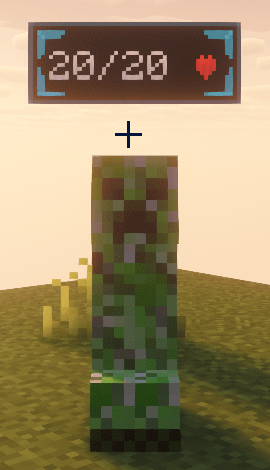
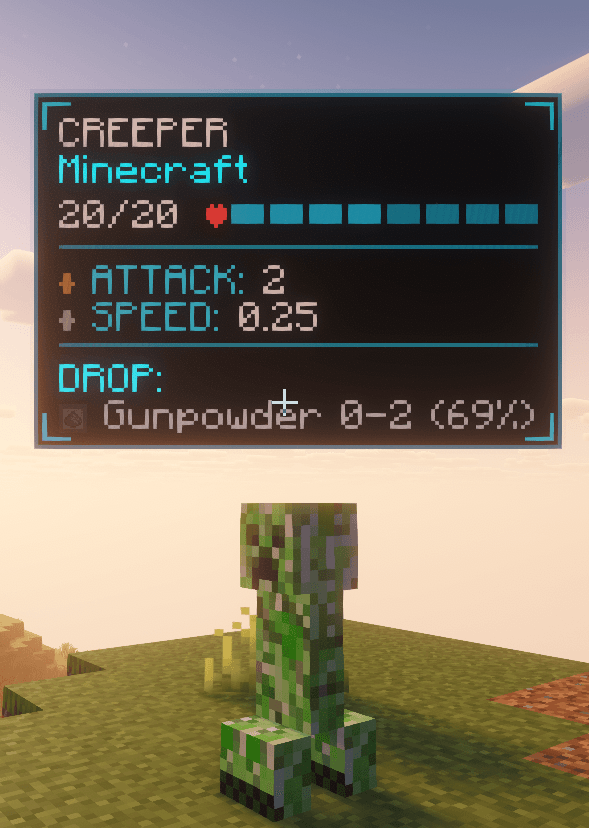
HoloMobInfo adds clean holographic information panels above mobs, turning simple health bars into a compact high-tech overlay.
Instead of opening menus or guessing mob stats, you can see the most important information directly in the world: health, name, mod source, combat stats, movement speed, and optional drop information.
Features
- Holographic mob health panels
- Compact and expanded panel states
- Smooth animated transitions
- Optional attack damage, armor, and movement speed stats
- Optional server-backed mob drop scanning
- Lightweight and readable high-tech visual style
Drop Information
When supported by the server, HoloMobInfo can scan a mob's loot table and display possible drops directly in the expanded panel.
On multiplayer servers, install the mod on both the client and the server to enable full drop syncing.
Configuration
The mod includes options for:
- Max display distance
- Attack damage visibility
- Armor visibility
- Movement speed visibility
- Drop visibility
- Mod source visibility
- Panel scale
- Animation speed
- Collapse delay
- Color theme
Available themes:
- Cyan
- Green
- Red
- Minimal
Compatibility
HoloMobInfo is designed as a lightweight information overlay. It does not change mob behavior, combat mechanics, loot tables, world generation, or progression.
It is suitable for vanilla-style playthroughs, RPG modpacks, tech modpacks, adventure packs, and client-side quality-of-life setups.
Notes
Fabric versions require Fabric API.
For the best multiplayer experience, install HoloMobInfo on both the client and the server. Client-only usage is still useful for basic mob information, but server-backed drop scanning requires server support.
Project description from CurseForge.
Pick your setup
HoloMobInfo by Minecraft version and loader
Choose the version and loader you play, then open the matching release.
Minecraft version
1.20.1
3 loader buildsMinecraft version
1.19.2
2 loader buildsCheck the dependencies, then try the file in a copied instance before changing a world you care about.
Recent files
HoloMobInfo versions and loaders
HoloMobInfo 1.21.1 NeoForge v1.5.0
holomobinfo-1.21.1-neoforge-1.5.0.jar
31 May 2026
Client Source doesn’t say Server Source doesn’t say Dependencies No extras listed Listed on Release listing
Check the 1.21.1 · NeoForge setup 1.21.1NeoForge release
HoloMobInfo 1.21.1 Fabric v1.5.0
holomobinfo-1.21.1-fabric-1.5.0.jar
31 May 2026
Client Source doesn’t say Server Source doesn’t say Dependencies 1 required · 1 unchecked Listed on Release listing
Check the 1.21.1 · Fabric setup Fabric1.21.1 release
HoloMobInfo 1.20.1 NeoForge v1.5.0
holomobinfo-1.20.1-neoforge-1.5.0.jar
31 May 2026
Client Source doesn’t say Server Source doesn’t say Dependencies No extras listed Listed on Release listing
Check the 1.20.1 · NeoForge setup 1.20.1NeoForge release
HoloMobInfo 1.20.1 Forge v1.5.0
holomobinfo-1.20.1-forge-1.5.0.jar
31 May 2026
Client Source doesn’t say Server Source doesn’t say Dependencies No extras listed Listed on Release listing
Check the 1.20.1 · Forge setup 1.20.1Forge release
HoloMobInfo 1.20.1 Fabric v1.5.0
holomobinfo-1.20.1-fabric-1.5.0.jar
31 May 2026
Client Source doesn’t say Server Source doesn’t say Dependencies 1 required · 1 unchecked Listed on Release listing
Check the 1.20.1 · Fabric setup Fabric1.20.1 release
HoloMobInfo 1.19.2 Forge v1.5.0
holomobinfo-1.19.2-forge-1.5.0.jar
31 May 2026
Client Source doesn’t say Server Source doesn’t say Dependencies No extras listed Listed on Release listing
Check the 1.19.2 · Forge setup Forge1.19.2 release
HoloMobInfo 1.19.2 Fabric v1.5.0
holomobinfo-1.19.2-fabric-1.5.0.jar
31 May 2026
Client Source doesn’t say Server Source doesn’t say Dependencies 1 required · 1 unchecked Listed on Release listing
Check the 1.19.2 · Fabric setup Fabric1.19.2 release
HoloMobInfo 1.21.1 NeoForge v1.4.0
holomobinfo-1.21.1-neoforge-1.4.0.jar
28 May 2026
Client Source doesn’t say Server Source doesn’t say Dependencies No extras listed Listed on Release listing
Check the 1.21.1 · NeoForge setup 1.21.1NeoForge release
HoloMobInfo 1.21.1 Fabric v1.4.0
holomobinfo-1.21.1-fabric-1.4.0.jar
28 May 2026
Client Source doesn’t say Server Source doesn’t say Dependencies 1 required · 1 unchecked Listed on Release listing
Check the 1.21.1 · Fabric setup Fabric1.21.1 release
HoloMobInfo 1.20.1 NeoForge v1.4.0
holomobinfo-1.20.1-neoforge-1.4.0.jar
28 May 2026
Client Source doesn’t say Server Source doesn’t say Dependencies No extras listed Listed on Release listing
Check the 1.20.1 · NeoForge setup 1.20.1NeoForge release
HoloMobInfo 1.20.1 Forge v1.4.0
holomobinfo-1.20.1-forge-1.4.0.jar
28 May 2026
Client Source doesn’t say Server Source doesn’t say Dependencies No extras listed Listed on Release listing
Check the 1.20.1 · Forge setup 1.20.1Forge release
HoloMobInfo 1.20.1 Fabric v1.4.0
holomobinfo-1.20.1-fabric-1.4.0.jar
28 May 2026
Client Source doesn’t say Server Source doesn’t say Dependencies 1 required · 1 unchecked Listed on Release listing
Check the 1.20.1 · Fabric setup Fabric1.20.1 release
Looking for an older file? The official CurseForge project page is in Resources.
 mod
CurseForge · Minecraft
Pentakel's Peaceful Days
Want to get some work done in a zombie apocalypse? Then Pentakel's Peaceful Days is perfect for you!
 mod
CurseForge · Minecraft
XP: Attribute Core
It adds a wide variety of RPG-style attributes
 mod
CurseForge · Minecraft
CS2 - Weapons
A mod designed to add all the weapons from Counter-Strike 2