Minecraft version
Back to mods 
CurseForge · Minecraft mod
Inventory Trash
A small QoL mod that adds a trash button to the singleplayer inventory, allowing you to destroy items.
Choose a version Pick your version below, then grab the matching file.
Quick answer
Which Inventory Trash release matches 26.2?
Best match for your filters Inventory Trash 1.2.3 (NeoForge 26.2)
Game version 26.2
Loader NeoForge
Inventory Trash 1.2.3 (NeoForge 26.2) targets 26.2 with NeoForge. The project page does not say whether this file belongs on the client, dedicated server, or both. No extra mods listed for this file.
Where it goes
Is Inventory Trash required on the client, server, or both?
The project page does not say whether this file belongs on the client, dedicated server, or both.
Client Source doesn’t say
Dedicated server Source doesn’t say
Loader for this release NeoForge
Required install it here Optional supported, not mandatory Not supported do not install here Source doesn’t say do not assume
The source does not explicitly classify this release as client-only or server-only.
What else does Inventory Trash 1.2.3 (NeoForge 26.2) need?
Inventory Trash 1.2.3 (NeoForge 26.2) on 26.2. Every mod below is checked against that same setup.
This file does not list any required mods. Do not add a library just because a different file uses it.
This file does not list any required or optional mods.
Before you install it
Add Inventory Trash without breaking your instance.
Built for Inventory Trash 1.2.3 (NeoForge 26.2) on 26.2. Pick another file and the loader, install side or required mods may change.
- 01
Stick to this file
Use Inventory Trash 1.2.3 (NeoForge 26.2). It targets 26.2 with NeoForge; another release may have different loader, side or dependency requirements.
- 02
Bring the mods it needs
This file does not list any required mods. Do not add a library just because a different file uses it.
- 03
Put it on the correct side
The project page does not say whether this file belongs on the client, dedicated server, or both.
- 04
Pick the file you checked
Use the “Get this file” button beside Inventory Trash 1.2.3 (NeoForge 26.2). It opens that exact file at the source.
About this project
What does Inventory Trash add?
Inventory Trash
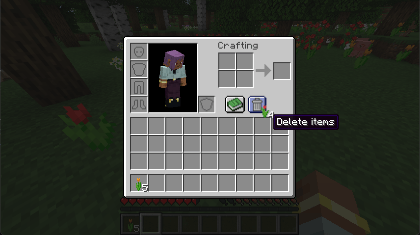
Inventory Trash is a small QoL mod that adds a trash can button to the survival inventory and the crafting table – with an undo for the last three deletions, so a misclick is never final.
Features
- Trash button in the survival inventory (next to the recipe book) and in the crafting table (next to the output slot)
- Left-click with an item on your cursor deletes the whole stack
- Right-click deletes a single item from the held stack
- Undo: hover the trash button with an empty cursor to open a small popup showing your last 3 deletions – click one to get it back
- Delete key deletes the stack under your mouse cursor
- Shift + Delete deletes every item of that kind in the same inventory or container

Good to know
- Works in survival mode only
- Crafting output slots are never touched by Delete / Shift + Delete
- Several right-click deletions of the same item are combined into one undo entry
- The undo history is kept per player until you leave the world or server
Versions
Available for Fabric, Forge and NeoForge on Minecraft 1.19.2, 1.20.1, 1.21.1, 26.1.2, 26.2 and 26.3 (NeoForge from 1.20.1).
Deleting and restoring is handled server-side, so on multiplayer servers the mod must be installed on both the client and the server. If the server does not have the mod, the trash button stays hidden and the Delete keys do nothing.
Project description from CurseForge.
Pick your setup
Inventory Trash by Minecraft version and loader
Choose the version and loader you play, then open the matching release.
Minecraft version
26.2
3 loader buildsMinecraft version
26.1.2
3 loader buildsMinecraft version
1.21.1
3 loader buildsMinecraft version
1.20.1
3 loader buildsMinecraft version
1.19.2
2 loader buildsCheck the dependencies, then try the file in a copied instance before changing a world you care about.
Recent files
Inventory Trash versions and loaders
Inventory Trash 1.2.3 (NeoForge 26.2)
inventorytrash-1.2.3_neoforge_26.2.jar
18 Nov 2026
Client Source doesn’t say Server Source doesn’t say Dependencies No extras listed Listed on Release listing
Check the 26.2 · NeoForge setup NeoForge26.2 release
Inventory Trash 1.2.3 (Forge 26.2)
inventorytrash-1.2.3_forge_26.2.jar
18 Nov 2026
Client Source doesn’t say Server Source doesn’t say Dependencies No extras listed Listed on Release listing
Check the 26.2 · Forge setup Forge26.2 release
Inventory Trash 1.2.3 (Fabric 26.2)
inventorytrash-1.2.3_fabric_26.2.jar
18 Nov 2026
Client Source doesn’t say Server Source doesn’t say Dependencies No extras listed Listed on Release listing
Check the 26.2 · Fabric setup Fabric26.2 release
Looking for an older file? The official CurseForge project page is in Resources.
 mod
CurseForge · Minecraft
Invincible Adaptation
Each death teaches immunity to that single cause, from lava and hunger to mobs, weapons, and potions.
 mod
CurseForge · Minecraft
Oculus Community Port
Unofficial client-side Forge Oculus port for 1.21.11 and 26.2 with secure shader loading and beta full-screen shader-pack compatibility.
 mod
CurseForge · Minecraft
Modpack Core Essentials [ MCE ]
Change game window title and icon. Add a welcome message to the screen when you first start the game. Very light. Easy to customize. Zero bloat. NeoForge & Fabric.