Minecraft version
Back to mods 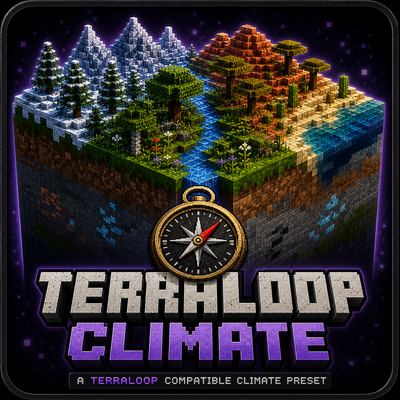
CurseForge · Minecraft mod
Terraloop Climate
Adds a selectable Overworld preset that improves vanilla biome distribution for finite TerraLoop Border worlds while keeping vanilla terrain generation.
Choose a version Pick your version below, then grab the matching file.
Quick answer
Which Terraloop Climate release should I use?
beta file terraloop_climate-0.4.1.jar
Game version 1.21.1
Loader NeoForge
Terraloop Climate terraloop_climate-0.4.1.jar targets 1.21.1 with NeoForge. The project page does not say whether this file belongs on the client, dedicated server, or both. No extra mods listed for this file.
Where it goes
Is Terraloop Climate required on the client, server, or both?
The project page does not say whether this file belongs on the client, dedicated server, or both.
Client Source doesn’t say
Dedicated server Source doesn’t say
Loader for this release NeoForge
Required install it here Optional supported, not mandatory Not supported do not install here Source doesn’t say do not assume
The source does not explicitly classify this release as client-only or server-only.
What else does Terraloop Climate terraloop_climate-0.4.1.jar need?
terraloop_climate-0.4.1.jar. Change the file and its required mods may change too.
This file does not list any required mods. Do not add a library just because a different file uses it.
This file does not list any required or optional mods.
Before you install it
Add Terraloop Climate without breaking your instance.
Built for Terraloop Climate terraloop_climate-0.4.1.jar. Pick another file and the loader, install side or required mods may change.
- 01
Stick to this file
Use terraloop_climate-0.4.1.jar. It targets 1.21.1 with NeoForge; another release may have different loader, side or dependency requirements.
- 02
Bring the mods it needs
This file does not list any required mods. Do not add a library just because a different file uses it.
- 03
Put it on the correct side
The project page does not say whether this file belongs on the client, dedicated server, or both.
- 04
Pick the file you checked
Use the “Get this file” button beside terraloop_climate-0.4.1.jar. It opens that exact file at the source.
About this project
What does Terraloop Climate add?

Terraloop Climate
**Terraloop Climate** is a NeoForge 1.21.1 world-generation mod that adds a selectable Overworld preset called **Terraloop Climate Overworld**.
The preset is designed for finite Overworld gameplay, especially when used with **TerraLoop Border**. Its goal is to make major vanilla biome families easier to find inside a limited playable map without replacing vanilla terrain generation.
What It Does
Terraloop Climate uses a custom server-side **BiomeSource** to control biome placement for its own Overworld preset.
It helps distribute major vanilla surface biome families across the world, including:
- Frozen biomes
- Cold forests
- Temperate forests
- Plains
- Swamps
- Jungles
- Deserts
- Badlands
- Savannas
- Oceans
- Deep oceans
- Beaches
- Rivers
- Mountains
- Peaks
When **TerraLoop Border** is installed, Terraloop Climate reads the finite map size and scales biome bands and biome variant patches to better fit the playable area.
This helps frozen, cold, temperate, hot, oceanic, mountain, and peak biome regions remain discoverable inside TerraLoop-sized worlds.
Features
- Adds the selectable **Terraloop Climate Overworld** world preset.
- Uses a custom server-side BiomeSource.
- Designed for TerraLoop Border finite worlds.
- Scales biome bands and biome variant patches when TerraLoop Border is present.
- Reduces biome repetition on small finite maps.
- Helps major vanilla biome families appear within the playable area.
- Keeps vanilla Overworld terrain density and noise settings.
- Does not replace the default vanilla Overworld preset.
- Includes audit/debug commands:
/completeclimate audit/completeclimate locateMissing/completeclimate dumpCatalog
Compatibility
- **Minecraft:** 1.21.1
- **Loader:** NeoForge
- **Mod ID:**
completeclimate
Terraloop Climate is designed to work with **TerraLoop Border**, but the preset is separate from the default vanilla Overworld preset.
TerraLoop Border is recommended for the intended finite-world experience. Unless otherwise stated, it should be treated as special compatibility rather than a hard dependency.
Compatibility with other world-generation mods may vary if those mods also replace Overworld presets, dimension settings, or biome generation.
How To Use
- Install NeoForge for Minecraft 1.21.1.
- Place the Terraloop Climate
.jarfile in yourmodsfolder. - Optional but recommended: install TerraLoop Border.
- Launch Minecraft.
- Create a new world.
- In the world preset or world type selection, choose:
**Terraloop Climate Overworld**
- Create the world.
For best results, use this preset when creating a new world.
Important Limitations
- Terraloop Climate controls biome placement, not terrain shape.
- It keeps vanilla Overworld terrain density and noise settings.
- It does not add new biomes.
- It does not add new blocks, mobs, structures, or dimensions.
- Existing chunks keep their old biome data.
- To see the new biome layout, create a new world or regenerate old chunks.
- The default vanilla Overworld preset is not replaced.
- Players must manually select **Terraloop Climate Overworld** during world creation.
Debug / Audit Commands
The mod includes commands for checking biome coverage during testing:
/completeclimate audit/completeclimate locateMissing/completeclimate dumpCatalog
These are mainly useful for testing, debugging, and verifying biome distribution.
Project description from CurseForge.
Pick your setup
Terraloop Climate by Minecraft version and loader
Choose the version and loader you play, then open the matching release.
Check the dependencies, then try the file in a copied instance before changing a world you care about.
Recent files
Terraloop Climate versions and loaders
terraloop_climate-0.4.1.jar
7 May 2026
Client Source doesn’t say Server Source doesn’t say Dependencies No extras listed Listed on Release listing
Check the 1.21.1 · NeoForge setup 1.21.1NeoForge beta
Looking for an older file? The official CurseForge project page is in Resources.
 mod
CurseForge · Minecraft
Unified Mana - Shared Mana for Spell Mods
One unified mana pool for every supported magic mod, displayed on a single HUD bar!
 mod
CurseForge · Minecraft
Dino's Industrial Decor
This mod adds a large collection of construction, industrial, and traffic related blocks.
 mod
CurseForge · Minecraft
Fancy Waystones Menu
Enhances the Waystones UI with Search, Sort, Favorites & QOL Features.