Mod Menu Needed by Utilities Plus utilitiesplus-1.1.0.0+fabric-mc26.3.jar
requiredMatching file found Matched file: v21.0.1-beta.1 for 26.3-rc-1
CurseForge · Minecraft mod
A bunch of useful vanilla+ kind of blocks and items.
Quick answer
Utilities Plus utilitiesplus-1.1.0.0+fabric-mc26.3.jar targets 26.3 with Fabric. The project page does not say whether this file belongs on the client, dedicated server, or both. 1 required mod needs a matching file.
Where it goes
The project page does not say whether this file belongs on the client, dedicated server, or both.
The source does not explicitly classify this release as client-only or server-only.
utilitiesplus-1.1.0.0+fabric-mc26.3.jar. Change the file and its required mods may change too.
Install Mod Menu, Cloth Config API (Fabric/Forge/NeoForge), Fabric API, Mod Menu and 3 more first, but 1 required mod has no matching file for this setup. Do not mix loader builds to force a match. 2 come through another mod in the chain.
2 extra mods were pulled in by other dependencies. Indented rows show who needs each one. We only count dependency files that match this setup. A file for another loader does not fill the gap.
Before you install it
Built for Utilities Plus utilitiesplus-1.1.0.0+fabric-mc26.3.jar. Pick another file and the loader, install side or required mods may change.
Use utilitiesplus-1.1.0.0+fabric-mc26.3.jar. It targets 26.3 with Fabric; another release may have different loader, side or dependency requirements.
Install Mod Menu, Cloth Config API (Fabric/Forge/NeoForge), Fabric API, Mod Menu and 3 more first, but 1 required mod has no matching file for this setup. Do not mix loader builds to force a match. 2 come through another mod in the chain.
The project page does not say whether this file belongs on the client, dedicated server, or both.
Use the “Get this file” button beside utilitiesplus-1.1.0.0+fabric-mc26.3.jar. It opens that exact file at the source.
About this project
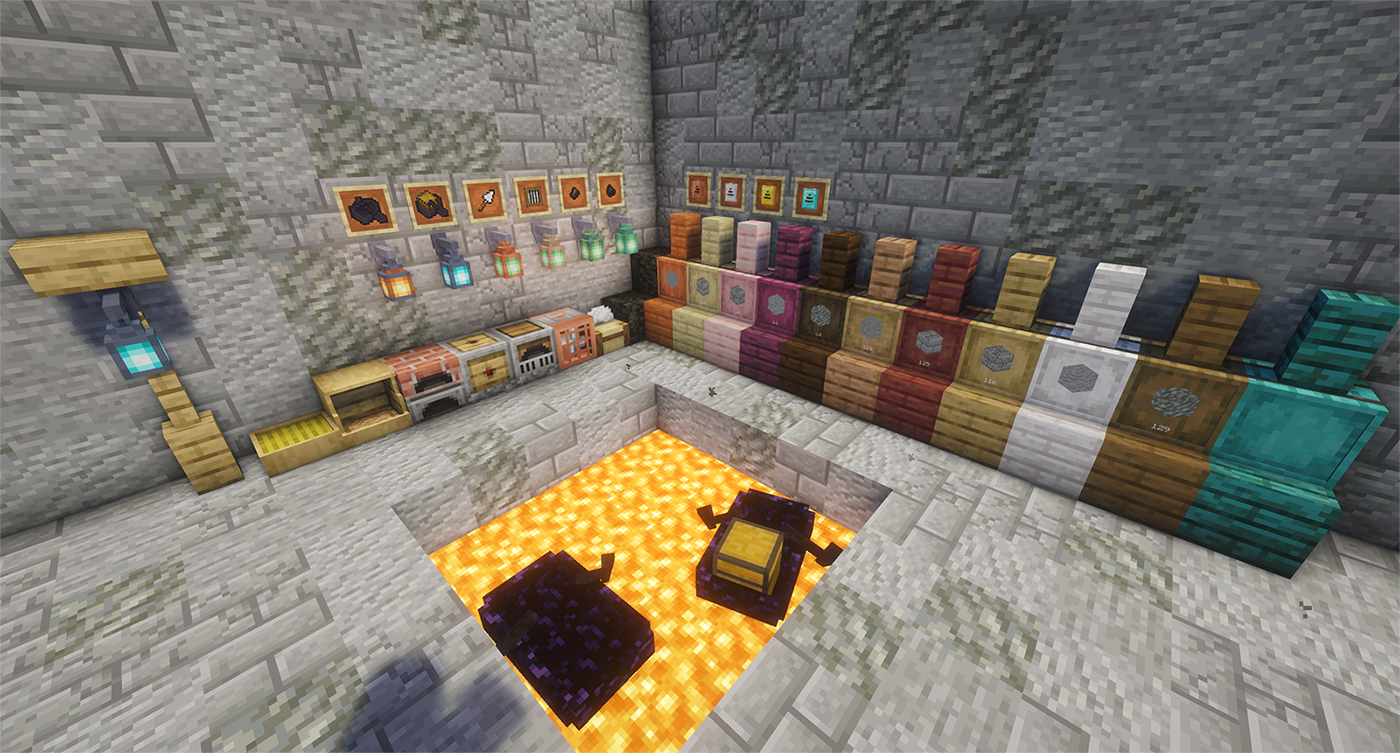
A bunch of useful vanilla+ kind of blocks and items.
The Kiln fixes the arbitrary smelting speed gap by processing the materials vanilla forgot at the same 2x speed as the Blast Furnace and Smoker:
A storage block that holds up to 4,096 (configurable) of a single item type. Upgradeable, hopper-compatible, and available in all 12 wood types.
Breaking a barrel preserves its contents and any installed upgrade.
One upgrade at a time. Upgrades can't be removed if the barrel is holding more items than the lower tier supports Upgrading is always unrestricted.
| Upgrade | Capacity |
|---|---|
| (Base) | Configurable, default 4,096 |
| Copper | Base × 2 |
| Iron | Copper × 2 |
| Gold | Iron × 2 |
| Diamond | Gold × 2 |
It needs fuel to run, and it needs a hoe slotted inside to do any harvesting. That hoe still loses durability, too. Auto-replants after every harvest.
(Configurable — see Config section)
Animals are hungry. You have food. The Feeding Trough bridges that gap automatically — place it, fill it with anything an animal might reasonably want to eat, and it'll feed any animal in a 9×3×9 area around it that finds the contents appetising. That covers the usual suspects — crops, seeds, hay, flowers, and a few more exotic options for the less picky animals. If the local animal population exceeds the configured limit, the trough stops working until you do something about the overcrowding. Also, no hopper support. Refill it manually.
(Configurable — see Config section)
Chickens are going to lay eggs whether you like it or not. The Nest Box at least makes sure those eggs end up somewhere useful. Place one down and the Nest Box collects eggs in a 3×3 area in front of it and stores them in its 9-slot inventory. Hoppers can pull eggs out from the bottom of the nest block.
(Configurable — see Config section)
A whole log's worth of planks, stairs, slabs, fences, doors, and whatever else you need — without the crafting grid busywork. Strips logs too. It's a saw. It cuts wood. You get it.
Slabs, but vertical. Available in all wood types.
A decorative structural beam. Doesn't connect to anything. Doesn't do anything clever. Just looks good holding your ceiling up. Available in all wood types.
A hopper with a single filter slot. Only items matching the filter pass through. Everything else gets ignored. That's the whole thing.
Moves 8 items per tick instead of the vanilla 1. Can also be filtered.
A redstone clock in a single block. Right-click to increase the pulse interval by 10 ticks, shift-right-click to decrease it. No more spaghetti repeater loops taking up half your base.
Reset it to factory settings (10 ticks) by right-clicking a redstone torch on the clock block.
Can now be toggled on/off with a redstone signal. Powering the block stops the clock and cuts its output; removing the signal resumes it.
(Configurable — see Config section)
A redstone-powered fan that pushes items, mobs, and players in the direction it's facing. Shift-right-click to reverse the flow and pull things toward it instead. Redstone signal strength controls the range. Useful for sorting systems, mob farms, or just annoying your friends.
9 charcoal in a crafting grid, one block out. Same burn properties as a coal block.
Long minecart rail systems snaking across your entire world just to move one villager into your trading hall? We've all been there. We've all hated it. Right-click a villager with the Villager Catcher to imprison the little guy until you're ready to release them.
⚠ Fair warning: Your precious Mending villager will not survive the trip with their trades intact. Upon release, every imprisoned villager resets to an unemployed novice. You have been warned.
(Configurable — see Config section)
(See Storage Barrels above)
When you need to smelt one thing and don't want to burn through an entire piece of coal.
A boat. For lava. Crafted from obsidian. Navigate lava lakes like a reasonable person instead of bridge-pillaring across them.
Don't try it on water. It sinks. Immediately. It's obsidian.
Building with varied textures means constantly swapping between block types in your hotbar. The Trowel does the swapping for you — right-click to place a random block from your hotbar. Stacks with more items are more likely to be picked, so your materials deplete evenly. Good for breaking up repetitive surfaces without the busywork.
Right-clicking a name tag opens a text field where you can type a name directly. No need for an anvil and it doesn't cost experience.
Lanterns can now be hung on the side of any solid block, fence, beam, or wall. Right-click with a lantern in hand and it'll mount itself with a bracket. Works with any lantern. That's the whole thing.
You can jump over fences, fence gates and walls. Not much to it.
| Option | Min | Max | Default |
|---|---|---|---|
| Storage Barrel base capacity | 512 | 16,384 | 4,096 |
| Redstone clock pulse interval (in ticks) | 2 | 300 | 10 |
| Redstone clock plays click sound on pulse | — | — | true |
| Feeding trough animal limit | 8 | 128 | 32 |
| Feeding trough feeding radius | 3×3 | 15×15 | 9×9 |
| Feeding trough feeding interval | 20 | 1200 | 200 |
| Nest Box collection radius | 3×3 | 9×9 | 3×3 |
| Harvester harvest check interval (in ticks) | 20 | 1200 | 200 |
| Harvester work area | 3×3 | 15×15 | 9×9 |
| Hoe loses durability in Harvester | — | — | true |
| Villager resets to unemployed on release | — | — | true |
Project description from CurseForge.
Pick your setup
Choose the version and loader you play, then open the matching release.
Check the dependencies, then try the file in a copied instance before changing a world you care about.
Recent files
23 Sept 2026
18 Jun 2026
13 Jun 2026
8 Jun 2026
23 May 2026
utilitiesplus-1.0.2+fabric-mc26.1.2.jar
19 May 2026
9 May 2026
8 May 2026
Looking for an older file? The official CurseForge project page is in Resources.
 mod
modA bunch of useful vanilla+ kind of blocks and items.
 mod
modFences connecting diagonally? Wait. That's illegal.
 mod
modNow windows are connecting diagonally, too?! This is getting out of hand!