Minecraft version
Back to mods 
CurseForge · Minecraft mod
Natural Motion BlurZ
A motion blur mod that tries to mimic human vision motion blur by blending frames together, reducing stroteoscopic effects and making motion appear more fluent and amazing.
Choose a version Pick your version below, then grab the matching file.
Quick answer
Which Natural Motion BlurZ release should I use?
Latest stable file NaturalMotionBlurZ-1.1.0+MC1.21.1.jar
Game version 1.21.1
Loader Fabric
Natural Motion BlurZ NaturalMotionBlurZ-1.1.0+MC1.21.1.jar targets 1.21.1 with Fabric. The project page does not say whether this file belongs on the client, dedicated server, or both. No extra mods listed for this file.
Where it goes
Is Natural Motion BlurZ required on the client, server, or both?
The project page does not say whether this file belongs on the client, dedicated server, or both.
Client Source doesn’t say
Dedicated server Source doesn’t say
Loader for this release Fabric
Required install it here Optional supported, not mandatory Not supported do not install here Source doesn’t say do not assume
The source does not explicitly classify this release as client-only or server-only.
What else does Natural Motion BlurZ NaturalMotionBlurZ-1.1.0+MC1.21.1.jar need?
NaturalMotionBlurZ-1.1.0+MC1.21.1.jar. Change the file and its required mods may change too.
This file does not list any required mods. Do not add a library just because a different file uses it.
This file does not list any required or optional mods.
Before you install it
Add Natural Motion BlurZ without breaking your instance.
Built for Natural Motion BlurZ NaturalMotionBlurZ-1.1.0+MC1.21.1.jar. Pick another file and the loader, install side or required mods may change.
- 01
Stick to this file
Use NaturalMotionBlurZ-1.1.0+MC1.21.1.jar. It targets 1.21.1 with Fabric; another release may have different loader, side or dependency requirements.
- 02
Bring the mods it needs
This file does not list any required mods. Do not add a library just because a different file uses it.
- 03
Put it on the correct side
The project page does not say whether this file belongs on the client, dedicated server, or both.
- 04
Pick the file you checked
Use the “Get this file” button beside NaturalMotionBlurZ-1.1.0+MC1.21.1.jar. It opens that exact file at the source.
About this project
What does Natural Motion BlurZ add?
Natural Motion BlurZ
This mod aims to mimic the way human vision motion blur works by blending frames together, reducing stroboscopic effects and making motion appear more fluent.
It is recommended to use the default strength value (1).
The config GUI can be accessed via these commands: /motionblur /mb

Feautre List
- Blur Toggle - Including adjustable Keybind (B)
- Refresh Rate Scaling - Adjusts blur strength based on FPS and refresh rate
- Blur Strength Adjustment
- Multiple Blur Methods
- Velocity Based (Default)
- Frame Blending
- Hybrid Blending
- Accumulation Max
- Accumulation Mix
- OBS Recording Output
OBS Recording Output
Since version 1.4.0 of the mod you now have the ability to directly output a frame blended game in OBS via a spout sender. This is a good option for people who can't or don't want to record in 240 FPS or more to create smooth gameplay videos. You can now simply use this option and record at a normal FPS rate.
To set this up follow these instructions:
- Download the Spout2 Plugin Installer from https://github.com/Off-World-Live/obs-spout2-plugin
- Run the installer, then enable the plugin via OBS > Tools > Plugin Manager
- In OBS, add a new Source and select "Spout2 Capture"
- Enable the in-game option
Instructions can also be viewed in the in-game GUI.
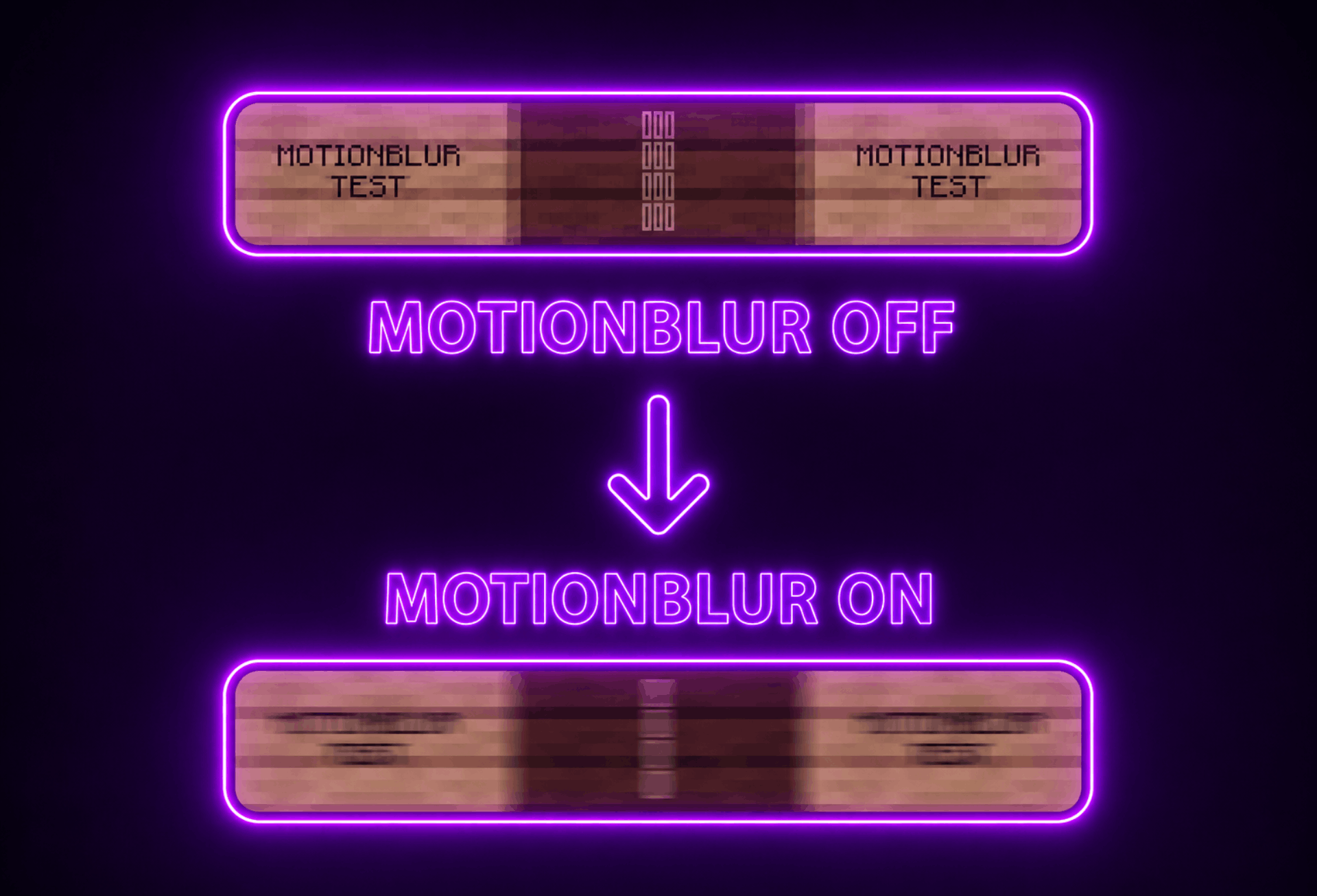
This Mod Is Made By Vonkar Sen
Project description from CurseForge.
Pick your setup
Natural Motion BlurZ by Minecraft version and loader
Choose the version and loader you play, then open the matching release.
Check the dependencies, then try the file in a copied instance before changing a world you care about.
Recent files
Natural Motion BlurZ versions and loaders
NaturalMotionBlurZ-1.1.0+MC1.21.1.jar
13 May 2026
Client Source doesn’t say Server Source doesn’t say Dependencies No extras listed Listed on Release listing
Check the 1.21.1 · Fabric setup Fabric1.21.1 release
Looking for an older file? The official CurseForge project page is in Resources.
 mod
CurseForge · Minecraft
Overdrived
Overdrived is an advanced technology mod for Minecraft 1.21.1 and NeoForge. Build powerful industrial systems, process exotic fluids, and master antimatter-based energy production.
 mod
CurseForge + Modrinth · Minecraft
Structure Voidable
Helps the Minecraft content developer by making the Structure Void block easier to use and visible like barriers.
 mod
CurseForge + Modrinth · Minecraft
SleepCycle
Enhances the sleeping mechanics by allowing time to pass progressively while players are asleep, rather than skipping the night instantly.