Xaero's World Map Needed by Xaero Map Regions xaeroregions-forge-1.20.1-1.0.8.jar
requiredMatching file found Matched file: xaeroworldmap-forge-1.20.1-1.47.0.jar
CurseForge · Minecraft mod
If you've been missing the ability to create regions - complete with names, boundaries, and icons - in your builds or servers, this mod is just what you need
Quick answer
Xaero Map Regions xaeroregions-forge-1.20.1-1.0.8.jar targets 1.20.1 with Forge. The project page does not say whether this file belongs on the client, dedicated server, or both. All 2 required mods have matching files.
Where it goes
The project page does not say whether this file belongs on the client, dedicated server, or both.
The source does not explicitly classify this release as client-only or server-only.
xaeroregions-forge-1.20.1-1.0.8.jar. Change the file and its required mods may change too.
Install Xaero's World Map, Kotlin for Forge first. We found matching files for this game-version and loader setup. 2 come through another mod in the chain.
2 extra mods were pulled in by other dependencies. Indented rows show who needs each one. We only count dependency files that match this setup. A file for another loader does not fill the gap.
Before you install it
Built for Xaero Map Regions xaeroregions-forge-1.20.1-1.0.8.jar. Pick another file and the loader, install side or required mods may change.
Use xaeroregions-forge-1.20.1-1.0.8.jar. It targets 1.20.1 with Forge; another release may have different loader, side or dependency requirements.
Install Xaero's World Map, Kotlin for Forge first. We found matching files for this game-version and loader setup. 2 come through another mod in the chain.
The project page does not say whether this file belongs on the client, dedicated server, or both.
Use the “Get this file” button beside xaeroregions-forge-1.20.1-1.0.8.jar. It opens that exact file at the source.
About this project
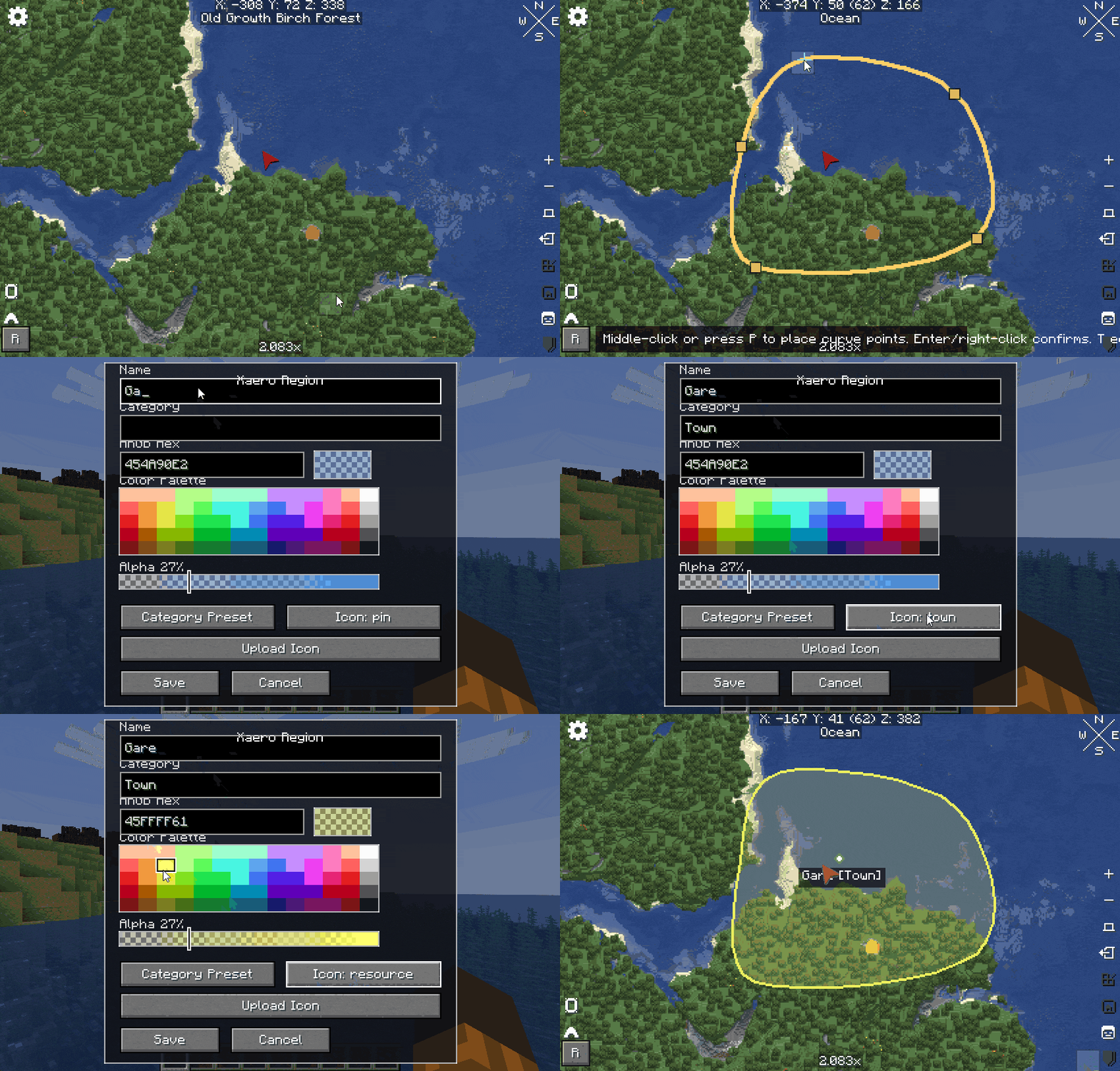
Install Xaero Regions and Kotlin for Forge on the dedicated server and on every client that should
see or manage regions. Xaero's World Map is required on clients. Players without the client mod do
not see the map overlay.
Open Xaero's World Map and use the region controls:
Display preferences are stored locally in
config/xaeroregions-client.properties. Available
options include region names, icons, overlap decluttering, minimum on-screen marker size, and the
maximum render distance. The default render distance is 8192 blocks; use0for unlimited.
Server permissions are configured in config/xaeroregions-server.properties:
operatorPermissionLevel=2allowNonOperatorRegionCreation=false
With the default value (false), only operators can create, edit, delete regions, or upload custom
icons. Operators may do this in Survival or Creative mode.
When allowNonOperatorRegionCreation=true, every player may create regions and upload new icons.
Non-operators may edit or delete only regions they created; operators may manage every region. The
server assigns and preserves the owner UUID, so ownership cannot be forged by a modified client.
Administrative /region commands remain operator-only regardless of this setting. Creative mode
is not required.
/region hide <player> <region>
/region visible <player> <region>
/region createpoint <player> <mode> <iconname> <label> <x> <y> <z>
/region delpoint./region delpoint <player> <x> <y> <z>
SavedData and synchronizes them to connected clients.Use these dependencies when publishing and when building a server pack.
NeoForge | 21.1.220 or newer.
Kotlin for Forge | Tested ver: 5.12.0 - required on server and client.
Xaero's World Map | 1.44.2 or newer - required on clients.
XaeroLib | Tested ver: 1.1.15
Traveler's Titles | Optional -> Tested by reflection only | If absent, Xaero Regions uses its built-in title overlay.
Do not redistribute xaeroworldmap-neoforge-1.21.1-1.44.2.jar inside the Xaero Regions jar or the
repository release artifact. Xaero's World Map is an external dependency with its own license.
Project description from CurseForge.
Pick your setup
Choose the version and loader you play, then open the matching release.
Check the dependencies, then try the file in a copied instance before changing a world you care about.
Recent files
20 Jul 2026
20 Jul 2026
20 Jul 2026
19 Jul 2026
17 May 2026
17 May 2026
16 May 2026
Looking for an older file? The official CurseForge project page is in Resources.
 mod
Terrain-blended procedural natural landmarks built from vanilla blocks — volcanoes, fjords, glaciers, waterfalls, canyons, caves, craters, islands, and ancient trees.
 mod
A mod that adds biome specific Pots randomly in your world with useful loot.
 mod
Your villagers fall in love, marry, raise children and work real jobs — humans and demons with lives of their own, even when you're away.