Minecraft version
Back to mods 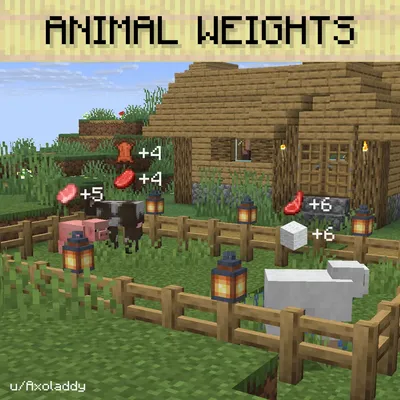
CurseForge · Minecraft mod
Animal Weights
Animals gain weight from good farm conditions, better light, water, grazing space, and breathing room mean bigger drops when they're killed.
Choose a version Pick your version below, then grab the matching file.
Quick answer
Which Animal Weights release should I use?
Latest stable file animalweights-26.3-NeoForge-1.2.2.jar
Game version 26.3
Loader NeoForge
Animal Weights animalweights-26.3-NeoForge-1.2.2.jar targets 26.3 with NeoForge. The project page does not say whether this file belongs on the client, dedicated server, or both. No extra mods listed for this file.
Where it goes
Is Animal Weights required on the client, server, or both?
The project page does not say whether this file belongs on the client, dedicated server, or both.
Client Source doesn’t say
Dedicated server Source doesn’t say
Loader for this release NeoForge
Required install it here Optional supported, not mandatory Not supported do not install here Source doesn’t say do not assume
The source does not explicitly classify this release as client-only or server-only.
What else does Animal Weights animalweights-26.3-NeoForge-1.2.2.jar need?
animalweights-26.3-NeoForge-1.2.2.jar. Change the file and its required mods may change too.
This file does not list any required mods. Do not add a library just because a different file uses it.
This file does not list any required or optional mods.
Before you install it
Add Animal Weights without breaking your instance.
Built for Animal Weights animalweights-26.3-NeoForge-1.2.2.jar. Pick another file and the loader, install side or required mods may change.
- 01
Stick to this file
Use animalweights-26.3-NeoForge-1.2.2.jar. It targets 26.3 with NeoForge; another release may have different loader, side or dependency requirements.
- 02
Bring the mods it needs
This file does not list any required mods. Do not add a library just because a different file uses it.
- 03
Put it on the correct side
The project page does not say whether this file belongs on the client, dedicated server, or both.
- 04
Pick the file you checked
Use the “Get this file” button beside animalweights-26.3-NeoForge-1.2.2.jar. It opens that exact file at the source.
About this project
What does Animal Weights add?
Animal Weights
Animals gain weight from good farm conditions. Healthy mobs drop more loot when killed. Mistreated ones get sick and stop breeding. Concept by u/Axoladdy
What it does
Every passive mob (cow, pig, sheep, chicken, rabbit, polar bear, axolotl, and any modded animal) tracks a hidden weight value from 1 to 8. By default mobs start at 1 and drop normal loot. As conditions around them change, the weight goes up or down, and so does what they drop on death.
Sick mobs (weight 0) turn green, can't be bred, and float a "Sick" label above their head.
Mobs with weight 2 or higher display their bonus drops above their head: an icon of each loot item with a "+N" next to it, showing exactly how many extra rolls you'll get on death.
How weight changes
Every in-game hour or so, each animal checks four things about its surroundings. The check is skipped at night: animals rest until dawn and don't lose weight while you're sleeping or wandering around with a torch.
The check is also diet-aware. Carnivores like wolves and polar bears don't care about grass, aquatic animals don't care about land, and so on.
The four checks for an herbivore (cow, sheep, pig, horse, rabbit, etc.) are:
- Light level of 10 or higher (block light from torches, or sunlight)
- Water within 4 blocks
- Grass or moss block within 4 blocks
- Fewer than 7 same-species mobs in a 5x5 area
Carnivores (wolf, polar bear, ocelot, frog, cat) trade the grazing requirement for a free point: they just need light, water, and space.
Aquatic mobs (axolotl, dolphin, all fish) need light, water (counts double), and space. Grass is irrelevant.
Omnivores (chicken, panda, fox, bee, turtle) need light, space, and either water or grass.
Modded animals fall under the configurable defaultDiet (omnivore by default, relaxed checks so unfamiliar mobs don't suffer). You can override per-entity-type in the config.
The score determines what happens to weight:
- 4 out of 4: 50% chance to gain a point
- 3 out of 4: no change
- 2 out of 4: 25% chance to lose a point
- 0 or 1 out of 4: 50% chance to lose a point
Hit 0 and the animal is sick. It can't breed and it tints green until conditions improve.
How drops change
Weight multiplies the loot table rolls. A cow at weight 5 will drop the loot table 5 times instead of once. Looting, Luck, and any other enchantments apply normally to every roll, and each roll is independently randomized.
XP works the same way: base XP gets multiplied by weight.
Passive mobs also get a small bonus when killed near water or inside a village (one extra loot roll, +1 XP), regardless of weight. Monsters are unaffected.
Magnifying Glass
Craft a Magnifying Glass with a spyglass and paper (or grab one from the new Animal Weights creative tab). Right-click an animal to see its current weight, sick status, habitat checks (light / water / grazing / space), and how long until the next weight evaluation.
If you have Jade installed, hovering over any animal shows the same info as a tooltip with a live countdown. No item needed.
Excluding mobs
Decorative pets or mobs that don't drop anything worth scaling (Quark's Shiba Inus, for example) can be opted out entirely. Add their entity ID to disabledEntities in the config:
"disabledEntities": ["quark:shiba", "examplemod:goldfish"]
Disabled mobs are completely ignored: no weight tracking, no sick tint, no breeding block, no Jade tooltip, no drop scaling.
Commands
/animalweights while looking at an entity prints its current weight, loot preview, and tracked overlays.
/animalweights set <0-8> sets the weight of the entity you're looking at. Use it for testing or debugging.
/animalweights set <0-8> <entity selector> sets weight on selected entities.
Requires permission level 2 (gamemaster).
Support on Discord
If you'd like to support me and the development of my mods, I recommend trying out BisectHosting. Use code "project8gbderam" to get 25% off your first month of a gaming server for new customers. They offer 24/7 support and lightning-fast response times, ensuring you're in great hands and providing exceptional assistance for all your gaming needs. https://www.bisecthosting.com/project8gbderam

Project description from CurseForge.
Pick your setup
Animal Weights by Minecraft version and loader
Choose the version and loader you play, then open the matching release.
Minecraft version
26.2
2 loader buildsMinecraft version
26.1.2
2 loader buildsMinecraft version
1.21.11
2 loader buildsMinecraft version
1.21.1
2 loader buildsMinecraft version
1.20.1
2 loader buildsCheck the dependencies, then try the file in a copied instance before changing a world you care about.
Recent files
Animal Weights versions and loaders
animalweights-26.3-NeoForge-1.2.2.jar
30 Sept 2026
Client Source doesn’t say Server Source doesn’t say Dependencies No extras listed Listed on Release listing
Check the 26.3 · NeoForge setup NeoForge26.3 release
animalweights-26.3-Fabric-1.2.2.jar
30 Sept 2026
Client Source doesn’t say Server Source doesn’t say Dependencies No extras listed Listed on Release listing
Check the 26.3 · Fabric setup Fabric26.3 release
animalweights-26.2-NeoForge-1.2.2.jar
30 Sept 2026
Client Source doesn’t say Server Source doesn’t say Dependencies No extras listed Listed on Release listing
Check the 26.2 · NeoForge setup NeoForge26.2 release
animalweights-26.2-Fabric-1.2.2.jar
30 Sept 2026
Client Source doesn’t say Server Source doesn’t say Dependencies No extras listed Listed on Release listing
Check the 26.2 · Fabric setup Fabric26.2 release
animalweights-26.3-NeoForge-1.2.1.jar
25 Sept 2026
Client Source doesn’t say Server Source doesn’t say Dependencies No extras listed Listed on Release listing
Check the 26.3 · NeoForge setup NeoForge26.3 release
animalweights-26.3-Fabric-1.2.1.jar
25 Sept 2026
Client Source doesn’t say Server Source doesn’t say Dependencies No extras listed Listed on Release listing
Check the 26.3 · Fabric setup Fabric26.3 release
animalweights-26.2-NeoForge-1.2.1.jar
25 Sept 2026
Client Source doesn’t say Server Source doesn’t say Dependencies No extras listed Listed on Release listing
Check the 26.2 · NeoForge setup NeoForge26.2 release
animalweights-26.2-Fabric-1.2.1.jar
25 Sept 2026
Client Source doesn’t say Server Source doesn’t say Dependencies No extras listed Listed on Release listing
Check the 26.2 · Fabric setup Fabric26.2 release
animalweights-26.1.2-NeoForge-1.2.1.jar
25 Sept 2026
Client Source doesn’t say Server Source doesn’t say Dependencies No extras listed Listed on Release listing
Check the 26.1.2 · NeoForge setup NeoForge26.1.2 release
animalweights-26.1.2-Fabric-1.2.1.jar
25 Sept 2026
Client Source doesn’t say Server Source doesn’t say Dependencies No extras listed Listed on Release listing
Check the 26.1.2 · Fabric setup Fabric26.1.2 release
animalweights-1.21.11-NeoForge-1.2.1.jar
25 Sept 2026
Client Source doesn’t say Server Source doesn’t say Dependencies No extras listed Listed on Release listing
Check the 1.21.11 · NeoForge setup NeoForge1.21.11 release
animalweights-1.21.11-Fabric-1.2.1.jar
25 Sept 2026
Client Source doesn’t say Server Source doesn’t say Dependencies No extras listed Listed on Release listing
Check the 1.21.11 · Fabric setup Fabric1.21.11 release
Looking for an older file? The official CurseForge project page is in Resources.
 mod
mod CurseForge · Minecraft
Stardew's Fishes
Add Stardew Valley's Fishes to Minecraft's Wild!
 mod
mod CurseForge + Modrinth · Minecraft
Fire Extinguisher
Enhance your fire safety with a straightforward and effective fire extinguisher modification that incorporates essential items for combating fires.
 mod
mod CurseForge + Modrinth · Minecraft
MMR - Moog's Mineshafts Reimagined
Large and complex mineshafts themed for various biomes and dimensions. Filled with loot and mobs