Minecraft version
Back to mods 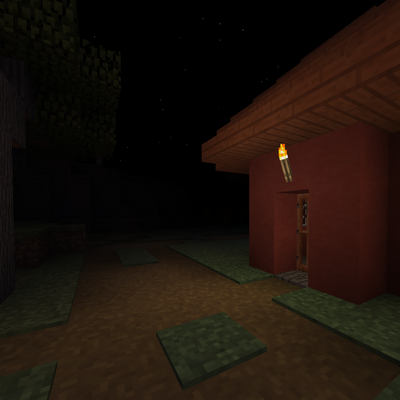
CurseForge · Minecraft mod
AdvancedDarkness (Void Fog)
an mod that makes night very dark, overworld very foggy and disables some features perfect for horror games
Choose a version Pick your version below, then grab the matching file.
Quick answer
Which AdvancedDarkness (Void Fog) release should I use?
Latest stable file advanceddarkness_2.2
Game version 1.20.1
Loader Forge
AdvancedDarkness (Void Fog) advanceddarkness_2.2 targets 1.20.1 with Forge. The project page does not say whether this file belongs on the client, dedicated server, or both. No extra mods listed for this file.
Where it goes
Is AdvancedDarkness (Void Fog) required on the client, server, or both?
The project page does not say whether this file belongs on the client, dedicated server, or both.
Client Source doesn’t say
Dedicated server Source doesn’t say
Loader for this release Forge
Required install it here Optional supported, not mandatory Not supported do not install here Source doesn’t say do not assume
The source does not explicitly classify this release as client-only or server-only.
What else does AdvancedDarkness (Void Fog) advanceddarkness_2.2 need?
advanceddarkness_2.2. Change the file and its required mods may change too.
This file does not list any required mods. Do not add a library just because a different file uses it.
This file does not list any required or optional mods.
Before you install it
Add AdvancedDarkness (Void Fog) without breaking your instance.
Built for AdvancedDarkness (Void Fog) advanceddarkness_2.2. Pick another file and the loader, install side or required mods may change.
- 01
Stick to this file
Use advanceddarkness_2.2. It targets 1.20.1 with Forge; another release may have different loader, side or dependency requirements.
- 02
Bring the mods it needs
This file does not list any required mods. Do not add a library just because a different file uses it.
- 03
Put it on the correct side
The project page does not say whether this file belongs on the client, dedicated server, or both.
- 04
Pick the file you checked
Use the “Get this file” button beside advanceddarkness_2.2. It opens that exact file at the source.
About this project
What does AdvancedDarkness (Void Fog) add?
Dread transforms the Overworld into a tense, oppressive environment built for horror. Fog swallows the world just a few blocks from your face, nights are pitch black with no stars or clouds to guide you, and all grass and flowers are stripped away — leaving the land bare and unsettling. Render distance is locked, fog thickens as darkness falls, and sleeping or skipping the night snaps the world into daylight instantly. Deep underground, classic Void Fog closes in until Y=0 is pitch black — while distant torches and lava still cut through the dark. Placed lights flicker on their own. Lightweight, client-friendly, and designed to drop into any horror modpack with configuration.
Updated 2.1 FIXED version (1.20.1 only)
- Added Void Fog (builds from Y=32, fully black at Y=0, with ash particles)
- Added Void Fog distance slider (2–6 chunks)
- Added individual flickering for placed light sources (torches, lanterns, campfires, lava, and more)
- Distant light sources stay visible through thick Void Fog
- Added advanced tab
- Expanded Day Fog (4–12), Night Fog (2–6), and Render Distance (6–12)
- Added
showConfigButtoninconfig/advanceddarkness.jsonto hide the in-game settings menu (modpack / definitive builds) - Config file is created automatically on first launch
Project description from CurseForge.
Pick your setup
AdvancedDarkness (Void Fog) by Minecraft version and loader
Choose the version and loader you play, then open the matching release.
Minecraft version
1.21.5
1 loader buildMinecraft version
1.20.1
1 loader buildCheck the dependencies, then try the file in a copied instance before changing a world you care about.
Recent files
AdvancedDarkness (Void Fog) versions and loaders
advanceddarkness_2.2
advanceddarkness_2.2.jar
10 Oct 2026
Client Source doesn’t say Server Source doesn’t say Dependencies No extras listed Listed on Release listing
Check the 1.20.1 · Forge setup 1.20.1Forge release
advanceddarknessFIXED2.1.jar
advanceddarknessFIXED2.0.jar
10 Sept 2026
Client Source doesn’t say Server Source doesn’t say Dependencies No extras listed Listed on Release listing
Check the 1.20.1 · Forge setup 1.20.1Forge release
advanceddarkness_2.0
advanceddarkness_2.0.jar
1 Sept 2026
Client Source doesn’t say Server Source doesn’t say Dependencies No extras listed Listed on Release listing
Check the 1.20.1 · Forge setup 1.20.1Forge release
AdvancedDarkness - 1.21.5
advanceddarkness_1-1.jar
8 Aug 2026
Client Source doesn’t say Server Source doesn’t say Dependencies No extras listed Listed on Release listing
Check the 1.21.5-Snapshot · Forge setup 1.21.51.21.5-SnapshotForge release
Advanced-Darkness - 1.5.jar
18 Jul 2026
Client Source doesn’t say Server Source doesn’t say Dependencies No extras listed Listed on Release listing
Check the 1.20.1 · Forge setup 1.20.1Forge release
AdvancedDarkness 1.1
AdvancedDarkness - 1.1.jar
10 Jun 2026
Client Source doesn’t say Server Source doesn’t say Dependencies No extras listed Listed on Release listing
Check the 1.20.1 · Forge setup 1.20.1Forge release
darkmode.jar
darkmode-1.0.0.jar
16 May 2026
Client Source doesn’t say Server Source doesn’t say Dependencies No extras listed Listed on Release listing
Check the 1.20.1 · Forge setup 1.20.1Forge release
Looking for an older file? The official CurseForge project page is in Resources.