WarpDrive Needed by WarpDrive Celestials 1.12.2-1.1.0
requiredMatching file found Matched file: WarpDrive-1.5.30 Release for 1.12.2
CurseForge · Minecraft mod
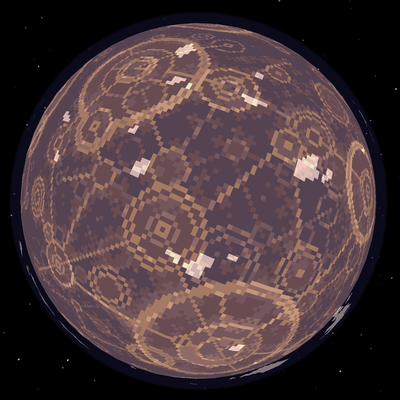
Replaces flat WarpDrive Mod visuals with configurable 3D cube or sphere planets and more varied star colors.
Quick answer
WarpDrive Celestials 1.12.2-1.1.0 targets 1.12.2 with Forge. The project page does not say whether this file belongs on the client, dedicated server, or both. All 1 required mods have matching files.
Where it goes
The project page does not say whether this file belongs on the client, dedicated server, or both.
The source does not explicitly classify this release as client-only or server-only.
WarpDrive Celestials 1.12.2-1.1.0. Change the file and its required mods may change too.
Install WarpDrive first. We found matching files for this game-version and loader setup. 3 come through another mod in the chain.
3 extra mods were pulled in by other dependencies. Indented rows show who needs each one. We only count dependency files that match this setup. A file for another loader does not fill the gap.
Before you install it
Built for WarpDrive Celestials 1.12.2-1.1.0. Pick another file and the loader, install side or required mods may change.
Use WarpDrive Celestials 1.12.2-1.1.0. It targets 1.12.2 with Forge; another release may have different loader, side or dependency requirements.
Install WarpDrive first. We found matching files for this game-version and loader setup. 3 come through another mod in the chain.
The project page does not say whether this file belongs on the client, dedicated server, or both.
Use the “Get this file” button beside WarpDrive Celestials 1.12.2-1.1.0. It opens that exact file at the source.
About this project


WarpDrive Celestials is a visual addon for WarpDrive that turns its flat planet renders into 3D celestial bodies. The mod can be used client-side only, so individual players can enable 3D planets even on servers that do not require it. For full server-wide support, including proper shared visuals for all players, custom rings, custom day/night textures, and additional render-layer behavior, the mod should also be installed on the server.
Planets render as Minecraft-style cubes by default, with an optional sphere render mode available in the config. Sphere rendering also includes LOD settings to reduce mesh complexity for smaller or distant objects, with Performance, Balanced, and Quality presets.
WarpDrive Celestials was originally made for The Empire Strikes Block server.
By default, planets render as cubes to better match Minecraft’s visual style while still making celestial bodies feel more dimensional than WarpDrive’s original flat renders.
Sphere rendering can also be enabled in the config for a smoother planet look. When spheres are used, the LOD preset controls how detailed the sphere mesh is, which can help reduce rendering cost for smaller or distant objects.
WarpDrive Celestials can be installed client-side only if you just want the visual upgrade locally. This lets players see 3D planets even on servers that do not require the addon.
For servers and modpacks that want everyone to see the same custom visuals, the mod should also be installed on the server. Server installation is needed for proper shared support of custom ring layers, custom day/night textures, and additional celestial render-layer behavior.
WarpDrive Celestials supports cubemap textures for planets, clouds, and similar render layers. A normal single-face texture uses a 1:1 aspect ratio, meaning the image is square, such as 512x512 or 1024x1024. A cubemap texture uses a 2:1 aspect ratio, meaning the image is twice as wide as it is tall, such as 1024x512.
When a compatible 2:1 texture is detected, the mod automatically maps it across the planet model’s faces. This allows planets to use proper multi-sided textures instead of repeating the same image on every side.
Planets receive automatic night-side shading by default, giving them a more natural day-night appearance as the lighting changes.
Creators can also add dedicated night textures for more detailed effects, such as glowing city lights or illuminated regions. To add a custom night texture, place an additional render layer directly after the planet’s normal base texture and use the same texture file name with night_ added to the front.
Example:
<render texture="warpdriveaddon:textures/cosmos/celestial/coruscant.png" />
<render texture="warpdriveaddon:textures/cosmos/celestial/night_coruscant.png" />
WarpDrive Celestials detects the matching pair automatically and uses the night texture on the dark side of the planet.
WarpDrive Celestials also supports custom planet rings through additional render layers. To add rings, place one or more ring render layers directly after the planet’s normal base texture and use ring_ at the front of the texture file name.
Example:
<render texture="warpdriveaddon:textures/cosmos/celestial/saturn.png" />
<render texture="warpdriveaddon:textures/cosmos/celestial/ring_saturn_1.png" />
<render texture="warpdriveaddon:textures/cosmos/celestial/ring_saturn_2.png" />
Additional ring layers can be used for wider or farther-out rings. The mod also supports vertical rings by using ring_vertical_ at the front of the texture file name.
Example:
<render texture="warpdriveaddon:textures/cosmos/celestial/uranus.png" />
<render texture="warpdriveaddon:textures/cosmos/celestial/ring_vertical_uranus.png" />
WarpDrive Celestials detects these ring layers automatically and renders them around the matching planet.
The mod includes several configurable star rendering presets:
This makes it easier to match the visual style of different modpacks, whether you want a more colorful space backdrop, a cleaner Minecraft-style sky, or no background stars at all.
Project description from CurseForge.
Pick your setup
Choose the version and loader you play, then open the matching release.
Check the dependencies, then try the file in a copied instance before changing a world you care about.
Recent files
WarpDriveAddon-1.12.2-1.1.0.jar
19 May 2026
WarpDriveAddon-1.1.0.jar
18 May 2026
WarpDriveAddon-1.0.0.jar
18 May 2026
Looking for an older file? The official CurseForge project page is in Resources.
 mod
Choose your origin and shape how you play with unique abilities, strengths, and weaknesses.
 mod
A mod that modifies various vanilla HUD elements, such as the bossbar, action bar, sidebar / scoreboard, hotbar, title / subtitle, and more. By Polyfrost, best with OneClient.
 mod
A new spell school called Immortal Arts has been added.