

Minecraft version
Back to mods 
CurseForge · Minecraft mod
VO: Item Clumps
Item Clumps completely redesigns how dropped item entities behave in the world, combining them into lightweight, virtual mega-stacks to maximize both server performance and client-side frame rates.
Choose a version Pick your version below, then grab the matching file.
Quick answer
Which VO: Item Clumps release should I use?
Latest stable file IG: Item Clumps 1.0.5+26.1.2
Game version 26.1.2
Loader Fabric
VO: Item Clumps IG: Item Clumps 1.0.5+26.1.2 targets 26.1.2 with Fabric. The project page does not say whether this file belongs on the client, dedicated server, or both. No extra mods listed for this file.
Where it goes
Is VO: Item Clumps required on the client, server, or both?
The project page does not say whether this file belongs on the client, dedicated server, or both.
Client Source doesn’t say
Dedicated server Source doesn’t say
Loader for this release Fabric
Required install it here Optional supported, not mandatory Not supported do not install here Source doesn’t say do not assume
The source does not explicitly classify this release as client-only or server-only.
What else does VO: Item Clumps IG: Item Clumps 1.0.5+26.1.2 need?
IG: Item Clumps 1.0.5+26.1.2. Change the file and its required mods may change too.
This file does not list any required mods. Do not add a library just because a different file uses it.
This file does not list any required or optional mods.
Before you install it
Add VO: Item Clumps without breaking your instance.
Built for VO: Item Clumps IG: Item Clumps 1.0.5+26.1.2. Pick another file and the loader, install side or required mods may change.
- 01
Stick to this file
Use IG: Item Clumps 1.0.5+26.1.2. It targets 26.1.2 with Fabric; another release may have different loader, side or dependency requirements.
- 02
Bring the mods it needs
This file does not list any required mods. Do not add a library just because a different file uses it.
- 03
Put it on the correct side
The project page does not say whether this file belongs on the client, dedicated server, or both.
- 04
Pick the file you checked
Use the “Get this file” button beside IG: Item Clumps 1.0.5+26.1.2. It opens that exact file at the source.
About this project
What does VO: Item Clumps add?



📦 Item Clumps (Server Only): The "Instant Gratification" Update
No Backports: I will NOT backport this mod to older Minecraft versions (1.21, 1.20, etc.). Please do not ask.
In vanilla Minecraft, dropped items merge, but they strictly cap at a maximum stack size of 64. If a high-efficiency mob farm, automated quarry, or massive TNT explosion drops thousands of items, the game is forced to tick and render hundreds of individual ground entities. This leads to heavy client-side frame drops, rendering lag, and severe server TPS decay.
Item Clumps (Server Only) changes this foundation by breaking the 64-item stack limit for ground entities entirely server-side. It aggressively condenses identical items into single, lightweight virtual mega-stacks of up to 9,999 items by default. Vanilla clients can connect to servers running this mod without having to install it!
🎥 Showcase Video
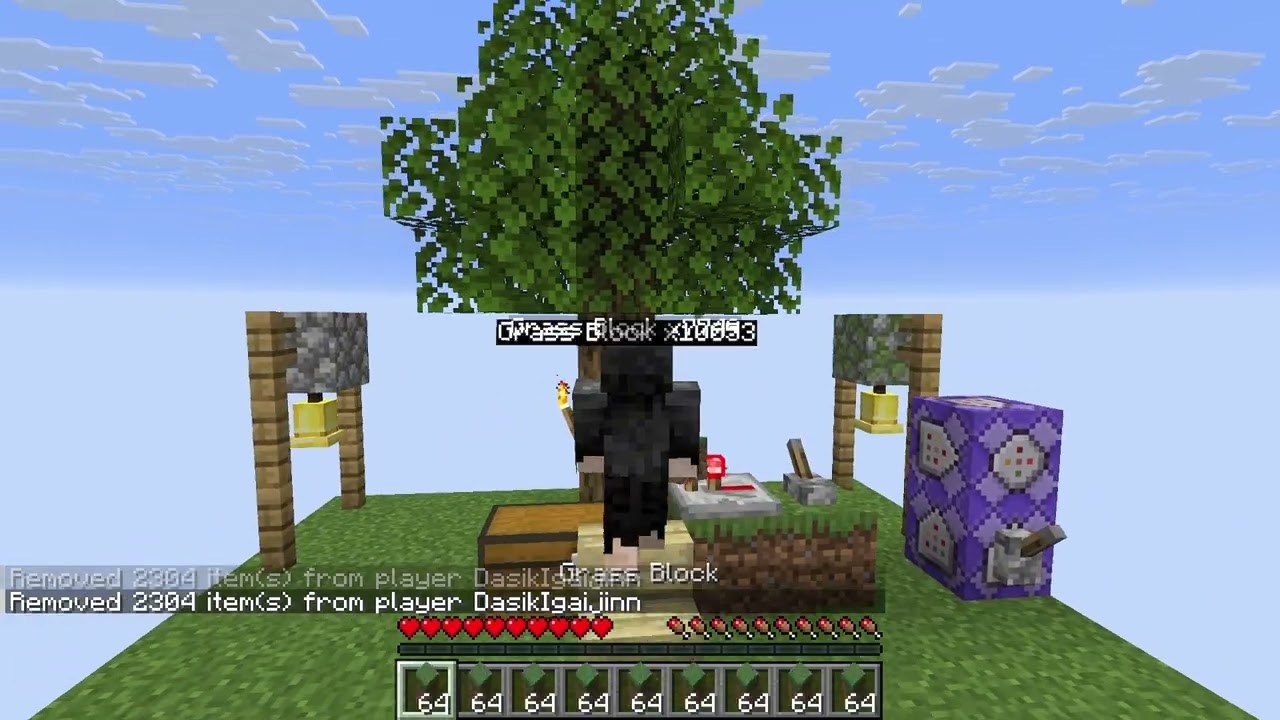
Click the image above to watch the mod showcase in action! (CurseForge does not support embeds)
✨ Features
🚀 Server-Side Stack Size Virtualization
Bypasses the 64-item ground stack cap. Identical items merge into single entities containing up to 9,999 items by default (configurable up the full 32-bit integer limit of 2,147,483,647 both in the GameRules screen and via commands).
MegaCount Strategy: In this server-side only version, the true virtual count is stored directly in the standard vanilla
ItemStackcount. Because Minecraft 26.x serializes stack counts using standard VarInts/integers rather than bytes, vanilla clients natively support, sync, and display these larger counts on item entities.
🏷️ Vanilla-Compatible Count Tags
Renders a custom name tag (e.g., Oak Log x450) above clumps when the count exceeds a normal stack. Uses vanilla's native custom name tags (setCustomName / setCustomNameVisible) on the server so that vanilla clients display the count tag without needing any client-side mod.
⏱️ Vanilla Despawn Timer Rules
To match vanilla merging logic, when two stacks merge, the resulting clump inherits the age of the youngest item in the merge (taking the smaller age value, as age ticks upwards). This extends/resets the despawn window for the combined clump exactly like vanilla, ensuring you don't lose items prematurely.
📦 Smart Inventory Integration
Walking over a clump smoothly transfers items to your inventory in max stack chunks. The mod dynamically calculates the exact amount of free space in your inventory and takes only what fits, keeping the remainder safely in the ground clump instead of deleting or de-syncing them.
⚙️ Hopper Drip-Feeding
Hoppers extract items from virtual clumps one by one at standard vanilla transfer speeds. This ensures your redstone automation, sorting systems, and item-elevator pipelines function exactly as they did in vanilla, keeping the game balanced.
📐 Vanilla Physics Alignment
To match vanilla merging rules and prevent glitches, clumping operates on a configurable horizontal block radius, but respects vertical space. Items will not merge if they are separated vertically by 1 block or more (e.g., items resting on top of a block won't merge with items below it).
⚙️ Config
⚠️ Important: Config vs. In-Game GameRules
The global configuration file only defines default values for new worlds at creation time. If you have already created/opened a world, changing the config file will have no effect. You must change the settings in-game using the Edit Game Rules UI screen or the/gamerulecommand.
The mod works out of the box with zero setup. All parameters are managed in-game using the Native Minecraft Game Rules system.
- In-Game: Use
/gamerule item_clumps:for core settings.item_clumps:enable_clumping(Default:true) - Toggles the clumping mechanic. When disabled, items behave exactly like vanilla.item_clumps:max_clump_size(Default:9999) - The maximum quantity of items a single clumped entity can contain. (Disabled automatically if Stack Size Adjuster is loaded).item_clumps:render_labels(Default:true) - Toggles the rendering of the floating custom count tag above virtual clumps.item_clumps:merge_radius(Default:1) - The horizontal block radius items will search to find matching items to merge.item_clumps:label_min_count(Default:-1) - Minimum item count before the clump label displays. Set to-1to use the default vanilla stack limit.
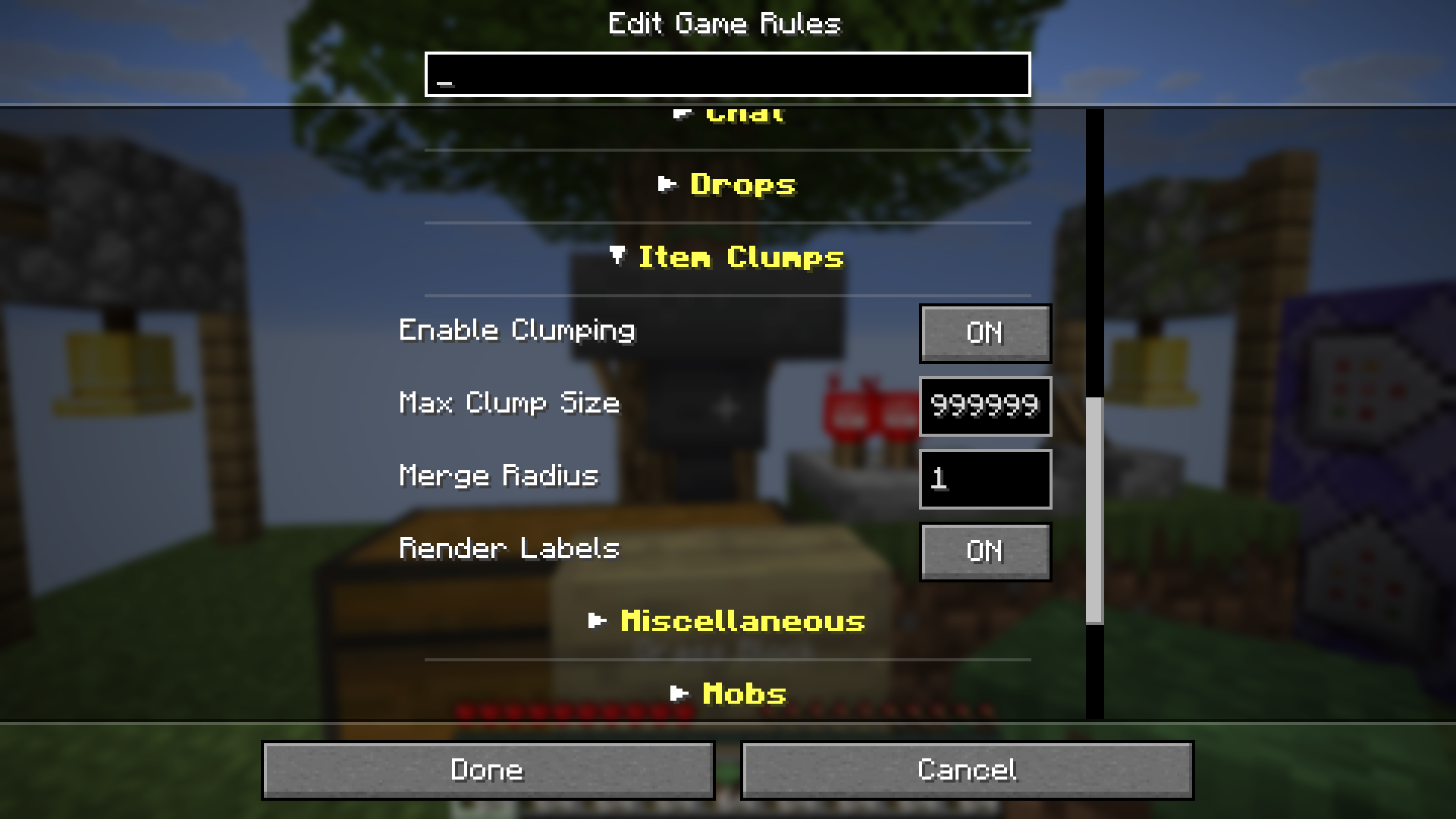
Recommended Mod: Since this mod adds several GameRules, we highly recommend using Collapsible Game Rules to keep your settings menu clean and organized.
📦 Installation & Environment
🖥️ Environment Support
- Server-side only: All functionality is done server-side and is compatible with vanilla clients.
- Works in singleplayer too
📥 Install Instructions
- Install Fabric API.
- Download
item-clumps-*.jarand place it in yourmodsfolder.
🧩 Compatibility
| Feature | Fabric (26.2+) |
|---|---|
| Singleplayer | ✅ |
| Multiplayer (LAN/Server) | ✅ |
| Empty Dimensions | ✅ |
🎮 Version Compatibility & Support
- Minecraft 26.2+: Current public release — Active & Supported.
- Minecraft 26.1.2: Discontinued
☕ Support
If you enjoy the Instant Gratification collection, consider fueling the next update!


📜 Credits
| Role | Author |
|---|---|
| Creator | Rifaditya (Dasik) |
| Collection | Instant Gratification |
| License | GNU GPLv3 |
Modpack Permission Policy:
You are free to include this mod in any modpack. However, cross-platform redistribution of this project or its files is strictly prohibited. Modpacks hosting this project's files must be published on the same platform (CurseForge).
Made with ❤️ for the Minecraft community
Part of the Instant Gratification Collection
Project description from CurseForge.
Pick your setup
VO: Item Clumps by Minecraft version and loader
Choose the version and loader you play, then open the matching release.
Minecraft version
26.1.2
1 loader buildCheck the dependencies, then try the file in a copied instance before changing a world you care about.
Recent files
VO: Item Clumps versions and loaders
IG: Item Clumps 1.0.5+26.1.2
item-clumps-1.0.5+26.1.2.jar
30 Aug 2026
Client Source doesn’t say Server Source doesn’t say Dependencies No extras listed Listed on Release listing
Check the 26.1.2 · Fabric setup Fabric26.1.2 release
IG: Item Clumps 1.0.4+26.1.2
item-clumps-1.0.4+26.1.2.jar
24 Aug 2026
Client Source doesn’t say Server Source doesn’t say Dependencies No extras listed Listed on Release listing
Check the 26.1.2 · Fabric setup Fabric26.1.2 release
item-clumps-1.0.22+26.2.jar
item-clumps-1.0.23+26.2.jar
22 Jul 2026
Client Source doesn’t say Server Source doesn’t say Dependencies 2 required · 2 unchecked Listed on Release listing
Check the 26.2 · Fabric setup Fabric26.1.226.2 release
item-clumps-1.0.21+26.2.jar
22 Jul 2026
Client Source doesn’t say Server Source doesn’t say Dependencies 2 required · 2 unchecked Listed on Release listing
Check the 26.2 · Fabric setup Fabric26.1.226.2 release
item-clumps-1.0.20+26.2.jar
14 Jul 2026
Client Source doesn’t say Server Source doesn’t say Dependencies 2 required · 2 unchecked Listed on Release listing
Check the 26.2 · Fabric setup Fabric26.1.226.2 release
item-clumps-1.0.18+26.2.jar
10 Jul 2026
Client Source doesn’t say Server Source doesn’t say Dependencies 2 required · 2 unchecked Listed on Release listing
Check the 26.2 · Fabric setup Fabric26.1.226.2 release
item-clumps-1.0.17+26.2.jar
8 Jul 2026
Client Source doesn’t say Server Source doesn’t say Dependencies 2 required · 2 unchecked Listed on Release listing
Check the 26.2 · Fabric setup Fabric26.1.226.2 alpha
item-clumps-1.0.16+26.2.jar
7 Jul 2026
Client Source doesn’t say Server Source doesn’t say Dependencies 2 required · 2 unchecked Listed on Release listing
Check the 26.2 · Fabric setup Fabric26.1.226.2 release
item-clumps-1.0.15+26.2.jar
6 Jul 2026
Client Source doesn’t say Server Source doesn’t say Dependencies 2 required · 2 unchecked Listed on Release listing
Check the 26.2 · Fabric setup Fabric26.1.226.2 release
item-clumps-1.0.0+build.11.jar
20 May 2026
Client Source doesn’t say Server Source doesn’t say Dependencies 2 required · 2 unchecked Listed on Release listing
Check the 26.1.2 · Fabric setup Fabric26.1.2 release
Looking for an older file? The official CurseForge project page is in Resources.
 mod
mod CurseForge + Modrinth · Minecraft
Carpet-FGA-Addition
An AI-powered Carpet extension mod packed with practical utilities, including longer player name support and fake-player area mining.
 mod
mod CurseForge + Modrinth · Minecraft
Easy Hopper
Speed up Hoppers and add classification function to it!
 mod
mod CurseForge · Minecraft
ObsidianOptimization
A Super Lightweight Mod Boost Your Game By sxrth