Minecraft version
Back to mods 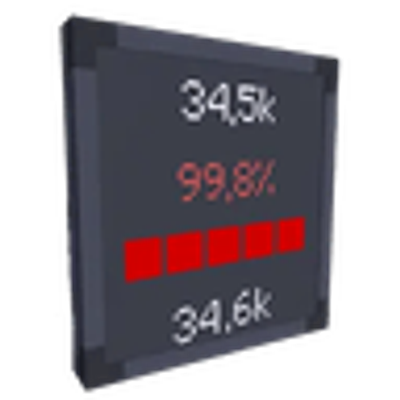
CurseForge · Minecraft mod
Create addon: Info Display
Info Display is an addon for Create that adds two information panel blocks: one for Item Vault, one for Fluid Tank
Choose a version Pick your version below, then grab the matching file.
Quick answer
Which Create addon: Info Display release matches 1.21.1 NeoForge?
Best match for your filters InfoDisplay-1.0 Neoforge 1.21.1.jar
Game version 1.21.1
Loader NeoForge
Create addon: Info Display InfoDisplay-1.0 Neoforge 1.21.1.jar targets 1.21.1 with NeoForge. The project page does not say whether this file belongs on the client, dedicated server, or both. No extra mods listed for this file.
Where it goes
Is Create addon: Info Display required on the client, server, or both?
The project page does not say whether this file belongs on the client, dedicated server, or both.
Client Source doesn’t say
Dedicated server Source doesn’t say
Loader for this release NeoForge
Required install it here Optional supported, not mandatory Not supported do not install here Source doesn’t say do not assume
The source does not explicitly classify this release as client-only or server-only.
What else does Create addon: Info Display InfoDisplay-1.0 Neoforge 1.21.1.jar need?
InfoDisplay-1.0 Neoforge 1.21.1.jar on 1.21.1 NeoForge. Every mod below is checked against that same setup.
This file does not list any required mods. Do not add a library just because a different file uses it.
This file does not list any required or optional mods.
Before you install it
Add Create addon: Info Display without breaking your instance.
Built for Create addon: Info Display InfoDisplay-1.0 Neoforge 1.21.1.jar on 1.21.1 NeoForge. Pick another file and the loader, install side or required mods may change.
- 01
Stick to this file
Use InfoDisplay-1.0 Neoforge 1.21.1.jar. It targets 1.21.1 with NeoForge; another release may have different loader, side or dependency requirements.
- 02
Bring the mods it needs
This file does not list any required mods. Do not add a library just because a different file uses it.
- 03
Put it on the correct side
The project page does not say whether this file belongs on the client, dedicated server, or both.
- 04
Pick the file you checked
Use the “Get this file” button beside InfoDisplay-1.0 Neoforge 1.21.1.jar. It opens that exact file at the source.
About this project
What does Create addon: Info Display add?
Info Display
Info Display is an addon for Create that adds two information panel blocks: one for Item Vault, one for Fluid Tank. Place them on any surface and get real-time storage data displayed directly on the block face.
Features
Storage Panel
Connects to a Create Item Vault placed directly behind it and displays:
- Current item count
- Fill percentage with color-coded indicator
- Progress bar (green → yellow → red)
- Maximum capacity
Fluid Panel
Connects to a Create Fluid Tank placed directly behind it and displays:
- Fluid name
- Current amount in millibuckets (mB)
- Fill percentage with color-coded indicator
- Progress bar
- Maximum capacity
Placement
Both panels can be placed on:
- Walls — face any of the 4 horizontal directions
- Floor — lies flat, face visible from above
- Ceiling — hangs upside down, face visible from below
- Underwater — fully waterloggable
The panel reads storage data from the block directly behind it (opposite to the face direction).
Requirements
| Dependency | Version |
|---|---|
| Minecraft | 1.21.1 |
| NeoForge | 21.1.219+ |
| Create | 6.0.0+ |
Compatibility
- Works with multi-block Item Vaults (any size)
- Works with Create: Connected Item Silos
- Works with multi-block Fluid Tanks (any size)
- Waterloggable
- Wrench support (rotate / pick up)
- Mineable with pickaxe
- JEI recipe support
License
MIT License — free to use in modpacks.
Project description from CurseForge.
Pick your setup
Create addon: Info Display by Minecraft version and loader
Choose the version and loader you play, then open the matching release.
Check the dependencies, then try the file in a copied instance before changing a world you care about.
Recent files
Create addon: Info Display versions and loaders
InfoDisplay-1.0 Neoforge 1.21.1.jar
21 May 2026
Client Source doesn’t say Server Source doesn’t say Dependencies No extras listed Listed on Release listing
Check the 1.21.1 · NeoForge setup 1.21.1NeoForge release
Looking for an older file? The official CurseForge project page is in Resources.
 mod
CurseForge · Minecraft
CobbleQuests & Expeditions
Send your Pokémon on expeditions, take on guild quests, and unlock portable tools as you level up in Cobblemon.
 mod
CurseForge · Minecraft
Q Shop Addon Confluence Compat
Connect a QShop currency to the coin system in Confluence: Otherworld. QShop shops, commands, quests, and scripts can all use the same balance, while players carry that money as Confluence coins.
 mod
CurseForge · Minecraft
Create: Plushie Factory
Create: Plushie Factory adds Create compatibility to automate all your favorite Plushie mods!