Minecraft version
Back to mods 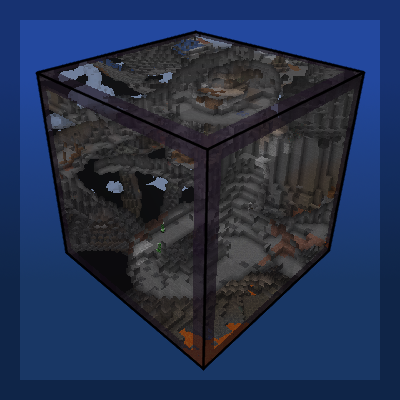
CurseForge · Minecraft mod
Accidental X-Ray Block
Adds a block that can X-Ray the world to reveal caves and hidden terrain
Choose a version Pick your version below, then grab the matching file.
Quick answer
Which Accidental X-Ray Block release should I use?
Latest stable file Accidental_Xray_Block-1.0.0_Forge-1.20.1.jar
Game version 1.20.1
Loader Forge
Accidental X-Ray Block Accidental_Xray_Block-1.0.0_Forge-1.20.1.jar targets 1.20.1 with Forge. The project page does not say whether this file belongs on the client, dedicated server, or both. No extra mods listed for this file.
Where it goes
Is Accidental X-Ray Block required on the client, server, or both?
The project page does not say whether this file belongs on the client, dedicated server, or both.
Client Source doesn’t say
Dedicated server Source doesn’t say
Loader for this release Forge
Required install it here Optional supported, not mandatory Not supported do not install here Source doesn’t say do not assume
The source does not explicitly classify this release as client-only or server-only.
What else does Accidental X-Ray Block Accidental_Xray_Block-1.0.0_Forge-1.20.1.jar need?
Accidental_Xray_Block-1.0.0_Forge-1.20.1.jar. Change the file and its required mods may change too.
This file does not list any required mods. Do not add a library just because a different file uses it.
This file does not list any required or optional mods.
Before you install it
Add Accidental X-Ray Block without breaking your instance.
Built for Accidental X-Ray Block Accidental_Xray_Block-1.0.0_Forge-1.20.1.jar. Pick another file and the loader, install side or required mods may change.
- 01
Stick to this file
Use Accidental_Xray_Block-1.0.0_Forge-1.20.1.jar. It targets 1.20.1 with Forge; another release may have different loader, side or dependency requirements.
- 02
Bring the mods it needs
This file does not list any required mods. Do not add a library just because a different file uses it.
- 03
Put it on the correct side
The project page does not say whether this file belongs on the client, dedicated server, or both.
- 04
Pick the file you checked
Use the “Get this file” button beside Accidental_Xray_Block-1.0.0_Forge-1.20.1.jar. It opens that exact file at the source.
About this project
What does Accidental X-Ray Block add?
 Accidental X-Ray Block came about by mistake while working on another mod. I created, quite by accident, a block that naturally x-rays terrain, like a window, when it is placed into the world. After adding a crafting recipe, I am happy to present this (totally serious not at all a joke) "survival-friendly" X-Ray block for the general public's viewing pleasure. You can increase the size of the x-ray "window" by adding more adjacent blocks together.
The mod adds one single block and one single crafting recipe. That's it. It uses the vanilla tinted glass texture. Don't expect the mod to be too serious; though it does work, it has a couple quirks. See known issues below.
Future plans:
Porting to NeoForge 1.21.1 and possibly future versions
Known issues:
Caves and other hidden terrain will not render unless it has been previously rendered, meaning sometimes you can only see things in the player's immediate vicinity, limiting the X-Ray Block's field of view. You might just need to look for more than a few seconds and the terrain might render, or it might not and you will only x-ray what is nearby (I've had both happen).
Without Night Vision, you won't see very much, not unlike when you are in Spectator Mode, though with a much more limited field of view.
Note:
1.20.1 is the current supported version. A NeoForge 1.21.1 port is planned if there is enough support for the current version
You are welcome to include this mod in any modpack, if you provide credit and a link to this page (Curseforge modpacks should do that automatically)
Project description from CurseForge.
Pick your setup
Accidental X-Ray Block by Minecraft version and loader
Choose the version and loader you play, then open the matching release.
Check the dependencies, then try the file in a copied instance before changing a world you care about.
Recent files
Accidental X-Ray Block versions and loaders
Accidental_Xray_Block-1.0.0_Forge-1.20.1.jar
21 May 2026
Client Source doesn’t say Server Source doesn’t say Dependencies No extras listed Listed on Release listing
Check the 1.20.1 · Forge setup 1.20.1Forge release
Looking for an older file? The official CurseForge project page is in Resources.
 mod
mod CurseForge + Modrinth · Minecraft
Trade Cycling
Refresh villager trades without needing to break workstations.
 mod
mod CurseForge · Minecraft
Mekanism: Astral Speed
This mod increases the ejecting speed of Mekanism machines.
 mod
mod CurseForge · Minecraft
Better Punch
This mod adds the Fist animation that all Fists weapons from Better combat have to the empty hands of the player