
Minecraft version
Back to mods 
CurseForge · Minecraft mod
VoxelPort
Open your Minecraft world or Fabric server to friends in one click. No port forwarding, no account. Relays in India and Europe.
Choose a version Pick your version below, then grab the matching file.
Quick answer
Which VoxelPort release should I use?
Latest stable file VoxelPort v1.5.0
Game version 26.1, 26.1.1, 26.1.2
Loader Fabric
VoxelPort v1.5.0 targets 26.1, 26.1.1, 26.1.2 with Fabric. The project page does not say whether this file belongs on the client, dedicated server, or both. No extra mods listed for this file.
Where it goes
Is VoxelPort required on the client, server, or both?
The project page does not say whether this file belongs on the client, dedicated server, or both.
Client Source doesn’t say
Dedicated server Source doesn’t say
Loader for this release Fabric
Required install it here Optional supported, not mandatory Not supported do not install here Source doesn’t say do not assume
The source does not explicitly classify this release as client-only or server-only.
What else does VoxelPort v1.5.0 need?
VoxelPort v1.5.0. Change the file and its required mods may change too.
This file does not list any required mods. Do not add a library just because a different file uses it.
This file does not list any required or optional mods.
Before you install it
Add VoxelPort without breaking your instance.
Built for VoxelPort v1.5.0. Pick another file and the loader, install side or required mods may change.
- 01
Stick to this file
Use VoxelPort v1.5.0. It targets 26.1, 26.1.1, 26.1.2 with Fabric; another release may have different loader, side or dependency requirements.
- 02
Bring the mods it needs
This file does not list any required mods. Do not add a library just because a different file uses it.
- 03
Put it on the correct side
The project page does not say whether this file belongs on the client, dedicated server, or both.
- 04
Pick the file you checked
Use the “Get this file” button beside VoxelPort v1.5.0. It opens that exact file at the source.
About this project
What does VoxelPort add?
Open to VoxelPort
Share your Minecraft world or Fabric server with friends in one click. No port forwarding, no account, and your friends need nothing but normal Minecraft.



⚡ Zero to online in four steps
- Install the mod in your Fabric
modsfolder. - Open your world and use Minecraft's Open to LAN.
- Press Esc, then Open to VoxelPort. The address is copied for you.
- Send it to your friends. They paste it into Multiplayer → Add Server.
Running a dedicated Fabric server? Put the jar in mods/, start the server and run /voxelport start.
✨ What you get
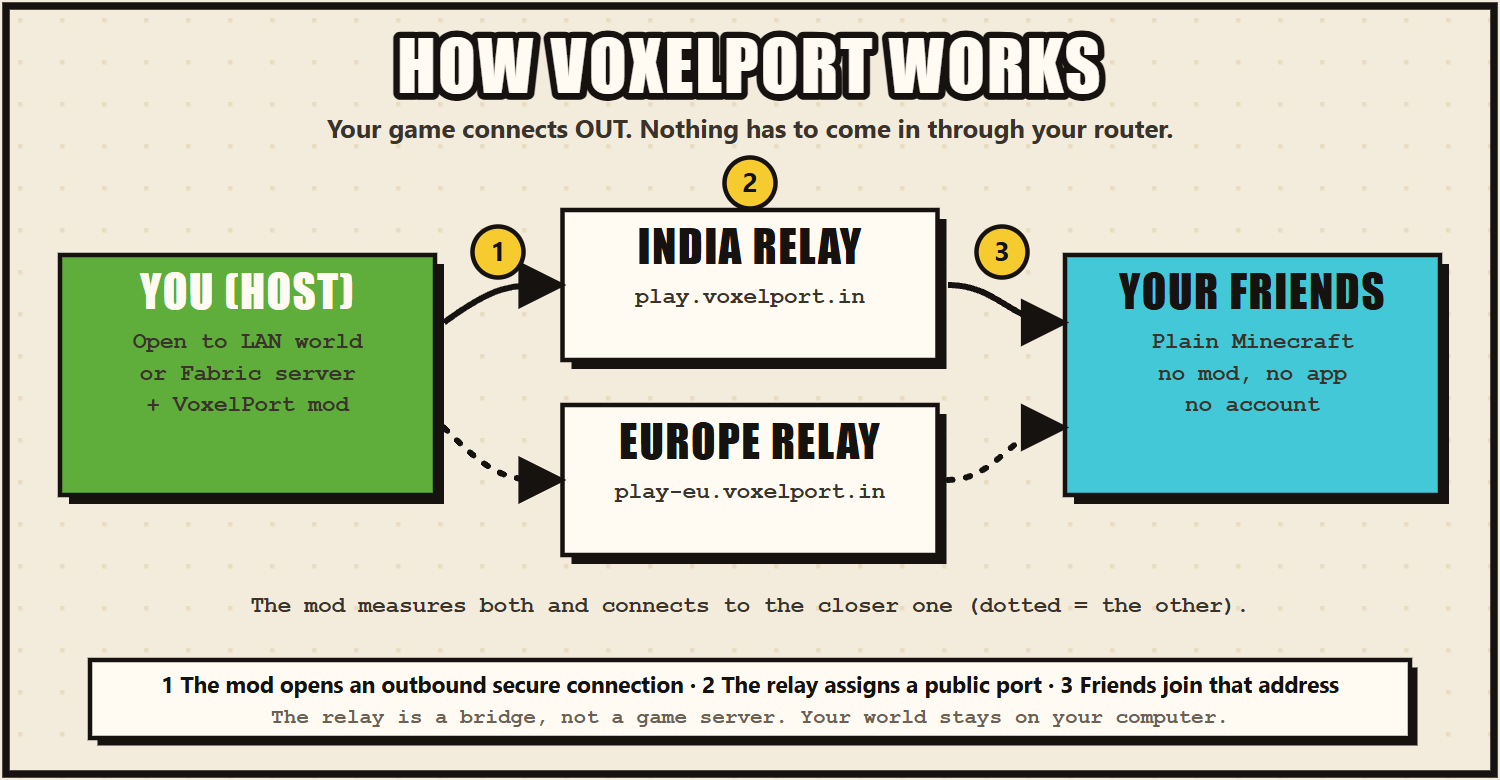
- 🌍 No port forwarding. The mod dials out to a relay, so it works behind CGNAT, on mobile data and on hostel or campus Wi-Fi.
- 🎮 Vanilla players. Friends join from an unmodified Minecraft. Only the host installs the mod.
- 🇮🇳🇪🇺 Two relay regions. India (
play.voxelport.in) and Europe (play-eu.voxelport.in). The mod measures both and uses the closer one automatically. - 🖱️ One click. Open to VoxelPort in the pause menu starts sharing and turns into VoxelPort: Live.
- 📺 Live screen. Address, uptime and connected players, with the relay ping in the player-list header (Tab).
- 🖥️ Dedicated servers too.
/voxelport start,statusandstop. - 📣 Relay announcements. If the relay is about to restart, you see it on the Live screen and in the log.
- 🔒 No account. A private device token is created on first use. Nothing to sign up for, copy or paste.
- 🧩 One jar for every 26.x. The same file runs on Minecraft 26.1, 26.1.1, 26.1.2, 26.2 and 26.3.
📋 Requirements
| Minecraft | 26.1, 26.1.1, 26.1.2, 26.2 or 26.3 |
| Fabric Loader | 0.18.6 or newer |
| Java | 25 or newer |
| Network | Outbound HTTPS/WSS to relay.voxelport.in and eu.voxelport.in on port 443 |
⚙️ This mod needs an external service. It connects to VoxelPort's relay servers to give you a public address, so it does not work offline.
🧰 Commands
/voxelport also works as /voxel and /vp. They need game-master permissions (operator level 2).
| Command | What it does |
|---|---|
/voxelport start [port] |
Go public (uses the server's own port unless you give one) |
/voxelport status |
Show the address, uptime, players and relay ping |
/voxelport stop |
Stop sharing |
❓ FAQ
Do my friends need the mod? No. They join with normal Minecraft: Java Edition using the address VoxelPort gives you.
Does my game have to stay open? Yes. The address works while your world or server is running. VoxelPort is not a 24/7 host, and the relays are run by one student with no uptime guarantee, so check the status page if something looks wrong.
Can't connect? Allow outbound HTTPS/WSS to relay.voxelport.in and eu.voxelport.in on port 443, make sure your world or server is still running, and have friends use the exact address on the Live screen or in /voxelport status.
Can I use my own relay or token? Optional. Settings live in config/voxelport/settings.properties (relay_url, public_host). Set the VOXELPORT_TOKEN environment variable to use your own token. With the defaults, the mod picks India or Europe for you.
🔐 Privacy
Stored on your computer: a random device token (vp_…). Sent to the relay: that token, the mod name and version (for support), and your game's network traffic while you share, which is passed on and never inspected. Not collected: passwords, email, Discord identity, chat, inventory, world data or analytics.
Full policy: https://voxelport.in/legal
Open source (MIT): https://github.com/VOXELPORT/VoxelPort · Questions or bugs: GitHub issues or the Discord. Not affiliated with Mojang or Microsoft.
Project description from CurseForge.
Pick your setup
VoxelPort by Minecraft version and loader
Choose the version and loader you play, then open the matching release.
Minecraft version
26.2
1 loader buildMinecraft version
26.1.2
1 loader buildMinecraft version
26.1.1
1 loader buildMinecraft version
26.1
1 loader buildMinecraft version
1.21.11
1 loader buildCheck the dependencies, then try the file in a copied instance before changing a world you care about.
Recent files
VoxelPort versions and loaders
VoxelPort v1.5.0
VoxelPort-1.5.0.jar
20 Oct 2026
Client Source doesn’t say Server Source doesn’t say Dependencies No extras listed Listed on Release listing
Check the 26.3 · Fabric setup Fabric26.126.1.126.1.2 release
VoxelPort v1.4.6
VoxelPort-1.4.6.jar
16 Aug 2026
Client Source doesn’t say Server Source doesn’t say Dependencies No extras listed Listed on Release listing
Check the 26.2 · Fabric setup Fabric26.2 release
VoxelPort-1.2.0.jar
22 Jun 2026
Client Source doesn’t say Server Source doesn’t say Dependencies No extras listed Listed on Release listing
Check the 26.1.2 · Fabric setup Fabric1.21.1126.126.1.1 release
voxelport-mod-1.2.0.jar
21 Jun 2026
Client Source doesn’t say Server Source doesn’t say Dependencies No extras listed Listed on Release listing
Check the 26.1.2 · Fabric setup Fabric1.21.1126.126.1.1 release
VoxelPort 1.2.0
voxelport-mod-1.2.0.jar
23 May 2026
Client Source doesn’t say Server Source doesn’t say Dependencies No extras listed Listed on Release listing
Check the 26.1.2 · Fabric setup Fabric1.21.1126.126.1.1 release
Looking for an older file? The official CurseForge project page is in Resources.
 mod
CurseForge + Modrinth · Minecraft
Step Crafter
Adds a Step Crafter and Step Requester which allows recursive crafting and keeping items in-stock to Refined Storage
 mod
CurseForge · Minecraft
Undead Invasion
Stronger undead!
 mod
CurseForge · Minecraft
Neural Exosuit
A modular sci-fi exosuit that deploys from a neural band, with per-skin helmet visors, a full HUD, jetpack, shield, Aegis hearts, grapple and FE-powered upgrade chips.