Minecraft version
Back to mods 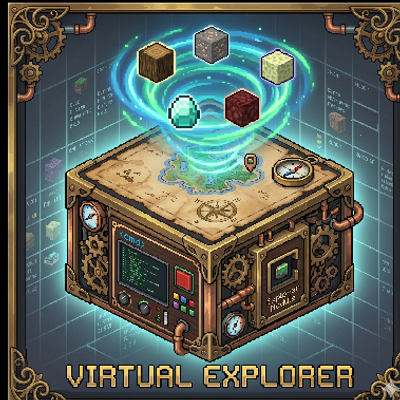
CurseForge · Minecraft mod
Virtual Explorer
Make exploration easier!
Choose a version Pick your version below, then grab the matching file.
Quick answer
Which Virtual Explorer release should I use?
Latest stable file virtualexplorer-1.0.3.jar
Game version 1.21.1
Loader NeoForge
Virtual Explorer virtualexplorer-1.0.3.jar targets 1.21.1 with NeoForge. The project page does not say whether this file belongs on the client, dedicated server, or both. No extra mods listed for this file.
Where it goes
Is Virtual Explorer required on the client, server, or both?
The project page does not say whether this file belongs on the client, dedicated server, or both.
Client Source doesn’t say
Dedicated server Source doesn’t say
Loader for this release NeoForge
Required install it here Optional supported, not mandatory Not supported do not install here Source doesn’t say do not assume
The source does not explicitly classify this release as client-only or server-only.
What else does Virtual Explorer virtualexplorer-1.0.3.jar need?
virtualexplorer-1.0.3.jar. Change the file and its required mods may change too.
This file does not list any required mods. Do not add a library just because a different file uses it.
This file does not list any required or optional mods.
Before you install it
Add Virtual Explorer without breaking your instance.
Built for Virtual Explorer virtualexplorer-1.0.3.jar. Pick another file and the loader, install side or required mods may change.
- 01
Stick to this file
Use virtualexplorer-1.0.3.jar. It targets 1.21.1 with NeoForge; another release may have different loader, side or dependency requirements.
- 02
Bring the mods it needs
This file does not list any required mods. Do not add a library just because a different file uses it.
- 03
Put it on the correct side
The project page does not say whether this file belongs on the client, dedicated server, or both.
- 04
Pick the file you checked
Use the “Get this file” button beside virtualexplorer-1.0.3.jar. It opens that exact file at the source.
About this project
What does Virtual Explorer add?
🗺️ Virtual Explorer — Advanced Virtual Resource Extraction
Are you tired of world data bloat caused by generating massive chunks just to search for resources? Do you want to automate resource collection without physically mining and leaving ugly quarry holes in your beautiful world?
Virtual Explorer is a high-tech, steampunk-themed industrial utility mod for Minecraft 1.21.1 (NeoForge). It allows you to build a sophisticated virtual mapping machine that scans dimensions, processes biome data, and extracts real resources virtually—saving your world files from expanding while supplying your industrial factory with endless materials.
🌟 Key Features
1. 📡 Virtual Space & Real-Time Scanning
- Zero World Destruction: Discover biomes and loot chest structures virtually. The actual world chunks remain untouched, keeping your save files lightweight and clean.
- 3D Holographic Visualizer: Watch in awe as a beautiful, spinning, real-time 3D holographic projection floats above your active Mapping Table. It displays scan progress and pulses with dynamic biome-specific colors!
2. 🌌 Multi-Dimensional Exploration Modules
Equip different modules to explore distinct dimensional environments and gather specialized loot tables:
- Surface Module: Harvest biome-specific wood, foliage, sand, and crops.
- Underground Module: Extract iron, gold, redstone, diamonds, and even ores added by other mods (like Mekanism)!
- Nether & End Modules: Safe virtual extraction of Nether Quartz, Netherrack, Glowstone, Chorus Fruits, and End Stone.
- Dimensional Module (Endgame): Point a Target Pin at any custom/mod dimension to instantly map and harvest other worlds!
3. ⚙️ Industrial Upgrades & Extreme Scaling
Optimize your virtual explorer using fully stackable upgrades (up to 8 of each, with support for 3x3 compressed variants: 9x, 81x, and 729x!):
- Speed & Parallelism: Scale your extraction rate to mine dozens of items simultaneously in milliseconds.
- Silk Touch & Fortune: Apply vanilla enchantments virtually to get intact blocks or high ore yields.
- Fluid Sampler: Dynamically extract water or lava directly into the machine's internal fluid tank.
- FE Consumption Reduction: Reduce energy costs exponentially for efficient endgame automation.
- Creative Upgrade: Zero-energy operation exclusive to Creative Mode players.
4. 🏚️ "Demolition Master" Dynamic Structure Resolution
- Automatic Mod Support: The revolutionary Demolition Master upgrade scans nearby structures (Villages, Mansions, Mineshafts, and custom structures from any other mod).
- Real-time NBT Scanning: It dynamically parses the Jigsaw NBT templates of the structure, filters out filler ground blocks (like dirt/stone/air), and dynamically determines and extracts the actual architectural blocks making up the building.
5. 🔌 Ultimate Automation & Smart Buffering
- High-Speed Power Charging: Directly drains massive power from adjacent batteries at lightning speed (up to 100,000 FE/tick).
- Backup Output Buffering (Loss Prevention): The machine has a giant hidden 100-slot backup buffer. Items are extracted into the buffer first, then safely merged into the main 8 output slots up to their stack limits, completely preventing any item loss or hoppers overflowing.
🛠️ How to Get Started
- Power Up: Place the Virtual Mapping Table and connect it to a Forge Energy (FE) generator or cable.
- Insert an Explorer Module: Put a module (e.g., Underground Module) in the top-left slot.
- Supply Maps: Provide Blank Maps in the designated slot. The explorer consumes maps to travel virtually between chunks.
- Gather Loot: Collect your automated resources from the front 8 output slots (fully compatible with hoppers and pipes).
- Precision Target Pins (Optional): Hold a bed, chest, or other key items, right-click a Target Pin in your offhand to lock onto specific structures (like Villages or Mineshafts), and insert it into the Filter slot to prioritize structural exploration.
📋 Compatibility & Requirements
- Minecraft Version:
1.21.1 - Mod Loader:
NeoForge (21.1.219 / 21.1.228+) - Industrial Synergy: Highly recommended to play alongside major tech/energy mods like Mekanism, Thermal Series, or Applied Engenetics for maximum fun!
Project description from CurseForge.
Pick your setup
Virtual Explorer by Minecraft version and loader
Choose the version and loader you play, then open the matching release.
Check the dependencies, then try the file in a copied instance before changing a world you care about.
Recent files
Virtual Explorer versions and loaders
virtualexplorer-1.0.3.jar
23 May 2026
Client Source doesn’t say Server Source doesn’t say Dependencies No extras listed Listed on Release listing
Check the 1.21.1 · NeoForge setup 1.21.1NeoForge release
virtualexplorer-1.0.2.jar
23 May 2026
Client Source doesn’t say Server Source doesn’t say Dependencies No extras listed Listed on Release listing
Check the 1.21.1 · NeoForge setup 1.21.1NeoForge release
virtualexplorer-1.0.1.jar
23 May 2026
Client Source doesn’t say Server Source doesn’t say Dependencies No extras listed Listed on Release listing
Check the 1.21.1 · NeoForge setup 1.21.1NeoForge release
virtualexplorer-1.0.0.jar
23 May 2026
Client Source doesn’t say Server Source doesn’t say Dependencies No extras listed Listed on Release listing
Check the 1.21.1 · NeoForge setup 1.21.1NeoForge release
Looking for an older file? The official CurseForge project page is in Resources.