Minecraft version
Back to mods 
CurseForge · Minecraft mod
Did That Hurt?
See how much damage you took, who hit you, and how that damage was calculated at a glance.
Choose a version Pick your version below, then grab the matching file.
Quick answer
Which Did That Hurt? release should I use?
Latest stable file DidThatHurt-1.0.0-fabric-1.21.10.jar
Game version 1.21.10
Loader Fabric
Did That Hurt? DidThatHurt-1.0.0-fabric-1.21.10.jar targets 1.21.10 with Fabric. The project page does not say whether this file belongs on the client, dedicated server, or both. No extra mods listed for this file.
Where it goes
Is Did That Hurt? required on the client, server, or both?
The project page does not say whether this file belongs on the client, dedicated server, or both.
Client Source doesn’t say
Dedicated server Source doesn’t say
Loader for this release Fabric
Required install it here Optional supported, not mandatory Not supported do not install here Source doesn’t say do not assume
The source does not explicitly classify this release as client-only or server-only.
What else does Did That Hurt? DidThatHurt-1.0.0-fabric-1.21.10.jar need?
DidThatHurt-1.0.0-fabric-1.21.10.jar. Change the file and its required mods may change too.
This file does not list any required mods. Do not add a library just because a different file uses it.
This file does not list any required or optional mods.
Before you install it
Add Did That Hurt? without breaking your instance.
Built for Did That Hurt? DidThatHurt-1.0.0-fabric-1.21.10.jar. Pick another file and the loader, install side or required mods may change.
- 01
Stick to this file
Use DidThatHurt-1.0.0-fabric-1.21.10.jar. It targets 1.21.10 with Fabric; another release may have different loader, side or dependency requirements.
- 02
Bring the mods it needs
This file does not list any required mods. Do not add a library just because a different file uses it.
- 03
Put it on the correct side
The project page does not say whether this file belongs on the client, dedicated server, or both.
- 04
Pick the file you checked
Use the “Get this file” button beside DidThatHurt-1.0.0-fabric-1.21.10.jar. It opens that exact file at the source.
About this project
What does Did That Hurt? add?
What does it do?
Did That Hurt? is a minimalist Minecraft-style damage HUD mod. When you take damage, the HUD shows the damage value, attack source, and optional damage breakdown in real time, helping you quickly understand how hard the hit was, whether it is time to run, and how big the power gap is between you and your opponent.
Features
Instant Damage Display
When the player takes damage, the HUD displays the result immediately in both hearts and health points. If multiple hits happen in a short time, older entries move upward and new ones stack below, making continuous damage easier to track.
Attack Source Detection
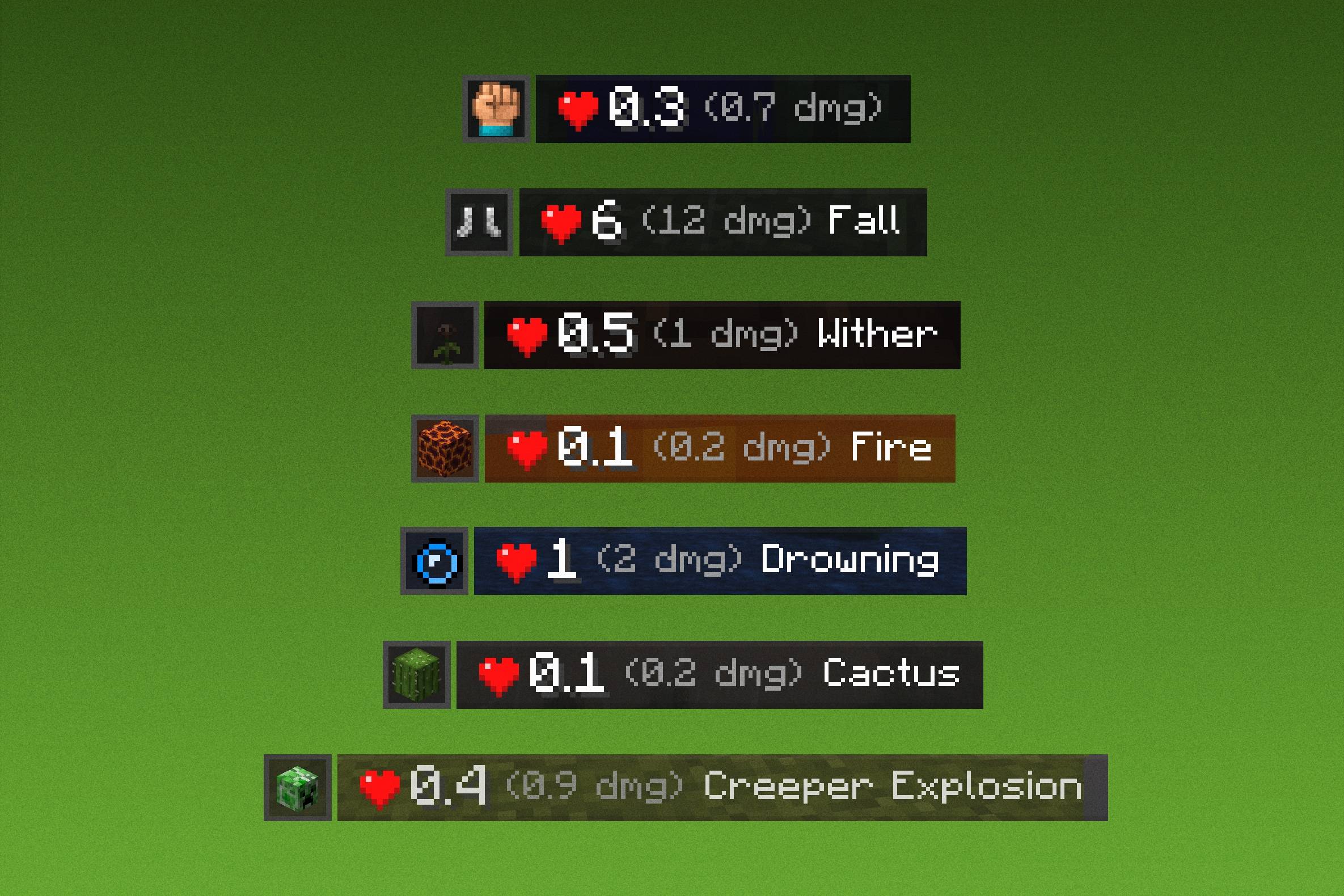
The mod prioritizes showing the attacking weapon. If no weapon is involved, it displays a matching source or icon based on the damage type, such as bare hand, fall damage, explosion, cactus, fire, drowning, wither, and more.
Weapon and Enchantment Info
Shows the attacking item name and compact enchantment information while preserving the item's original display color style when possible.
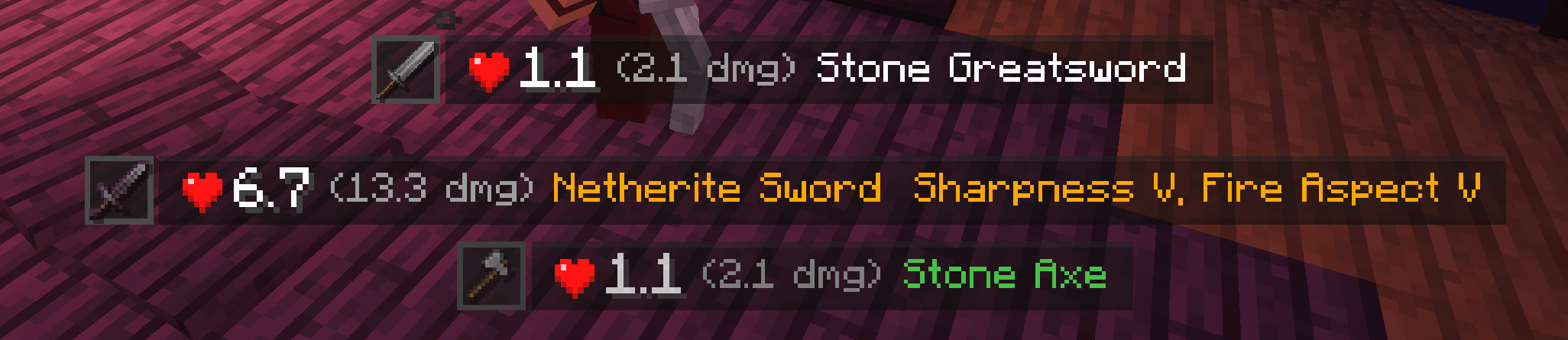
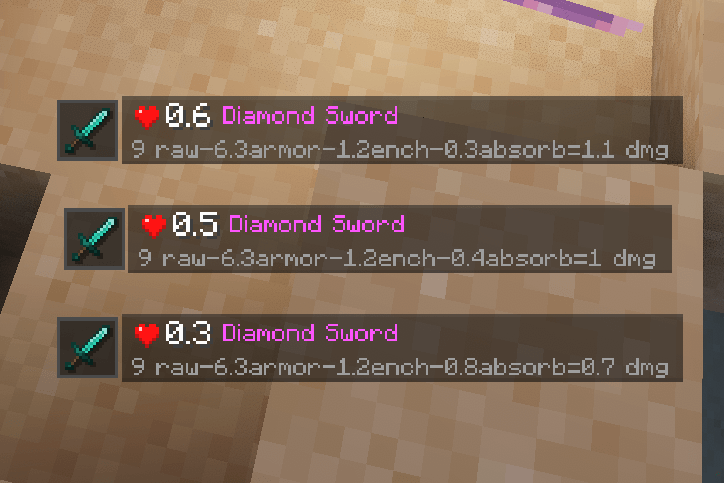
Simple and Detailed Mode Toggle
Use a keybind to switch between simple mode and detailed mode directly in game. Simple mode shows the core hit result, while detailed mode adds calculation details such as original damage, armor reduction, enchantment reduction, effect reduction, absorption, blocking, and more.
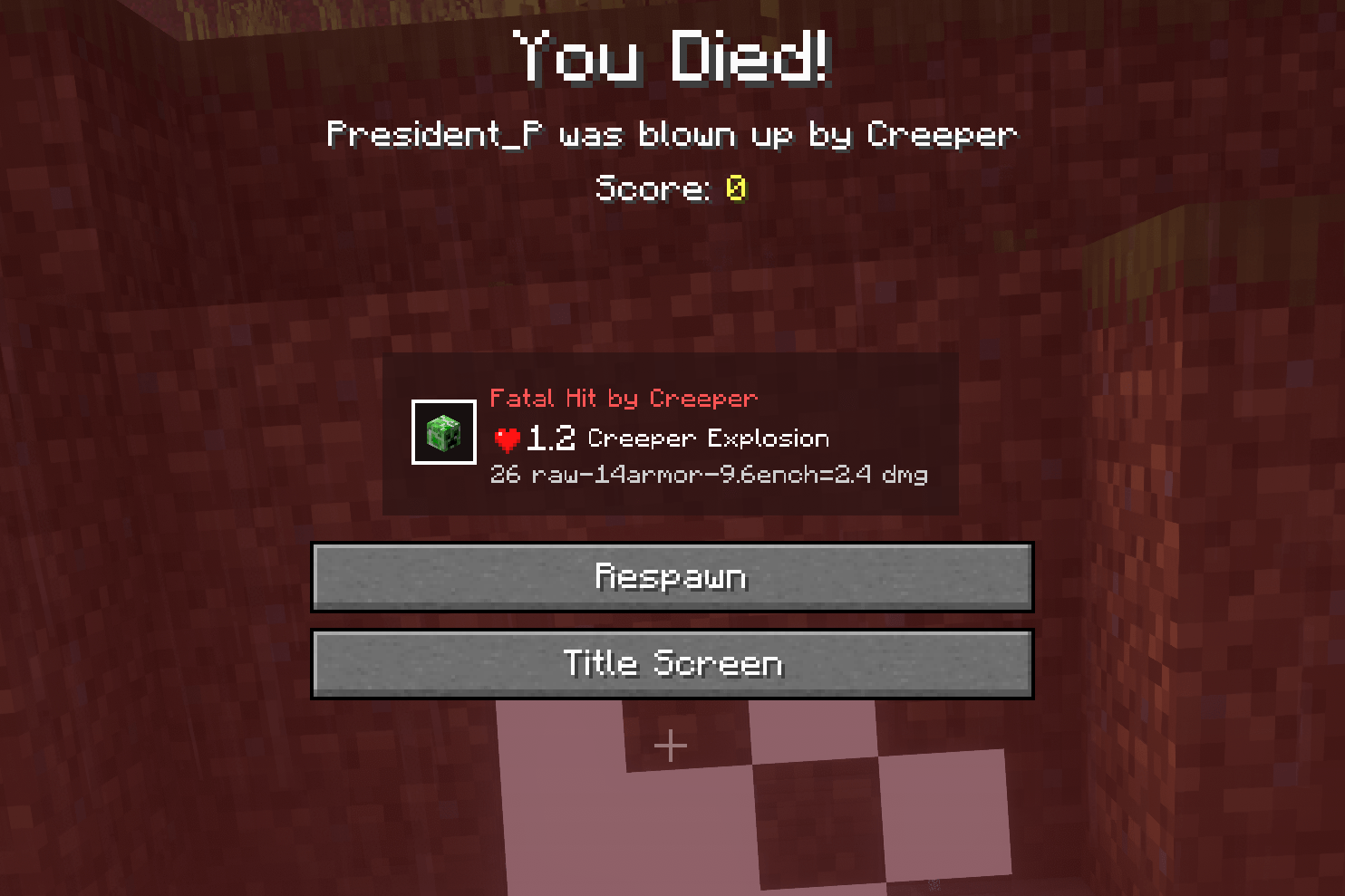
Fatal Hit
If a hit would kill the player, it is highlighted with a dedicated fatal-hit style and shows the source of the kill.
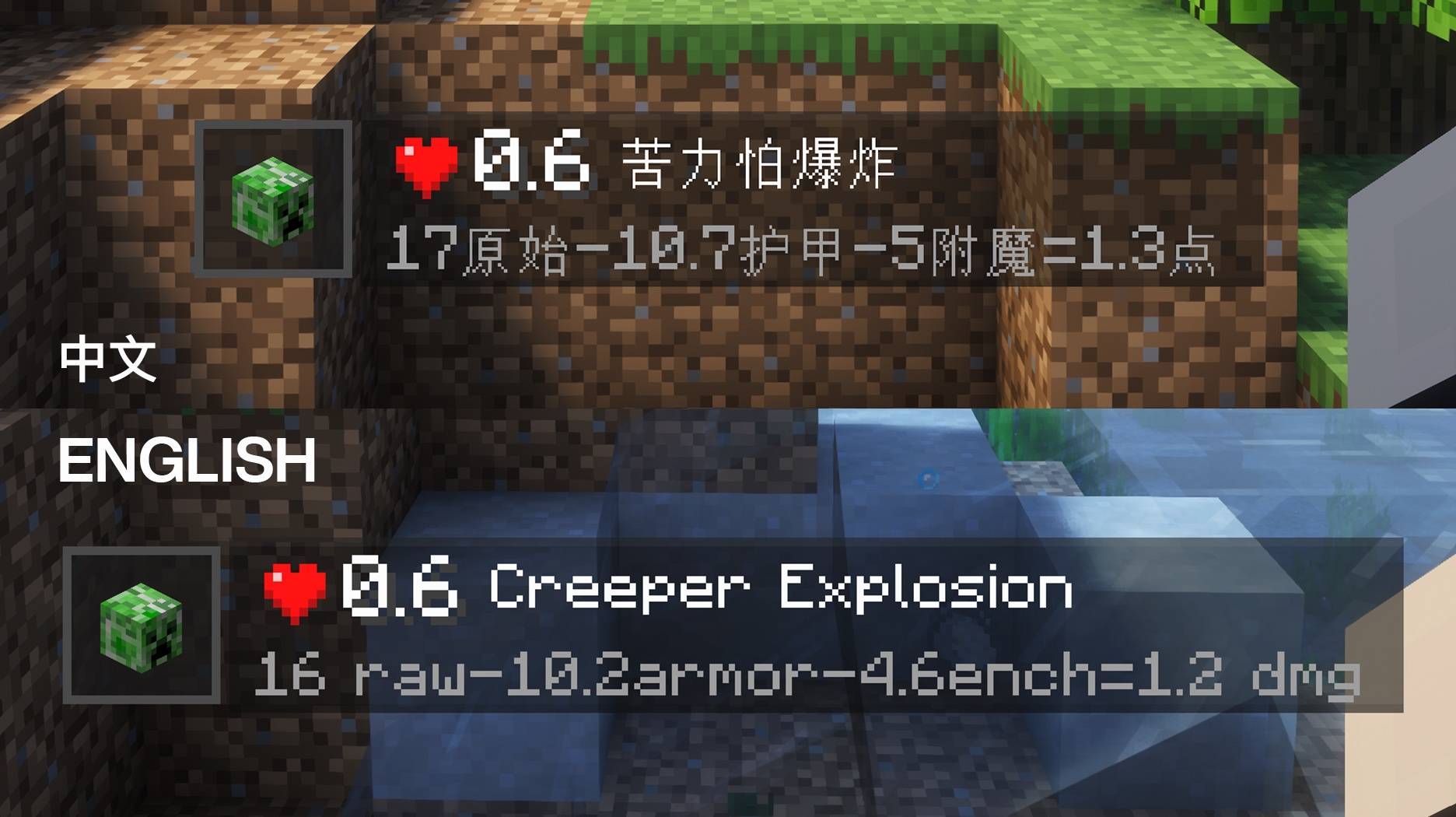
Chinese and English Support
Includes both Chinese and English text, and displays the matching language according to your Minecraft language setting.
Configurable HUD Appearance
Supports display options such as HUD position, scale, display duration, and background opacity, so the damage display can better fit your interface layout.
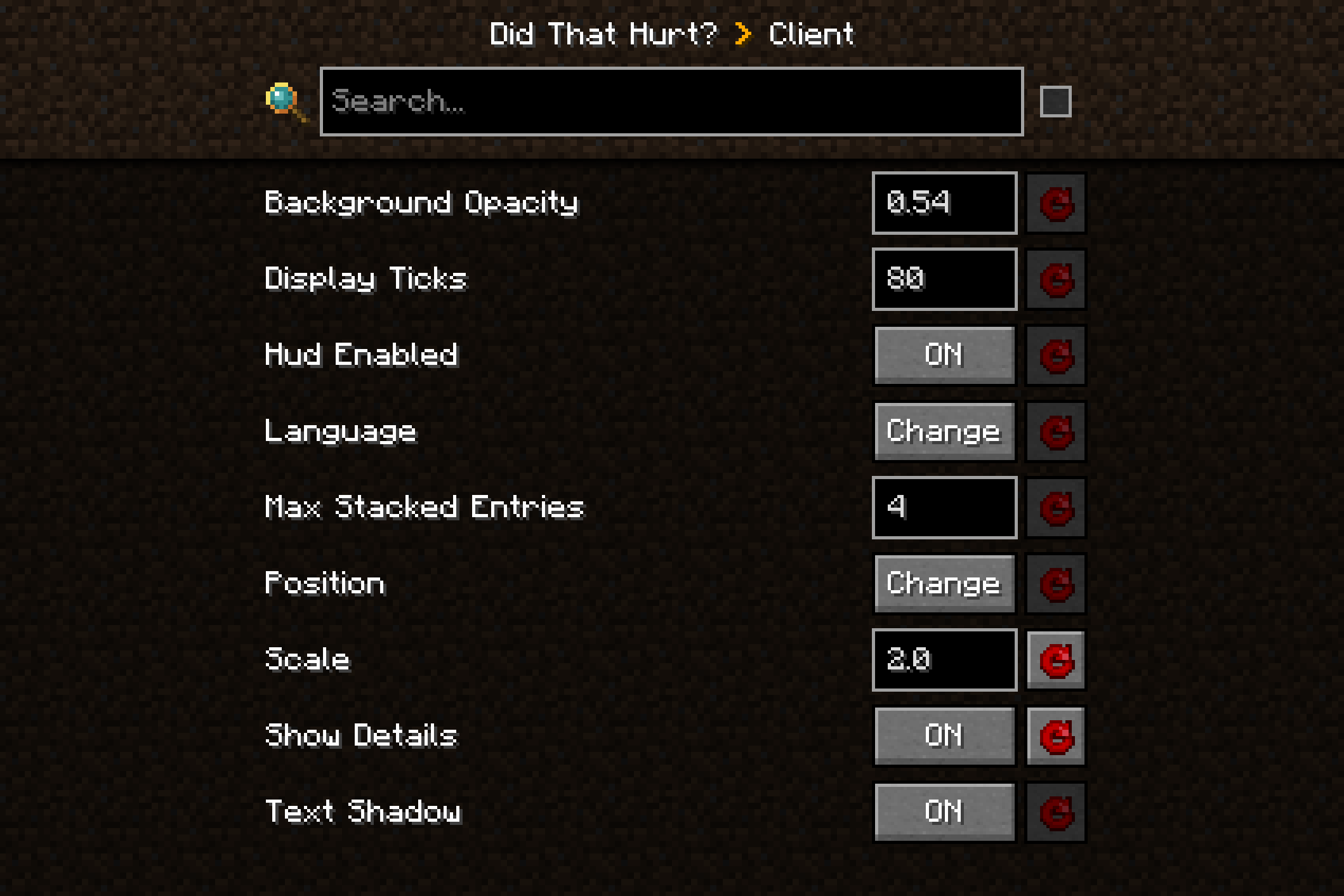
Modpacks & Permissions
You may include this mod in modpacks. Credit and a link back to the project page are appreciated.
Issues / Feedback
Please use GitHub Issues for bug reports and feedback. Include your Minecraft version, Forge version, mod version, crash log, and reproduction steps when possible.
https://github.com/ThisIsPresidentP/DidThatHurt/issues
Project description from CurseForge.
Pick your setup
Did That Hurt? by Minecraft version and loader
Choose the version and loader you play, then open the matching release.
Minecraft version
1.21.6
1 loader buildMinecraft version
1.21.5
1 loader buildMinecraft version
1.21.4
1 loader buildMinecraft version
1.21.1
2 loader buildsMinecraft version
1.20.1
1 loader buildCheck the dependencies, then try the file in a copied instance before changing a world you care about.
Recent files
Did That Hurt? versions and loaders
DidThatHurt-1.0.0-fabric-1.21.10.jar
1 Aug 2026
Client Source doesn’t say Server Source doesn’t say Dependencies No extras listed Listed on Release listing
Check the 1.21.10 · Fabric setup Fabric1.21.10 release
DidThatHurt-1.0.0-fabric-1.21.6.jar
1 Aug 2026
Client Source doesn’t say Server Source doesn’t say Dependencies No extras listed Listed on Release listing
Check the 1.21.6 · Fabric setup Fabric1.21.6 release
DidThatHurt-1.0.0-fabric-1.21.5.jar
1 Aug 2026
Client Source doesn’t say Server Source doesn’t say Dependencies No extras listed Listed on Release listing
Check the 1.21.5 · Fabric setup Fabric1.21.5 release
DidThatHurt-1.0.0-fabric-1.21.4.jar
1 Aug 2026
Client Source doesn’t say Server Source doesn’t say Dependencies No extras listed Listed on Release listing
Check the 1.21.4 · Fabric setup Fabric1.21.4 release
DidThatHurt-1.0.0-fabric-1.21.1.jar
1 Aug 2026
Client Source doesn’t say Server Source doesn’t say Dependencies No extras listed Listed on Release listing
Check the 1.21.1 · Fabric setup Fabric1.21.1 release
DidThatHurt-1.0.0-neoforge-1.21.1.jar
23 May 2026
Client Source doesn’t say Server Source doesn’t say Dependencies No extras listed Listed on Release listing
Check the 1.21.1 · NeoForge setup 1.21.1NeoForge release
DidThatHurt-1.0.0-forge-1.20.1.jar
23 May 2026
Client Source doesn’t say Server Source doesn’t say Dependencies No extras listed Listed on Release listing
Check the 1.20.1 · Forge setup 1.20.1Forge release
Looking for an older file? The official CurseForge project page is in Resources.
 mod
CurseForge + Modrinth · Minecraft
Agritech: Evolved (ATE)
Farming automation mod with planters, machines, modules, and power gen.
 mod
CurseForge + Modrinth · Minecraft
Rune Enchanting
Replace the enchanting system with a rune system. Find runes in the world and apply them to items
 mod
CurseForge + Modrinth · Minecraft
One Kick
One Kick - Kick anything flying, anytime, anywhere.