Minecraft version
Back to mods 
CurseForge · Minecraft mod
Area Restore
Mark a small area and turn it into a self-regenerating mining zone — broken blocks drop loot, then come back.
Choose a version Pick your version below, then grab the matching file.
Quick answer
Which Area Restore release should I use?
Latest stable file arearestore-1.1.0.jar
Game version 1.21.1
Loader NeoForge
Area Restore arearestore-1.1.0.jar targets 1.21.1 with NeoForge. The project page does not say whether this file belongs on the client, dedicated server, or both. No extra mods listed for this file.
Where it goes
Is Area Restore required on the client, server, or both?
The project page does not say whether this file belongs on the client, dedicated server, or both.
Client Source doesn’t say
Dedicated server Source doesn’t say
Loader for this release NeoForge
Required install it here Optional supported, not mandatory Not supported do not install here Source doesn’t say do not assume
The source does not explicitly classify this release as client-only or server-only.
What else does Area Restore arearestore-1.1.0.jar need?
arearestore-1.1.0.jar. Change the file and its required mods may change too.
This file does not list any required mods. Do not add a library just because a different file uses it.
This file does not list any required or optional mods.
Before you install it
Add Area Restore without breaking your instance.
Built for Area Restore arearestore-1.1.0.jar. Pick another file and the loader, install side or required mods may change.
- 01
Stick to this file
Use arearestore-1.1.0.jar. It targets 1.21.1 with NeoForge; another release may have different loader, side or dependency requirements.
- 02
Bring the mods it needs
This file does not list any required mods. Do not add a library just because a different file uses it.
- 03
Put it on the correct side
The project page does not say whether this file belongs on the client, dedicated server, or both.
- 04
Pick the file you checked
Use the “Get this file” button beside arearestore-1.1.0.jar. It opens that exact file at the source.
About this project
What does Area Restore add?
Area Restore
Tired of running back to the mines every time you need more iron? Area Restore lets you pick a small region of blocks and turn it into a self-regenerating mining zone. Break a block, get the drops, and a few seconds later the block reappears — exactly where it was, with exactly the same state.
Features
- Area Selector — a craftable tool. Right-click two corners to mark an area (auto-clamped to a 3×3×3 maximum), then right-click in the air to confirm.
- Source-agnostic regeneration — works with any way of breaking blocks: player hands, pickaxes, Create's Mechanical Drill, TNT, even other mods.
- Configurable delay — change
regenDelayTicksin<world>/serverconfig/arearestore-server.toml. Default 3 seconds, range 0.05s–5min. - Persists everywhere — snapshots are stored at the world level, so the tool can sit in a chest, in your ender chest, on the floor — regeneration keeps going.
- Subtle feedback — selection outline shown only to the holder; a soft chime and particle puff when a block regrows.
Crafting
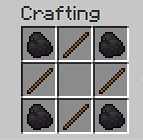
How to use
- Craft the Area Selector.
- Right-click two blocks to define opposite corners.
- Right-click in the air to confirm and start the snapshot.
- Break blocks inside the area — drops fall normally, blocks regenerate after the delay.
- Right-click in the air again to release and stop regeneration.
- Sneak + right-click to fully reset.
Requirements
- Minecraft 1.21.1
- NeoForge 21.1.x (tested on 21.1.222)
- Java 21
License
MIT — fork, modify, include in modpacks freely.
Project description from CurseForge.
Pick your setup
Area Restore by Minecraft version and loader
Choose the version and loader you play, then open the matching release.
Check the dependencies, then try the file in a copied instance before changing a world you care about.
Recent files
Area Restore versions and loaders
arearestore-1.1.0.jar
23 May 2026
Client Source doesn’t say Server Source doesn’t say Dependencies No extras listed Listed on Release listing
Check the 1.21.1 · NeoForge setup 1.21.1NeoForge release
Looking for an older file? The official CurseForge project page is in Resources.
 mod
mod CurseForge + Modrinth · Minecraft
Fertile Grounds
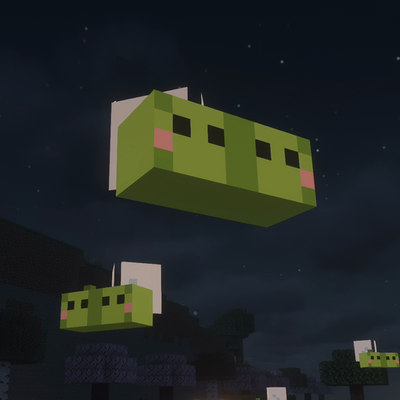
A cozy vanilla+ farming mod: richer soils speed up your crops, shy edamame fairies grow your fields at night, and late game they build you a lantern-lit garden. Inspired by Stardew Valley's crop fairy.
 mod
mod CurseForge + Modrinth · Minecraft
Macro Keybinds
Create macro to be more fast
 mod
mod CurseForge + Modrinth · Minecraft
cbbg 🥬
color banding be gone - Remove pesky color banding from Minecraft