Minecraft version
Back to mods 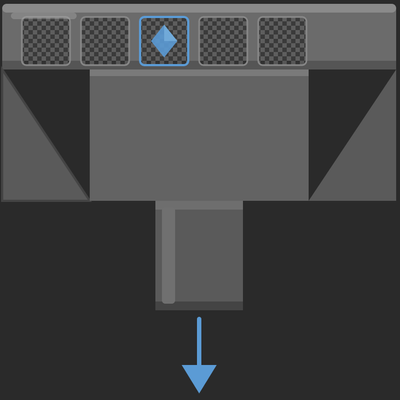
CurseForge · Minecraft mod
MrDeadPools Filter Hopper
A hopper with configurable item filter. Set up to 5 filter templates in the ghost slots — only matching items get transferred. No filter = everything blocked.
Choose a version Pick your version below, then grab the matching file.
Quick answer
Which MrDeadPools Filter Hopper release should I use?
Latest stable file filterhopper-1.21.1-1.0.1.jar
Game version 1.21.1
Loader NeoForge
MrDeadPools Filter Hopper filterhopper-1.21.1-1.0.1.jar targets 1.21.1 with NeoForge. The project page does not say whether this file belongs on the client, dedicated server, or both. No extra mods listed for this file.
Where it goes
Is MrDeadPools Filter Hopper required on the client, server, or both?
The project page does not say whether this file belongs on the client, dedicated server, or both.
Client Source doesn’t say
Dedicated server Source doesn’t say
Loader for this release NeoForge
Required install it here Optional supported, not mandatory Not supported do not install here Source doesn’t say do not assume
The source does not explicitly classify this release as client-only or server-only.
What else does MrDeadPools Filter Hopper filterhopper-1.21.1-1.0.1.jar need?
filterhopper-1.21.1-1.0.1.jar. Change the file and its required mods may change too.
This file does not list any required mods. Do not add a library just because a different file uses it.
This file does not list any required or optional mods.
Before you install it
Add MrDeadPools Filter Hopper without breaking your instance.
Built for MrDeadPools Filter Hopper filterhopper-1.21.1-1.0.1.jar. Pick another file and the loader, install side or required mods may change.
- 01
Stick to this file
Use filterhopper-1.21.1-1.0.1.jar. It targets 1.21.1 with NeoForge; another release may have different loader, side or dependency requirements.
- 02
Bring the mods it needs
This file does not list any required mods. Do not add a library just because a different file uses it.
- 03
Put it on the correct side
The project page does not say whether this file belongs on the client, dedicated server, or both.
- 04
Pick the file you checked
Use the “Get this file” button beside filterhopper-1.21.1-1.0.1.jar. It opens that exact file at the source.
About this project
What does MrDeadPools Filter Hopper add?
[ENG]
Filter Hopper
Filter Hopper is a lightweight NeoForge mod for Minecraft 1.21.1 that adds a new block: a hopper with a configurable item filter — perfect for automated sorting systems.
What is the Filter Hopper?
Vanilla hoppers transfer every item without distinction. The Filter Hopper gives you control: you decide which items are allowed to pass through and which are not. Everything else gets blocked.
How it works
Right-click the Filter Hopper to open it. You'll see a familiar interface — the vanilla hopper GUI — with one special detail: 5 ghost slots above the inventory, recognizable by their semi-transparent checkerboard grid overlay.
Drag an item into a ghost slot to set it as a filter template. The item stays in your hand — it is not consumed. Right-clicking a filled ghost slot removes the template again.
The Filter Hopper then only pulls items matching one of your templates from the inventory above and pushes them into the inventory it is facing — just like a regular hopper, but filtered.
Features
5 Ghost Slots — configure up to 5 different item templates simultaneously
Directional — faces all directions like a vanilla hopper (down, north, south, east, west)
Blocks everything without a filter — if no template is set, no items are transferred
Inactive without connection — if no inventory is present above or in the facing direction, nothing happens
Persistent — filter templates are saved and restored on world reload
Multiplayer compatible — all players see the same filter templates in real time
No dependencies — works without any additional mods
Usage
[Chest/Inventory]
↓
[Filter Hopper] → [Target Inventory]
Place the Filter Hopper and orient it towards the target inventory
Right-click → fill the ghost slots with your desired item templates
Place an inventory above the hopper
Done — the hopper will only transfer the filtered items
Compatibility
Minecraft: 1.21.1
ModLoader: NeoForge
Dependencies: none
Side: both (Client + Server)
[GER]
Filter Hopper
Der Filter Hopper ist eine leichtgewichtige NeoForge Mod für Minecraft 1.21.1, die einen neuen Block hinzufügt: einen Hopper mit konfigurierbarem Itemfilter — perfekt für automatisierte Sortiersysteme.
Was ist der Filter Hopper?
Vanilla Hopper transportieren alle Items ohne Unterschied. Der Filter Hopper gibt dir die Kontrolle: Du bestimmst welche Items transportiert werden dürfen und welche nicht. Alles andere wird blockiert.
Funktionsweise
Öffne den Filter Hopper mit einem Rechtsklick. Du siehst eine vertraute Oberfläche — die Vanilla Hopper GUI — mit einem besonderen Detail: 5 Ghost-Slots über dem Inventar, erkennbar an dem halbtransparenten Schachbrett-Gitter.
Ziehe ein Item in einen Ghost-Slot um es als Filter-Template zu setzen. Das Item bleibt dabei in deiner Hand — es wird nicht verbraucht. Rechtsklick auf einen belegten Ghost-Slot entfernt das Template wieder.
Der Filter Hopper zieht dann nur Items die einem deiner Templates entsprechen aus dem Inventar über ihm und schiebt sie in das Inventar in die Richtung in die er zeigt — genau wie ein normaler Hopper, nur gefiltert.
Features
5 Ghost-Slots — bis zu 5 verschiedene Item-Templates gleichzeitig konfigurierbar
Richtungsabhängig — zeigt in alle Richtungen wie ein Vanilla Hopper (unten, norden, süden, osten, westen)
Alles blockiert ohne Filter — ist kein Template gesetzt wird kein Item transportiert
Kein Inventar ohne Verbindung — ist kein Inventar oben oder in Blickrichtung vorhanden passiert nichts
Persistent — Filter-Templates bleiben nach dem Speichern und Neuladen erhalten
Multiplayer-kompatibel — alle Spieler sehen die gleichen Filter-Templates in Echtzeit
Keine Abhängigkeiten — funktioniert ohne weitere Mods
Verwendung
[Kiste/Inventar]
↓
[Filter Hopper] → [Ziel-Inventar]
Filter Hopper platzieren und in Richtung des Ziel-Inventars ausrichten
Rechtsklick → Ghost-Slots mit gewünschten Item-Templates befüllen
Inventar über dem Hopper platzieren
Fertig — der Hopper transportiert nur die gefilterten Items
Kompatibilität
Minecraft: 1.21.1
ModLoader: NeoForge
Abhängigkeiten: keine
Seite: beide (Client + Server)

Project description from CurseForge.
Pick your setup
MrDeadPools Filter Hopper by Minecraft version and loader
Choose the version and loader you play, then open the matching release.
Check the dependencies, then try the file in a copied instance before changing a world you care about.
Recent files
MrDeadPools Filter Hopper versions and loaders
filterhopper-1.21.1-1.0.1.jar
26 May 2026
Client Source doesn’t say Server Source doesn’t say Dependencies No extras listed Listed on Release listing
Check the 1.21.1 · NeoForge setup 1.21.1NeoForge release
filterhopper-1.21.1-1.0.0.jar
25 May 2026
Client Source doesn’t say Server Source doesn’t say Dependencies No extras listed Listed on Release listing
Check the 1.21.1 · NeoForge setup 1.21.1NeoForge release
Looking for an older file? The official CurseForge project page is in Resources.