Minecraft version
Back to mods 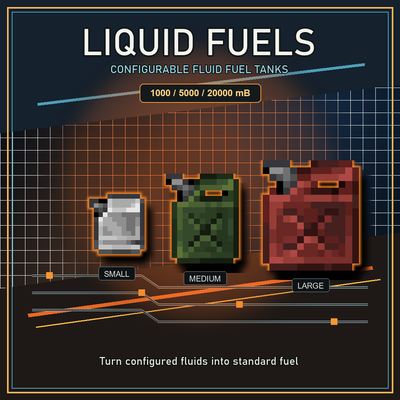
CurseForge · Minecraft mod
Liquid_Fuels
A highly customizable solution for converting liquid into conventional fuel, and a universal container compatible with other mods.
Choose a version Pick your version below, then grab the matching file.
Quick answer
Which Liquid_Fuels release should I use?
Latest stable file LiquidFuels-NeoForge-1.21.1-1.0.0.jar
Game version 1.21, 1.21.1
Loader NeoForge
Liquid_Fuels LiquidFuels-NeoForge-1.21.1-1.0.0.jar targets 1.21, 1.21.1 with NeoForge. The project page does not say whether this file belongs on the client, dedicated server, or both. No extra mods listed for this file.
Where it goes
Is Liquid_Fuels required on the client, server, or both?
The project page does not say whether this file belongs on the client, dedicated server, or both.
Client Source doesn’t say
Dedicated server Source doesn’t say
Loader for this release NeoForge
Required install it here Optional supported, not mandatory Not supported do not install here Source doesn’t say do not assume
The source does not explicitly classify this release as client-only or server-only.
What else does Liquid_Fuels LiquidFuels-NeoForge-1.21.1-1.0.0.jar need?
LiquidFuels-NeoForge-1.21.1-1.0.0.jar. Change the file and its required mods may change too.
This file does not list any required mods. Do not add a library just because a different file uses it.
This file does not list any required or optional mods.
Before you install it
Add Liquid_Fuels without breaking your instance.
Built for Liquid_Fuels LiquidFuels-NeoForge-1.21.1-1.0.0.jar. Pick another file and the loader, install side or required mods may change.
- 01
Stick to this file
Use LiquidFuels-NeoForge-1.21.1-1.0.0.jar. It targets 1.21, 1.21.1 with NeoForge; another release may have different loader, side or dependency requirements.
- 02
Bring the mods it needs
This file does not list any required mods. Do not add a library just because a different file uses it.
- 03
Put it on the correct side
The project page does not say whether this file belongs on the client, dedicated server, or both.
- 04
Pick the file you checked
Use the “Get this file” button beside LiquidFuels-NeoForge-1.21.1-1.0.0.jar. It opens that exact file at the source.
About this project
What does Liquid_Fuels add?
中文
最重要:内容都在配置文件里面,如果没有自行魔改,更新时建议删除旧配置文件,让模组重新生成新版默认配置。
1.0.0 版本更新速览
- 三种油桶方块改为标准含水方块: 可以放置在水源中与水共存,水流流入只把方块含水化,不会冲走方块。
- 新增手持油桶右键容器主动与容器交换液体(即高兼容模式,默认启用),只要容器本身确实有输入输出的功能,则可正常识别,即兼容更多的容器了.如,沉浸式车辆的燃油泵、Refueled 的加油站、IE 储罐.机械动力的注液器等等。 如果容器本身只能输入则也只能识别到输入,输出也一样,必须容器有才能识别,如群峦传说的坩埚,则只有输入没有输出,只能给液体倒入,无法取出。
- 新增可选沉浸式车辆(Immersive Vehicles)加油兼容,默认启用: 油桶可以直接给 IV 车辆和车上的储液零件加油。如果兼容失效时也只会静默不加载不影响正常的功能,
- 新增 配置项目
[placement] disable_right_click_placement(默认开启): 不潜行的右键不再放置油桶,避免舀岩浆这类危险液体时误把油桶放进液体里;潜行右键仍照常放置,物品提示会写明"下蹲右键放置在地上"。 - 新增
[tanks] fluid_blacklist,可以声明油桶不允许装入的流体,支持精确流体 ID 与流体标签。 - 新增
[interaction] block_blacklist(容器黑名单),可以声明本模组不主动右键交互的方块,支持方块 ID 与方块标签。
液体燃料
高度可自定义的流体燃料转换方案,同时可作为通用容器兼容各模组。
它添加了小油桶、中油桶和大油桶三种可携带、可放置的储液容器。玩家或整合包维护者可以在一份全局配置文件中声明哪些流体可以燃烧,以及每 1000 mB 对应的燃烧时间,然后把这些流体通过油桶当作常规燃料使用。
功能
- 三种油桶:
- 小油桶:
1000 mB - 中油桶:
5000 mB - 大油桶:
20000 mB
- 小油桶:
- 油桶既是物品,也是可放置方块。
- 方块形态的油桶是标准含水方块,可以和方块里的水共存。
- 空桶可以堆叠,带液体的油桶不可堆叠。
- 物品态和方块态都有标准流体能力。
- 支持流体容器、流体管道,以及通过标准流体能力交互的其他模组。
- 手持油桶右键即可主动与其它模组的流体容器交换液体(高兼容模式);只在容器确实存在输入输入时才有效。假容器或者本身不支持输入输出则无效,具体还请游戏实测。
- 可以在配置中声明油桶不允许装入的流体(精确流体 ID 或流体标签)。
- 可右键流体源方块直接打捞液体。
- 支持背包内倒液: 鼠标拿着流体容器,右键槽内油桶即可倒入。
- 配置中声明的流体可作为常规燃料使用。
- 每次作为燃料消耗
100 mB,保留油桶本体。 - JEI 会显示已配置且当前游戏实际存在的可燃流体、
1000MB单位和约可燃烧物品数量。 - 对 Immersive Aircraft 提供可选燃料消耗兼容,对沉浸式车辆(Immersive Vehicles)提供可选车辆加油兼容;可选兼容出错时会自动停用并只打印一行日志。
- 对 TerraFirmaCraft 提供蓝钢/红钢可选合成配方。
配置
配置文件生成在 config/liquidfuels-common.toml。它自带中英双语注释,可以直接编辑;下面这份就是默认生成的完整内容,可以直接照抄一份用:
#Fuel settings.
#燃料设置。
[fuels]

    #Fluid fuel definitions. Value is burn ticks for 1000 mB. 200 ticks = 1 smelted item.
    #Use an exact fluid id: modid:fluid=burn_ticks_for_1000mb, for example minecraft:lava=20000.
    #Use a fluid tag with #: #namespace:tag=burn_ticks_for_1000mb, for example #forge:diesel=24000 or #c:biodiesel=12000.
    #Exact fluid ids take priority over tags. If multiple matching tags exist, the later config entry wins.
    #The tank consumes 100 mB each time, so each use burns for one tenth of the configured value.
    #Unknown exact fluids are ignored until their owning mod is loaded. Unknown tags are allowed and only match when a loaded fluid has that tag.
    #Default format is a TOML table with one fuel per line. Old string arrays like ["modid:fluid=20000"] are still accepted.
    #In table format, keep quotes around keys that contain : or #.
    #液体燃料配置。右侧数值是每 1000 mB 的燃烧 tick,200 tick = 1 个物品。
    #精确流体 ID 写法: modid:fluid=每1000mB燃烧tick,例如 minecraft:lava=20000。
    #流体标签写法需要以 # 开头: #namespace:tag=每1000mB燃烧tick,例如 #forge:diesel=24000 或 #c:biodiesel=12000。
    #精确流体 ID 优先于标签;如果多个标签同时匹配同一种流体,靠后的配置项生效。
    #油桶每次作为燃料消耗 100 mB,所以单次燃烧时间是配置值的十分之一。
    #未加载的精确流体会被忽略;未加载的标签可以保留,只有实际加载的流体带有该标签时才会匹配。
    #默认格式是 TOML 子表,每种燃料单独一行;旧版 ["modid:fluid=20000"] 字符串数组仍兼容。
    #子表格式中,带 : 或 # 的键需要保留英文引号。
    [fuels.burn_times_for_1000mb]
        "minecraft:lava" = 20000
        "tfc:olive_oil" = 8000
        "immersiveengineering:creosote" = 3200
        "immersiveengineering:ethanol" = 8000
        "immersiveengineering:plantoil" = 8000
        "immersiveengineering:biodiesel" = 12000
        "immersiveengineering:high_power_biodiesel" = 13200
        "#c:creosote" = 3200
        "#c:ethanol" = 8000
        "#c:plantoil" = 8000
        "#c:plant_oil" = 8000
        "#c:biodiesel" = 12000
        "#c:high_power_biodiesel" = 13200
        "#c:diesel" = 24000
        "#c:diesel_sulfur" = 20000
        "#c:kerosene" = 24000
        "#c:gasoline" = 32000
        "#forge:creosote" = 3200
        "#forge:ethanol" = 8000
        "#forge:plantoil" = 8000
        "#forge:plant_oil" = 8000
        "#forge:biodiesel" = 12000
        "#forge:diesel" = 24000
        "#forge:diesel_sulfur" = 20000
        "#forge:kerosene" = 24000
        "#forge:gasoline" = 32000
        "createdieselgenerators:ethanol" = 8000
        "createdieselgenerators:plant_oil" = 8000
        "createdieselgenerators:biodiesel" = 12000
        "createdieselgenerators:diesel" = 24000
        "createdieselgenerators:gasoline" = 32000
        "immersivepetroleum:diesel" = 24000
        "immersivepetroleum:diesel_sulfur" = 20000
        "immersivepetroleum:kerosene" = 24000
        "immersivepetroleum:gasoline" = 32000

#Fuel tank capacity and fluid blacklist settings.
#油桶容量和液体黑名单设置。
[tanks]
    #Capacity of the small fuel tank, in mB.
    #The tank still consumes 100 mB each time it is used as fuel.
    #小油桶容量,单位 mB。
    #油桶每次作为燃料仍消耗 100 mB。
    # Range: > 1
    small_fuel_tank_capacity = 1000
    #Capacity of the medium fuel tank, in mB.
    #中油桶容量,单位 mB。
    # Range: > 1
    fuel_tank_capacity = 5000
    #Capacity of the large fuel tank, in mB.
    #大油桶容量,单位 mB。
    # Range: > 1
    large_fuel_tank_capacity = 20000
    #Fluids the fuel tanks refuse to hold. Empty = every fluid can be stored.
    #Entries are exact fluid ids like minecraft:water, or fluid tags like #namespace:tag.
    #This applies to every way a tank is filled (this mod's blocks, other mods' containers and pipes, world fluid sources and the block interaction below); a tank that already holds a listed fluid can still be emptied.
    #油桶不允许装入的流体,留空 = 任何流体都可以装。
    #支持精确流体 ID(例如 minecraft:water)与流体标签(#namespace:tag)。
    #对油桶的所有进液途径生效(本模组方块、其它模组的容器与管道、世界流体源、下面的方块交互);已经装有该流体的油桶仍可正常倒出。
    fluid_blacklist = []

#High-compatibility interaction settings.
#高兼容交互设置。
[interaction]
    #High-compatibility mode: a normal right-click with a fuel tank exchanges fluid with containers on its own, such as Immersive Vehicles fuel pumps or the Create spout.
    #It only takes effect when the container really supports the direction used: an input-only container can only be filled, an output-only container can only be drained. Which face exposes the capability does not matter, it just has to exist.
    #Keeping this true is recommended. When set to false the tank can only rely on the container starting the exchange itself, and many containers never implement that.
    #高兼容模式,手持油桶右键可主动从容器里面交换液体,如沉浸式车辆的燃油泵,机械动力注液器等也可以交互了。
    #只有容器确实支持输入输出才可生效,只支持输入则只能输入等。不管输入输出面在哪里,存在即有效。
    #建议常为 true,设为 false 时,只能依赖容器本身主动交互,但很多容器没有制作这部分功能。
    direct_block_fluid_interaction = true
    #If some containers should not be directly drained or filled, add them to the blacklist here.
    #Entries are block ids like somemod:fuel_pump, or block tags like #namespace:tag.
    #Blacklisted blocks only have this mod's own right-click exchange switched off; the exchange they start themselves still works.
    #如果部分容器觉得不适合直接取出放入液体,可在此处给容器加入黑名单。
    #支持方块 ID(例如 somemod:fuel_pump)与方块标签(#namespace:tag)。
    #黑名单方块只关闭本模组新增的右键主动交换这一个入口,其自身的主动交换仍然有效。
    block_blacklist = []

#Optional cross-mod compatibility.
#可选的跨模组兼容。
[compat]
    #Enables the Immersive Vehicles (modid mts) bridge: right-clicking an IV vehicle or one of its fluid tanks with a fuel tank item moves fuel between them.
    #The bridge only loads when Immersive Vehicles is installed. If anything inside it fails it disables itself and logs a single warning line instead of breaking the game.
    #沉浸式车辆(modid mts)桥接:手持油桶右键 IV 车辆本体或车上的储液零件可以互相转移液体。
    #仅在安装沉浸式车辆时才会生效;桥接内部一旦出错会自动停用并只打印一行警告,不会导致游戏崩溃。
    immersive_vehicles_compat = true

#Placement settings.
#放置设置。
[placement]
    #If true, a normal (non-sneaking) right-click with a fuel tank never places it as a block, so a click near fluid only ever scoops or exchanges and can never drop the tank into lava by accident.
    #Sneaking still places the tank as usual. Set to false to restore the vanilla-style behaviour where a normal right-click can place the tank.
    #开启后,不潜行的右键不会把油桶当方块放置,避免在舀液体(尤其岩浆)时误操作把油桶放进液体里。
    #潜行右键仍照常放置。设为 false 可回到原版风格的右键放置行为。
    disable_right_click_placement = true
注释里没有举例、需要自己填的两项(可直接照抄):
- 不让油桶装入某些流体 ——
[tanks] fluid_blacklist:
fluid_blacklist = ["minecraft:water", "tfc:river_water"]
支持精确流体 ID 与 #namespace:tag 流体标签;对油桶的所有进液途径生效(世界流体源、其它模组的容器与管道、方块交互),已经装有该流体的油桶仍可正常倒出。
- 不让本模组主动右键某些方块 ——
[interaction] block_blacklist:
block_blacklist = ["somemod:fuel_pump", "#somemod:fluid_blocks"]
支持方块 ID 与 #namespace:tag 方块标签;只关闭本模组新增的右键主动交换这一步,方块自身的主动交换仍然有效。
三点配置注释里没写:
- 表格式每行末尾不要加逗号。
- 燃烧值示例:
"minecraft:lava" = 20000表示1000 mB烧20000 tick;油桶实际每次烧100 mB,也就是每次2000 tick。桶内不足100 mB时不视为燃料。 - 把
[tanks]容量调低后,已有油桶或方块里超过新上限的液体按新上限处理。
配方
原版默认配方:
- 上排: 铁锭、空、铁锭
- 中排: 空、铁桶、空
- 下排: 空、空、空
该配方合成小油桶。
同样形状继续升级:
- 小油桶 + 2 个铁锭 -> 中油桶
- 中油桶 + 2 个铁锭 -> 大油桶
安装 TerraFirmaCraft 时,会额外启用可选配方:
- 蓝钢桶 + 2 个蓝钢锭 -> 小油桶
- 红钢桶 + 2 个红钢锭 -> 小油桶
- 小油桶 + 2 个蓝钢锭或红钢锭 -> 中油桶
- 中油桶 + 2 个蓝钢锭或红钢锭 -> 大油桶
所有配方都是数据包配方,整合包可以覆盖或移除。
Liquid Fuels / 液体燃料
English
The most important thing: All the content is contained in the configuration file. If you have not customized it yourself, it is recommended to delete the old config file when updating so the mod can generate the new default config.
1.0.0 Update Overview
- All three placed fuel tanks are now standard waterlogged blocks: they can share a block with water, and flowing water only waterlogs them instead of washing them away.
- A fuel tank right-click now actively exchanges fluid with containers (that is the high-compatibility mode, enabled by default). Any container that really supports input and/or output is recognised, so far more containers work: Immersive Vehicles fuel pumps, Refueled gas stations, IE tanks, the Create spout, and so on. If a container only supports input, only input is recognised, and the same goes for output — the container has to actually support the direction. TFC's crucible, for example, only accepts fluid: you can pour in, but you can never take it out.
- Optional Immersive Vehicles refuelling compatibility, enabled by default: a fuel tank can refuel IV vehicles and the fluid tank parts mounted on them. If that compatibility fails it simply does not load and nothing else is affected.
- New config entry
[placement] disable_right_click_placement(enabled by default): a normal right-click no longer places the tank, so aiming around dangerous fluids like lava can never drop the tank into them; sneaking still places it as usual, and the item tooltip says "Sneak + right-click to place it". - New
[tanks] fluid_blacklist, which lists fluids the tanks are not allowed to hold; exact fluid ids and fluid tags are supported. - New
[interaction] block_blacklist(container blacklist), which lists blocks this mod must not grab the right-click from; block ids and block tags are supported.
Liquid Fuels
A highly customizable solution for converting liquid into conventional fuel, and a universal container compatible with other mods.
It adds three portable and placeable storage tanks: small, medium and large. Players or modpack maintainers can declare which fluids burn, and the burn time for each 1000 mB, in one global config file, then use those fluids as ordinary fuel through the tanks.
Features
- Three fuel tanks:
- Small Fuel Tank:
1000 mB - Fuel Tank:
5000 mB - Large Fuel Tank:
20000 mB
- Small Fuel Tank:
- Tanks work both as items and as placed blocks.
- Placed tanks are standard waterlogged blocks, so they can share a block with water.
- Empty tanks stack; filled tanks do not stack.
- Tank items and placed blocks both expose standard fluid capabilities.
- Supports fluid containers, pipes, and other mods that interact through standard fluid capabilities.
- A fuel tank right-click actively exchanges fluid with other mods' containers (high-compatibility mode); it only works when the container really supports input/output. Fake containers, or containers that support neither, do nothing — verify the specific case in game.
- Fluids the tanks are not allowed to hold can be listed in the config (exact fluid ids or fluid tags).
- Right-click a fluid source block to scoop fluid directly.
- Inventory fluid transfer: hold a fluid container on the cursor and right-click a tank slot to pour into it.
- Fluids declared in the config can be used as regular fuel.
- Each fuel use consumes
100 mBand keeps the tank item. - JEI shows the configured burnable fluids that exist in the current game, the
1000MBunit, and the approximate item burn count. - Optional Immersive Aircraft fuel consumption compatibility, and optional Immersive Vehicles refuelling compatibility; if either fails it disables itself and logs a single line.
- Optional TerraFirmaCraft recipes using blue steel and red steel.
Configuration
The generated config lives at config/liquidfuels-common.toml. It carries bilingual comments and can be edited as it is; the complete default content is listed as a template in the Chinese section above (the file itself is the same for both versions).
Two entries have no examples in the comments and are worth copying:
- Fluids the tanks must not hold —
[tanks] fluid_blacklist:
fluid_blacklist = ["minecraft:water", "tfc:river_water"]
Exact fluid ids and #namespace:tag fluid tags are supported. It applies to every way a tank is filled (world fluid sources, other mods' containers and pipes, block interaction), and a tank that already holds a listed fluid can still be emptied.
- Blocks this mod must not grab the right-click from —
[interaction] block_blacklist:
block_blacklist = ["somemod:fuel_pump", "#somemod:fluid_blocks"]
Block ids and #namespace:tag block tags are supported. It only switches off this mod's own right-click exchange; the exchange a block starts itself still works.
Three notes the comments do not cover:
- Do not add trailing commas in table format.
- Worked example:
"minecraft:lava" = 20000means1000 mBburns for20000ticks; a fuel use consumes100 mB, so each use is2000ticks. Tanks holding less than100 mBare not treated as fuel. - If a
[tanks]capacity is lowered, fluid above the new limit in existing tanks or blocks is clamped to it.
Recipes
Vanilla-style recipes:
- Top row: Iron Ingot, Empty, Iron Ingot
- Middle row: Empty, Bucket, Empty
- Bottom row: Empty, Empty, Empty
This crafts a Small Fuel Tank.
The same shape upgrades:
- Small Fuel Tank + 2 Iron Ingots -> Fuel Tank
- Fuel Tank + 2 Iron Ingots -> Large Fuel Tank
When TerraFirmaCraft is loaded, additional optional recipes are available:
- Blue Steel Bucket + 2 Blue Steel Ingots -> Small Fuel Tank
- Red Steel Bucket + 2 Red Steel Ingots -> Small Fuel Tank
- Small Fuel Tank + 2 Blue Steel or Red Steel Ingots -> Fuel Tank
- Fuel Tank + 2 Blue Steel or Red Steel Ingots -> Large Fuel Tank
All recipes are data-pack recipes and can be overwritten or removed by modpacks.
Project description from CurseForge.
Pick your setup
Liquid_Fuels by Minecraft version and loader
Choose the version and loader you play, then open the matching release.
Minecraft version
1.21
1 loader buildMinecraft version
1.20.1
1 loader buildMinecraft version
1.20
1 loader buildCheck the dependencies, then try the file in a copied instance before changing a world you care about.
Recent files
Liquid_Fuels versions and loaders
LiquidFuels-NeoForge-1.21.1-1.0.0.jar
4 Oct 2026
Client Source doesn’t say Server Source doesn’t say Dependencies No extras listed Listed on Release listing
Check the 1.21.1 · NeoForge setup 1.211.21.1NeoForge release
LiquidFuels-Forge-1.20.1-1.0.0.jar
4 Oct 2026
Client Source doesn’t say Server Source doesn’t say Dependencies No extras listed Listed on Release listing
Check the 1.20.1 · Forge setup 1.20.1Forge1.20 release
LiquidFuels-Forge-1.20.1-0.2.0.jar
5 Jul 2026
Client Source doesn’t say Server Source doesn’t say Dependencies No extras listed Listed on Release listing
Check the 1.20.1 · Forge setup 1.20.1Forge1.20 release
LiquidFuels-NeoForge-1.21.1-0.2.0.jar
5 Jul 2026
Client Source doesn’t say Server Source doesn’t say Dependencies No extras listed Listed on Release listing
Check the 1.21.1 · NeoForge setup 1.211.21.1NeoForge release
LiquidFuels-NeoForge-1.21.1-0.1.1.jar
1 Jul 2026
Client Source doesn’t say Server Source doesn’t say Dependencies No extras listed Listed on Release listing
Check the 1.21.1 · NeoForge setup 1.211.21.1NeoForge release
LiquidFuels-Forge-1.20.1-0.1.1.jar
1 Jul 2026
Client Source doesn’t say Server Source doesn’t say Dependencies No extras listed Listed on Release listing
Check the 1.20.1 · Forge setup 1.20.1Forge release
liquidfuels-0.1.0.jar
26 May 2026
Client Source doesn’t say Server Source doesn’t say Dependencies No extras listed Listed on Release listing
Check the 1.20.1 · Forge setup 1.20.1Forge release
Looking for an older file? The official CurseForge project page is in Resources.