Minecraft version
Back to mods 
CurseForge · Minecraft mod
Twitchify
Integrate your Twitch Chat into Minecraft with interaction commands.
Choose a version Pick your version below, then grab the matching file.
Quick answer
Which Twitchify release matches 1.8.9 Forge?
Best match for your filters twitchify-1.0.0.jar
Game version 1.8.9
Loader Forge
twitchify-1.0.0.jar targets 1.8.9 with Forge. The project page does not say whether this file belongs on the client, dedicated server, or both. No extra mods listed for this file.
Where it goes
Is Twitchify required on the client, server, or both?
The project page does not say whether this file belongs on the client, dedicated server, or both.
Client Source doesn’t say
Dedicated server Source doesn’t say
Loader for this release Forge
Required install it here Optional supported, not mandatory Not supported do not install here Source doesn’t say do not assume
The source does not explicitly classify this release as client-only or server-only.
What else does twitchify-1.0.0.jar need?
twitchify-1.0.0.jar on 1.8.9 Forge. Every mod below is checked against that same setup.
This file does not list any required mods. Do not add a library just because a different file uses it.
This file does not list any required or optional mods.
Before you install it
Add Twitchify without breaking your instance.
Built for twitchify-1.0.0.jar on 1.8.9 Forge. Pick another file and the loader, install side or required mods may change.
- 01
Stick to this file
Use twitchify-1.0.0.jar. It targets 1.8.9 with Forge; another release may have different loader, side or dependency requirements.
- 02
Bring the mods it needs
This file does not list any required mods. Do not add a library just because a different file uses it.
- 03
Put it on the correct side
The project page does not say whether this file belongs on the client, dedicated server, or both.
- 04
Pick the file you checked
Use the “Get this file” button beside twitchify-1.0.0.jar. It opens that exact file at the source.
About this project
What does Twitchify add?
Twitchify - A Twitch Chat integration with commands to interact with the game
Twitchify is a lightweight, customizable Minecraft Mod that lets you display the live Twitch Chat of any channel directly in-game. The chat appears in the top-left corner, making it perfect for streamers who have only one screen and still want to read the chat without switching between applications. Additionally, it provides commands that let your community interact with the game without causing too much disruption.
Key Features:
- Live Twitch Chat Overlay
Connect to any Twitch Channel and view incoming messages in real time. The overlay is clean, minimal, and designed to stay out of your way while playing.
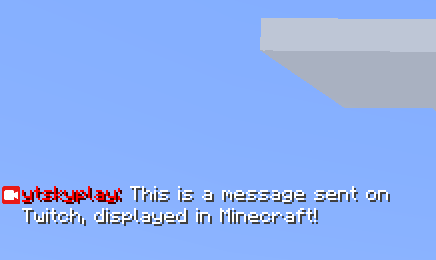
- Chat Commands
Twitchify allows you to enable/disable commands that interact with your game, which creates hilarious scenarios if timed properly. To make sure you won't get disturbed during the whole gameplay, you can set a cooldown to make sure commands won't be spammed by your viewers and make the game unplayable.
Commands:
- !america - Plays a loud version of the American Anthem
- !bruh - Plays the bruh meme sound
- !scream - Plays the Wilhelm scream sound
- !bed - Plays the "BED DESTROYED" Effect from Hypixel
- !jump - Like pressing the space bar
- !drop - Drops your current item holding
- !message - Lets the viewer write a message into public chat in your name (WARNING: NO FILTER IN PLACE BESIDES THE TWITCH ONE)
- !horbar - Changes your selected slot in your hotbar (0-8)
- Custom commands will be added in the future. So stay tuned!
Third-Party Notice:
- Twich4j: For providing the API to receive the messages sent on twitch
Project description from CurseForge.
Pick your setup
Twitchify by Minecraft version and loader
Choose the version and loader you play, then open the matching release.
Check the dependencies, then try the file in a copied instance before changing a world you care about.
Recent files
Twitchify versions and loaders
twitchify-1.0.0.jar
26 May 2026
Client Source doesn’t say Server Source doesn’t say Dependencies No extras listed Listed on Release listing
Check the 1.8.9 · Forge setup Forge1.8.9 release
Looking for an older file? The official CurseForge project page is in Resources.