Minecraft version
Back to mods 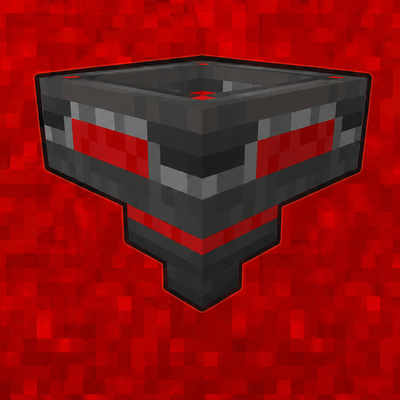
CurseForge · Minecraft mod
Item Filter
A configurable Fabric item filter block that works like a hopper with filter slots and toggleable filter mode.
Choose a version Pick your version below, then grab the matching file.
Quick answer
Which Item Filter release should I use?
Latest stable file itemfilter-1.1.0.jar
Game version 1.21.1
Loader Fabric
Item Filter itemfilter-1.1.0.jar targets 1.21.1 with Fabric. The project page does not say whether this file belongs on the client, dedicated server, or both. No extra mods listed for this file.
Where it goes
Is Item Filter required on the client, server, or both?
The project page does not say whether this file belongs on the client, dedicated server, or both.
Client Source doesn’t say
Dedicated server Source doesn’t say
Loader for this release Fabric
Required install it here Optional supported, not mandatory Not supported do not install here Source doesn’t say do not assume
The source does not explicitly classify this release as client-only or server-only.
What else does Item Filter itemfilter-1.1.0.jar need?
itemfilter-1.1.0.jar. Change the file and its required mods may change too.
This file does not list any required mods. Do not add a library just because a different file uses it.
This file does not list any required or optional mods.
Before you install it
Add Item Filter without breaking your instance.
Built for Item Filter itemfilter-1.1.0.jar. Pick another file and the loader, install side or required mods may change.
- 01
Stick to this file
Use itemfilter-1.1.0.jar. It targets 1.21.1 with Fabric; another release may have different loader, side or dependency requirements.
- 02
Bring the mods it needs
This file does not list any required mods. Do not add a library just because a different file uses it.
- 03
Put it on the correct side
The project page does not say whether this file belongs on the client, dedicated server, or both.
- 04
Pick the file you checked
Use the “Get this file” button beside itemfilter-1.1.0.jar. It opens that exact file at the source.
About this project
What does Item Filter add?
Item Filter
Item Filter is a Minecraft Fabric mod that adds a configurable item filter block.
It works like a hopper, but with filter slots and a toggleable filter mode. You can choose which items are allowed to pass through, or disable the filter mode and use it like a normal hopper.
Showcase
Embed Removed: https://www.youtube-nocookie.com/embed/oFVMrfMS_e0
Features
| Feature | Description |
|---|---|
| 🧰 Item Filter Block | Adds a custom hopper-like block focused on item filtering. |
| 🔍 Configurable Filter | Lets you choose which items are allowed to pass through. |
| 🔘 Toggleable Mode | Switch between filtered mode and normal hopper behavior. |
| ⬇️ Pulls From Above | Can pull items from inventories placed above, like chests, barrels, furnaces, smokers, and more. |
| 📦 Double Chest Support | Correctly pulls items from large chests and trapped large chests. |
| 🧲 Dropped Item Pickup | Can pick up dropped items from above, like a vanilla hopper. |
| ↪️ Directional Output | Outputs items in the direction the block is facing, like a vanilla hopper. |
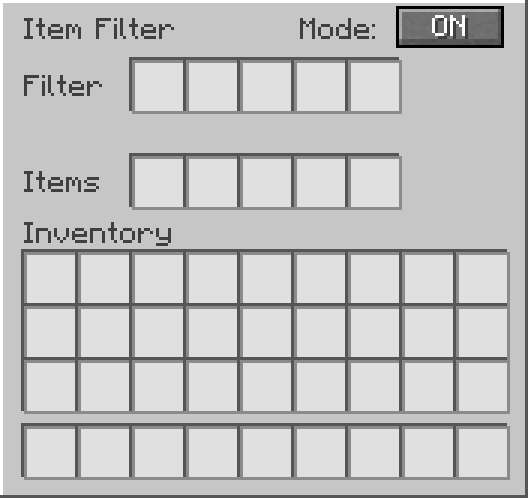
| 🖥️ Custom GUI | Includes filter slots, internal item slots, and an ON/OFF button. |
How It Works
Place the Item Filter like a vanilla hopper.
Items can enter from the top through hoppers or be pulled directly from inventories placed above the Item Filter.
Items leave through the direction the block is facing.
Inside the GUI:
- Filter slots define which items are allowed to pass.
- Items slots work as the internal hopper inventory.
- Mode ON allows only filtered items.
- Mode OFF allows any item to pass through.
When filter mode is ON, only items matching the filter slots can enter the Item Filter.
When filter mode is OFF, the Item Filter behaves like a normal hopper and allows any item to pass through.
Recipe
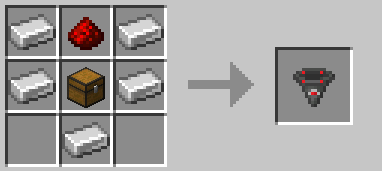
GUI Preview
Support
Need help, found a bug, or want to suggest something?
Join the Discord support forum:
License
This project is licensed under the MIT License.
Project description from CurseForge.
Pick your setup
Item Filter by Minecraft version and loader
Choose the version and loader you play, then open the matching release.
Check the dependencies, then try the file in a copied instance before changing a world you care about.
Recent files
Item Filter versions and loaders
itemfilter-1.1.0.jar
26 May 2026
Client Source doesn’t say Server Source doesn’t say Dependencies No extras listed Listed on Release listing
Check the 1.21.1 · Fabric setup Fabric1.21.1 release
Looking for an older file? The official CurseForge project page is in Resources.
 mod
CurseForge + Modrinth · Minecraft
Modern Morph
A modern port of iChun's iconic Morph mod
 mod
CurseForge · Minecraft
TownTopia: Integrations
Connects TownTopia villages with Diorama, Xaero's, JourneyMap, FTB Teams and Quests, Waystones, Supplementaries, modded trees, Artifacts, Relics, Visual Workbench, Iron Furnaces, Jade and JEI. All optional.
 mod
CurseForge · Minecraft
TownTopia Menu Expander
More in TownTopia's own menus: extra job settings, village rules, "why isn't this villager working?", building checks, presets, Storage contents, a trader Buy menu and villager diaries for operators.