
Minecraft version
Back to mods 
CurseForge · Minecraft mod
WorldGen Editor
A Minecraft mod that allows you to control world generation directly in the game via a JSON file!
Choose a version Pick your version below, then grab the matching file.
Quick answer
Which WorldGen Editor release should I use?
Latest stable file worldgen-editor-fabric-0.3.0.jar
Game version 1.21.1
Loader Fabric
WorldGen Editor worldgen-editor-fabric-0.3.0.jar targets 1.21.1 with Fabric. The project page does not say whether this file belongs on the client, dedicated server, or both. No extra mods listed for this file.
Where it goes
Is WorldGen Editor required on the client, server, or both?
The project page does not say whether this file belongs on the client, dedicated server, or both.
Client Source doesn’t say
Dedicated server Source doesn’t say
Loader for this release Fabric
Required install it here Optional supported, not mandatory Not supported do not install here Source doesn’t say do not assume
The source does not explicitly classify this release as client-only or server-only.
What else does WorldGen Editor worldgen-editor-fabric-0.3.0.jar need?
worldgen-editor-fabric-0.3.0.jar. Change the file and its required mods may change too.
This file does not list any required mods. Do not add a library just because a different file uses it.
This file does not list any required or optional mods.
Before you install it
Add WorldGen Editor without breaking your instance.
Built for WorldGen Editor worldgen-editor-fabric-0.3.0.jar. Pick another file and the loader, install side or required mods may change.
- 01
Stick to this file
Use worldgen-editor-fabric-0.3.0.jar. It targets 1.21.1 with Fabric; another release may have different loader, side or dependency requirements.
- 02
Bring the mods it needs
This file does not list any required mods. Do not add a library just because a different file uses it.
- 03
Put it on the correct side
The project page does not say whether this file belongs on the client, dedicated server, or both.
- 04
Pick the file you checked
Use the “Get this file” button beside worldgen-editor-fabric-0.3.0.jar. It opens that exact file at the source.
About this project
What does WorldGen Editor add?
WorldGen Editor

WorldGen Editor is a Minecraft world generation mod for creating island worlds from simple JSON preset files.
It is made for players, server owners, and modpack developers who want configurable archipelago-style worlds without rebuilding a full custom datapack by hand. The mod keeps Minecraft's normal noise generation as the base, then routes the Overworld through island-aware biome and density logic.
What It Does
- Adds datapack-style world presets for island generation.
- Adds three bundled world types:
WGE: IslandsWGE: ArchipelagoWGE: Small Island
- Adds configurable preset files in
config/worldgen_editor/presets/. - Adds a main config file:
config/worldgen_editor/worldgen_editor.json. - Supports
island,ocean, andarchipelagoentry types. - Supports normal islands, ocean-carved straits/bays, and generated archipelago clusters.
- Supports custom position, radius, stretch, rotation, base shape, coastline roughness, temperature, biome patch size, and noise settings.
- Supports per-entry biome exclusions using exact biome ids and biome tags.
- Supports climate-aware land and ocean fallback biome selection.
- Supports configurable outer ocean biome, defaulting to
minecraft:deep_ocean. - Keeps terrain generation soft, so islands still use vanilla-style terrain instead of flat forced shapes.
- Keeps caves, ores, structures, vanilla surface logic, and terrain features as close to normal Minecraft generation as possible.
- Includes a separate developer previewer for checking island layouts before generating a Minecraft world.
Main Config
The main file is:
config/worldgen_editor/worldgen_editor.json
{
  "enabled": true,
  "active_preset": "archipelago"
}
Preset files are stored here:
config/worldgen_editor/presets/default.json
config/worldgen_editor/presets/archipelago.json
config/worldgen_editor/presets/small_island.json
The bundled presets are:
default: a mixed example with a spawn island, an ocean cut, a larger island, and a warm archipelago.archipelago: a spawn archipelago with many smaller islands plus extra islands around it.small_island: one compact island for simple survival starts or testing.
Preset priority is:
world type preset > config active_preset > legacy continents.json
That means a world created with WGE: Archipelago uses presets/archipelago.json, even if the global config fallback says "active_preset": "default".
Basic example:
in previewer: 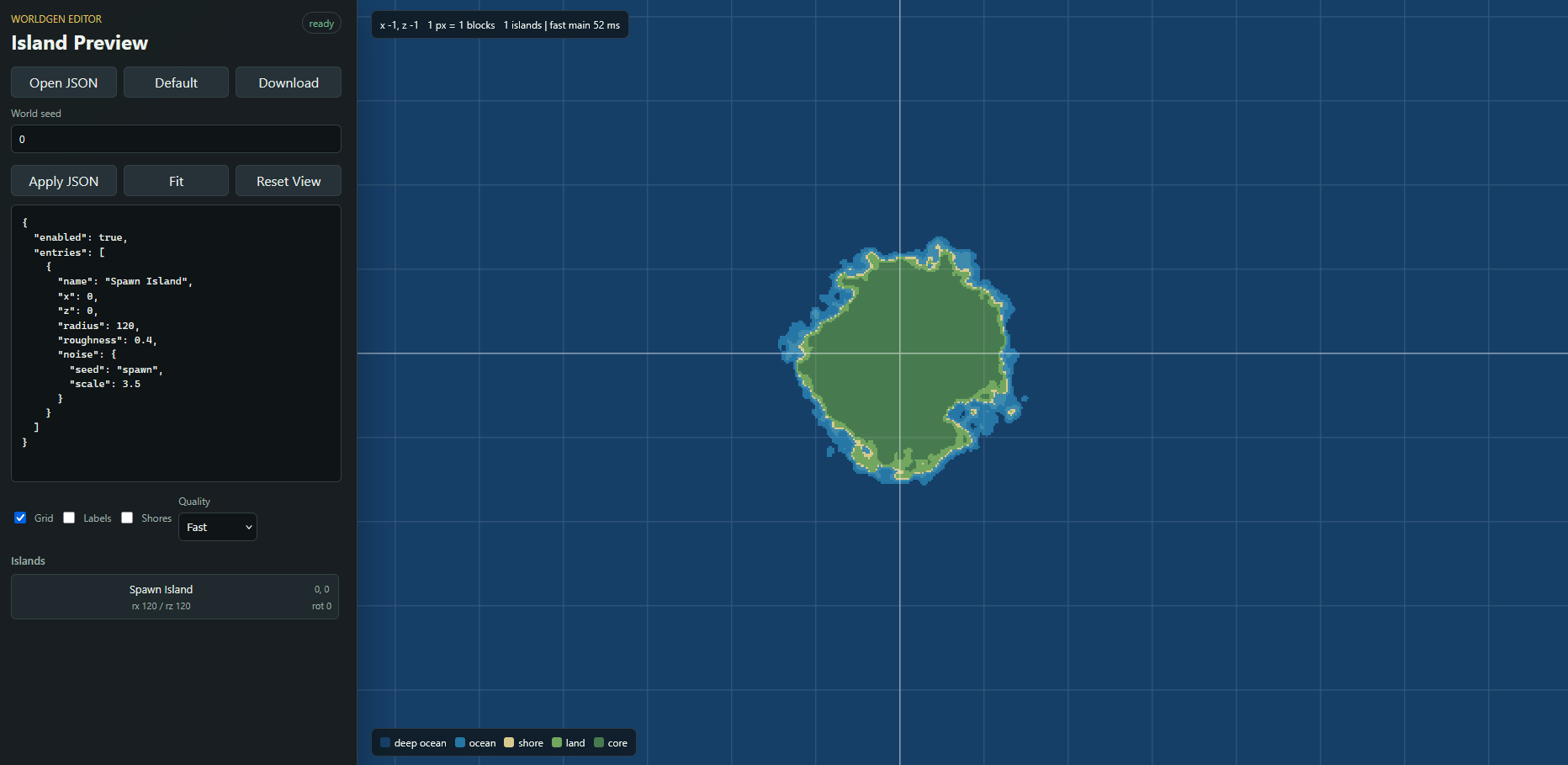
in game: 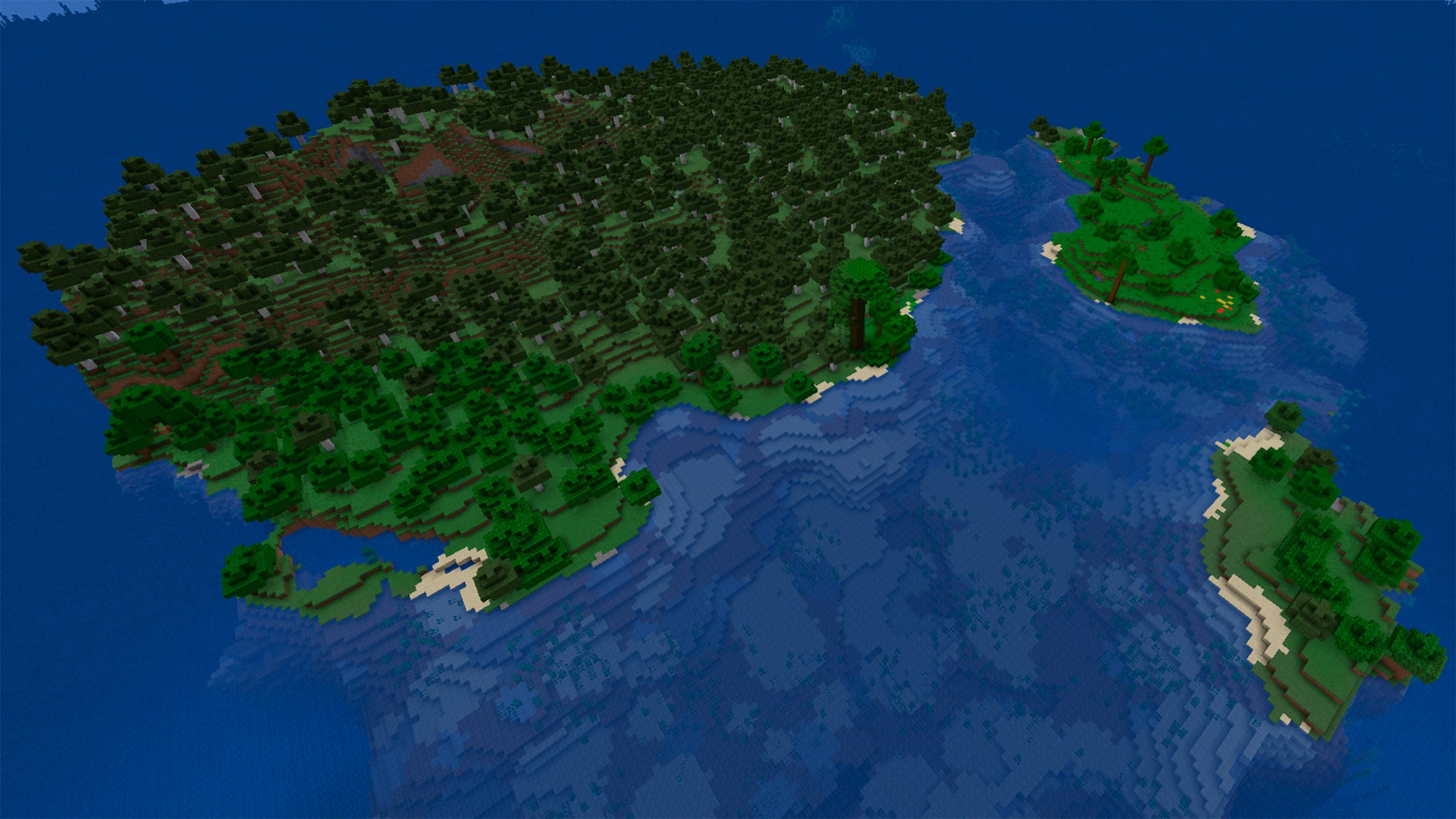
For a full explanation of all fields, see wiki in the GitHub.
How To Use
- Install the correct mod jar for your loader.
- Start Minecraft once so the config files can be created.
- Edit one of the files in
config/worldgen_editor/presets/. - Create a new world and select WGE world types, where you edited:
WGE: Islands
WGE: Archipelago
WGE: Small Island
If you edit the config while a world is already open, run:
/worldgen_editor reload
Reload affects only newly generated chunks. Existing chunks are not rebuilt.
Previewer
WorldGen Editor also has a separate previewer tool for development. It helps tune island positions, sizes, coastlines, roughness, ocean cuts, and archipelago layouts before opening Minecraft and generating a new test world.
WorldGen Editor preview github
The previewer is intended as a helper for planning layouts. Minecraft's final terrain still depends on vanilla world generation, the selected seed, and the active world preset.
Commands
/worldgen_editor enable
/worldgen_editor disable
/worldgen_editor status
/worldgen_editor preset <name>
/worldgen_editor reload
status shows the effective state, global config flag, per-world flag, selected world type preset, active preset, entry count, active config path, and world-state path.
preset <name> changes the config fallback preset. If the world was created with a WGE world type, that world type remains the main source of truth for newly generated chunks.
Notes
- The mod is intended for new worlds.
- Existing chunks are not automatically regenerated.
- For clean results after major config changes, create a new world or delete the affected region files carefully.
continents.jsonis only a legacy fallback for old configs. New configs useworldgen_editor.jsonandpresets/*.json.- The previewer is a helper tool for developers and modpack makers. It is not required to play with the mod and does not simulate every part of Minecraft world generation.
Links
- Mod github: waterflane/WorldGen-Editor
- Previewer github: waterflane/WorldGen-Editor-Preview
- License: Creative Commons BY-NC-SA 4.0
Project description from CurseForge.
Pick your setup
WorldGen Editor by Minecraft version and loader
Choose the version and loader you play, then open the matching release.
Check the dependencies, then try the file in a copied instance before changing a world you care about.
Recent files
WorldGen Editor versions and loaders
worldgen-editor-fabric-0.3.0.jar
17 Jun 2026
Client Source doesn’t say Server Source doesn’t say Dependencies No extras listed Listed on Release listing
Check the 1.21.1 · Fabric setup Fabric1.21.1 release
worldgen-editor-forge-0.3.0.jar
17 Jun 2026
Client Source doesn’t say Server Source doesn’t say Dependencies No extras listed Listed on Release listing
Check the 1.21.1 · Forge setup Forge1.21.1 release
worldgen-editor-neoforge-0.3.0.jar
17 Jun 2026
Client Source doesn’t say Server Source doesn’t say Dependencies No extras listed Listed on Release listing
Check the 1.21.1 · NeoForge setup 1.21.1NeoForge release
worldgen-editor-fabric-0.2 beta.jar
29 May 2026
Client Source doesn’t say Server Source doesn’t say Dependencies 1 required · 1 unchecked Listed on Release listing
Check the 1.21.1 · Fabric setup Fabric1.21.1 release
worldgen-editor-forge-0.2 beta.jar
29 May 2026
Client Source doesn’t say Server Source doesn’t say Dependencies No extras listed Listed on Release listing
Check the 1.21.1 · Forge setup Forge1.21.1 release
worldgen-editor-neoforge-0.2 beta.jar
29 May 2026
Client Source doesn’t say Server Source doesn’t say Dependencies 2 required · 2 unchecked Listed on Release listing
Check the 1.21.1 · NeoForge setup 1.21.1NeoForge release
worldgen-editor-neoforge-0.1.0 beta.jar
27 May 2026
Client Source doesn’t say Server Source doesn’t say Dependencies 1 required · 1 unchecked Listed on Release listing
Check the 1.21.1 · NeoForge setup 1.21.1NeoForge beta
worldgen-editor-forge-0.1.0 beta.jar
27 May 2026
Client Source doesn’t say Server Source doesn’t say Dependencies No extras listed Listed on Release listing
Check the 1.21.1 · Forge setup Forge1.21.1 beta
worldgen-editor-fabric-0.1.0 beta.jar
27 May 2026
Client Source doesn’t say Server Source doesn’t say Dependencies 2 required · 2 unchecked Listed on Release listing
Check the 1.21.1 · Fabric setup Fabric1.21.1 beta
Looking for an older file? The official CurseForge project page is in Resources.
 mod
CurseForge + Modrinth · Minecraft
Book of Familiars
A simple mod to add the Familiar Book, an item that allows players to store and release their tamed creatures.
 mod
CurseForge · Minecraft
Polis
A registry for land, contracts, money and a court - it records what players do and never prevents it.
 mod
CurseForge · Minecraft
[EM]Electronics Mod
This mod adds a smartphone to Minecraft.