Minecraft version
Back to mods 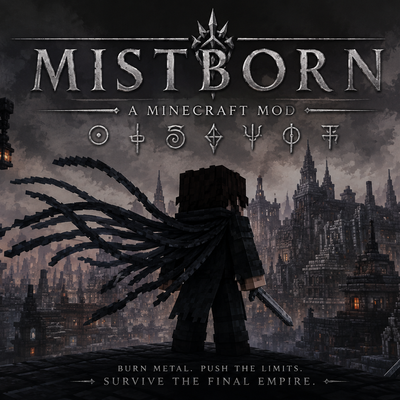
CurseForge · Minecraft mod
Mistborn
Harness the metallic arts of Brandon Sanderson's Mistborn in Minecraft! Burn metals with Allomancy, store attributes in Feruchemical metalminds, or forge Hemalurgic spikes to steal power. Features custom HUD, machines, and structures. Forge 1.20.1.
Choose a version Pick your version below, then grab the matching file.
Quick answer
Which Mistborn release should I use?
beta file mistborn_metal_arts-0.1.0.jar
Game version 1.20.1
Loader Forge
mistborn_metal_arts-0.1.0.jar targets 1.20.1 with Forge. The project page does not say whether this file belongs on the client, dedicated server, or both. No extra mods listed for this file.
Where it goes
Is Mistborn required on the client, server, or both?
The project page does not say whether this file belongs on the client, dedicated server, or both.
Client Source doesn’t say
Dedicated server Source doesn’t say
Loader for this release Forge
Required install it here Optional supported, not mandatory Not supported do not install here Source doesn’t say do not assume
The source does not explicitly classify this release as client-only or server-only.
What else does mistborn_metal_arts-0.1.0.jar need?
mistborn_metal_arts-0.1.0.jar. Change the file and its required mods may change too.
This file does not list any required mods. Do not add a library just because a different file uses it.
This file does not list any required or optional mods.
Before you install it
Add Mistborn without breaking your instance.
Built for mistborn_metal_arts-0.1.0.jar. Pick another file and the loader, install side or required mods may change.
- 01
Stick to this file
Use mistborn_metal_arts-0.1.0.jar. It targets 1.20.1 with Forge; another release may have different loader, side or dependency requirements.
- 02
Bring the mods it needs
This file does not list any required mods. Do not add a library just because a different file uses it.
- 03
Put it on the correct side
The project page does not say whether this file belongs on the client, dedicated server, or both.
- 04
Pick the file you checked
Use the “Get this file” button beside mistborn_metal_arts-0.1.0.jar. It opens that exact file at the source.
About this project
What does Mistborn add?
Mistborn: Metal Arts
Welcome to Scadrial in Minecraft. Mistborn: Metal Arts is a comprehensive gameplay mod for Minecraft 1.20.1 (Forge) that faithfully brings the deep, tactical metallic magic systems from Brandon Sanderson’s acclaimed Mistborn universe into your survival experience.
Whether you want to soar through the skies pushing off iron blocks, store your strength for a difficult boss fight, or steal the powers of other entities using ancient spike rituals, this mod provides a stable, highly-polished foundation to live out your fantasy as a Mistborn, Misting, or Keeper.
Note: This is an unofficial, fan-created mod. It is not affiliated with, endorsed by, or associated with Brandon Sanderson or Dragonsteel Entertainment.
⚡ The Three Metallic Arts
1. Allomancy (The Art of Preservation)
Swallow metal flakes suspended in water and burn them to fuel powerful physical and mental abilities.
- Steel & Iron (The Lashings): See blue allomantic lines connecting you to nearby metallic sources. Pull yourself toward them (Iron) or push away from them (Steel) to achieve high-velocity, physics-based flight.
- Pewter (The Brute): Greatly boost your movement speed, jump height, physical resistance, and melee damage.
- Tin (The Sentry): Sharpen your senses to gain night vision and highlight nearby hidden entities.
- Copper & Bronze (The Pulsings): Burn Copper to mask your actions from other Allomancers, or burn Bronze to detect the location of others burning metals.
- God Metals: Discover Lerasium caches to unlock Allomancy permanently, or burn Atium to gain extreme combat foresight.
2. Feruchemy (The Art of Balance)
Unlike Allomancy, Feruchemy is net-neutral. You must weaken yourself now to become exceptionally powerful later by storing attributes in metal accessories called Metalminds.
- Storage & Tapping: Store your physical speed, strength, health, or sensory acuity in matching metal jewelry.
- Unleash Power: Tap your metalminds when you need a massive surge—become a temporary juggernaut of speed or instant regeneration in critical moments.
3. Hemalurgy (The Art of Ruin)
A dark, power-stealing art. By driving metallic spikes through living entities, you can rip away their innate powers and transfer them to yourself.
- Spike Pressing: Craft specialized spikes of various metals (Iron, Steel, Bronze, Pewter, etc.) using the custom Spike Press.
- Power Theft: Charge spikes by taking down powerful entities or other players.
- Curios API Integration: Wear your charged spikes in dedicated Curios accessory slots to gain their stolen capabilities temporarily, or opt for permanent spike installation.
🛠️ Specialized Machinery
Prepare your metals and craft your equipment using custom interactive blocks:
- Alloy Furnace: Smelt and combine pure metals to create perfect allomantic alloys (like Pewter, Steel, and Brass).
- Metallurgy Table: Shave ingots down into consumable allomantic flakes and mix your metal vials.
- Spike Press: Shape molten metal into precise Hemalurgic spikes.
- Metalmind Charging Stand: Safely manage and charge your Feruchemical metalminds.
🏰 World Exploration & Structures
Uncover Scadrian history hidden throughout your Minecraft world:
- Kredik Shaw: Explore the massive, seven-layer fortress-city "The Hill of a Thousand Spires." Brave its dangerous corridors and conquer the hostile Metalborn guards defending it.
- Metal Caches: Seek out concealed underground caches containing rare ingots, pre-mixed vials, and lost journals.
📖 Getting Started
- Mine the Ores: Keep an eye out for new ores including Tin, Zinc, Cadmium, Chromium, and Aluminum.
- Build a Metallurgy Table: Craft your first table to shave iron and copper ingots down into flakes.
- Drink a Vial: Craft an Empty Glass Vial, fill it with water and your metal flakes, drink it, and press your Allomancy GUI key to start burning!
🔌 Dependencies & Recommended Mods
- Curios API (Forge): Strongly recommended! If installed, it enables dedicated visual slots to wear your Hemalurgic spikes as accessories. Without it, the mod uses capability-based inventory scanning.
Project description from CurseForge.
Pick your setup
Mistborn by Minecraft version and loader
Choose the version and loader you play, then open the matching release.
Check the dependencies, then try the file in a copied instance before changing a world you care about.
Recent files
Mistborn versions and loaders
mistborn_metal_arts-0.1.0.jar
28 May 2026
Client Source doesn’t say Server Source doesn’t say Dependencies No extras listed Listed on Release listing
Check the 1.20.1 · Forge setup 1.20.1Forge beta
mistborn_metal_arts-0.1.0.jar
27 May 2026
Client Source doesn’t say Server Source doesn’t say Dependencies No extras listed Listed on Release listing
Check the 1.20.1 · Forge setup 1.20.1Forge beta
Looking for an older file? The official CurseForge project page is in Resources.
 mod
mod CurseForge + Modrinth · Minecraft
Modern Beta Forge
Generate Beta, Alpha, Infdev, and Indev terrain for Minecraft 1.12.2
 mod
mod Modrinth · Minecraft
Bossmode
Bossmode is the difficulty above hardcore that turns every mob into a boss fight, including passive mobs. Can you survive?
 mod
mod Modrinth · Minecraft
Integrated Mowzie's Mobs
Integrated Mowzie's Mobs is a mod that revamps and integrates all the structures of the mod with many improvements.