Minecraft version
Back to mods 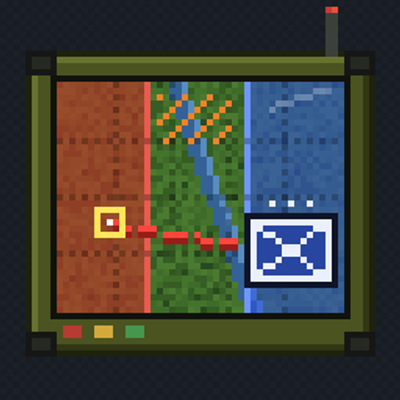
CurseForge · Minecraft mod
Iron Command
Command AI squads from a tactical map: they dig trenches, lay minefields, flank, suppress and capture territory.
Choose a version Pick your version below, then grab the matching file.
Quick answer
Which Iron Command release should I use?
Latest stable file IronCommand-1.0.0-beta.1.jar
Game version 1.21.1
Loader NeoForge
Iron Command IronCommand-1.0.0-beta.1.jar targets 1.21.1 with NeoForge. The project page does not say whether this file belongs on the client, dedicated server, or both. No extra mods listed for this file.
Where it goes
Is Iron Command required on the client, server, or both?
The project page does not say whether this file belongs on the client, dedicated server, or both.
Client Source doesn’t say
Dedicated server Source doesn’t say
Loader for this release NeoForge
Required install it here Optional supported, not mandatory Not supported do not install here Source doesn’t say do not assume
The source does not explicitly classify this release as client-only or server-only.
What else does Iron Command IronCommand-1.0.0-beta.1.jar need?
IronCommand-1.0.0-beta.1.jar. Change the file and its required mods may change too.
This file does not list any required mods. Do not add a library just because a different file uses it.
This file does not list any required or optional mods.
Before you install it
Add Iron Command without breaking your instance.
Built for Iron Command IronCommand-1.0.0-beta.1.jar. Pick another file and the loader, install side or required mods may change.
- 01
Stick to this file
Use IronCommand-1.0.0-beta.1.jar. It targets 1.21.1 with NeoForge; another release may have different loader, side or dependency requirements.
- 02
Bring the mods it needs
This file does not list any required mods. Do not add a library just because a different file uses it.
- 03
Put it on the correct side
The project page does not say whether this file belongs on the client, dedicated server, or both.
- 04
Pick the file you checked
Use the “Get this file” button beside IronCommand-1.0.0-beta.1.jar. It opens that exact file at the source.
About this project
What does Iron Command add?
Iron Command
Command a real army in Minecraft. Deploy squads of AI soldiers from a tactical tablet, watch them dig their own trenches, lay minefields, flank and suppress the enemy — and fight for every sector of the map.
✨ Features
🗺 Command from a tactical tablet
- A command tablet drawn over Xaero's World Map — the game keeps running while you give orders.
- Deploy a squad with a right-click on the map, select it, send it on a march or an assault, line it up, make it follow you, order an autonomous sector sweep.
- Squad card on the map: stance (Watch / Attention / At ease), rules of engagement (Fire at will / Return fire / Hold fire), mobile air defence, mount / dismount vehicles.
- Commander's walkie-talkie for orders on foot: "Follow me!", march to the aimed point, assault march, fall in, suppressive fire into a sector.
🪖 Squads that fight like squads
- Native AI infantry armed with TaCZ guns — riflemen, machine gunners, snipers, CQB, medics and sappers.
- Tactics at the squad level: bounding rushes and flanking, suppressing fire on positions they just saw, taking cover, occupying trenches, an orderly retreat only when pinned down and badly hurt.
- No wallhacks: soldiers shoot only with a line of sight.
- Squad builder — your own squad templates with per-slot loadouts.
- Russian and English voice lines with a radio filter.
⛏ Field fortifications — built by your soldiers
- Order "⛏ Fortify" and the squad builds it: sandbags, concertina wire, dragon's teeth, full-depth trenches with revetments (earth, planks, mesh), exit ramps and dugouts.
- Draw a defence line point by point on the map (up to 256 m) — engineers build it section by section, and carry on after a server restart.
- Soldiers occupy trenches on their own, crouch-run along them and take shelter in dugouts when explosions get close.
- Combat engineers do the heavy engineering work and build twice as fast.
- Dragon's teeth stop vehicles from Superb Warfare and Immersive Vehicles.
💥 Minefields
- Russian and NATO mines: PMN-2, M14 (anti-personnel), TM-62M, M15 (anti-tank), OZM-72, M16 (bounding, with tripwires); MON-50 and M18A1 Claymore are WIP.
- Bury them in dirt, grass, sand or gravel, or lay them on the surface; fresh digging marks grow over in about two days.
- Sappers lay minefields on order. Your squads walk around your own mines — the enemy has to find them first.
- Mine detection and demining, minefield warning signs, detonation from a strong blast nearby.
- Radio detonator (up to 256 m) and throwable demolition charges that bring buildings down.
- Faction mine doctrine: Russian, NATO or any.
🏴 Factions, territory and war
- The world is split into 64×64 sectors: mark your territory and capture the enemy's in combat.
- Diplomacy: declare war, make peace, ranks and recruitment policy, custom factions.
- Fog of war: enemy squads are visible only where your own forces can see them.
- Casualties: killed and wounded, kills, causes of death, a war journal and the War Status window with the balance of the war.
📡 Base and support
- Tactical Radio — a forward respawn point for your faction; deliver Reinforcement Packs to it to add respawns.
- Air raid sirens with a callsign, audible radius and alarm sound of your choice.
- Mobile air defence: a squad shoots down enemy drones within 50 m.
- Vehicles: squads mount and dismount Superb Warfare, Immersive Vehicles and vanilla vehicles.
- Personal wardrobe: camouflage uniforms and skins.
📦 Requirements
| Mod | Side | |
|---|---|---|
| TaCZ — Timeless and Classics Zero | client + server | required |
| Xaero's World Map | client only | required |
| Superb Warfare | client + server | optional — vehicles, anti-tank mines vs. vehicles, drones |
| Immersive Vehicles | client + server | optional — vehicles |
| FPV To Minecraft | client + server | optional — drones |
Minecraft 1.21.1, NeoForge 21.1.178+, Java 21. Works in single player and on dedicated servers.
🚀 Quick start
- Join a faction:
/fob team join redor/fob team join blue— or create your own on the tablet's Diplomacy tab. - Take the Command Tablet from the Iron Command creative tab and use it.
- On the Map tab: right-click the map to deploy the selected squad template, left-click a squad to select it, right-click to send it marching.
⌨ Commands
/fob team join|leave|info— faction membership./fob capture on|off— your personal auto-capture of enemy sectors./fob casualties— casualty report of your faction.
🌍 Languages
English and Russian — the tablet, chat messages and soldier nameplates follow each player's game language.
⚠ Beta notes
- This is the first public beta — please report bugs.
- Items have no survival recipes yet: take them from the creative tab.
- MON-50 / Claymore directional mines are WIP.
- Immersive Vehicles cars do not set off mines yet.
▶ YouTube: youtube.com/@RealFayndi
💬 Discord: discord.com/invite/xAWwhcAUZu
🇷🇺 На русском
Iron Command — командуйте армией ИИ-бойцов с тактического планшета поверх карты Xaero: отряды сами роют траншеи, ставят мины, обходят с фланга, подавляют огнём и захватывают территорию. Полевые укрепления и «Линия обороны», минные поля РФ и НАТО с растяжками и радиодетонатором, фракции и дипломатия, туман войны, учёт потерь, сирены ПВО, техника и ПВО против дронов. Интерфейс полностью на русском и английском — по языку игры каждого игрока.
Project description from CurseForge.
Pick your setup
Iron Command by Minecraft version and loader
Choose the version and loader you play, then open the matching release.
Minecraft version
1.20.1
1 loader buildCheck the dependencies, then try the file in a copied instance before changing a world you care about.
Recent files
Iron Command versions and loaders
IronCommand-1.0.0-beta.1.jar
30 Oct 2026
Client Source doesn’t say Server Source doesn’t say Dependencies No extras listed Listed on Release listing
Check the 1.21.1 · NeoForge setup 1.21.1NeoForge release
FOB Deployment 1.1.0 hotfix
fobdeployment-1.1.0.jar
29 May 2026
Client Source doesn’t say Server Source doesn’t say Dependencies No extras listed Listed on Release listing
Check the 1.20.1 · Forge setup 1.20.1Forge release
FOB Deployment 1.1.0
fobdeployment-1.1.0.jar
29 May 2026
Client Source doesn’t say Server Source doesn’t say Dependencies No extras listed Listed on Release listing
Check the 1.20.1 · Forge setup 1.20.1Forge release
fobdeployment-1.0.0.jar
28 May 2026
Client Source doesn’t say Server Source doesn’t say Dependencies No extras listed Listed on Release listing
Check the 1.20.1 · Forge setup 1.20.1Forge release
Looking for an older file? The official CurseForge project page is in Resources.
 mod
CurseForge + Modrinth · Minecraft
Not Enough Recipe Book [NERB]
Completely removes recipe book from the game, optimizing player data.
 mod
CurseForge + Modrinth · Minecraft
Yet Another Industrialization!
Miscellaneous features for Modern Industrialization that make you go "YAI!"
 mod
CurseForge · Minecraft
Occultism
A magic mod inspired by the world of Jonathan Stroud's Bartimaeus. With the help of occult rituals players can summon entities from the "Other Side" to perform magic.