Minecraft version
Back to mods 
CurseForge · Minecraft mod
QCommand (+Macro/Keybind)
Save and run commands in a simple way
Choose a version Pick your version below, then grab the matching file.
Quick answer
Which QCommand (+Macro/Keybind) release matches 26.3?
Best match for your filters qcommand-1.1-fabric-26.x.jar
Game version 26.1, 26.1.1, 26.1.2
Loader Fabric
QCommand (+Macro/Keybind) qcommand-1.1-fabric-26.x.jar targets 26.1, 26.1.1, 26.1.2 with Fabric. The project page does not say whether this file belongs on the client, dedicated server, or both. No extra mods listed for this file.
Where it goes
Is QCommand (+Macro/Keybind) required on the client, server, or both?
The project page does not say whether this file belongs on the client, dedicated server, or both.
Client Source doesn’t say
Dedicated server Source doesn’t say
Loader for this release Fabric
Required install it here Optional supported, not mandatory Not supported do not install here Source doesn’t say do not assume
The source does not explicitly classify this release as client-only or server-only.
What else does QCommand (+Macro/Keybind) qcommand-1.1-fabric-26.x.jar need?
qcommand-1.1-fabric-26.x.jar on 26.3. Every mod below is checked against that same setup.
This file does not list any required mods. Do not add a library just because a different file uses it.
This file does not list any required or optional mods.
Before you install it
Add QCommand (+Macro/Keybind) without breaking your instance.
Built for QCommand (+Macro/Keybind) qcommand-1.1-fabric-26.x.jar on 26.3. Pick another file and the loader, install side or required mods may change.
- 01
Stick to this file
Use qcommand-1.1-fabric-26.x.jar. It targets 26.1, 26.1.1, 26.1.2 with Fabric; another release may have different loader, side or dependency requirements.
- 02
Bring the mods it needs
This file does not list any required mods. Do not add a library just because a different file uses it.
- 03
Put it on the correct side
The project page does not say whether this file belongs on the client, dedicated server, or both.
- 04
Pick the file you checked
Use the “Get this file” button beside qcommand-1.1-fabric-26.x.jar. It opens that exact file at the source.
About this project
What does QCommand (+Macro/Keybind) add?
QCommand is a client-side Minecraft Forge mod that adds quick command buttons to the chat screen. It lets players save one or more commands behind small clickable buttons, choose an icon for each button, assign optional keybinds, and quickly run repeated commands without retyping them.
The mod is designed for players who frequently use commands, server utilities, testing commands, admin tools, teleport commands, gamemode switches, or custom datapack/plugin commands.
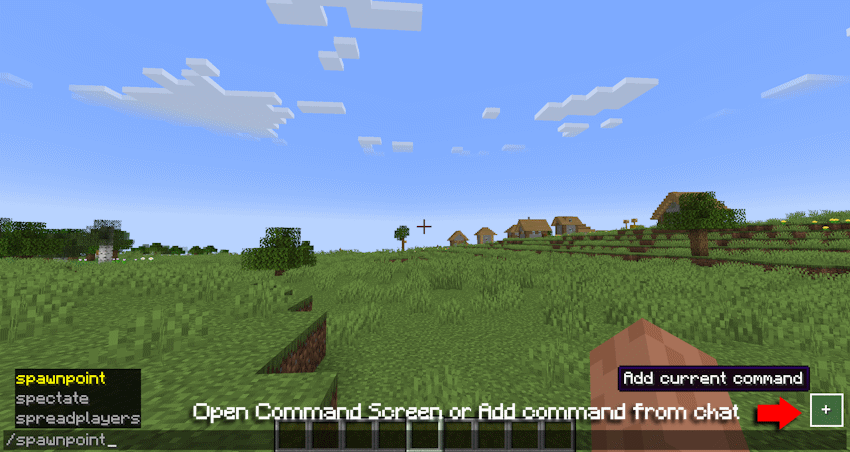
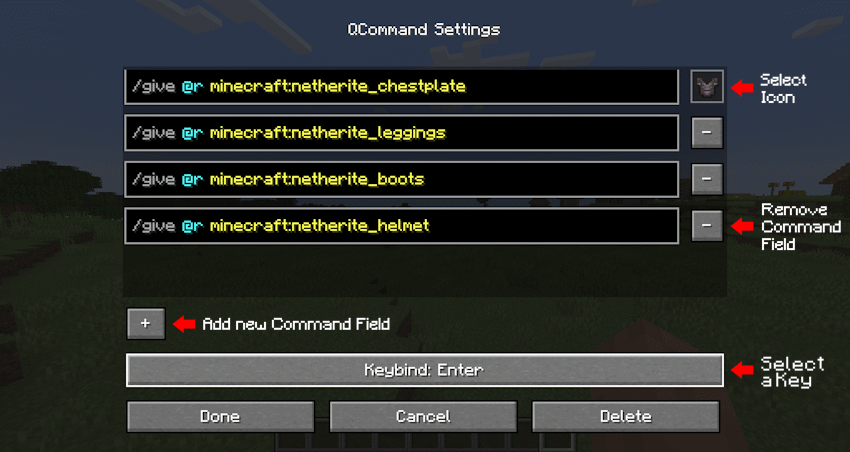
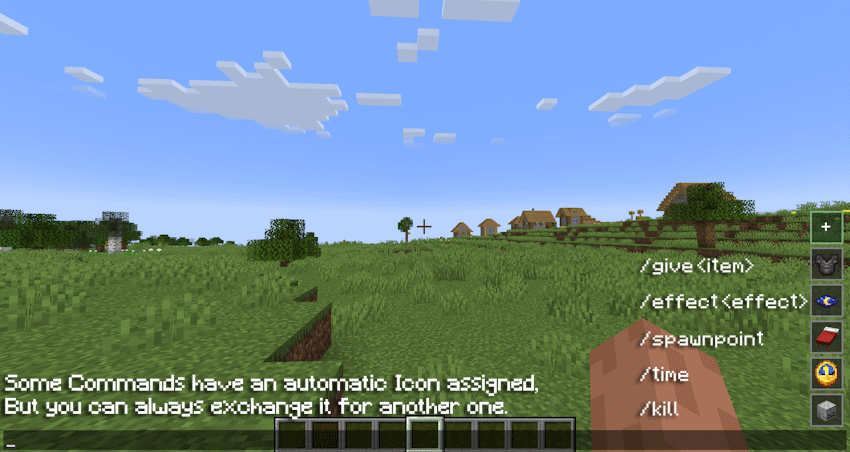
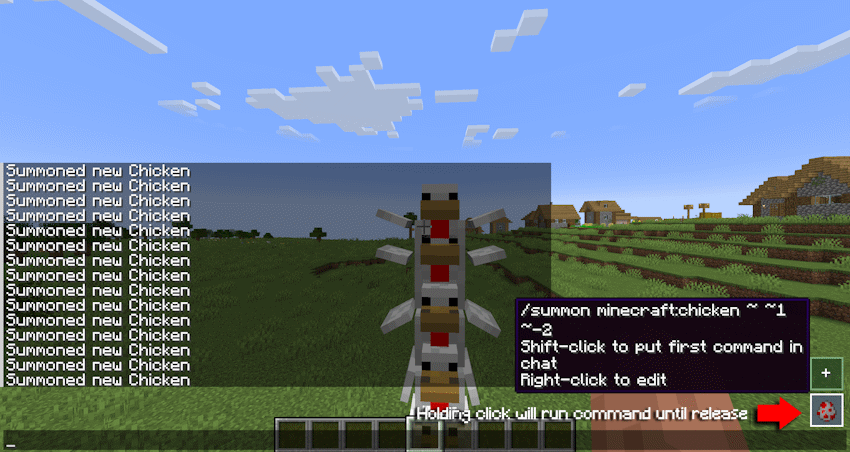
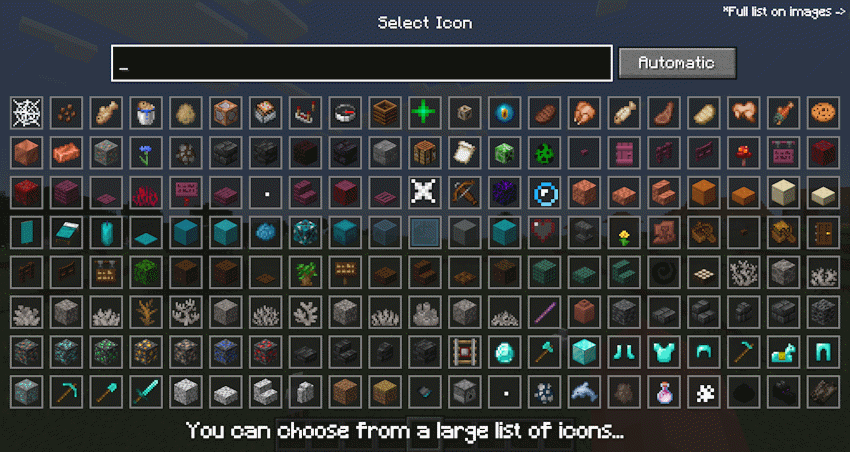
Main features:
•Adds quick command buttons directly to the chat screen.
•Lets you create, edit, delete, and store custom command entries.
•Supports multiple command lines per saved button.
•Executes saved commands quickly from the chat UI.
•Allows choosing custom visual icons from items, effects, or particles.
•Supports optional keybinds for saved commands.
•Includes command autocomplete while editing command fields.
•Supports repeat behavior while holding a command button.
•Stores commands locally on the client.
•Does not require the server to install the mod.
Example uses:
•Save /home, /spawn, /warp, or /back.
•Save admin commands like /gamemode creative, /time set day, or /weather clear.
•Save testing commands for modpacks, datapacks, maps, or servers.
•Group several related commands into one command entry.
•Use icons to visually recognize each command quickly.
In short: QCommand makes Minecraft command usage faster by turning repeated commands into customizable chat-screen buttons.
Project description from CurseForge.
Pick your setup
QCommand (+Macro/Keybind) by Minecraft version and loader
Choose the version and loader you play, then open the matching release.
Minecraft version
26.2
2 loader buildsMinecraft version
26.1.2
2 loader buildsMinecraft version
26.1.1
2 loader buildsMinecraft version
26.1
2 loader buildsMinecraft version
1.21.1
2 loader buildsMinecraft version
1.20.1
2 loader buildsCheck the dependencies, then try the file in a copied instance before changing a world you care about.
Recent files
QCommand (+Macro/Keybind) versions and loaders
qcommand-1.1-fabric-26.x.jar
6 Oct 2026
Client Source doesn’t say Server Source doesn’t say Dependencies No extras listed Listed on Release listing
Check the 26.3 · Fabric setup Fabric26.126.1.126.1.2 release
qcommand-1.1-neoforge-26.x.jar
5 Oct 2026
Client Source doesn’t say Server Source doesn’t say Dependencies No extras listed Listed on Release listing
Check the 26.3 · NeoForge setup NeoForge26.126.1.126.1.2 release
Looking for an older file? The official CurseForge project page is in Resources.
 mod
CurseForge · Minecraft
Workling
Workling traz novas formas de fazer as coisas em Minecraft, combinando mecânicas úteis, novas possibilidades e pequenos ajudantes para o seu mundo.
 mod
CurseForge · Minecraft
Villagers Have a Life
Villagers Have a Life makes Minecraft villages feel more alive by giving their inhabitants personalities, moods, relationships, and reasons to interact.
 mod
CurseForge · Minecraft
Ice and Fire Fabric
Ice and Fire for Fabric 26.3: dragons that grow from eggs to giants, mythical creatures, an exiled pixie companion with 14 memories, and Cryona's duel on Black Frost.