Minecraft version
Back to mods 
CurseForge · Minecraft mod
Version Mod Sorter
Load a different set of mods for each Minecraft version. Just drop them in mods/[loader]/[version]/ — no more swapping mods when you switch versions. Works on Fabric, Forge, and NeoForge.
Choose a version Pick your version below, then grab the matching file.
Quick answer
Which Version Mod Sorter release matches 1.21.9 Forge?
beta file Version Mod Sorter v0.1.0
Game version 1.21, 1.21.8, 1.21.5
Loader Fabric, Forge, NeoForge
Version Mod Sorter v0.1.0 targets 1.21, 1.21.8, 1.21.5 with Fabric, Forge, NeoForge. The project page does not say whether this file belongs on the client, dedicated server, or both. No extra mods listed for this file.
Where it goes
Is Version Mod Sorter required on the client, server, or both?
The project page does not say whether this file belongs on the client, dedicated server, or both.
Client Source doesn’t say
Dedicated server Source doesn’t say
Loader for this release Fabric, Forge, NeoForge
Required install it here Optional supported, not mandatory Not supported do not install here Source doesn’t say do not assume
The source does not explicitly classify this release as client-only or server-only.
What else does Version Mod Sorter v0.1.0 need?
Version Mod Sorter v0.1.0 on 1.21.9 Forge. Every mod below is checked against that same setup.
This file does not list any required mods. Do not add a library just because a different file uses it.
This file does not list any required or optional mods.
Before you install it
Add Version Mod Sorter without breaking your instance.
Built for Version Mod Sorter v0.1.0 on 1.21.9 Forge. Pick another file and the loader, install side or required mods may change.
- 01
Stick to this file
Use Version Mod Sorter v0.1.0. It targets 1.21, 1.21.8, 1.21.5 with Fabric, Forge, NeoForge; another release may have different loader, side or dependency requirements.
- 02
Bring the mods it needs
This file does not list any required mods. Do not add a library just because a different file uses it.
- 03
Put it on the correct side
The project page does not say whether this file belongs on the client, dedicated server, or both.
- 04
Pick the file you checked
Use the “Get this file” button beside Version Mod Sorter v0.1.0. It opens that exact file at the source.
About this project
What does Version Mod Sorter add?
Version Mod Sorter
Tired of swapping mods every time you switch Minecraft versions or loaders? Version Mod Sorter loads mods from version-specific and loader-specific folders so you don't have to.
How It Works
Place your mods in mods/<loader>/<version>/ (e.g. mods/fabric/1.20.4/), and only the mods matching the current loader and Minecraft version will be loaded — in addition to mods in the regular mods/ folder.
You can also drop mods directly in mods/<loader>/ (e.g. mods/fabric/) to share them across all Minecraft versions of that loader. Subfolders inside a version folder are also picked up, so you can organize mods by category.
The version folder is automatically created on first launch. Just drop your mods in and go.
Folder structure example:
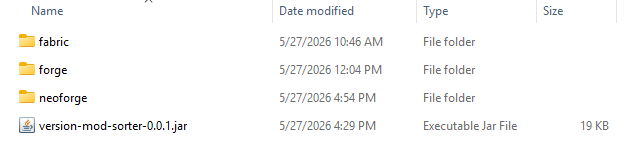
📁 mods
├─ version-mod-sorter-x.x.x.jar
│  (VMS itself)
├─ ModA.jar
│  (mods/ root: loaded on every loader and version)
├─ 📁 fabric
│  ├─ ModB.jar
│  │  (Fabric: loaded on every version)
│  └─ 📁 26.1.2
│     ├─ ModC.jar
│     │  (Fabric MC26.1.2 only)
│     └─ 📁 folder
│        └─ ModD.jar
│           (subfolders can be used for organization)
├─ 📁 forge
│  ├─ ModE.jar
│  │  (Forge: loaded on every version)
│  └─ 📁 1.21.4
│     └─ ModF.jar
│        (Forge MC1.21.4 only)
└─ 📁 neoforge
   ├─ ModG.jar
   │  (NeoForge: loaded on every version)
   └─ 📁 1.20.6
      └─ ModH.jar
         (NeoForge MC1.20.6 only)
Features
- Works with Fabric, Forge, and NeoForge — a single jar supports all three
- Per-loader shared folder for mods that work across all Minecraft versions
- Subfolder organization inside each version folder
- No need for separate game directories or instances
- No Minecraft class modifications or bytecode patching
Crash Analysis (Fabric)
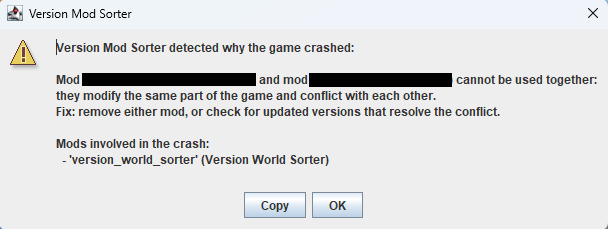
When the game crashes on Fabric, VMS analyzes the cause and shows a dialog. It checks crash reports (crash-reports/) first, then falls back to the tail of logs/latest.log.
It detects two categories of crashes and shows the involved mods and suggested fixes:
- Mod conflicts — when multiple mods modify the same code and collide, both mod names are shown with the suggestion to remove one or check for updates
- Version mismatch — when a mod references code that does not exist in the current Minecraft version, the mod name is shown with the suggestion to move it to the matching version folder, update it, or remove it
For crashes that match neither category, VMS still lists mods inferred from the stack trace. If the loader itself reports a mod resolution failure (Mod resolution failed, etc.), VMS stays silent because the loader already shows its own error screen.
Requirements
- Fabric Loader 0.13.0+ / Forge 41.1.0 (MC 1.19)+ / NeoForge 20.6.62-beta (MC 1.20.6)+
Notes
- The version folder name must exactly match the Minecraft version reported by the loader.
- Startup may take slightly longer when loading mods.
- This mod relies on internal loader implementations. A major loader update may cause it to stop working, but it will never affect the game or other mods.
Project description from CurseForge.
Pick your setup
Version Mod Sorter by Minecraft version and loader
Choose the version and loader you play, then open the matching release.
Minecraft version
26.1.2
3 loader buildsMinecraft version
26.1.1
3 loader buildsMinecraft version
26.1
3 loader buildsMinecraft version
1.21.11
3 loader buildsMinecraft version
1.21.10
3 loader buildsMinecraft version
1.21.9
3 loader buildsMinecraft version
1.21.8
3 loader buildsMinecraft version
1.21.7
3 loader buildsMinecraft version
1.21.6
3 loader buildsMinecraft version
1.21.5
3 loader buildsMinecraft version
1.21.4
3 loader buildsShowing the newest 12 of 47 game versions. Older files are in the list below.
Check the dependencies, then try the file in a copied instance before changing a world you care about.
Recent files
Version Mod Sorter versions and loaders
Version Mod Sorter v0.1.0
version-mod-sorter-0.1.0.jar
23 Jun 2026
Client Source doesn’t say Server Source doesn’t say Dependencies No extras listed Listed on Release listing
Check the 1.21.9 · Forge setup 1.21Fabric1.21.81.21.5 beta
Version Mod Sorter v0.0.4
version-mod-sorter-0.0.4.jar
12 Jun 2026
Client Source doesn’t say Server Source doesn’t say Dependencies No extras listed Listed on Release listing
Check the 1.21.9 · Forge setup 1.21Fabric1.21.81.21.5 beta
Version Mod Sorter v0.0.3
version-mod-sorter-0.0.3.jar
29 May 2026
Client Source doesn’t say Server Source doesn’t say Dependencies No extras listed Listed on Release listing
Check the 1.21.9 · Forge setup 1.21Fabric1.21.81.20.5 beta
Version Mod Sorter v0.0.2
version-mod-sorter-0.0.2.jar
29 May 2026
Client Source doesn’t say Server Source doesn’t say Dependencies No extras listed Listed on Release listing
Check the 1.21.9 · Forge setup 1.21Fabric1.21.81.20.5 beta
0.0.1
version-mod-sorter-0.0.1.jar
27 May 2026
Client Optional Server Optional Dependencies No extras listed Listed on Release listing
Check the 1.21.9 · Forge setup 1.20.61.211.21.11.21.2 beta
Looking for an older file? The official CurseForge project page is in Resources.
 mod
mod Modrinth · Minecraft
Enhanced Biomes Music
Improves soundtrack playback in biomes, adds an Intelligent Playback System in Mountain and Cave biomes — something that was so missing in Minecraft. Check out the description to see what else the mod improves.
 mod
mod Modrinth · Minecraft
Physics Mod
Welcome to a more destructive Minecraft than you've ever seen before!
 mod
mod CurseForge + Modrinth · Minecraft
Better MC Screenshots
Enhance your screenshots with previews, sounds, uploader, and an in-game gallery!