Minecraft version
Back to mods 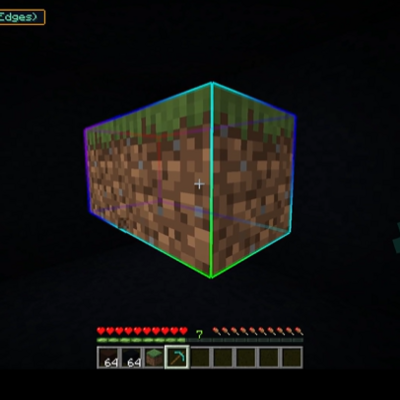
CurseForge · Minecraft mod
TC VeinGlow PC
An advanced vein mining mod with radial menu, RGB-customizable block outline highlighter, custom mining shapes, and a skill system for harvesting, tree-felling, and liquid handling.
Choose a version Pick your version below, then grab the matching file.
Quick answer
Which TC VeinGlow PC release should I use?
Latest stable file tc-veinglow-1.21.1-neoforge-1.0.2.jar
Game version 1.21.1
Loader NeoForge
TC VeinGlow PC tc-veinglow-1.21.1-neoforge-1.0.2.jar targets 1.21.1 with NeoForge. The project page does not say whether it belongs on the client. The project page does not say whether it belongs on the dedicated server. No extra mods listed for this file.
Where it goes
Is TC VeinGlow PC required on the client, server, or both?
The project page does not say whether it belongs on the client. The project page does not say whether it belongs on the dedicated server.
Client Source doesn’t say
Dedicated server Source doesn’t say
Loader for this release NeoForge
Required install it here Optional supported, not mandatory Not supported do not install here Source doesn’t say do not assume
The source does not explicitly classify this release as client-only or server-only.
What else does TC VeinGlow PC tc-veinglow-1.21.1-neoforge-1.0.2.jar need?
tc-veinglow-1.21.1-neoforge-1.0.2.jar. Change the file and its required mods may change too.
This file does not list any required mods. Do not add a library just because a different file uses it.
This file does not list any required or optional mods.
Before you install it
Add TC VeinGlow PC without breaking your instance.
Built for TC VeinGlow PC tc-veinglow-1.21.1-neoforge-1.0.2.jar. Pick another file and the loader, install side or required mods may change.
- 01
Stick to this file
Use tc-veinglow-1.21.1-neoforge-1.0.2.jar. It targets 1.21.1 with NeoForge; another release may have different loader, side or dependency requirements.
- 02
Bring the mods it needs
This file does not list any required mods. Do not add a library just because a different file uses it.
- 03
Put it on the correct side
The project page does not say whether it belongs on the client. The project page does not say whether it belongs on the dedicated server.
- 04
Pick the file you checked
Use the “Get this file” button beside tc-veinglow-1.21.1-neoforge-1.0.2.jar. It opens that exact file at the source.
About this project
What does TC VeinGlow PC add?
TC VeinGlow
TC VeinGlow is an advanced mining and block interaction mod for Minecraft 1.21.1, fully supporting Fabric, Forge, and NeoForge. It goes far beyond a standard vein miner by providing a radial menu, customizable RGB block outlines, advanced mining shapes, and a complete skill system.
Features
Smart Vein Mining
Break an entire ore vein, fell a whole tree, or harvest an entire field with a single action.
The mod uses a server-side Block Action Queue to process blocks gradually, ensuring:
- Reduced TPS impact
- Smooth large-scale mining
- Better multiplayer synchronization
- Stable performance on modded servers
Radial Menu
Hold G to open the intuitive radial menu.
Quickly switch between:
- Mining modes
- Mining shapes
- Skills
- Active tools
No need to memorize dozens of keybinds.
RGB Block Outline System
Blocks that will be affected are highlighted with smooth outlines before activation.
Fully customizable:
- RGB colors
- Outline thickness
- Transparency
- Color transition speed
- Animated rainbow mode
- Glow effects
This allows players to clearly preview the affected area before performing an action.
Mining Shapes
| Menu Name | Description |
|---|---|
| Standard (Face) | Expands through the 6 directly adjacent block faces. |
| Standard V2 (Edges) | Expands through faces and edge-adjacent blocks (18 directions). |
| Standard V3 (Corners) | Expands through faces, edges, and 3D corners (26 directions), providing the widest coverage. |
| TreeCapitator | Cuts down an entire tree using the #logs tag and automatically replants saplings. |
| Tunnel 1×2 | Mines a tunnel 1 block wide and 2 blocks high, extending in the direction you are looking. |
| Tunnel 3×3 | Mines a 3×3 tunnel extending in the direction you are looking. |
| Stair Up | Creates an upward staircase, moving up one block for each step forward. |
| Stair Down | Creates a downward staircase, moving down one block for each step forward. |
| 3×3 Area | Mines a 3×3 area perpendicular to the face you are targeting. |
| 5×5 Area | Mines a 5×5 area perpendicular to the face you are targeting. |
Custom Shapes
Create your own shapes using:
- Mathematical expressions
- Logical conditions
- Block filters
- Relative coordinate systems
This enables nearly unlimited mining patterns and workflows.
Skill System
Break Skill
- Mass-break standard blocks
- Supports ores, stone, wood, and many other block types
Harvest Skill
- Harvest large farming areas
- Automatically replant crops
- Supports multiple crop types
Examples:
- Wheat
- Carrots
- Potatoes
- Beetroot
Bucket Skill
Perform large-scale liquid operations:
- Collect water
- Collect lava
- Place water
- Place lava
Interact Skill
Execute bulk interactions such as:
- Stripping logs
- Tilling farmland
- Creating dirt paths
- Activating special blocks
- Interacting with supported modded content
HUD Overlay
A compact HUD displays:
- Current mode
- Active skill
- Current shape
- Affected block count
- Quick mode-switch notifications
Fully customizable:
- Position
- Colors
- Transparency
- Scale
- Display style
In-Game Configuration
All settings can be configured directly inside the game.
No manual configuration file editing required.
Configuration Categories
- General
- Colors
- Filters
- Skills
- Shapes
- HUD & Dashboard
Block Filtering System
Manage per-world:
- Whitelists
- Blacklists
Supports Minecraft tags:
#minecraft:logs
#minecraft:leaves
#minecraft:mineable/pickaxe
#forge:ores
#c:ores
Compatible with:
- Vanilla Minecraft
- Fabric mods
- Forge mods
- NeoForge mods
Multiplayer Support
Fully multiplayer compatible.
Requirements
The mod must be installed on both:
- Server
- Client
Benefits
- Server-authoritative logic
- Cheat prevention
- Accurate synchronization
- Reduced client workload
- Stable performance for larger player counts
Default Keybinds
| Key | Action |
|---|---|
V |
Activate Vein Mining (hold while breaking blocks) |
G |
Open Radial Menu |
N |
Cycle Mining Shapes |
← |
Previous Shape |
→ |
Next Shape |
1–9 |
Quick Shape Slot Selection |
All keybinds can be changed in:
Options → Controls
Requirements
| Component | Version |
|---|---|
| Minecraft | 1.21.1 |
| Java | 21 |
| Fabric Loader | ≥ 0.15.11 |
| Fabric API | ≥ 0.102.0+1.21.1 |
| NeoForge | 21.1.x |
| Forge | 52.1.x |
Optional Dependency
Mod Menu (Fabric)
Provides quick access to the configuration screen directly from the main menu.
Not required.
Compatibility
✅ Fabric
✅ Forge
✅ NeoForge
✅ Multiplayer Servers
✅ Large Modpacks
✅ In-Game Configuration
✅ Custom Shapes
✅ Skill System
✅ Customizable HUD
✅ RGB Block Outlines
✅ Block Tag Filtering
TC VeinGlow is designed to be a complete mining and block interaction solution, combining performance, flexibility, and a modern user experience for Minecraft 1.21.1.
Project description from CurseForge.
Pick your setup
TC VeinGlow PC by Minecraft version and loader
Choose the version and loader you play, then open the matching release.
Check the dependencies, then try the file in a copied instance before changing a world you care about.
Recent files
TC VeinGlow PC versions and loaders
tc-veinglow-1.21.1-neoforge-1.0.2.jar
2 Aug 2026
Client Source doesn’t say Server Source doesn’t say Dependencies No extras listed Listed on Release listing
Check the 1.21.1 · NeoForge setup 1.21.1NeoForge release
tc-veinglow-1.21.1-forge-1.0.2.jar
2 Aug 2026
Client Source doesn’t say Server Source doesn’t say Dependencies No extras listed Listed on Release listing
Check the 1.21.1 · Forge setup Forge1.21.1 release
tc-veinglow-1.21.1-fabric-1.0.2.jar
2 Aug 2026
Client Source doesn’t say Server Source doesn’t say Dependencies No extras listed Listed on Release listing
Check the 1.21.1 · Fabric setup Fabric1.21.1 release
tc-veinglow-1.21.1-forge-1.0.1.jar
1 Jun 2026
Client Source doesn’t say Server Source doesn’t say Dependencies No extras listed Listed on Release listing
Check the 1.21.1 · Fabric setup Fabric1.21.1 release
tc-veinglow-1.21.1-fabric-1.0.1.jar
1 Jun 2026
Client Source doesn’t say Server Source doesn’t say Dependencies 1 required · 1 unchecked Listed on Release listing
Check the 1.21.1 · Fabric setup Fabric1.21.1 release
tc-veinglow-1.21.1-neoforge-1.0.1.jar
1 Jun 2026
Client Source doesn’t say Server Source doesn’t say Dependencies No extras listed Listed on Release listing
Check the 1.21.1 · NeoForge setup 1.21.1NeoForge release
tc-veinglow-1.21.1-neoforge-1.0.0.jar
31 May 2026
Client Source doesn’t say Server Source doesn’t say Dependencies No extras listed Listed on Release listing
Check the 1.21.1 · NeoForge setup 1.21.1NeoForge release
tc-veinglow-1.21.1-forge-1.0.0.jar
31 May 2026
Client Source doesn’t say Server Source doesn’t say Dependencies No extras listed Listed on Release listing
Check the 1.21.1 · Forge setup Forge1.21.1 release
tc-veinglow-1.21.1-fabric-1.0.0.jar
31 May 2026
Client Source doesn’t say Server Source doesn’t say Dependencies No extras listed Listed on Release listing
Check the 1.21.1 · Fabric setup Fabric1.21.1 release
Looking for an older file? The official CurseForge project page is in Resources.
 mod
mod CurseForge · Minecraft
Sky Logistics
A celestial logistics mod for moving items, fluids, and energy across your Minecraft world with clean wireless networks.
 mod
mod CurseForge · Minecraft
The Sound of Rain
Material based rain sound effects and some cool thunder
 mod
mod CurseForge · Minecraft
Bookling Gear
Library and in game configuration for Eruannie_9's mods