Minecraft version
Back to mods 
CurseForge · Minecraft mod
Inventory Stacks+
Inventory Stack Upgrade adds three craftable tiers that increase your personal inventory stack size to 256, 1024, or 4096. Works with any mod's items and containers. Requires NeoForge 1.21.1
Choose a version Pick your version below, then grab the matching file.
Quick answer
Which Inventory Stacks+ release should I use?
Latest stable file invstackupgrade-1.0.2.jar
Game version 1.21.1
Loader NeoForge
Inventory Stacks+ invstackupgrade-1.0.2.jar targets 1.21.1 with NeoForge. The project page does not say whether this file belongs on the client, dedicated server, or both. No extra mods listed for this file.
Where it goes
Is Inventory Stacks+ required on the client, server, or both?
The project page does not say whether this file belongs on the client, dedicated server, or both.
Client Source doesn’t say
Dedicated server Source doesn’t say
Loader for this release NeoForge
Required install it here Optional supported, not mandatory Not supported do not install here Source doesn’t say do not assume
The source does not explicitly classify this release as client-only or server-only.
What else does Inventory Stacks+ invstackupgrade-1.0.2.jar need?
invstackupgrade-1.0.2.jar. Change the file and its required mods may change too.
This file does not list any required mods. Do not add a library just because a different file uses it.
This file does not list any required or optional mods.
Before you install it
Add Inventory Stacks+ without breaking your instance.
Built for Inventory Stacks+ invstackupgrade-1.0.2.jar. Pick another file and the loader, install side or required mods may change.
- 01
Stick to this file
Use invstackupgrade-1.0.2.jar. It targets 1.21.1 with NeoForge; another release may have different loader, side or dependency requirements.
- 02
Bring the mods it needs
This file does not list any required mods. Do not add a library just because a different file uses it.
- 03
Put it on the correct side
The project page does not say whether this file belongs on the client, dedicated server, or both.
- 04
Pick the file you checked
Use the “Get this file” button beside invstackupgrade-1.0.2.jar. It opens that exact file at the source.
About this project
What does Inventory Stacks+ add?
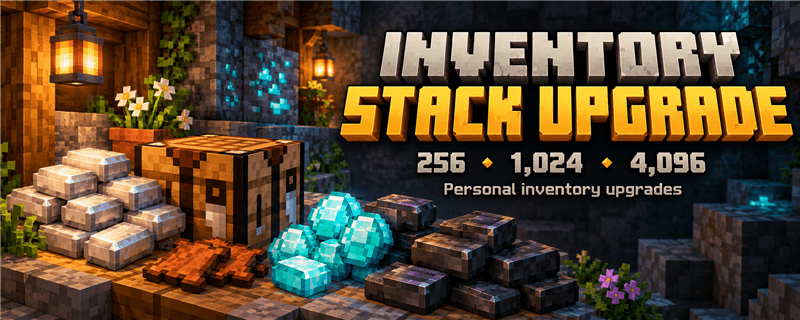
Inventory Stack Upgrade
More room for the grind. Craft an upgrade, equip it in your inventory, and raise your personal stack limit to 256, 1,024, or 4,096 items per stack.
No commands or configuration required—just craft and equip. Inspired by the progression-based upgrades in Sophisticated Backpacks.
How It Works
Craft a Stack Upgrade and place it in the dedicated upgrade slot above the crafting output slot in your inventory screen. Your personal inventory uses the higher stack limit while the upgrade is equipped. You can also shift-click an upgrade from your inventory into the empty upgrade slot.
Each player has their own upgrade level. Your equipped upgrade is saved with your player and retained when you respawn.
Removing or downgrading an upgrade: split any inventory or cursor stacks that exceed the new limit first. An in-game message will let you know when a stack needs splitting. Removing the upgrade restores each item's normal limit.
Upgrade Tiers & Crafting
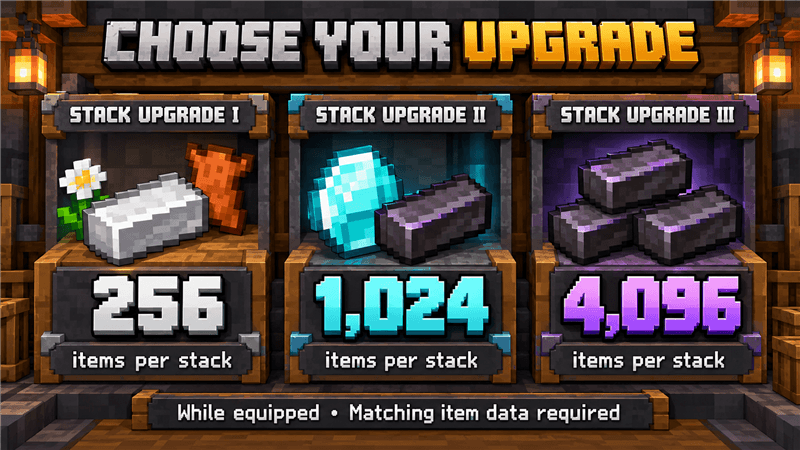
Stack Upgrade I — Up to 256 items per stack
F I F
I L I
F I F
F: Any small flower • I: Iron ingot • L: Leather
Requires 4 small flowers, 4 iron ingots, and 1 leather.
Stack Upgrade II — Up to 1,024 items per stack
D D D
D U D
D N D
D: Diamond • U: Stack Upgrade I • N: Netherite ingot
Requires 7 diamonds, 1 netherite ingot, and Stack Upgrade I.
Stack Upgrade III — Up to 4,096 items per stack
N N N
N U N
N N N
N: Netherite ingot • U: Stack Upgrade II
Requires 8 netherite ingots and Stack Upgrade II.
Expanded Stacking in Version 1.0.2
Items normally limited to 16 or even 1 per stack can now benefit from the equipped upgrade too—including ender pearls, eggs, buckets, potions, and matching tools or armor stored in your inventory.
Item data must match. Different enchantments, durability values, custom names, potion contents, or other item data do not merge into one stack. This mod does not erase those differences to make items stack.
Armor equipment slots and the dedicated upgrade slot still hold one item. Ordinary chest slots retain their normal item limits; the upgrade increases your personal inventory capacity.
Features
- Three craftable tiers: progress from 256 to 1,024 to 4,096 items per stack.
- Dedicated equipment slot: manage your upgrade directly from the inventory screen.
- Expanded item support: upgrades also apply to matching items normally limited below 64.
- Pickup and inventory handling: upgraded limits are used for item pickups, inventory clicks, and shift-click transfers into your inventory, subject to the source container's rules.
- Independent player progression: each player equips and manages their own upgrade.
- Persistent equipped upgrade: the upgrade is saved with your player and retained on respawn.
- Removal protection: oversized stacks must be split before an upgrade can be removed or downgraded.
Compatibility & Scope
For Minecraft 1.21.1 with NeoForge 21.1.230 or newer in the 21.1 series.
The mod uses Minecraft's inventory and slot logic, so items using the standard stacking system can benefit from upgrades. Mods with custom inventories, storage systems, or item-use behavior may need additional integration.
Backpack-specific compatibility is not included yet. Universal compatibility with all modded items and containers is not guaranteed.
Requirements & Installation
- Minecraft: 1.21.1
- Loader: NeoForge 21.1.230 or newer in the 21.1 series
- Java: 21
- Install the same mod version on the server and every client.
- Replace older versions rather than keeping multiple copies in the mods folder.
Back up your world before updating and test on a copy first. Updates cannot recover items already lost in an earlier version.
Project description from CurseForge.
Pick your setup
Inventory Stacks+ by Minecraft version and loader
Choose the version and loader you play, then open the matching release.
Check the dependencies, then try the file in a copied instance before changing a world you care about.
Recent files
Inventory Stacks+ versions and loaders
invstackupgrade-1.0.2.jar
17 Oct 2026
Client Source doesn’t say Server Source doesn’t say Dependencies No extras listed Listed on Release listing
Check the 1.21.1 · NeoForge setup 1.21.1NeoForge release
invstackupgrade-1.0.1.jar
14 Oct 2026
Client Source doesn’t say Server Source doesn’t say Dependencies No extras listed Listed on Release listing
Check the 1.21.1 · NeoForge setup 1.21.1NeoForge release
invstackupgrade-1.0.0.jar
31 May 2026
Client Source doesn’t say Server Source doesn’t say Dependencies No extras listed Listed on Release listing
Check the 1.21.1 · NeoForge setup 1.21.1NeoForge release
Looking for an older file? The official CurseForge project page is in Resources.