Minecraft version
Back to mods 
CurseForge · Minecraft mod
The Error (Horror)
There is an error in your world… and it is your fault.
Choose a version Pick your version below, then grab the matching file.
Quick answer
Which The Error (Horror) release should I use?
Latest stable file theerror-3.0.1-fabric-1.20.1.jar
Game version 1.20.1
Loader Fabric
The Error (Horror) theerror-3.0.1-fabric-1.20.1.jar targets 1.20.1 with Fabric. The project page does not say whether this file belongs on the client, dedicated server, or both. No extra mods listed for this file.
Where it goes
Is The Error (Horror) required on the client, server, or both?
The project page does not say whether this file belongs on the client, dedicated server, or both.
Client Source doesn’t say
Dedicated server Source doesn’t say
Loader for this release Fabric
Required install it here Optional supported, not mandatory Not supported do not install here Source doesn’t say do not assume
The source does not explicitly classify this release as client-only or server-only.
What else does The Error (Horror) theerror-3.0.1-fabric-1.20.1.jar need?
theerror-3.0.1-fabric-1.20.1.jar. Change the file and its required mods may change too.
This file does not list any required mods. Do not add a library just because a different file uses it.
This file does not list any required or optional mods.
Before you install it
Add The Error (Horror) without breaking your instance.
Built for The Error (Horror) theerror-3.0.1-fabric-1.20.1.jar. Pick another file and the loader, install side or required mods may change.
- 01
Stick to this file
Use theerror-3.0.1-fabric-1.20.1.jar. It targets 1.20.1 with Fabric; another release may have different loader, side or dependency requirements.
- 02
Bring the mods it needs
This file does not list any required mods. Do not add a library just because a different file uses it.
- 03
Put it on the correct side
The project page does not say whether this file belongs on the client, dedicated server, or both.
- 04
Pick the file you checked
Use the “Get this file” button beside theerror-3.0.1-fabric-1.20.1.jar. It opens that exact file at the source.
About this project
What does The Error (Horror) add?
There is an error in your world…
This mod turns your Minecraft experience into something unpredictable and deeply unsettling. Not everything you see can be trusted anymore.
The “Error”
It might appear for a moment and vanish… or it might decide to stay. If it stays, it will follow you, mess with you, and hunt you down.
Corrupted Chat
Random, eerie messages start appearing in chat — messages that definitely aren’t from you or any other player.
The Dimensions
There isn’t just one corrupted place. There are multiple layers — each one deeper and more twisted than the last. They give off strong Backrooms vibes: endless hallways, strange architecture, and that constant feeling that something is wrong.
The Flashlight
A proper vanilla-style flashlight that actually works well in the dark. No more blindly stumbling around in those terrifying dimensions.
The Endboss
And if you manage to go deep enough… there’s a final boss waiting. A real, intense, epic fight that tests everything you’ve got.
Can you beat the Corruption?
Or will you eventually just log off… and never come back?
If you have any problems, please join the Discord
Help on progression below
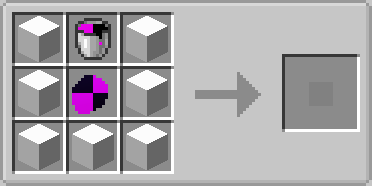
**Getting to first dimension:**After defeating the Error you will recieve the item "Item", use it on the following recipe to obtain the "Error Cube", use it to get to the first dimension.
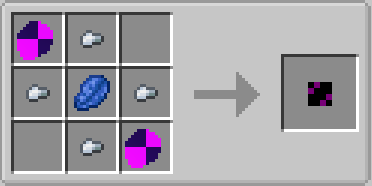
Getting to the second dimensionLoot the following items and craft "Project Zero", use it to get to the next dimension.
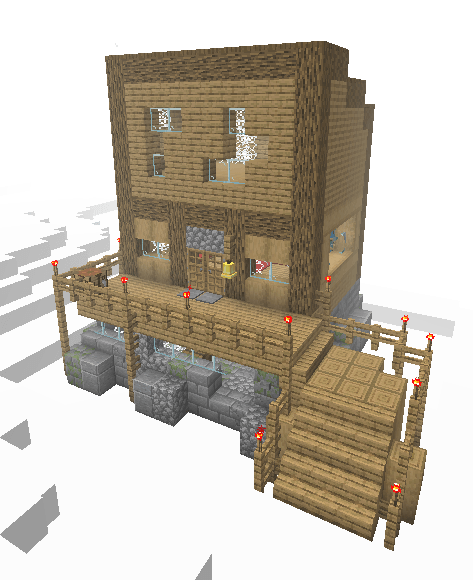
Getting to the third dimensionIn the white dimension look for this structure and interact with the desk upstairs.
Getting to the fourth dimension
Loot the following items and craft "Error Crystal", use it to get to the next dimension.
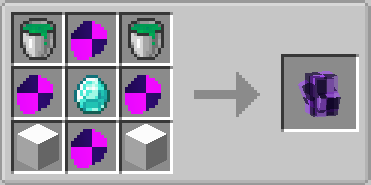
Escaping to the overworld
Beat the boss and return to the overworld
Project description from CurseForge.
Pick your setup
The Error (Horror) by Minecraft version and loader
Choose the version and loader you play, then open the matching release.
Minecraft version
1.21.1
1 loader buildMinecraft version
1.20.1
2 loader buildsCheck the dependencies, then try the file in a copied instance before changing a world you care about.
Recent files
The Error (Horror) versions and loaders
theerror-3.0.1-fabric-1.20.1.jar
27 Nov 2026
Client Source doesn’t say Server Source doesn’t say Dependencies No extras listed Listed on Release listing
Check the 1.20.1 · Fabric setup Fabric1.20.1 release
theerror-3.0.1-Port-neoforge-1.21.1.jar
15 Oct 2026
Client Source doesn’t say Server Source doesn’t say Dependencies No extras listed Listed on Release listing
Check the 1.21.1 · NeoForge setup 1.21.1NeoForge release
theerror-3.0.1-forge-1.20.1.jar
15 Oct 2026
Client Source doesn’t say Server Source doesn’t say Dependencies No extras listed Listed on Release listing
Check the 1.20.1 · Forge setup 1.20.1Forge release
theerror-3.0-Port-neoforge-1.21.1.jar
11 Oct 2026
Client Source doesn’t say Server Source doesn’t say Dependencies No extras listed Listed on Release listing
Check the 1.21.1 · NeoForge setup 1.21.1NeoForge release
theerror-3.0-forge-1.20.1.jar
11 Oct 2026
Client Source doesn’t say Server Source doesn’t say Dependencies No extras listed Listed on Release listing
Check the 1.20.1 · Forge setup 1.20.1Forge release
theerror-2.7.1.beta.port-neoforge-1.21.1.jar
15 Sept 2026
Client Source doesn’t say Server Source doesn’t say Dependencies No extras listed Listed on Release listing
Check the 1.21.1 · NeoForge setup 1.21.1NeoForge release
theerror-2.7.1-forge-1.20.1.jar
26 Aug 2026
Client Source doesn’t say Server Source doesn’t say Dependencies No extras listed Listed on Release listing
Check the 1.20.1 · Forge setup 1.20.1Forge release
theerror-2.7-forge-1.20.1.jar
17 Jul 2026
Client Source doesn’t say Server Source doesn’t say Dependencies No extras listed Listed on Release listing
Check the 1.20.1 · Forge setup 1.20.1Forge release
theerror-2.6-forge-1.20.1.jar
15 Jul 2026
Client Source doesn’t say Server Source doesn’t say Dependencies No extras listed Listed on Release listing
Check the 1.20.1 · Forge setup 1.20.1Forge release
theerror-2.5.2-forge-1.20.1.jar
theerror-2.5bugfix2-forge-1.20.1.jar
14 Jul 2026
Client Source doesn’t say Server Source doesn’t say Dependencies 1 required · 1 unchecked Listed on Release listing
Check the 1.20.1 · Forge setup 1.20.1Forge release
theerror-2.5.1-forge-1.20.1.jar
theerror-2.5bugfix1-forge-1.20.1.jar
3 Jul 2026
Client Source doesn’t say Server Source doesn’t say Dependencies No extras listed Listed on Release listing
Check the 1.20.1 · Forge setup 1.20.1Forge release
theerror-2.5-forge-1.20.1.jar
30 Jun 2026
Client Source doesn’t say Server Source doesn’t say Dependencies No extras listed Listed on Release listing
Check the 1.20.1 · Forge setup 1.20.1Forge release
Looking for an older file? The official CurseForge project page is in Resources.
 mod
CurseForge · Minecraft
The Convergence Tutorial
A mod for my modpack that creates a quick tutorial for Epic Fight and ParCool
 mod
CurseForge · Minecraft
Valiant
RPG progression bridge for Pixelmon and Apotheosis featuring Pokémon Auras, Apothic Invaders, custom Skill Trees, and Progression Raids.
 mod
CurseForge · Minecraft
Genetic Incubator - Hybrid Creatures
Draw DNA from any mob, splice it in the incubator and bring creatures to life that never existed before.