Minecraft version
Back to mods 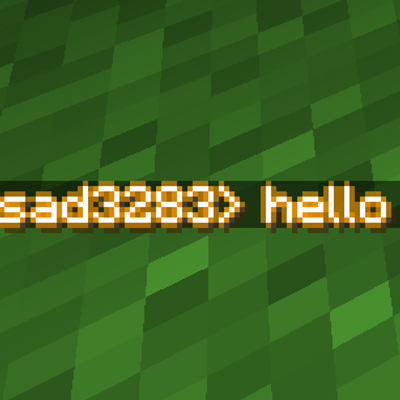
CurseForge · Minecraft mod
Rainbow Chat
Chat Glow enhances your default Minecraft chat HUD by adding a subtle, dynamic glowing aura to all chat text.
Choose a version Pick your version below, then grab the matching file.
Quick answer
Which Rainbow Chat release should I use?
Latest stable file rainbowchatmod 1.21.1+.jar
Game version 1.21.4, 1.21.1, 1.21.3
Loader Fabric
Rainbow Chat rainbowchatmod 1.21.1+.jar targets 1.21.4, 1.21.1, 1.21.3 with Fabric. The project page does not say whether this file belongs on the client, dedicated server, or both. No extra mods listed for this file.
Where it goes
Is Rainbow Chat required on the client, server, or both?
The project page does not say whether this file belongs on the client, dedicated server, or both.
Client Source doesn’t say
Dedicated server Source doesn’t say
Loader for this release Fabric
Required install it here Optional supported, not mandatory Not supported do not install here Source doesn’t say do not assume
The source does not explicitly classify this release as client-only or server-only.
What else does Rainbow Chat rainbowchatmod 1.21.1+.jar need?
rainbowchatmod 1.21.1+.jar. Change the file and its required mods may change too.
This file does not list any required mods. Do not add a library just because a different file uses it.
This file does not list any required or optional mods.
Before you install it
Add Rainbow Chat without breaking your instance.
Built for Rainbow Chat rainbowchatmod 1.21.1+.jar. Pick another file and the loader, install side or required mods may change.
- 01
Stick to this file
Use rainbowchatmod 1.21.1+.jar. It targets 1.21.4, 1.21.1, 1.21.3 with Fabric; another release may have different loader, side or dependency requirements.
- 02
Bring the mods it needs
This file does not list any required mods. Do not add a library just because a different file uses it.
- 03
Put it on the correct side
The project page does not say whether this file belongs on the client, dedicated server, or both.
- 04
Pick the file you checked
Use the “Get this file” button beside rainbowchatmod 1.21.1+.jar. It opens that exact file at the source.
About this project
What does Rainbow Chat add?
Chat Glow is a lightweight, client-side Fabric mod that upgrades the appearance and readability of your default Minecraft chat. It replaces the flat, static vanilla drop shadow with a beautiful, pulsing neon gold-to-orange glow outline.
What It Does
- Pulsing Glow Outline: Captures all text rendered in your chat HUD and wraps every character in a smooth, ambient glow that gently transitions between a warm neon gold and a vibrant orange.
- Enhanced Readability: The 4-directional outline creates high contrast, making messages incredibly easy to read against bright backgrounds like snow, desert sand, or sky, where default chat text normally washes out.
- Smooth Fading: Fully syncs with Minecraft’s default chat animations. As your chat messages fade away, the glow fades out naturally alongside them.
- Highly Optimized: Built using efficient Sponge Mixins with zero frame drops, meaning you get premium visuals without sacrificing performance.
- Client-Side Only: Runs entirely on your computer. You can safely join any vanilla or modded multiplayer server, and the glowing effect will work perfectly.
How to Use It
Install Fabric: Ensure you have the Fabric Loader installed for Minecraft 1.21.1 (or compatible 1.21.x version).
Add the Mod: Download the rainbowchat
mod 1.21.1+.jarfile and place it directly into your Minecraftmodsfolder (located inside your.minecraftdirectory). > or install in curseforge if you have the appEnsure Dependencies: Make sure you also have the Fabric API mod in your
modsfolder.Play: Launch Minecraft using your Fabric profile, join any world or multiplayer server, and open your chat window—your messages will immediately start glowing!
(yes description is ai slop)
Project description from CurseForge.
Pick your setup
Rainbow Chat by Minecraft version and loader
Choose the version and loader you play, then open the matching release.
Minecraft version
1.21.3
1 loader buildMinecraft version
1.21.2
1 loader buildMinecraft version
1.21.1
1 loader buildCheck the dependencies, then try the file in a copied instance before changing a world you care about.
Recent files
Rainbow Chat versions and loaders
rainbowchatmod 1.21.1+.jar
1 Jun 2026
Client Source doesn’t say Server Source doesn’t say Dependencies No extras listed Listed on Release listing
Check the 1.21.4 · Fabric setup Fabric1.21.41.21.11.21.3 release
Looking for an older file? The official CurseForge project page is in Resources.
 mod
CurseForge · Minecraft
Boiling Cauldron Forge
A Forge cooking mod about Malatang and Bobo Chicken: grow spices, brew soup bases in a wok, then cold-soak your food in the Bobo Chicken Pot.
 mod
CurseForge + Modrinth · Minecraft
LDLib
LDLib is a libarary mod for custom rendering, modular gui.
 mod
CurseForge + Modrinth · Minecraft
Player Animation Library
A library that allows mods to animate the player, in a way that doesn't conflict with other mods. (and much more!)