Sodium Needed by scalable-fabric-1.0.5-26.1.jar
requiredMatching file found Matched file: Sodium 0.9.2 for Fabric 26.1.2

CurseForge · Minecraft mod
Scale each element of the GUI individually!
Quick answer
scalable-fabric-1.0.5-26.1.jar targets 26.1, 26.1.1, 26.1.2 with Fabric, Quilt. The project page does not say whether this file belongs on the client, dedicated server, or both. All 3 required mods have matching files.
Where it goes
The project page does not say whether this file belongs on the client, dedicated server, or both.
The source does not explicitly classify this release as client-only or server-only.
scalable-fabric-1.0.5-26.1.jar on 26.1.2. Every mod below is checked against that same setup.
Install Sodium, Cloth Config API (Fabric/Forge/NeoForge), Cloth Config API first. We found matching files for this game-version and loader setup.
We only count dependency files that match this setup. A file for another loader does not fill the gap.
Before you install it
Built for scalable-fabric-1.0.5-26.1.jar on 26.1.2. Pick another file and the loader, install side or required mods may change.
Use scalable-fabric-1.0.5-26.1.jar. It targets 26.1, 26.1.1, 26.1.2 with Fabric, Quilt; another release may have different loader, side or dependency requirements.
Install Sodium, Cloth Config API (Fabric/Forge/NeoForge), Cloth Config API first. We found matching files for this game-version and loader setup.
The project page does not say whether this file belongs on the client, dedicated server, or both.
Use the “Get this file” button beside scalable-fabric-1.0.5-26.1.jar. It opens that exact file at the source.
About this project
Allows you to scale each element of the GUI indivudually, including:
The rest of the GUI elements, such as your hotbar or the scoreboard, are still controlled by the global toggle. You configure these through the Sodium options menu.
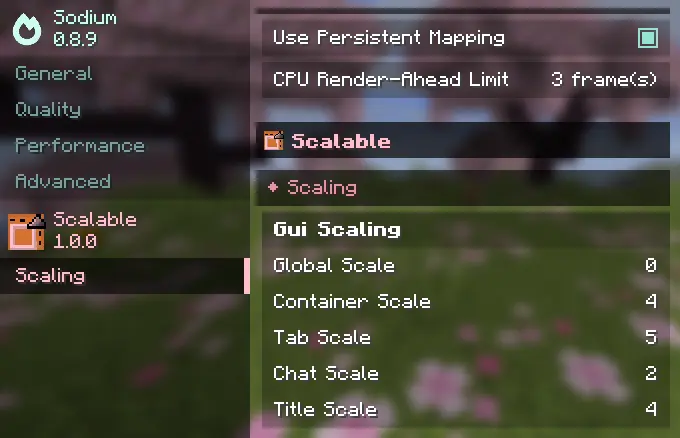
Requires Sodium and Cloth Config API. Make sure to download a version of Sodium over above 0.8.9 as any version below that is incompatible with modern versions of the Fabric API.
Project description from CurseForge.
Pick your setup
Choose the version and loader you play, then open the matching release.
Check the dependencies, then try the file in a copied instance before changing a world you care about.
Recent files
2 Jul 2026
2 Jul 2026
1 Jun 2026
1 Jun 2026
scalable-fabric-1.0.3-26.1.jar
21 May 2026
scalable-neoforge-1.0.2-26.1.jar
18 May 2026
scalable-fabric-1.0.2-26.1.jar
18 May 2026
scalable-fabric-1.0.1.jar
7 May 2026
scalable-neoforge-1.0.1.jar
7 May 2026
scalable-neoforge-1.0.0.jar
5 May 2026
scalable-fabric-1.0.0.jar
5 May 2026
Looking for an older file? The official CurseForge project page is in Resources.
 mod
Smooth interface animations with extensive customization!
 mod
Closed doors, trapdoors, curtains and shutters finally block light – no shaders needed. Windows let a faint glow through, and modded doors are detected automatically from their own textures.
 mod
Rediscover classic mobs with enhanced animations and reimagined visuals in your blocky adventures!