Minecraft version
Back to mods 
CurseForge · Minecraft mod
Sound Webhook Alert
Client-side Fabric mod that sends Discord webhook alerts when selected Minecraft sounds are heard
Choose a version Pick your version below, then grab the matching file.
Quick answer
Which Sound Webhook Alert release should I use?
Latest stable file Sound Webhook Alert
Game version 1.21.11
Loader Fabric
Sound Webhook Alert targets 1.21.11 with Fabric. The project page does not say whether this file belongs on the client, dedicated server, or both. No extra mods listed for this file.
Where it goes
Is Sound Webhook Alert required on the client, server, or both?
The project page does not say whether this file belongs on the client, dedicated server, or both.
Client Source doesn’t say
Dedicated server Source doesn’t say
Loader for this release Fabric
Required install it here Optional supported, not mandatory Not supported do not install here Source doesn’t say do not assume
The source does not explicitly classify this release as client-only or server-only.
What else does Sound Webhook Alert need?
Sound Webhook Alert. Change the file and its required mods may change too.
This file does not list any required mods. Do not add a library just because a different file uses it.
This file does not list any required or optional mods.
Before you install it
Add Sound Webhook Alert without breaking your instance.
Built for Sound Webhook Alert. Pick another file and the loader, install side or required mods may change.
- 01
Stick to this file
Use Sound Webhook Alert. It targets 1.21.11 with Fabric; another release may have different loader, side or dependency requirements.
- 02
Bring the mods it needs
This file does not list any required mods. Do not add a library just because a different file uses it.
- 03
Put it on the correct side
The project page does not say whether this file belongs on the client, dedicated server, or both.
- 04
Pick the file you checked
Use the “Get this file” button beside Sound Webhook Alert. It opens that exact file at the source.
About this project
What does Sound Webhook Alert add?
Sound Webhook Alert is a client-side Fabric utility for Minecraft Java Edition 1.21.11.
It lets you listen for Minecraft sounds on your own client and send a Discord webhook message when a matching sound is heard. The server does not need to install the mod.
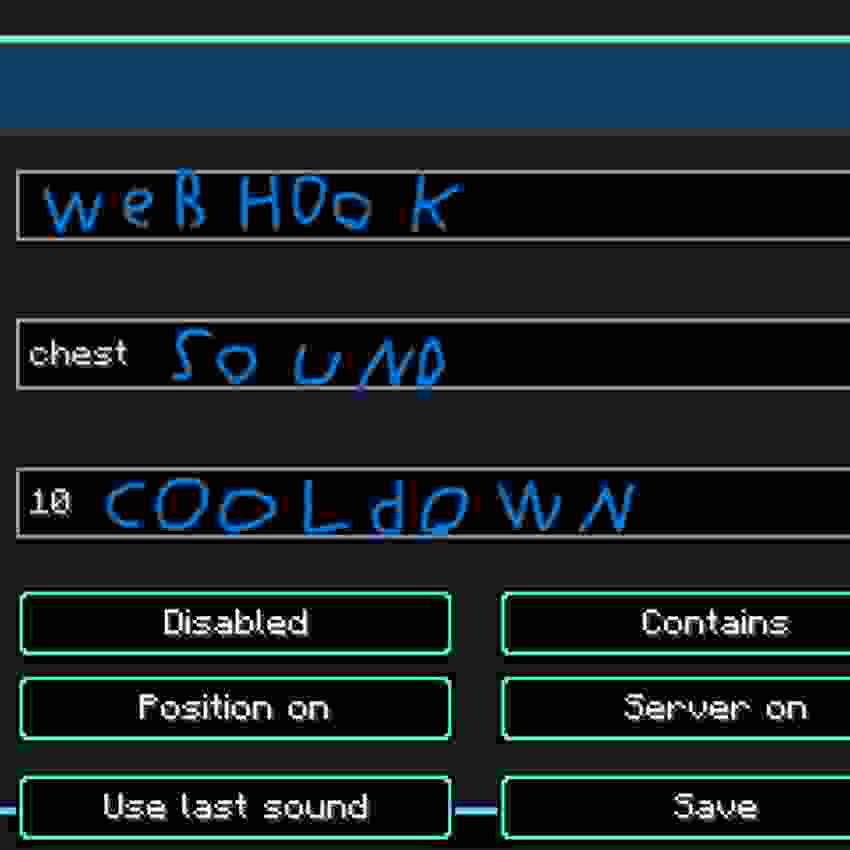
Open the in-game menu with V, paste your Discord webhook URL, choose a sound filter, enable the listener, and save.
Features
- Client-side sound listener
- Discord webhook alerts
- In-game configuration menu
- V keybind
- Broad sound matching with Contains
- Exact sound matching with Exact match
- Last-heard-sound helper
- Cooldown setting to reduce spam
- Optional player position in alerts
- Optional server address in alerts
- English, Lithuanian, and Russian UI translations
Settings
Discord Webhook URL
The Discord webhook URL where alerts are sent.
The webhook URL is saved locally in:
.minecraft/config/sound_webhook_alert.jsonKeep this URL private.
Sound Filter
The sound filter decides which Minecraft sounds trigger an alert.
Examples:
step break chest minecraft:block.chest.open minecraft:block.stone.break minecraft:entity.zombie.hurtMatch Mode
Contains triggers when the sound ID contains your filter.
Example:
stepcan match:
minecraft:block.stone.step minecraft:block.grass.stepExact match triggers only when the full sound ID is exactly the same as your filter.
Cooldown
Cooldown controls the minimum time between Discord messages.
Recommended values:
10 seconds for testing 30-60 seconds for normal useInclude Position
When enabled, alerts include your current block position.
Include Server
When enabled, alerts include the server address shown to your client.
Use Last Sound
The menu shows the last useful sound heard by your client.
Press Use last sound to copy it into the sound filter box. UI sounds such as button clicks are ignored.
Popular Sound Filters
Event Filter Player footsteps step Block breaking break Chest opening minecraft:block.chest.open Chest closing minecraft:block.chest.close Doors door Buttons button Levers lever Explosions explode Bows bow Eating eat Drinking drink Villagers villager Zombies zombie Creepers creeper How To Use
- Install Fabric Loader for Minecraft 1.21.11.
- Install Fabric api DO NOT FORGET FABRIC API
- Put the mod jar in your mods folder.
- Start Minecraft.
- Join a world or server.
- Press V.
- Paste your Discord webhook URL.
- Enter a sound filter.
- Enable the listener.
- Press Save.
Safety And Server Rules
Use this mod only on servers where client-side alert mods are allowed.
This mod does not add server-side features. It only listens to sounds that your Minecraft client receives.
Project description from CurseForge.
Pick your setup
Sound Webhook Alert by Minecraft version and loader
Choose the version and loader you play, then open the matching release.
Check the dependencies, then try the file in a copied instance before changing a world you care about.
Recent files
Sound Webhook Alert versions and loaders
Sound Webhook Alert
sound-webhook-alert-1.0.0.jar
3 Jun 2026
Client Source doesn’t say Server Source doesn’t say Dependencies No extras listed Listed on Release listing
Check the 1.21.11 · Fabric setup Fabric1.21.11 release
Looking for an older file? The official CurseForge project page is in Resources.
 mod
mod CurseForge + Modrinth · Minecraft
Resettable Trial Vaults & Spawners
Sneak and use the Trial Key to reset Trial Vaults and Trial Spawners.
 mod
mod CurseForge + Modrinth · Minecraft
Straw Bed Backport
Backports the Straw Bed from the upcoming Minecraft updates to older versions.
 mod
mod CurseForge · Minecraft
Instant Grow
Instantly grow baby mobs and farmland crops with configurable keys or commands, even in singleplayer with cheats disabled.