Minecraft version
Back to mods 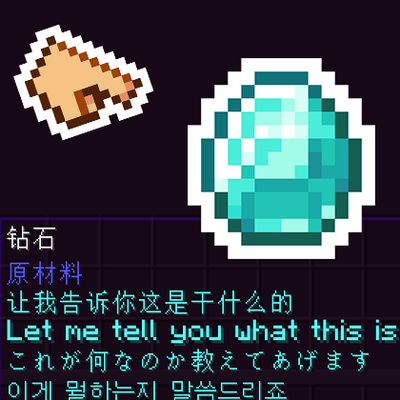
CurseForge · Minecraft mod
DataTip
JSON-driven custom item tooltips via resource packs. Multi-language, rich text, NBT/condition matching, shift-protected display. No coding — just JSON.
Choose a version Pick your version below, then grab the matching file.
Quick answer
Which DataTip release should I use?
Latest stable file datatip-1.2.8.1-neoforge.jar
Game version 1.21.1
Loader NeoForge
datatip-1.2.8.1-neoforge.jar targets 1.21.1 with NeoForge. The project page does not say whether this file belongs on the client, dedicated server, or both. No extra mods listed for this file.
Where it goes
Is DataTip required on the client, server, or both?
The project page does not say whether this file belongs on the client, dedicated server, or both.
Client Source doesn’t say
Dedicated server Source doesn’t say
Loader for this release NeoForge
Required install it here Optional supported, not mandatory Not supported do not install here Source doesn’t say do not assume
The source does not explicitly classify this release as client-only or server-only.
What else does datatip-1.2.8.1-neoforge.jar need?
datatip-1.2.8.1-neoforge.jar. Change the file and its required mods may change too.
This file does not list any required mods. Do not add a library just because a different file uses it.
This file does not list any required or optional mods.
Before you install it
Add DataTip without breaking your instance.
Built for datatip-1.2.8.1-neoforge.jar. Pick another file and the loader, install side or required mods may change.
- 01
Stick to this file
Use datatip-1.2.8.1-neoforge.jar. It targets 1.21.1 with NeoForge; another release may have different loader, side or dependency requirements.
- 02
Bring the mods it needs
This file does not list any required mods. Do not add a library just because a different file uses it.
- 03
Put it on the correct side
The project page does not say whether this file belongs on the client, dedicated server, or both.
- 04
Pick the file you checked
Use the “Get this file” button beside datatip-1.2.8.1-neoforge.jar. It opens that exact file at the source.
About this project
What does DataTip add?
About
Add custom tooltips to any item with a JSON file in your resource pack. Multi-language, rich styling, conditional display — no Java required.
{
  "minecraft:diamond": {
    "type": "text",
    "text": "A shiny diamond",
    "color": "#55FFFF"
  }
}
Features
- 14 Content Types — text, items, 3D blocks/entities, progress bars, charts, carousels, typewriter effect, textures, images, layouts
- Rich Text — hex/named colors, bold, italic, underline, strikethrough, custom fonts
- Multi-Language — per-language text with per-language styles, no fallback
- Custom Fonts —
fontproperty for text and typewriter (e.g.minecraft:alt,minecraft:uniform) - Live Variables (27+) —
{durability},{player_health},{player_x/y/z},{game_time},{nbt:path}, and more - Expressions —
{durability > 100 ? 'Good' : 'Needs repair'} - Color Expressions —
"color": "{durability > 100 ? 'green' : 'red'}" - Flexible Matching — exact ID, tags (
#minecraft:swords), wildcards (minecraft:*_sword) - Conditions (17 types) — filter by dimension, biome, weather, time, health, hunger, nbt, item_tag, etc.
- Shift Toggle — hide details behind a "Hold Shift" prompt
- Prepend Display — show content after item name (before original tooltip)
- Hot Reload —
/reloadorF3+Tapplies changes instantly - Charts — bar, pie, line charts with variable support
- 3D Rendering — rotating block models, entity models, painting display
- X/Y Offset — fine-tune position with
offsetXandoffsetY - Event System — pre/post render hooks, variable resolve events
Quick Start
- Create
assets/<namespace>/datatip/datatip.jsonin your resource pack - Define entries with item ID as key
/reload— done
Configuration
config/datatip-common.toml:
enabled— global on/off toggledefaultColor— default text color (ARGB format)defaultLineHeight— default line height in pixelsmaxWidth— maximum tooltip width
Key bind in Controls → DataTip (default: Left Shift)
For Mod Developers
Datagen Support
// Text with styles and fonts
TipContentBuilder.text("Hello", "gold", true, false, false, false)
TipContentBuilder.text("Hello", "gold", "minecraft:alt")

// Multi-language with styles
TipContentBuilder.langText(langMap, "gold", true, false, false, false)

// All content types
TipContentBuilder.item("minecraft:diamond")
TipContentBuilder.entity("minecraft:wolf", 48, 0, 8)
TipContentBuilder.block("minecraft:stone", 48)
TipContentBuilder.atlas("minecraft:apple", 32)
TipContentBuilder.image("mymod:icon.png", 32, 32)
TipContentBuilder.progress(0.75f, 100, "75%")
TipContentBuilder.chart("bar", 100, 60, "Title", chartEntry("A", 50, "#FF0000"))
TipContentBuilder.typewriter(0xFF55FF, "Line 1", "Line 2")
TipContentBuilder.divider("gray", "dashed")
TipContentBuilder.aligned(content, HorizontalAlign.CENTER)
Java API
// Register custom content type
TipContentRegistry.registerParser("my_type", new MyContentParser());

// Register custom variable
VariableResolver.registerVariable("my_var", stack -> "custom_value");

// Register custom condition
ConditionChecker.registerCondition("my_condition", (value, stack, player, level) -> {
    return player.getAbsorptionAmount() > 0;
});

// Event hooks
TipEventManager.onPreRender(event -> { /* ... */ });
TipEventManager.onResolveVariable(event -> { /* ... */ });
TipEventManager.onAppendLines(event -> { /* ... */ });
Project description from CurseForge.
Pick your setup
DataTip by Minecraft version and loader
Choose the version and loader you play, then open the matching release.
Minecraft version
1.20.1
1 loader buildCheck the dependencies, then try the file in a copied instance before changing a world you care about.
Recent files
DataTip versions and loaders
datatip-1.2.8.1-neoforge.jar
16 Oct 2026
Client Source doesn’t say Server Source doesn’t say Dependencies No extras listed Listed on Release listing
Check the 1.21.1 · NeoForge setup 1.21.1NeoForge release
datatip-1.2.8.1-forge.jar
16 Oct 2026
Client Source doesn’t say Server Source doesn’t say Dependencies No extras listed Listed on Release listing
Check the 1.20.1 · Forge setup 1.20.1Forge release
datatip-1.2.8-forge.jar
13 Oct 2026
Client Source doesn’t say Server Source doesn’t say Dependencies No extras listed Listed on Release listing
Check the 1.20.1 · Forge setup 1.20.1Forge release
datatip-1.2.8-neoforge.jar
13 Oct 2026
Client Source doesn’t say Server Source doesn’t say Dependencies No extras listed Listed on Release listing
Check the 1.21.1 · NeoForge setup 1.21.1NeoForge release
datatip-1.2.7-neoforge.jar
13 Sept 2026
Client Source doesn’t say Server Source doesn’t say Dependencies No extras listed Listed on Release listing
Check the 1.21.1 · NeoForge setup 1.21.1NeoForge release
datatip-1.2.7-forge.jar
13 Sept 2026
Client Source doesn’t say Server Source doesn’t say Dependencies No extras listed Listed on Release listing
Check the 1.20.1 · Forge setup 1.20.1Forge release
datatip-1.2.6-fix-forge.jar
24 Jul 2026
Client Source doesn’t say Server Source doesn’t say Dependencies No extras listed Listed on Release listing
Check the 1.20.1 · Forge setup 1.20.1Forge release
datatip-1.2.6-fix-neoforge.jar
24 Jul 2026
Client Source doesn’t say Server Source doesn’t say Dependencies No extras listed Listed on Release listing
Check the 1.21.1 · NeoForge setup 1.21.1NeoForge release
datatip-1.2.6-neoforge.jar
20 Jul 2026
Client Source doesn’t say Server Source doesn’t say Dependencies No extras listed Listed on Release listing
Check the 1.21.1 · NeoForge setup 1.21.1NeoForge release
datatip-1.2.6-forge.jar
20 Jul 2026
Client Source doesn’t say Server Source doesn’t say Dependencies No extras listed Listed on Release listing
Check the 1.20.1 · Forge setup 1.20.1Forge release
datatip-1.2.5-hotfix-forge.jar
20 Jul 2026
Client Source doesn’t say Server Source doesn’t say Dependencies No extras listed Listed on Release listing
Check the 1.20.1 · Forge setup 1.20.1Forge release
datatip-1.2.5-hotfix-neoforge.jar
20 Jul 2026
Client Source doesn’t say Server Source doesn’t say Dependencies No extras listed Listed on Release listing
Check the 1.21.1 · NeoForge setup 1.21.1NeoForge release
Looking for an older file? The official CurseForge project page is in Resources.
 mod
CurseForge + Modrinth · Minecraft
Modulation
A growing collection of quality-of-life tweaks, bug fixes, and cross-mod integrations for modpack creators!
 mod
CurseForge · Minecraft
Realms of Reverie
Realms of Reverie Modpack Mod
 mod
CurseForge · Minecraft
All_Recipes
A few new recipes that are sure to come in handy.