



Minecraft version
Back to mods 
CurseForge · Minecraft mod
Odyssey Map
Explore. Navigate. Never get lost again. A clean, lightweight minimap and fullscreen map for Minecraft.
Choose a version Pick your version below, then grab the matching file.
Quick answer
Which Odyssey Map release should I use?
Latest stable file odysseymap-neoforge-26.2-1.2.2.jar
Game version 26.2
Loader NeoForge
Odyssey Map odysseymap-neoforge-26.2-1.2.2.jar targets 26.2 with NeoForge. The project page does not say whether this file belongs on the client, dedicated server, or both. No extra mods listed for this file.
Where it goes
Is Odyssey Map required on the client, server, or both?
The project page does not say whether this file belongs on the client, dedicated server, or both.
Client Source doesn’t say
Dedicated server Source doesn’t say
Loader for this release NeoForge
Required install it here Optional supported, not mandatory Not supported do not install here Source doesn’t say do not assume
The source does not explicitly classify this release as client-only or server-only.
What else does Odyssey Map odysseymap-neoforge-26.2-1.2.2.jar need?
odysseymap-neoforge-26.2-1.2.2.jar. Change the file and its required mods may change too.
This file does not list any required mods. Do not add a library just because a different file uses it.
This file does not list any required or optional mods.
Before you install it
Add Odyssey Map without breaking your instance.
Built for Odyssey Map odysseymap-neoforge-26.2-1.2.2.jar. Pick another file and the loader, install side or required mods may change.
- 01
Stick to this file
Use odysseymap-neoforge-26.2-1.2.2.jar. It targets 26.2 with NeoForge; another release may have different loader, side or dependency requirements.
- 02
Bring the mods it needs
This file does not list any required mods. Do not add a library just because a different file uses it.
- 03
Put it on the correct side
The project page does not say whether this file belongs on the client, dedicated server, or both.
- 04
Pick the file you checked
Use the “Get this file” button beside odysseymap-neoforge-26.2-1.2.2.jar. It opens that exact file at the source.
About this project
What does Odyssey Map add?


Odyssey Map is a modern client-side minimap mod built for players who want a clear overview of the world without clutter, performance hits, or confusing menus.
Designed to feel like a natural extension of Minecraft, Odyssey Map combines a clean UI, smooth navigation, and accurate terrain rendering while staying lightweight enough for large modpacks.


Why Odyssey Map?
- Clean and modern design
- Lightweight and optimized
- Multiplayer friendly
- Modpack ready
- Beautiful fullscreen map
- Easy waypoint management
- Vanilla-inspired experience
Features
| Feature | Description |
|---|---|
| Minimap HUD | Circular or square minimap styles |
| Rotation Modes | North-Up or Heading-Up |
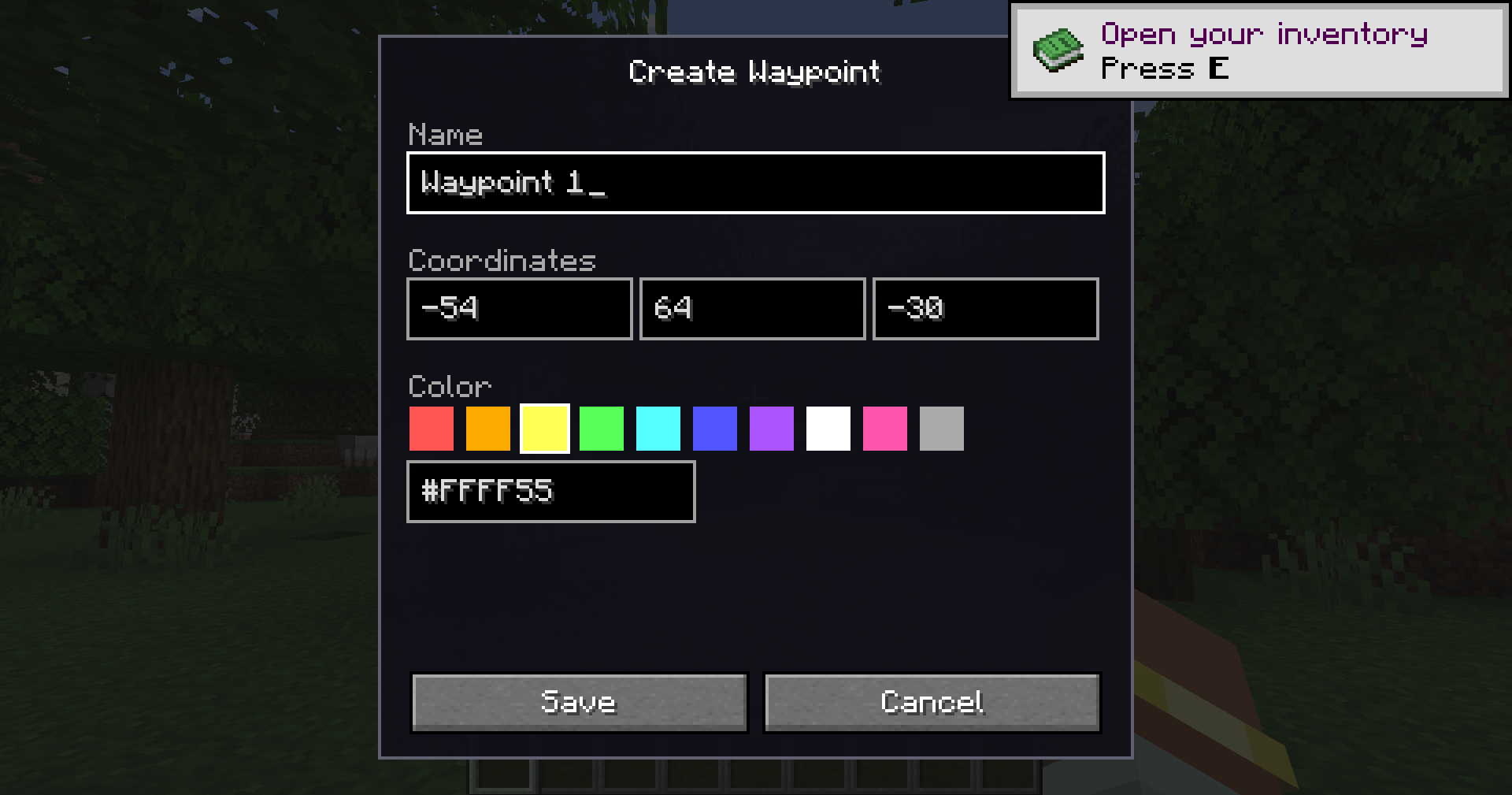
| Waypoints | Create and manage custom markers |
| Death Points | Automatically track deaths |
| Bed Tracking | Quickly find your spawn point |
| Fullscreen Map | Explore your world in detail |
| Custom Colors | Override terrain colors |
| Fully Configurable | Customize every aspect of the map |
| Lightweight | Designed for large worlds and modpacks |
Screenshots
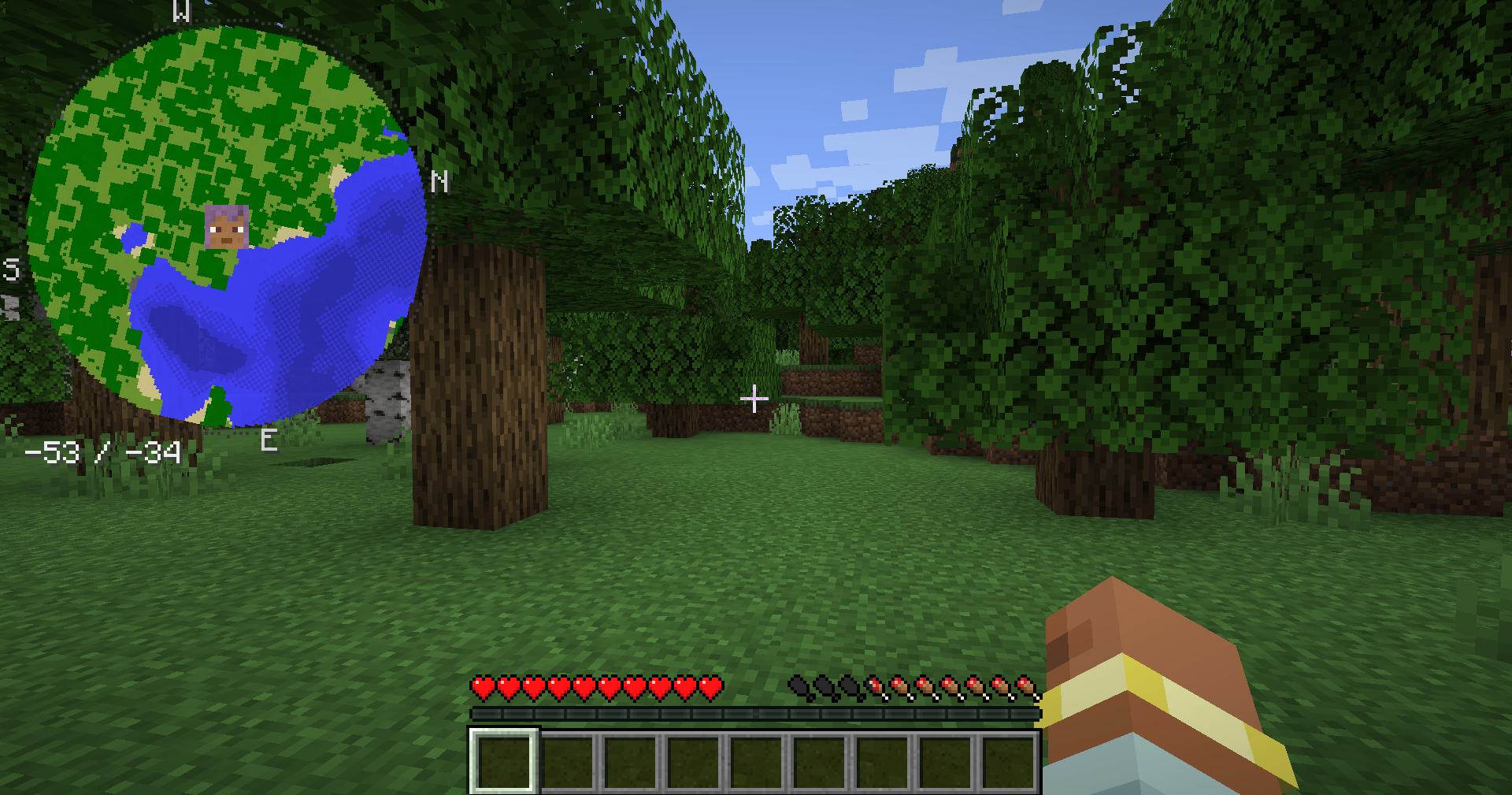
Minimap HUD
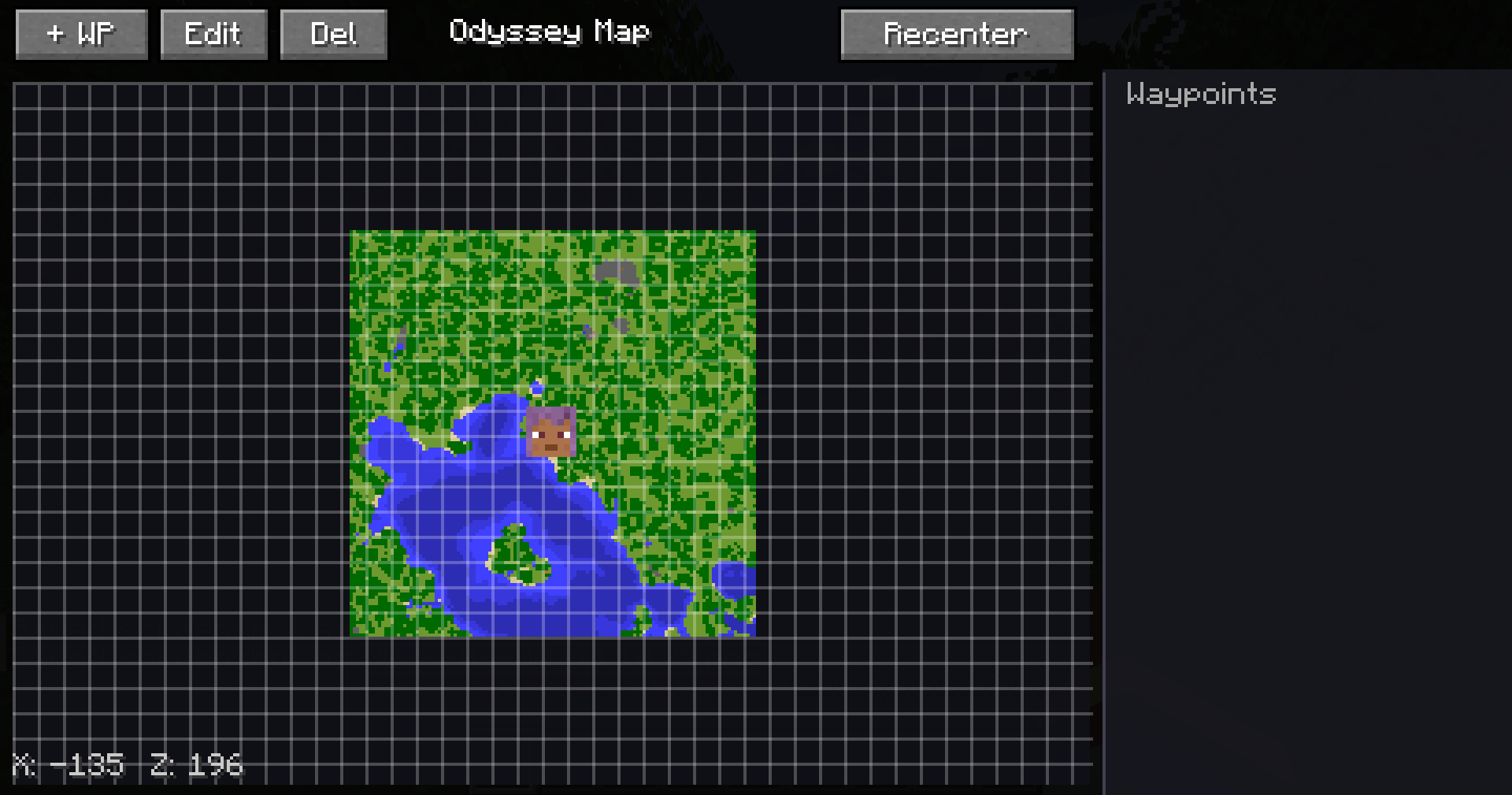
Fullscreen Map
Waypoint Management
Default Keybindings
| Key | Action |
|---|---|
M |
Toggle Minimap HUD |
J |
Open Fullscreen Map |
= |
Zoom In |
- |
Zoom Out |
B |
Create Waypoint |
All keybindings can be customized through:
Options → Controls
Configuration
Odyssey Map automatically generates the following files:
odysseymap-client.toml
Controls:
- HUD Position
- HUD Size
- Rotation Mode
- Transparency
- Marker Visibility
- Zoom Levels
- Map Shape
odysseymap-blocks.toml
Allows custom terrain colors:
minecraft:stone=minecraft:grass_block
minecraft:deepslate=minecraft:stone
Compatibility
- Singleplayer
- Multiplayer
- Dedicated Servers
- Forge
- NeoForge
- Fabric
- Quilt
- Large Modpacks
Frequently Asked Questions
Does the server need the mod installed?
No. Odyssey Map is completely client-side.
Can I use it in my modpack?
Absolutely.
Does it impact performance?
Very little. Terrain data is cached efficiently.
Does it support shaders?
Yes.
Does it have cave maps?
Not currently.
Can I move the minimap?
Yes. Position and size are configurable.
Roadmap
Planned Features
- Better waypoint categories
- Additional minimap themes
- More marker customization
- Improved fullscreen map tools
- Team markers
- More HUD customization
Support Development

Community & Support
- Discord: https://discord.gg/TJc3CxR4jK
- GitHub: https://github.com/MeherBenSalem
- CurseForge: https://www.curseforge.com/members/nightbeamstudio/projects
- Modrinth: https://modrinth.com/organization/nightbeam
License
Feel free to include Odyssey Map in modpacks.
Please do not redistribute modified versions without permission.
NightBeam Studio
Explore more. Get lost less.
Project description from CurseForge.
Pick your setup
Odyssey Map by Minecraft version and loader
Choose the version and loader you play, then open the matching release.
Minecraft version
26.1.2
2 loader buildsMinecraft version
1.21.1
2 loader buildsMinecraft version
1.20.1
3 loader buildsCheck the dependencies, then try the file in a copied instance before changing a world you care about.
Recent files
Odyssey Map versions and loaders
odysseymap-neoforge-26.2-1.2.2.jar
27 Aug 2026
Client Source doesn’t say Server Source doesn’t say Dependencies No extras listed Listed on Release listing
Check the 26.2 · NeoForge setup NeoForge26.2 release
odysseymap-neoforge-26.1.2-1.2.2.jar
27 Aug 2026
Client Source doesn’t say Server Source doesn’t say Dependencies No extras listed Listed on Release listing
Check the 26.1.2 · NeoForge setup NeoForge26.1.2 release
odysseymap-neoforge-1.21.1-1.2.2.jar
27 Aug 2026
Client Source doesn’t say Server Source doesn’t say Dependencies No extras listed Listed on Release listing
Check the 1.21.1 · NeoForge setup 1.21.1NeoForge release
odysseymap-forge-1.20.1-1.2.2.jar
27 Aug 2026
Client Source doesn’t say Server Source doesn’t say Dependencies No extras listed Listed on Release listing
Check the 1.20.1 · Forge setup 1.20.1Forge release
odysseymap-fabric-26.2-1.2.2.jar
27 Aug 2026
Client Source doesn’t say Server Source doesn’t say Dependencies No extras listed Listed on Release listing
Check the 26.2 · Fabric setup Fabric26.2 release
odysseymap-fabric-26.1.2-1.2.2.jar
27 Aug 2026
Client Source doesn’t say Server Source doesn’t say Dependencies No extras listed Listed on Release listing
Check the 26.1.2 · Fabric setup Fabric26.1.2 release
odysseymap-fabric-1.21.1-1.2.2.jar
27 Aug 2026
Client Source doesn’t say Server Source doesn’t say Dependencies No extras listed Listed on Release listing
Check the 1.21.1 · Fabric setup Fabric1.21.1 release
odysseymap-fabric-1.20.1-1.2.2.jar
27 Aug 2026
Client Source doesn’t say Server Source doesn’t say Dependencies No extras listed Listed on Release listing
Check the 1.20.1 · Fabric setup Fabric1.20.1 release
odysseymap-neoforge-26.2-1.2.1.jar
16 Jul 2026
Client Source doesn’t say Server Source doesn’t say Dependencies No extras listed Listed on Release listing
Check the 26.2 · NeoForge setup NeoForge26.2 release
odysseymap-neoforge-26.1.2-1.2.1.jar
16 Jul 2026
Client Source doesn’t say Server Source doesn’t say Dependencies No extras listed Listed on Release listing
Check the 26.1.2 · NeoForge setup NeoForge26.1.2 release
odysseymap-neoforge-1.21.1-1.2.1.jar
16 Jul 2026
Client Source doesn’t say Server Source doesn’t say Dependencies No extras listed Listed on Release listing
Check the 1.21.1 · NeoForge setup 1.21.1NeoForge release
odysseymap-forge-1.20.1-1.2.1.jar
16 Jul 2026
Client Source doesn’t say Server Source doesn’t say Dependencies No extras listed Listed on Release listing
Check the 1.20.1 · Forge setup 1.20.1ForgeNeoForge release
Looking for an older file? The official CurseForge project page is in Resources.
 mod
mod CurseForge + Modrinth · Minecraft
ModernFix
All-in-one mod that improves performance, reduces memory usage, and fixes many bugs. Compatible with all your favorite performance mods!
 mod
mod CurseForge · Minecraft
XP: Epic Damage Indicator
It shows the damage within the game
 mod
mod CurseForge · Minecraft
Genshin Domains
Find special doors through your world and get into interdimensional dungeons!